To open an APK file on an Android phone or tablet, tap it in your file manager, allow that app to install unknown apps, and tap Install; on a Windows PC, run it in the Android Emulator or inspect it with Android Studio's APK Analyzer.
This guide covers each route, how to look inside an APK without installing it, split APK files, and fixes for an APK that will not open.
Open and install an APK on an Android phone or tablet
An APK is an Android app package, so opening one on Android means installing it. Android blocks apps from anywhere other than Google Play until you opt in, and the opt-in differs by Android version.
- Open your file manager app, such as Files, and go to the Download folder.
- Tap the APK file.
- When Android says the app is not allowed to install unknown apps, tap Settings.
- Turn on the permission for that file manager on the Install unknown apps screen.
- Go back and tap Install.
- Tap Open when the install finishes, or find the new icon in the app drawer.
Android 8.0 and later: the permission is granted per app on the Install unknown apps screen, so only the file manager you used can install APKs. Turn it off again once the app is installed.
Android 7.1.1 and earlier: turn on Unknown sources under Settings > Security before you tap the APK. If Android offers to allow only this one app, choose that option.
Some network providers block installs from unknown sources on the phones they sell, so the setting may be missing on carrier devices.
Choose the right way to open the file
What to use for each situation depends on two things: the device you are on, and whether you want to run the app or only look inside it.
| Your situation | What to use | What happens |
|---|---|---|
| The APK is on your Android phone or tablet | Tap it in your file manager | Android installs the app after you allow unknown apps |
| The APK is on your PC and the phone is plugged in | ADB or a USB file copy | The app installs on the phone from the PC |
| You want to run the app on a Windows PC | The Android Emulator in Android Studio | Drag the APK onto the emulator screen and it installs |
| You want to see what is inside the APK | APK Analyzer in Android Studio, or apkanalyzer | Files, manifest, permissions and sizes, with nothing installed |
| You are on an iPhone or iPad | Nothing: get the iOS version from the App Store | iOS cannot install Android packages |
| The app is listed on Google Play | Install it from Google Play instead | Updates arrive automatically and Play checks the app before download |
APK versus APKM and split APK files
Most apps on Google Play are now published as Android App Bundles. Google Play turns each bundle into a base APK plus configuration APKs matched to your device, so many apps are no longer a single APK file.
| File | What it is | How it opens |
|---|---|---|
| .apk | A single Android app package, stored in ZIP format | Tap to install on Android, or drag onto the Android Emulator |
| Split APKs | A base APK plus configuration APKs that must be installed together | Install every file in one go with adb install-multiple |
| .aab (Android App Bundle) | A publishing format developers upload to Google Play; not an installable file | Open it in APK Analyzer to inspect it |
| .apkm and similar bundles | A container made by a third-party download site, not an Android format | Android cannot open it; get the app from Google Play or the developer instead |
A sideloaded app that is missing one of its required split APKs fails to install on all Google-certified devices and on Android 10 and later. Installing only the base APK is the usual cause.
Install an APK with ADB
ADB (Android Debug Bridge) installs an APK from a computer onto a phone, tablet or emulator with one command. It needs USB debugging turned on under Developer options and the Android SDK Platform Tools on the computer.
adb install path_to_apkReplace path_to_apk with the full path to the file. Add -r to reinstall over an existing copy and keep its data, or -t for a test APK built from Android Studio. For a split app, run adb install-multiple followed by every APK in the set.
You should see: adb prints Success and the app appears in the device's app drawer.
If you have never connected the phone to ADB, set up USB debugging and the driver first, then install the APK on Android from your PC over USB or Wi-Fi.
Open an APK in the Android Emulator
The Android Emulator ships with Android Studio for Windows and Mac and runs a virtual Android device on Windows, macOS or Linux. It is the official way to run an APK on a computer.
- Install Android Studio from developer.android.com and open it.
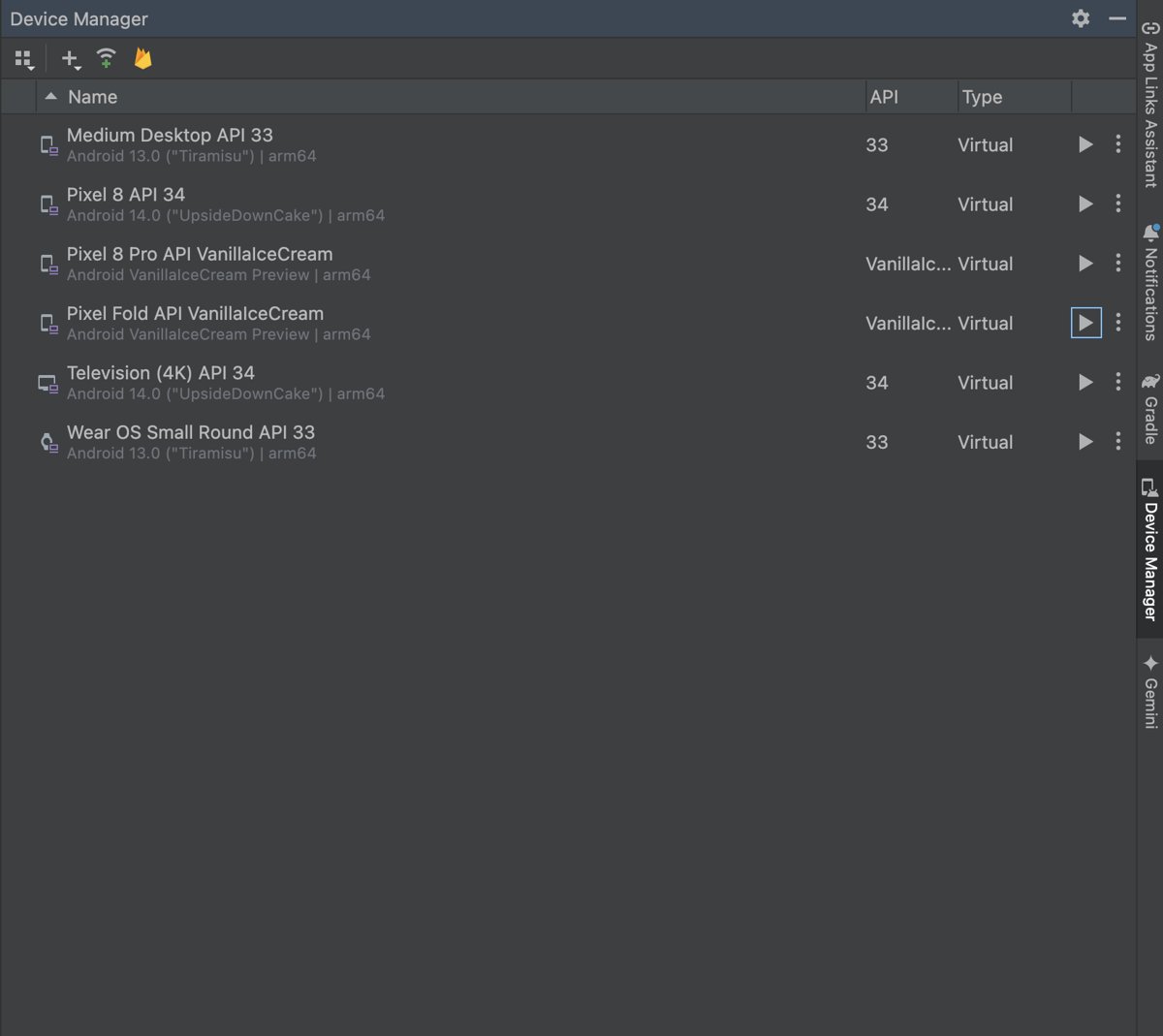
- On the Welcome screen, select More Actions > Virtual Device Manager.
- Click +, then Create Virtual Device, and pick a phone hardware profile.
- Choose a system image, change the properties if needed, and click Finish.
- In the Virtual tab of the Device Manager, click Launch next to the new device.
- Drag the APK file from File Explorer onto the emulator screen.
- Wait for the APK Installer dialog to finish, then open the app from the emulator's app list.
Pick a hardware profile with the Google Play logo if the app needs Google Play services. Any other file you drag onto the emulator lands in /sdcard/Download/ instead of installing.
Open an APK on Windows
Windows cannot open or run an APK file by itself, on Windows 11 or Windows 10. Windows Subsystem for Android and the Amazon Appstore, which ran Android apps on Windows 11, left the Microsoft Store on March 5, 2025.
| What you want on the PC | Official route | Notes |
|---|---|---|
| Run or test the app | Android Emulator in Android Studio | Drag the APK onto the running virtual device |
| See the files, manifest and permissions | Android Studio APK Analyzer | Nothing is installed or run |
| Put the app on your phone | ADB, or copy the file over USB and tap it on the phone | The app runs on the phone, not the PC |
| Play Android games on Windows | Google Play Games on PC | Games come from Google Play's catalogue, not from your APK file |
To play Android titles on a Windows laptop or desktop, set up Google Play Games on PC and install the game from there.
Inspect an APK without installing it
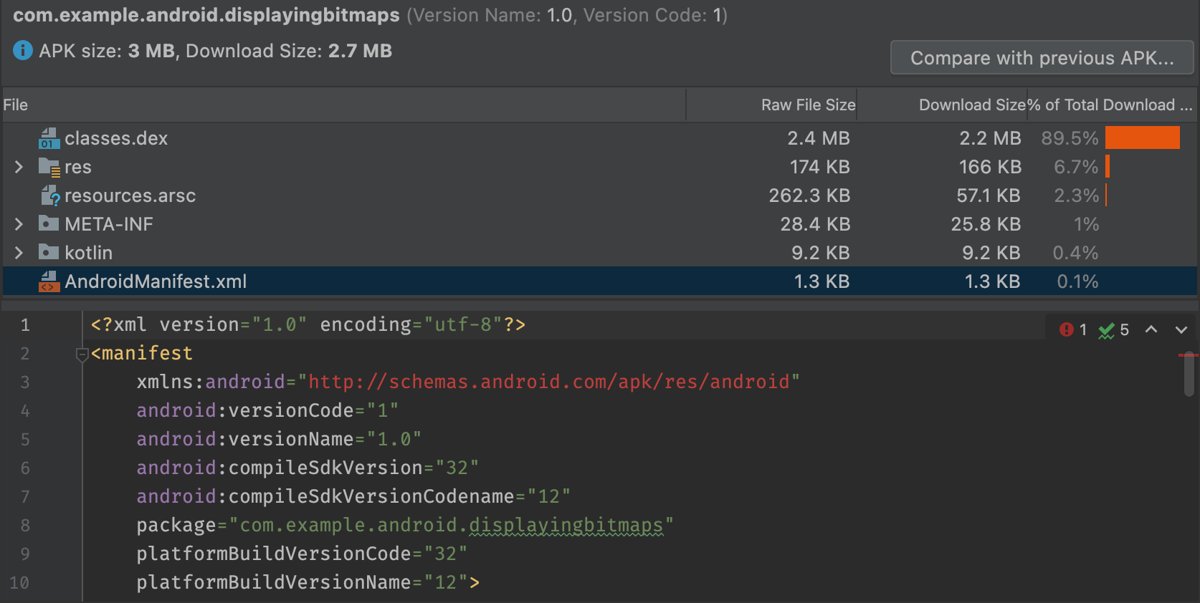
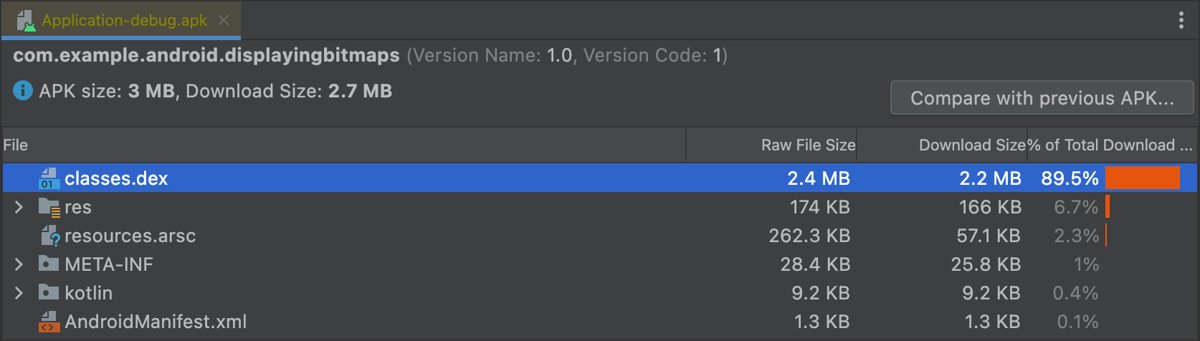
APKs follow the ZIP file format, but the manifest and resources inside are compiled binary files. Android Studio's APK Analyzer rebuilds them into readable form.
- Open Android Studio and open any project.
- Select Build > Analyze APK in the menu bar, or drag the APK into the Editor window.
- Select the APK and review the file list with each entry's Raw File Size and Download Size.
- Click AndroidManifest.xml to read the app's package name, permissions and version as XML.
- Click a classes.dex file to see the app's packages, classes and method counts.
- Click Compare with previous APK to compare two versions side by side.
Import a pre-built APK for profiling or debugging: on the Android Studio Welcome screen, click Profile or debug APK (or File > Profile or Debug APK with a project open) and select the APK. Android Studio creates a project under ApkProjects/ in your home folder with the manifests, SMALI files and native libraries. Debugging works only on an APK built with debugging enabled, and the menu item appears only when the Android APK Support plugin is on.
Android Studio does not decompile an APK into its original source code. It disassembles the DEX files into SMALI, and you attach the real Kotlin or Java sources yourself.
Read an APK's version and permissions with apkanalyzer
Using the command line, apkanalyzer from the Android SDK Command-Line Tools prints the same details without opening Android Studio. It lives in android_sdk/cmdline-tools/version/bin/.
apkanalyzer apk summary app.apkPrints the application ID, version code and version name. Swap the subject and verb for other details: apkanalyzer manifest permissions app.apk lists permissions, apkanalyzer manifest min-sdk app.apk prints the minimum Android version, and apkanalyzer files list app.apk lists every file inside.
You should see: One line such as com.myapp 5 1.1-beta, showing the app ID, version code and version name.
How to check the APK opened and installed correctly
- Find the new app icon in the app drawer and launch it once.
- Open Settings > Apps, select the app and confirm the version matches the one you expected.
- Open the Play Store app, tap your profile icon, then Play Protect, and check no harmful-app warning appears.
- On the emulator, confirm the app shows in the virtual device's app list after the APK Installer dialog closes.
- For ADB, confirm the command ended with Success.
Why an APK will not open or install
Tapping the APK does nothing, or the tablet says installs are blocked
The app you opened it from has not been allowed to install unknown apps, or a carrier blocks unknown sources.
- Tap the APK again and choose Settings when Android prompts.
- Turn on the permission for that app on the Install unknown apps screen.
- On Android 7.1.1 and earlier, turn on Unknown sources under Settings > Security.
- If the option is missing on a carrier phone, get the app from Google Play instead.
Android says the app was not installed when you update it
Android only installs an update signed with the same certificate as the installed copy, even when the app has the same name.
- Check the new APK came from the same developer as the installed app.
- Download the update from that developer's official site or Google Play.
- If you must switch versions, back up the app's data, uninstall the old copy, then install the new APK.
Play Protect warns about or blocks the APK
Google Play Protect checks apps from outside Google Play and can block or remove ones it finds harmful.
- Cancel the install.
- Delete the APK file.
- Get the app from Google Play or the developer's own website instead.
The app installs but crashes or is missing parts
The app is a set of split APKs and only the base file was installed.
- Uninstall the incomplete app.
- Install it from Google Play, which installs every required split for your device.
- For your own builds, run
adb install-multiplewith every APK in the set.
Windows asks which app to use to open the APK
Windows has no built-in app for Android packages.
- Close the dialog.
- Run the APK in the Android Emulator, or open it in APK Analyzer to inspect it.
- To use the app on your phone, copy the APK to the phone and tap it there.
Install APK files only from trusted sources
An APK runs with whatever permissions you grant it, and Android skips Google Play's pre-download checks for it. Modified copies of paid apps are a common way malware reaches phones.
- Install from Google Play whenever the app is listed there.
- Otherwise, download APKs only from the app developer's own website, or use your own builds.
- Never install modified or cracked APKs, or APKs from mirror and repost sites.
- Keep Scan apps with Play Protect turned on under Play Protect settings in the Play Store app.
- Turn off the install unknown apps permission for your file manager after each install.
- Check the app's permissions in APK Analyzer or
apkanalyzerbefore installing if you are unsure.
Opening APK files FAQ
Can Windows open APK files?
No. Windows 11 and Windows 10 cannot run an APK on their own, and Windows Subsystem for Android left the Microsoft Store on March 5, 2025. Use the Android Emulator in Android Studio to run it, or APK Analyzer to look inside it.
How do I open APK files on PC with Windows 11?
Install Android Studio, create a virtual device in Virtual Device Manager, launch it, and drag the APK onto the emulator screen. The APK Installer dialog installs it, and the app then appears in the emulator's app list.
What opens APK files on a PC?
Android Studio opens them in two ways: the Android Emulator runs the app, and APK Analyzer shows its files, manifest and permissions. The command-line apkanalyzer tool reads the same details without the full IDE.
How do I open APK files on Android?
Tap the APK in your file manager, choose Settings when Android asks, allow that app to install unknown apps, then tap Install. On Android 7.1.1 and earlier, turn on Unknown sources under Settings > Security first.
Why can't I open APK files on my tablet?
The file manager on the tablet usually lacks the install unknown apps permission. Tap the APK, choose Settings, allow it, and go back. Some carrier-sold tablets block unknown sources entirely, and split APK sets will not install from a single file.
How do I open APK files on an iPhone?
You cannot. An APK is an Android package, and iOS installs apps only in its own format. Look for the iPhone version of the same app in the App Store instead.
How do I open APK files on a Kindle Fire or Fire tablet?
Copy the APK to the tablet and tap it, the same way as on an Android phone, after turning on the tablet's permission for apps from unknown sources. You can install Android apps on a Kindle Fire once that setting is on.
Can I open an APK without installing it?
Yes. Select Build > Analyze APK in Android Studio, or drag the APK into the editor, to see its files, manifest and sizes. Nothing is installed or run, so this is a safe way to check an unfamiliar APK.
What is the difference between APK and APKM?
An APK is Android's own app package. An APKM file is a bundle format created by a third-party download site, and Android cannot open it. Get the app from Google Play or the developer instead of converting such files.
Does Android Studio decompile an APK into the original source code?
No. Android Studio disassembles the DEX files into SMALI, a readable form of the bytecode, and extracts the manifest and native libraries. To debug with real Kotlin or Java code, you attach the original sources yourself.
The bottom line on opening APK files
On Android, tap the APK and allow your file manager to install unknown apps; on Windows, use the Android Emulator to run it or APK Analyzer to inspect it. These are the only official routes now that Windows Subsystem for Android is gone, and they work only as safely as the file itself, so install APKs from Google Play or the developer's own site and nowhere else.