The official VirtualDJ download installs the DJ software on Windows 11, Windows 10 and Mac, and it is free for home use. Atomix Productions offers a 556.7 MB MSI for 64-bit Windows and a PKG for macOS 10.15 and later on virtualdj.com.
This guide covers which file to take, installing and signing in, the Free, Home and Pro licenses, updates, install fixes, and a clean uninstall.
Which VirtualDJ download do you need?
Match your computer to a row. Every file comes from virtualdj.com, published by Atomix Productions.
| Your computer | Take this | Size |
|---|---|---|
| Windows 11 or Windows 10, 64-bit | VirtualDJ 2026 for PC (MSI) | 556.7 MB |
| Mac on macOS 10.15 or later | VirtualDJ 2026 for Mac (PKG) | 992.1 MB |
| Old 32-bit Windows PC | VirtualDJ 2020 legacy build (PC32) | 44.8 MB |
To check your Windows type, open Settings > System > About and read System type. Anything that says 64-bit takes the main MSI.
Download VirtualDJ from the official links
Each link below starts the installer straight from virtualdj.com. The same page also lists the 32-bit legacy build.
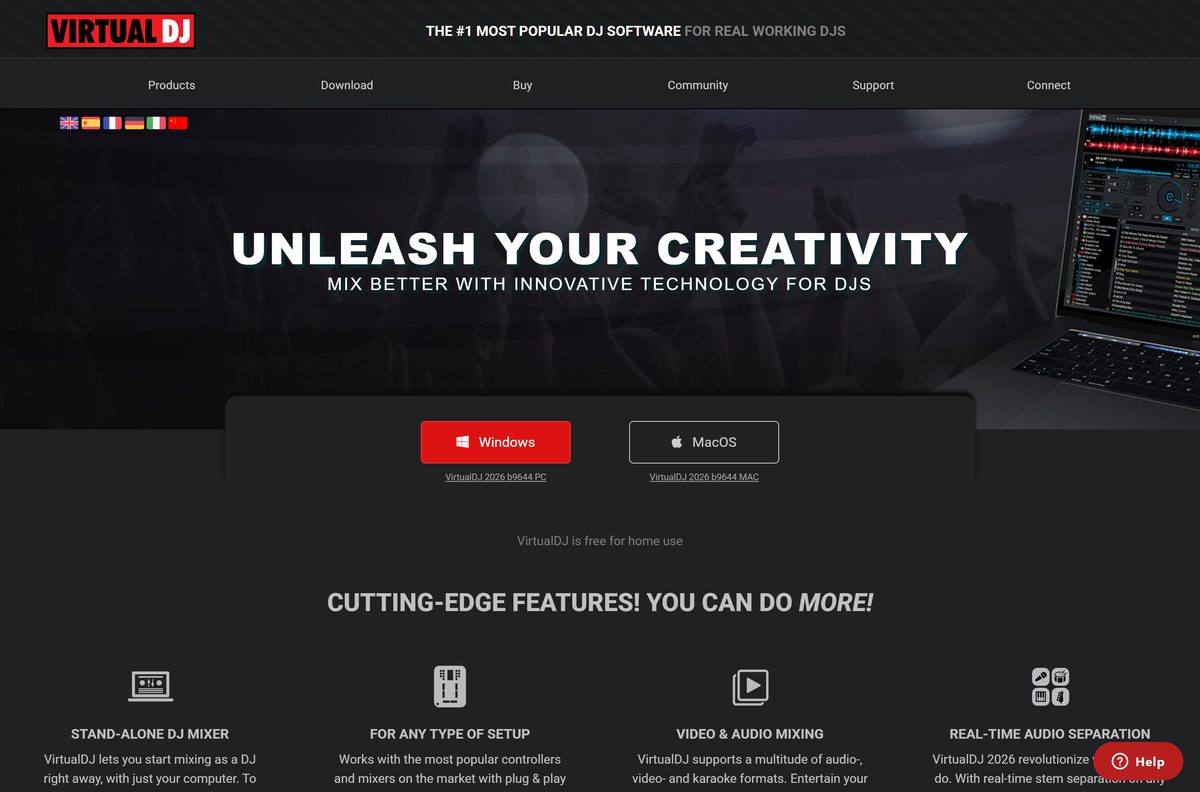
- VirtualDJ 2026 b9644 for Windows — 556.7 MB · Windows 10 64-bit or later
- VirtualDJ 2026 b9644 for Mac — 992.1 MB · macOS 10.15 or later
- All VirtualDJ downloads — official download page
How to install VirtualDJ on Windows 11 and 10
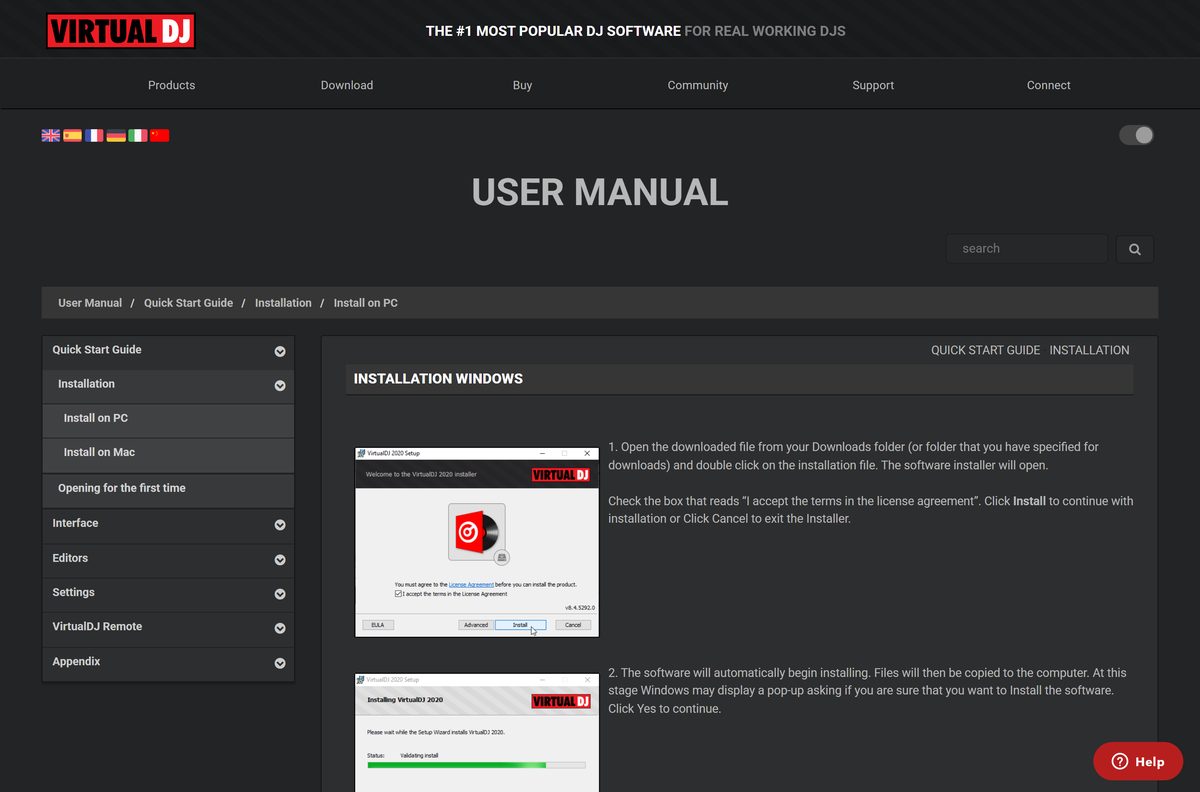
The MSI copies the program files automatically once you accept the license agreement.
- Download the Windows MSI from the official link above.
- Open your Downloads folder and double-click install_virtualdj_2026_b9644_pc.msi.
- Tick I accept the terms in the license agreement.
- Select Install.
- Select Yes when Windows asks to allow changes.
- Wait while the files are copied, then select Launch VirtualDJ.
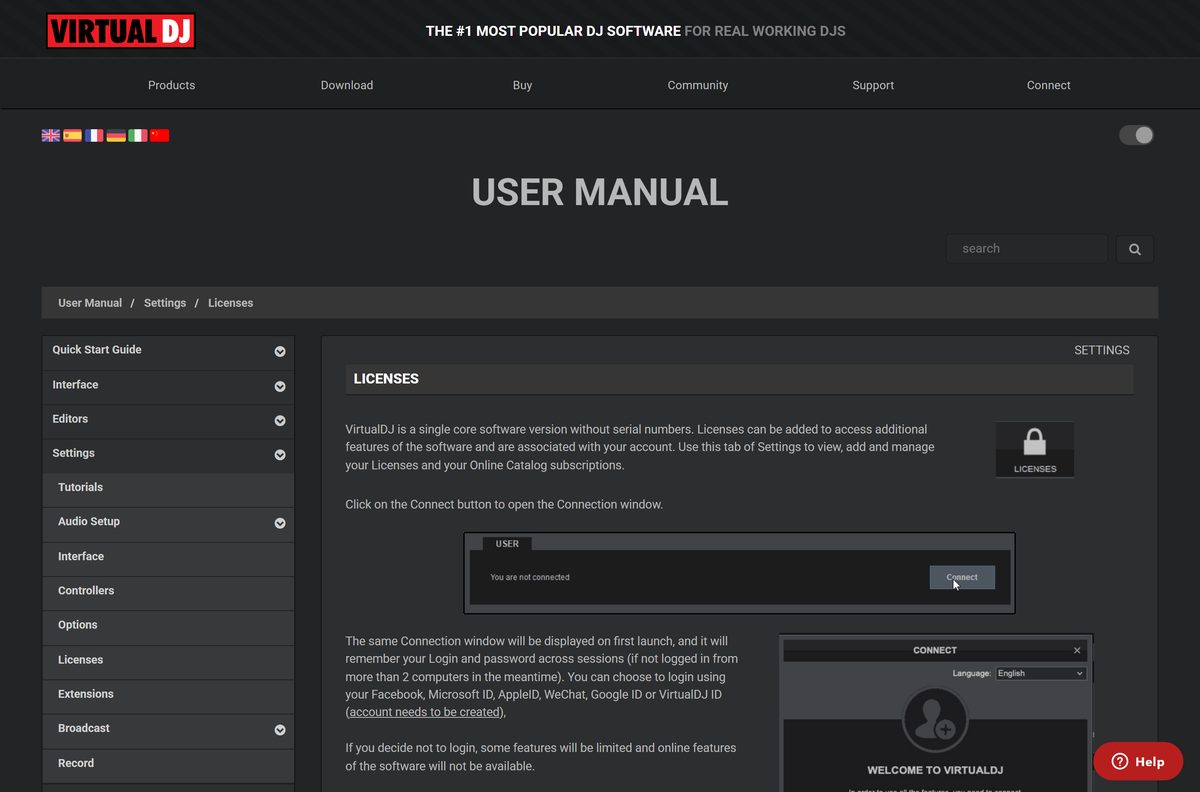
- In the login window, sign in with your virtualdj.com account, or with Facebook, Microsoft, Google or WeChat.
- Close the login window instead if you want to start mixing without an account.
Signing in enables any licenses you bought, CloudLists and your performance history.
Which VirtualDJ download do you need for your Mac?
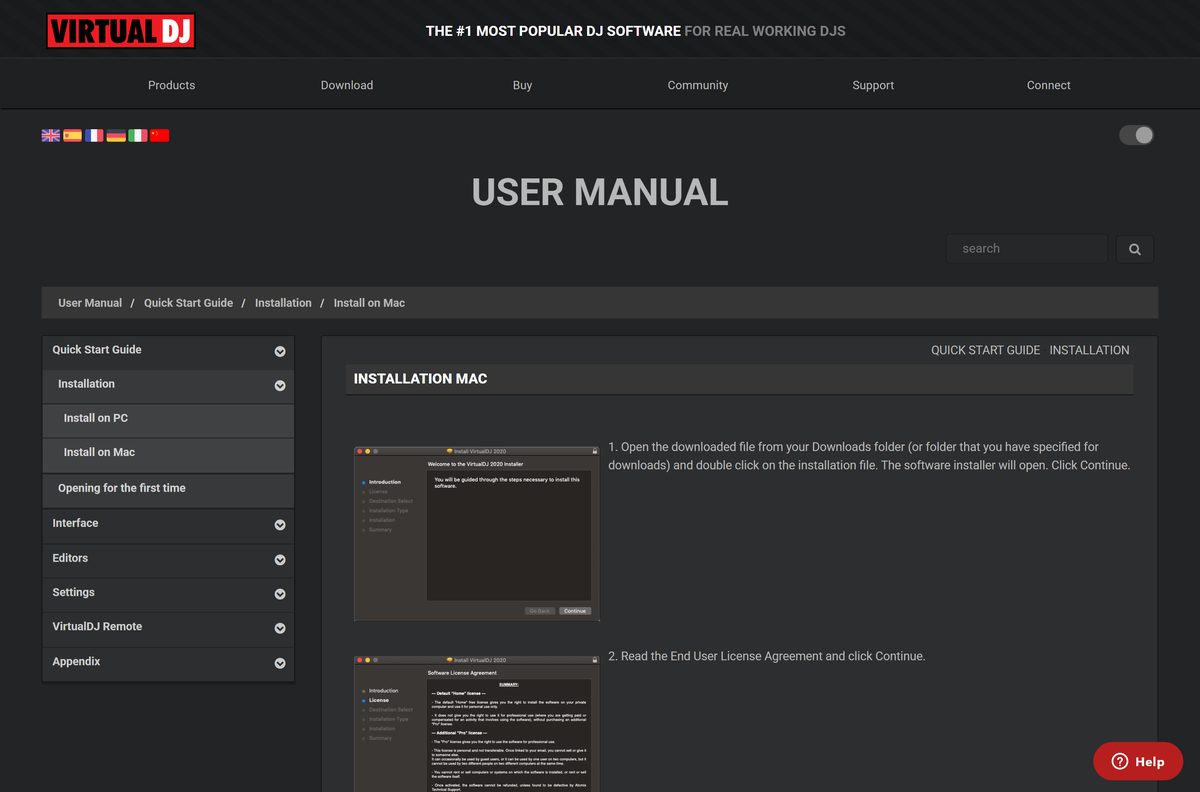
Atomix ships one PKG installer for macOS. The installer shows the target drive and the space it needs before it starts.
| Your Mac | What to do | Link |
|---|---|---|
| macOS 10.15 or later | Install the VirtualDJ 2026 PKG (992.1 MB) | VirtualDJ 2026 for Mac |
| macOS 26 | Install the same PKG; this is the recommended macOS | VirtualDJ 2026 for Mac |
| Gatekeeper blocks the installer | Select Open Anyway under Privacy & Security, then run the PKG again | Apple: Safely open apps on your Mac |
Double-click the PKG and select Continue on the license screen, then Agree. Select Install, enter your Mac password, and select Install Software. Select Close when it finishes, then open VirtualDJ from Applications.
Is VirtualDJ free?
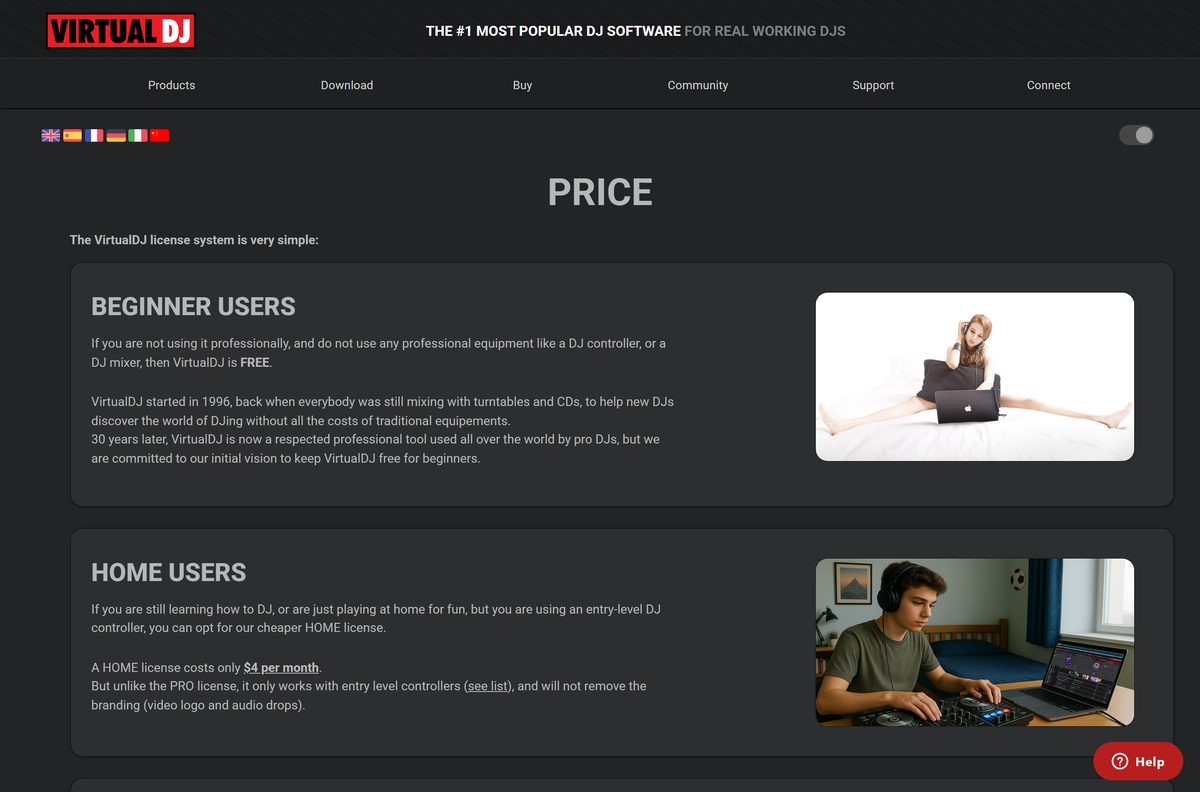
Yes, for home use. VirtualDJ is free if you do not earn money with it and do not connect a DJ controller or DJ mixer.
A Home license costs $4 per month and works with entry-level controllers, but keeps the video logo and audio drops. VDJ Pro costs $19 per month or $199 per year. It works with every controller, removes the audio drop and allows paid gigs.
A Business license costs $99 per month or $999 per year for DJ companies and clubs. Licenses are sold only on virtualdj.com or inside the software, and Atomix says any other seller is a scam.
Start on the free version to learn; buy Home when you plug in an entry-level controller, and Pro as soon as you play paid gigs. The free version already has the full player, library and effects. What you pay for is controller support, clean output and the right to earn money with it.
Choose between VirtualDJ 2026 and the 2020 legacy build
The download page keeps VirtualDJ 2020 build 8336 as an old legacy build for 32-bit Windows. It predates the 2026 features, such as real-time stem separation.
Install VirtualDJ 2026 on any 64-bit Windows 10 or 11 PC and on every supported Mac; take the 2020 legacy build only on a 32-bit PC. VirtualDJ 2026 requires 64-bit Windows, and the legacy build is the only VirtualDJ download Atomix still offers for 32-bit systems.
How to keep VirtualDJ updated
VirtualDJ checks for new versions itself. The checkUpdates option decides what happens when a new build is out.
- Open VirtualDJ and select the Settings gear.
- Select the OPTIONS category.
- Type checkUpdates in the search field at the top.
- Choose what VirtualDJ should do when a new version is available.
- Search earlyAccessUpdates and turn it on if you want new features as soon as they are tested.
- To update by hand, download the latest installer from virtualdj.com/download and run it.
Check the VirtualDJ system requirements
Compare your computer with the table before you download. Stem separation leans on the processor and GPU, so the recommended systems matter for live use.
| Specification | Detail |
|---|---|
| Software | VirtualDJ |
| Developer | Atomix Productions |
| Latest version | VirtualDJ 2026 build 9644 (Windows and Mac) |
| License / price | Free for home use; Home $4/month; Pro $19/month; Business $99/month |
| Windows | Windows 10 64-bit minimum; Windows 11 recommended |
| macOS | macOS 10.15 minimum; macOS 26 recommended |
| Architecture | 64-bit Windows; single macOS PKG; 32-bit legacy build 2020 b8336 |
| Windows download size | 556.7 MB MSI |
| Mac download size | 992.1 MB PKG |
| Offline installer | Yes, the MSI and PKG are full installers |
| Official download source | virtualdj.com/download |
| Last verified | 2026-09-25 |
Fix VirtualDJ not installing or not working
Match the symptom below. Each one has a single cause and a short fix.
Windows refuses to run the MSI
The PC is in Windows S mode, which only allows Microsoft Store apps.
- Open Microsoft’s Switching out of S mode in Windows support page and follow its link to the Microsoft Store.
- On the Switch out of S mode page, select Get.
- Wait for the confirmation message, then run the MSI again. The switch is free but one-way.
The Mac says the installer cannot be opened
Gatekeeper blocked the PKG.
- Open System Settings and select Privacy & Security.
- Scroll down and select Open Anyway next to the VirtualDJ message.
- Select Open when the warning appears again, then finish the install.
The installer does not run on an old PC
The PC runs 32-bit Windows, and VirtualDJ 2026 needs 64-bit.
- Check System type under Settings > System > About.
- Download the VirtualDJ 2020 legacy build (PC32) from virtualdj.com.
- Install it the same way as the main MSI.
Your DJ controller does nothing
The free version does not include controller support.
- Open Settings > LICENSES and select Connect to sign in.
- Buy a Home license for an entry-level controller, or Pro for any controller.
- Restart VirtualDJ with the controller plugged in.
Stems stop working after moving to a new Mac
Apple’s migration tool can corrupt GPU use for stems.
- Drag VirtualDJ from Applications to the Trash.
- Download a fresh PKG from virtualdj.com.
- Reinstall it instead of relying on the migrated copy.
How to uninstall VirtualDJ
Removing the program leaves your music files where they are.
- Close VirtualDJ.
- On Windows 11, open Settings > Apps > Installed apps.
- Search for VirtualDJ, select the three dots next to it and choose Uninstall.
- Select Uninstall again to confirm.
- On Windows 10, open Settings > Apps > Apps & features, select VirtualDJ and choose Uninstall.
- On a Mac, open Finder > Applications and drag VirtualDJ to the Trash, then empty the Trash.
A paid subscription is tied to your account, not to the app. Uninstalling does not cancel it.
Frequently asked questions
Is VirtualDJ free?
Yes, for home use without professional gear. VirtualDJ is free if you do not earn money with it and do not use a DJ controller or DJ mixer. A Home license costs $4 per month and Pro costs $19 per month.
What is the official VirtualDJ download page?
The official page is virtualdj.com/download, run by Atomix Productions. It links the Windows MSI, the Mac PKG and the old 32-bit Windows build. Licenses are sold only on virtualdj.com or inside the software.
Does VirtualDJ work on Windows 11?
Yes. VirtualDJ 2026 needs Windows 10 64-bit at minimum, and Atomix recommends Windows 11. If your PC runs Windows 11 in S mode, switch out of S mode before you run the installer.
How big is the VirtualDJ download?
The Windows MSI installer is 556.7 MB and the Mac PKG installer is 992.1 MB. The legacy 32-bit Windows build is much smaller at 44.8 MB. Leave extra free space for your music library and recordings.
Is there a VirtualDJ offline installer?
Yes. The Windows MSI and the Mac PKG are full installers, not small web stubs. You can copy either file to a USB stick and install VirtualDJ on a computer that is not online, then sign in later.
Is VirtualDJ available for Mac?
Yes. VirtualDJ 2026 installs on macOS 10.15 or later from a PKG file on virtualdj.com, and macOS 26 is recommended. The installer asks for your Mac password and places the app in Applications.
Does VirtualDJ support 32-bit Windows or ARM64?
VirtualDJ 2026 needs 64-bit Windows. For 32-bit PCs, Atomix still offers the old VirtualDJ 2020 build 8336 as a legacy download. The download page lists no separate ARM64 or Apple silicon build.
Is VirtualDJ safe to download?
Yes, when you download it from virtualdj.com. Atomix Productions publishes every build there. Avoid download portals and anyone selling VirtualDJ licenses elsewhere, because Atomix says licenses bought outside virtualdj.com are scams and will not work.
What is the latest version of VirtualDJ?
VirtualDJ 2026 build 9644 is the current release for both Windows and Mac. You can turn on early-access updates in the options if you want new features as soon as Atomix finishes testing them.
Why won’t VirtualDJ install on Windows?
The most common cause is Windows S mode, which blocks installers from outside the Microsoft Store. Switch out of S mode, then run the MSI again. A 32-bit copy of Windows also cannot run VirtualDJ 2026.
Can I use a DJ controller with free VirtualDJ?
No. The free version covers mixing with just your computer. A Home license at $4 per month adds entry-level controllers, and a Pro license at $19 per month works with every DJ controller and external mixer.
Do I need an account to use VirtualDJ?
No, but signing in unlocks more. Without a login, some features are limited and online features are unavailable. You can connect with a virtualdj.com account or with Facebook, Microsoft, Apple, Google or WeChat.