The Proxmox VE download is a free ISO installer from proxmox.com that turns a PC or server into a virtualization host. You write it to a USB drive on Windows 11, Windows 10 or a Mac, boot the target machine from it, and then run everything from a web browser.
Proxmox Virtual Environment combines the KVM hypervisor and Linux Containers (LXC) with software-defined storage and networking on one platform. Version 9.2 ships as a 1.71 GB ISO for Intel and AMD machines, plus a separate ISO for 64-bit Arm servers.
Below: the right ISO for your hardware, a checksum check, USB steps for Windows and Mac, the installer walkthrough, subscription costs, requirements and fixes for common install problems.
Which Proxmox VE download do you need?
Match the machine you will install on, not the PC you download with. The ISO replaces whatever is on the target disk.
| Target machine | What you download | Size | Link |
|---|---|---|---|
| Intel or AMD 64-bit PC or server with Intel VT or AMD-V | proxmox-ve_9.2-1.iso | 1.71 GB | Proxmox VE 9.2 ISO |
| 64-bit Arm server with an Armv9-A or newer processor | proxmox-ve_9.2-1-arm64.iso | 1.50 GB | Proxmox VE 9.2 ARM64 ISO |
| A new node joining an existing 8.x cluster | proxmox-ve_8.4-1.iso | 1.57 GB | Proxmox VE 8.4 ISO |
Each ISO also has a Torrent link on the download page, which helps on slow or unstable connections.
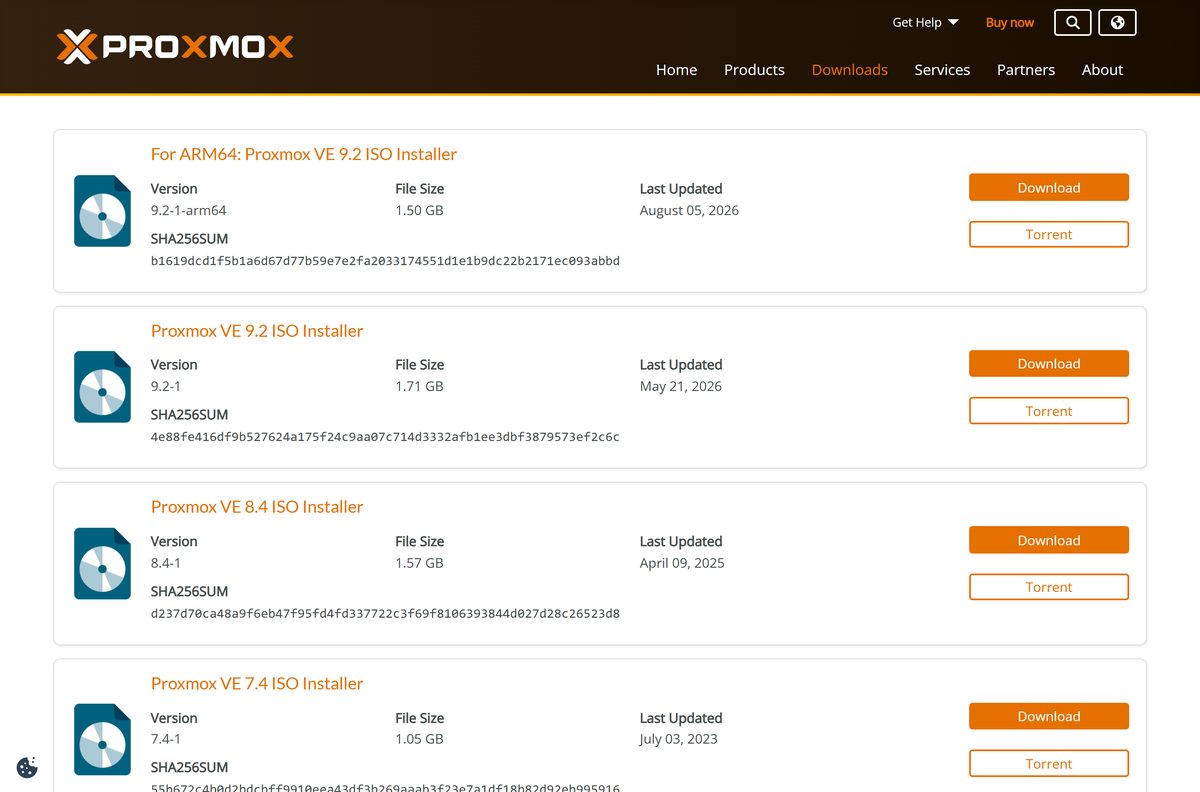
Download the Proxmox VE ISO from the official page
Proxmox VE 9.2 was released on May 21, 2026. It runs on Debian Trixie 13.5 with Linux kernel 7.0, QEMU 11.0 and LXC 7.0.
The ARM64 ISO arrived on August 5, 2026. It is the first Proxmox VE release for a CPU architecture other than x86-64.
- Proxmox VE ISO download page — every ISO with its SHA256 checksum and torrent
- Proxmox VE 9.2 ISO installer (x86-64) — 1.71 GB · version 9.2-1
- Proxmox VE 9.2 ISO installer (ARM64) — 1.50 GB · version 9.2-1-arm64
- Proxmox VE 9.2 torrent (x86-64) — same ISO over BitTorrent
Proxmox VE 9.2 adds dynamic load balancing for HA guests, WireGuard and BGP fabrics in SDN, and a manager for custom CPU models.
How to verify the Proxmox VE ISO checksum
The download page prints a SHA256 checksum under every ISO. A mismatch means a broken or altered file, so check it before you write the USB drive.
- Open the Proxmox VE ISO download page and copy the SHA256SUM under your ISO.
- On Windows, open PowerShell in your Downloads folder.
- Run Get-FileHash .\proxmox-ve_9.2-1.iso -Algorithm SHA256 .
- On a Mac, open Terminal and run shasum -a 256 ~/Downloads/proxmox-ve_9.2-1.iso .
- Compare the result with the page. For 9.2-1 it must read 4e88fe416df9b527624a175f24c9aa07c714d3332afb1ee3dbf3879573ef2c6c .
- If the values differ, delete the file and download it again.
How to install Proxmox VE from a USB drive made on Windows 11 or 10
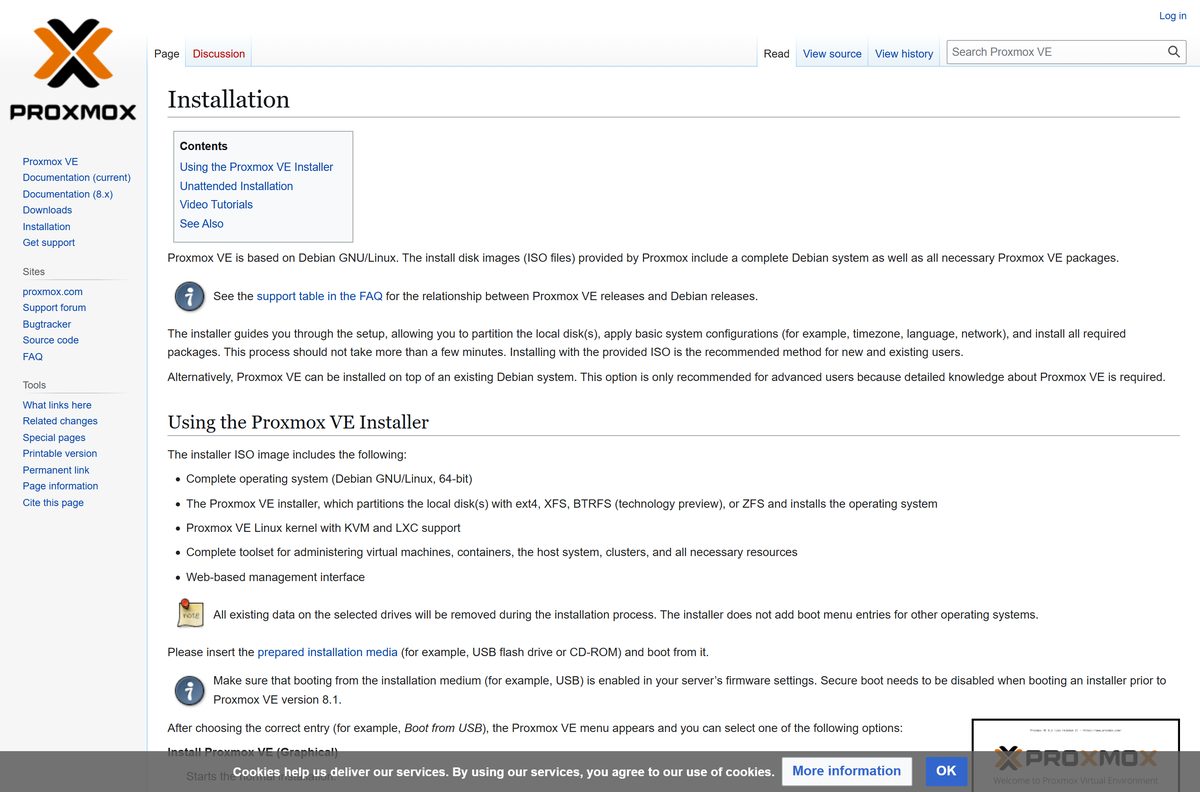
You need a USB flash drive larger than the ISO. Writing it erases the drive, and installing erases the target disk.
- Plug in the USB drive and open Etcher, or Rufus if you prefer a lighter tool.
- In Etcher, select the Proxmox VE ISO, select the USB drive and select Flash.
- In Rufus, select the ISO and Start. Click No when asked to download a different version of GRUB, then select DD mode.
- Plug the USB drive into the target machine, enable Intel VT or AMD-V in its firmware, and boot from USB.
- Choose Install Proxmox VE (Graphical). Use Install Proxmox VE (Terminal UI) if the graphical installer fails to start.
- Accept the EULA, pick the target disk, then set your country, time zone and keyboard layout.
- Enter a root password of at least 8 characters and an email address for system notices.
- Set the management network with a hostname and one IPv4 or IPv6 address, review the Summary and select Install.
- When the machine reboots, open https://youripaddress:8006 in a browser on your PC and log in as root with that password.
Keep a keyboard and monitor on the target machine until the first boot finishes. After that, the browser is the only console you need.
Which Proxmox VE steps do you need on a Mac?
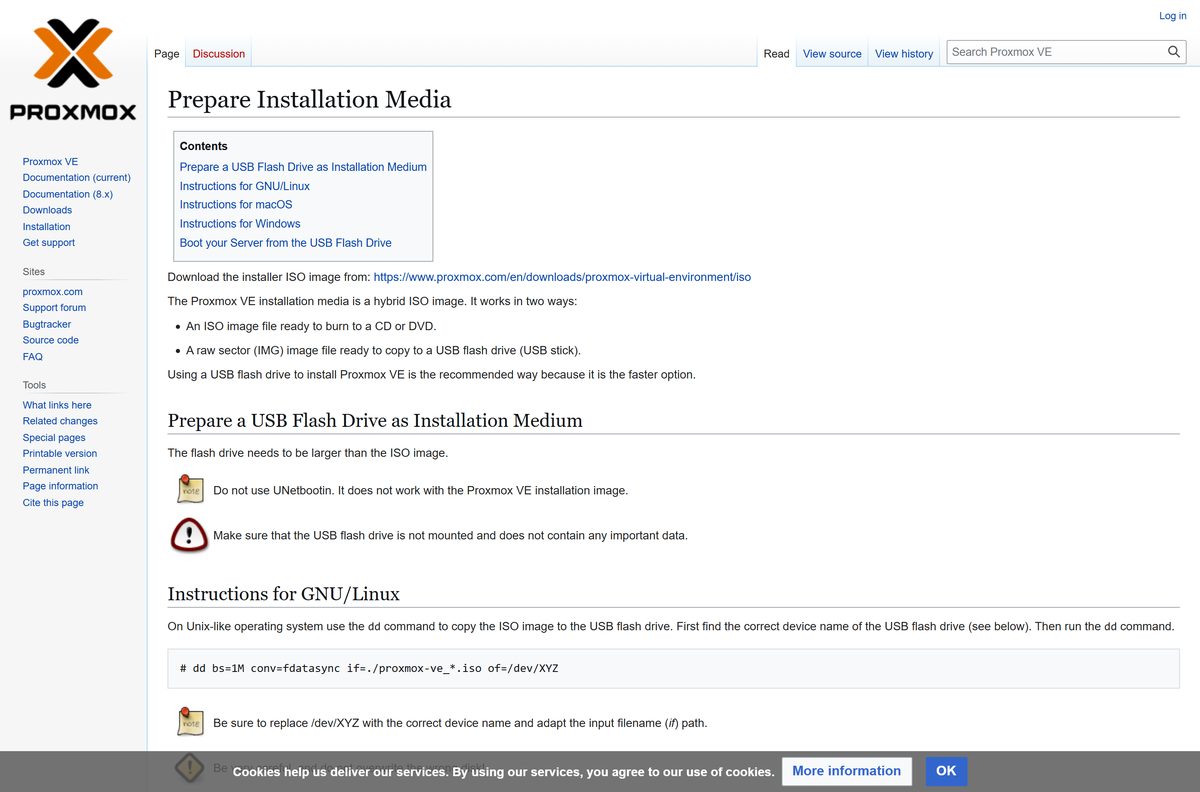
There is no Proxmox VE app for macOS. The Mac writes the USB drive and then acts as your management console in Safari.
| You want to | Do this on the Mac | Source |
|---|---|---|
| Convert the ISO for writing | Run hdiutil convert proxmox-ve_.iso -format UDRW -o proxmox-ve_.dmg |
Prepare Installation Media |
| Find the USB drive | Run diskutil list, insert the drive, run it again and note the new /dev/diskX |
Prepare Installation Media |
| Write the USB drive | Run diskutil unmountDisk /dev/diskX, then sudo dd if=proxmox-ve_*.dmg bs=1M of=/dev/rdiskX |
Prepare Installation Media |
| Manage the server after install | Open https://youripaddress:8006 in current Safari, Chrome, Firefox or Edge |
Installation guide |
Use rdiskX, not diskX, in the dd command. The raw device writes faster. Double-check the disk number, because dd overwrites the wrong drive without asking.
Is Proxmox VE free to use?
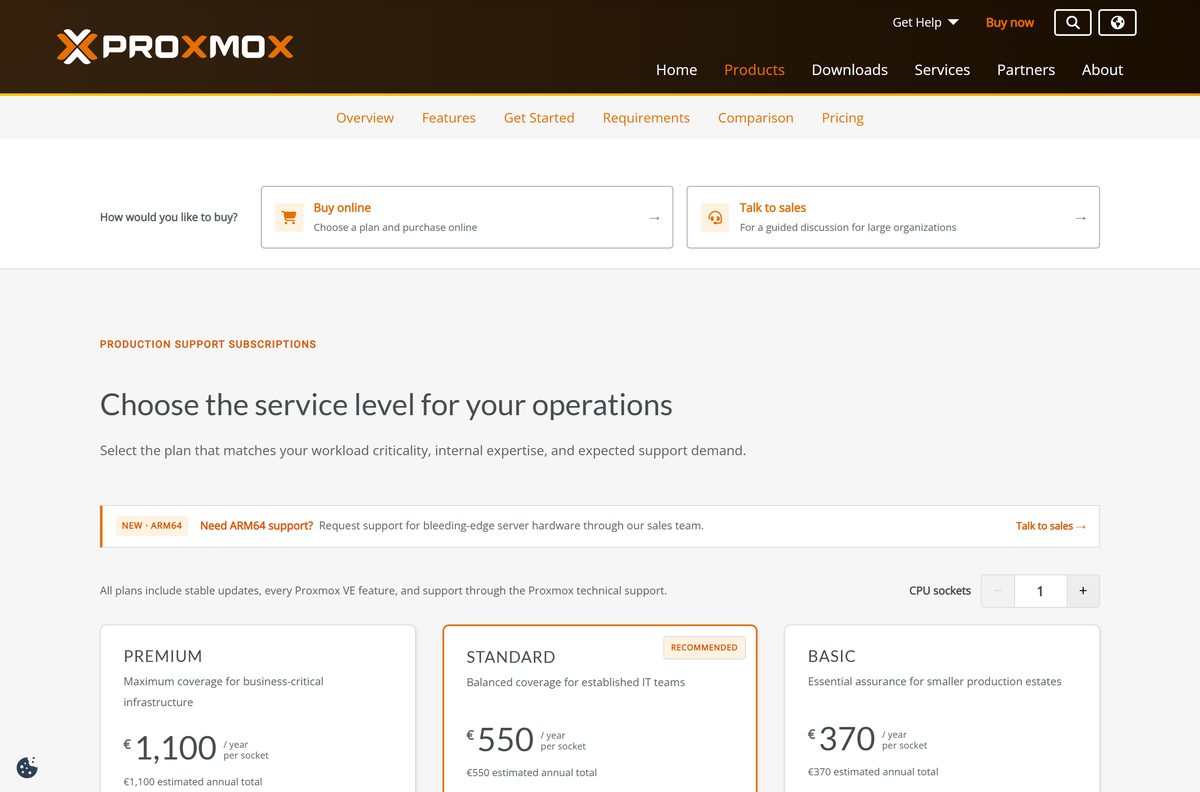
Proxmox VE is open-source software under the GNU AGPLv3 licence. Subscriptions are sold per CPU socket per year: Community EUR 120, Basic EUR 370, Standard EUR 550 and Premium EUR 1,100.
Yes. The ISO and every Proxmox VE feature are free, and a subscription is optional. A subscription unlocks the tested enterprise repository and, from Basic upward, support tickets with guaranteed response times. Without one, switch to the pve-no-subscription repository, which Proxmox describes as suitable for testing and non-production use.
No feature is locked behind a tier. Paying buys update stability and access to Proxmox support staff, not extra functions.
Choose between Proxmox VE 9.2 and 8.4 for your install
The download page still offers 8.4, 7.4 and 6.4 next to 9.2.
Install Proxmox VE 9.2 on any new host. It carries the current Debian Trixie base, kernel 7.0 and the new HA, SDN and CPU model features, and it is the only release with an ARM64 ISO. Pick 8.4 only when you add a node to a cluster that still runs 8.x and plan to upgrade the whole cluster later.
How to check for Proxmox VE updates and install them
A fresh install points at the enterprise repository, which needs a subscription key. Without a key, set up the free repository first.
- Log in to the web interface at https://youripaddress:8006 .
- Select your node, then open Repositories.
- Without a subscription, disable pve-enterprise and add No-Subscription.
- Open Updates under the same node and select Refresh to load the package list.
- Select Upgrade to install the pending packages in a console window.
- From a shell, run apt update followed by apt full-upgrade for the same result.
The no-subscription repository uses http://download.proxmox.com/debian/pve with the suite trixie and the component pve-no-subscription on Proxmox VE 9.
Check the Proxmox VE system requirements before you install
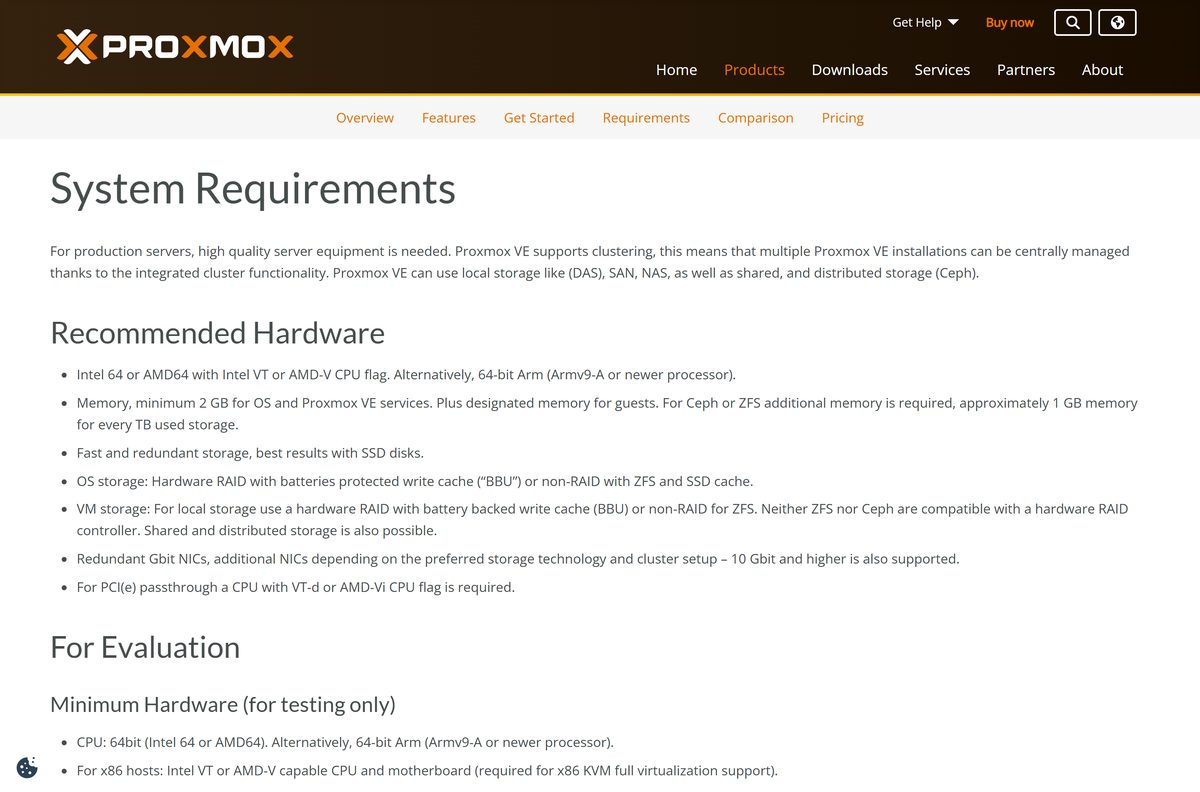
The minimum is for testing only. Plan for the recommended column on any host that runs real workloads.
| Field | Value |
|---|---|
| Software | Proxmox Virtual Environment (Proxmox VE) |
| Developer | Proxmox Server Solutions GmbH |
| Latest version | 9.2-1 (x86-64, May 21, 2026); 9.2-1-arm64 (August 5, 2026) |
| License | Free and open source, GNU AGPLv3; optional subscriptions |
| File size | 1.71 GB ISO (x86-64); 1.50 GB ISO (ARM64) |
| CPU | Intel 64 or AMD64 with Intel VT or AMD-V, or 64-bit Arm (Armv9-A or newer) |
| Memory | Minimum 1 GB; recommended 2 GB for the OS and services plus memory for guests |
| Storage | One hard drive minimum; fast, redundant SSD storage recommended |
| Network | One NIC minimum; redundant Gbit NICs recommended |
| Management | Web browser on Windows 11, Windows 10, macOS or Linux: current Firefox, Chrome, Edge or Safari |
| Official download source | proxmox.com |
| Offline installer | Yes, the ISO is a complete installer |
| Last verified | 2026-09-25 |
Proxmox VE does not run inside Windows or macOS. It installs as the operating system of the target machine and wipes the disk you select.
What Proxmox VE can run once it is installed
One host runs full virtual machines and lightweight containers side by side, all managed from the same web interface.
| Workload | Technology | Use it for |
|---|---|---|
| Virtual machines | KVM hypervisor with QEMU 11.0 | Windows, Linux and other full operating systems |
| Containers | Linux Containers (LXC 7.0) | Linux services with lower overhead than a VM |
| Storage | Software-defined storage | Shared or local disks for guests across nodes |
| Networking | Software-defined networking (SDN) | Virtual networks, including WireGuard and BGP fabrics in 9.2 |
| Clusters | Cluster Resource Scheduler and HA | Moving and balancing guests between nodes |
Fix Proxmox VE not installing or booting
Match what you see to one fix below.
The USB drive made with Rufus does not boot
Rufus wrote the image in ISO mode instead of DD mode.
- Open Rufus again and select the Proxmox VE ISO.
- Click No on the GRUB download prompt.
- Select DD mode and write the drive again, or use Etcher instead.
An older installer refuses to boot with Secure Boot on
Installers before Proxmox VE 8.1 need Secure Boot disabled.
- Use the 9.2 ISO, which boots with Secure Boot.
- For 7.4 or 6.4, turn off Secure Boot in the firmware settings, then boot the USB drive.
The graphical installer shows a black screen or freezes
The graphics hardware is not compatible with the graphical installer.
- Reboot from the USB drive.
- Choose Install Proxmox VE (Terminal UI) instead.
- For a machine with no monitor, choose Install Proxmox VE (Terminal UI, Serial Console).
Virtual machines refuse to start on the new host
Intel VT or AMD-V is off in the firmware, or the CPU lacks it.
- Enter the firmware setup at boot.
- Enable Intel Virtualization Technology or SVM Mode (AMD-V).
- Save, reboot and run the installer again.
The browser cannot reach the web interface
The address misses https or port 8006, or the IP differs from the one set at install.
- Type the full address, https://youripaddress:8006 , including https.
- Log in at the host’s own console and confirm the IP address set during install.
Updates fail right after a fresh install
The enterprise repository is enabled by default and needs a subscription key.
- Open your node and select Repositories.
- Disable pve-enterprise, add No-Subscription, and select Refresh under Updates.
Frequently asked questions
Is Proxmox VE free to download?
Yes. Proxmox VE is free and open source under the GNU AGPLv3, and the ISO costs nothing on proxmox.com. Optional subscriptions, from EUR 120 per CPU socket per year, add the enterprise repository and support. Every feature works without one.
What is the official Proxmox VE download page?
The official page is proxmox.com/en/downloads/proxmox-virtual-environment/iso. It lists the 9.2 ISO for x86-64, the 9.2 ISO for ARM64 and older 8.4, 7.4 and 6.4 ISOs, each with a SHA256 checksum and a torrent link.
Can I install Proxmox VE on Windows 11?
Not as an app. Proxmox VE installs on bare metal and replaces the operating system on the target disk. Windows 11 and Windows 10 PCs download the ISO, write it to USB with Etcher or Rufus, and manage the server in a browser.
How big is the Proxmox VE download?
The Proxmox VE 9.2 ISO for Intel and AMD machines is 1.71 GB. The ARM64 ISO is 1.50 GB. Use a USB flash drive larger than the ISO to hold the installer.
Is the Proxmox VE ISO an offline installer?
Yes. The ISO holds the complete system, so installation needs no internet access. You need a network connection later to pull updates from the enterprise or no-subscription repository.
Is there a Proxmox VE app for Mac?
No. On a Mac you convert the ISO with hdiutil, write it to USB with dd, and manage the server in Safari at https://youripaddress:8006. The ISO itself installs on an x86-64 or Armv9-A server.
Does Proxmox VE support ARM64?
Yes. Proxmox VE 9.2 has a separate ARM64 ISO for 64-bit Arm processors that are Armv9-A or newer. The standard ISO covers Intel 64 and AMD64 machines with Intel VT or AMD-V.
Is the Proxmox VE ISO safe?
The ISO from proxmox.com is safe. Proxmox Server Solutions GmbH publishes a SHA256 checksum for every ISO, so compare it with Get-FileHash on Windows or shasum on a Mac before you write the USB drive.
What is the latest version of Proxmox VE?
Proxmox VE 9.2 is the latest release, published on May 21, 2026, with version string 9.2-1. It runs on Debian Trixie 13.5 with Linux kernel 7.0. The ARM64 build, 9.2-1-arm64, followed on August 5, 2026.
Why won’t Proxmox VE install?
The usual causes are a USB drive written in Rufus ISO mode instead of DD mode, virtualization turned off in the firmware, or a graphics issue. Rewrite the drive in DD mode, enable Intel VT or AMD-V, or choose the Terminal UI installer.