The official iMazing download installs a desktop iPhone and iPad manager on Windows 11, Windows 10 and Mac, and you can start using it free right away. Version 3.6.5 is the current release for both platforms.
Windows gets a 216.2 MB installer and the Mac gets a 323.7 MB disk image, both from imazing.com. Quick Transfer, app management and personal backups work without paying.
This guide covers which file to take, installing on each system, what the trial limits are, the older builds for old computers, and fixes for a phone that iMazing does not detect.
Which iMazing download do you need?
Match your computer to a row. One Windows file and one Mac file cover almost every machine, because iMazing runs natively on Intel and Apple silicon Macs and on 32-bit and 64-bit Windows.
| Your computer | Take this | Size |
|---|---|---|
| Windows 11, 10, 8.1, 8 or 7 | iMazing3forWindows.exe | 216.2 MB |
| Mac on macOS 10.12 Sierra or later, Intel or Apple silicon | iMazing3forMac.dmg | 323.7 MB |
| Mac stuck on OS X El Capitan 10.11 | iMazing 3.4.0 on the previous versions page | Listed on the page |
| PC still on Windows XP | iMazing 1.5.10 on the previous versions page | Listed on the page |
Both current files are full installers. You can copy either one to a computer with no internet connection and install from it.
Download iMazing for Windows 11 and 10 from the official page
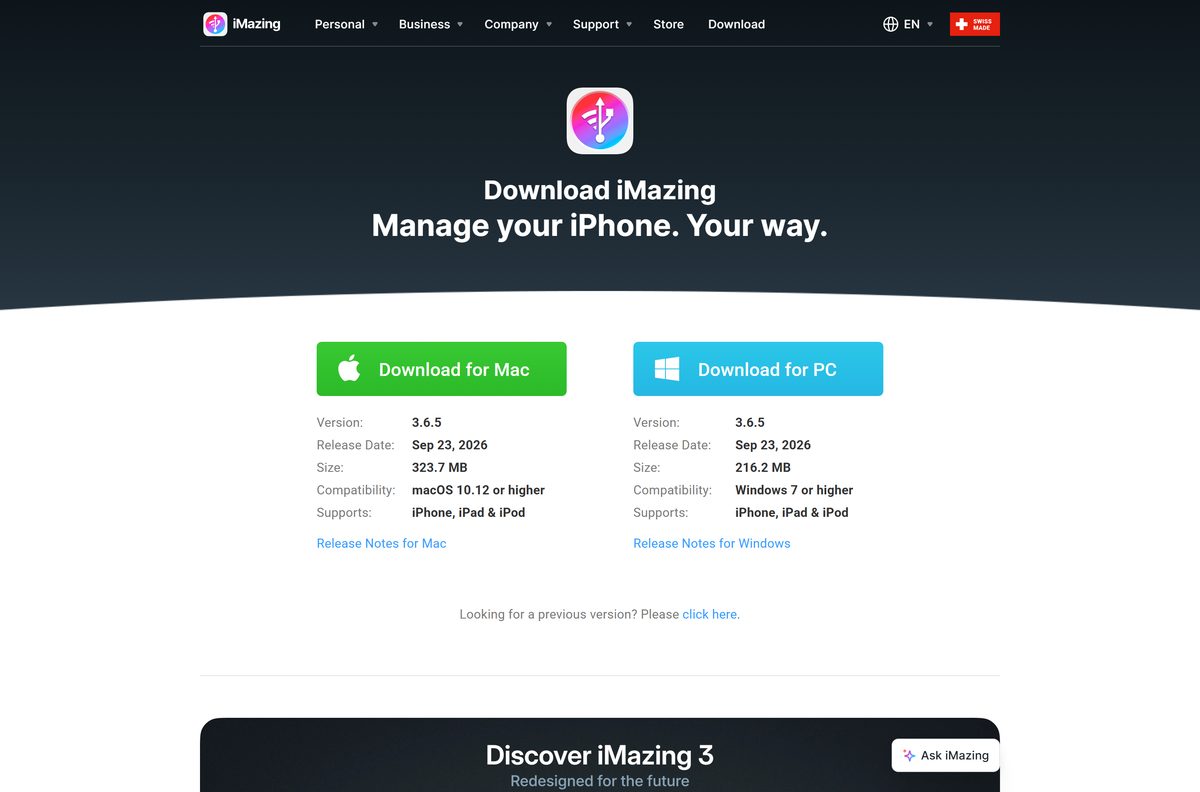
The download page at imazing.com shows a Download for PC button and a Download for Mac button, each with its version, release date and size. Both builds carry the same version number and release date.
- iMazing3forWindows.exe — 216.2 MB · Windows 7 or later
- iMazing3forMac.dmg — 323.7 MB · macOS 10.12 or later
- iMazing download page — release notes for each platform linked below the buttons
- Windows release notes — changes in each release
The installer is the same file whether you use the trial or a paid licence. A licence code unlocks the full app inside the copy you already have.
How to install iMazing on Windows 11 and 10
You do not need iTunes first. iMazing offers to download the Apple drivers it needs to talk to your iPhone or iPad if they are missing.
- Open imazing.com/download and select Download for PC.
- Open iMazing3forWindows.exe from your browser’s downloads list.
- Select Yes when User Account Control asks to allow changes.
- Select Next and follow the setup wizard to the end.
- Launch iMazing and accept the offer to install the Apple drivers if it appears.
- Connect your iPhone or iPad with a USB cable and unlock it.
- Approve the Trust alert on the phone and enter your passcode.
- Use the trial, or enter a licence code from the License menu.
Plug the cable straight into the PC rather than a hub or keyboard port. The connection is more reliable that way.
Which iMazing download do you need for your Mac?
Open the Apple menu and select About This Mac to read your macOS version. The same disk image runs natively on Intel and Apple silicon Macs.
To install, double-click iMazing3forMac.dmg in Downloads, drag the iMazing icon to Applications, then launch it from Applications.
| Your Mac says | Download | Size |
|---|---|---|
| Apple M-series chip, macOS 11 or later | iMazing3forMac.dmg | 323.7 MB |
| Intel processor, macOS 10.12 Sierra or later | iMazing3forMac.dmg | 323.7 MB |
| Intel processor, OS X El Capitan 10.11 | iMazing 3.4.0 (previous versions) | Listed on the page |
| Intel processor, OS X Yosemite 10.10 | iMazing 2.18 (previous versions) | Listed on the page |
iMazing Mini comes inside the same app. It sits in the Mac menu bar and runs scheduled backups, so there is nothing extra to download.
Check what the iMazing trial lets you transfer before you pay
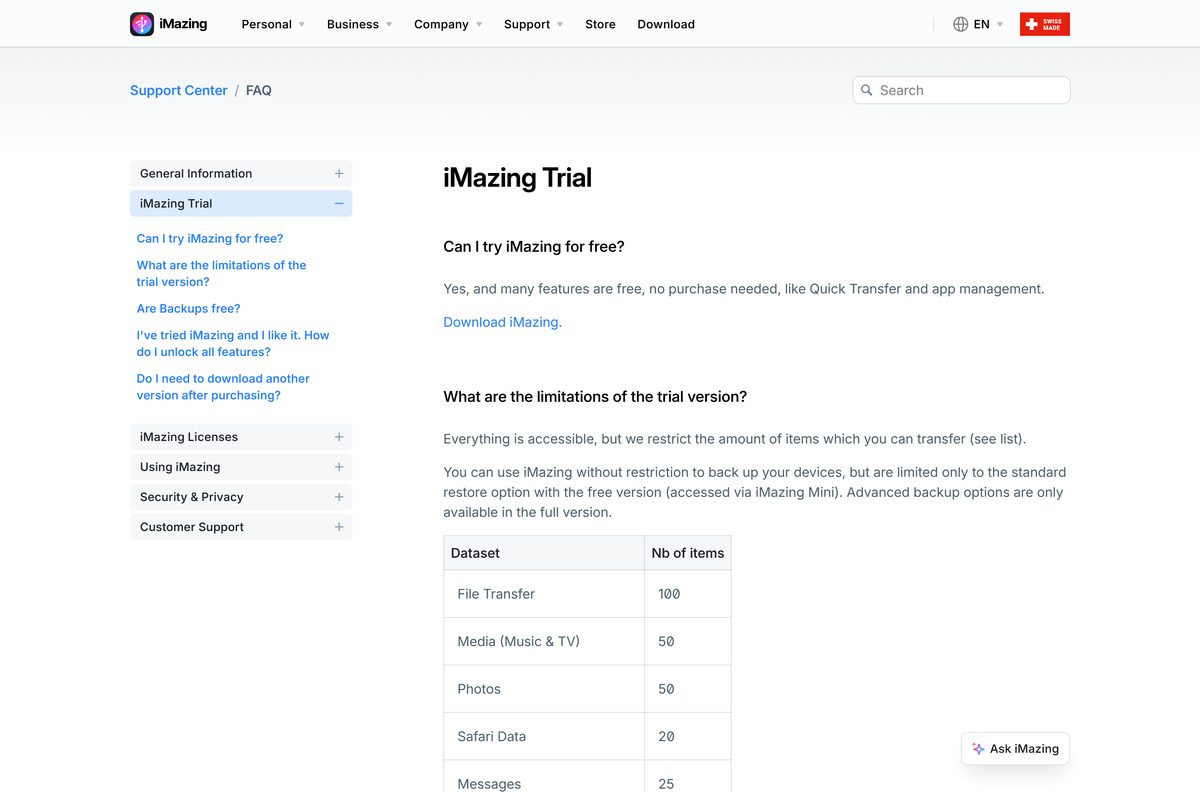
Every feature opens in the trial, but each data type has a cap on how many items you can transfer or export. Personal backups are unlimited, while the free version offers only the standard restore through iMazing Mini.
| Data type | Trial limit (items) |
|---|---|
| File Transfer | 100 |
| Media (Music and TV) | 50 |
| Photos | 50 |
| Messages | 25 |
| 25 | |
| Install, update or restore apps | 25 |
| Safari data | 20 |
| Contacts | 10 |
| Calendars | 10 |
| Extract or edit backup files | 10 |
| Books, Call History, Notes | 5 each |
| Voice Memos | 3 |
| Voicemail | 1 |
Test a small export first, such as a few message threads or photos. It shows whether the output suits you before you buy.
Is iMazing free?
iMazing is free to download and partly free to use. Quick Transfer, app management and personal backups need no purchase, while larger transfers and advanced restore options need a subscription.
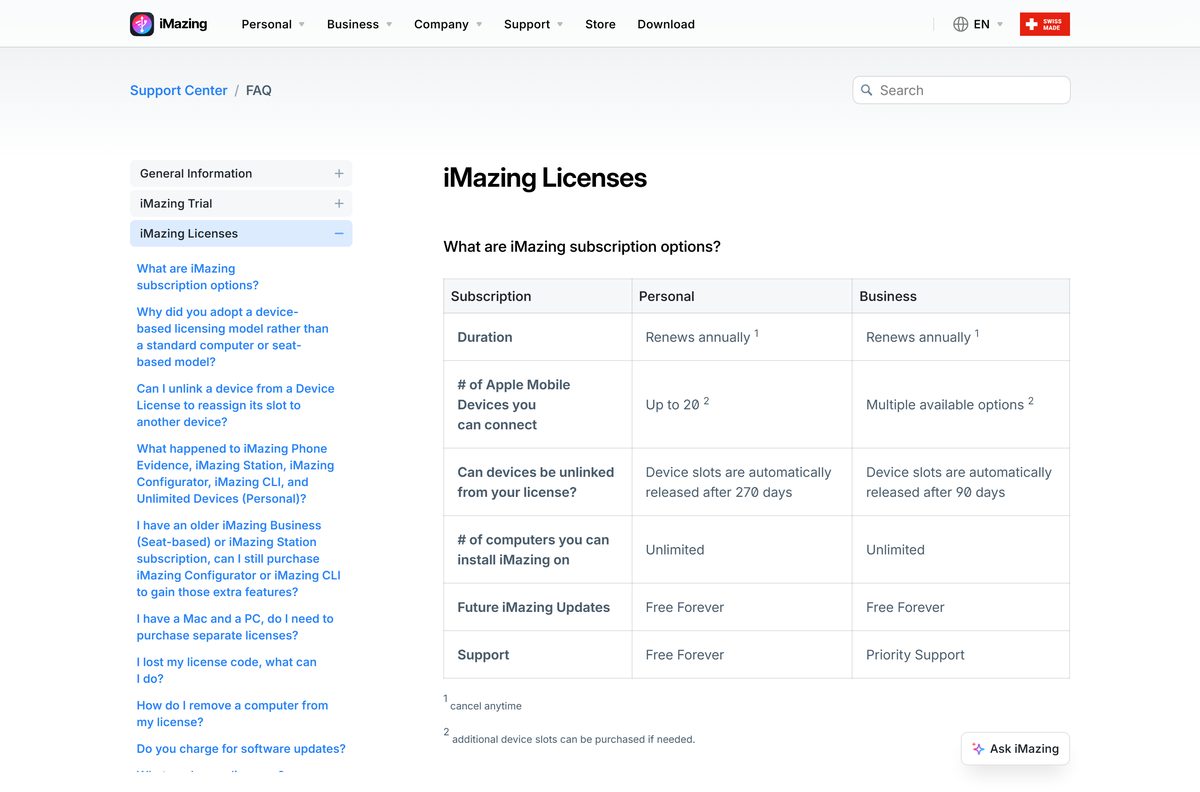
The Personal Subscription covers up to 5 Apple mobile devices a year and the Family tier covers up to 20. Both renew annually, can be cancelled at any time, and install on any number of Macs and PCs.
Device slots free up on their own after 270 days without a connection on personal plans. Updates are included for as long as the subscription runs.
The store shows prices in your local currency. Treat any “iMazing full version”, cracked build or free licence key from another site as malware.
Install the trial first and buy the Personal Subscription only if you hit a transfer limit. The trial runs every feature with item caps, and a licence code unlocks the same installed copy without a second download.
Choose between iMazing 3 and iMazing 2 for an older computer
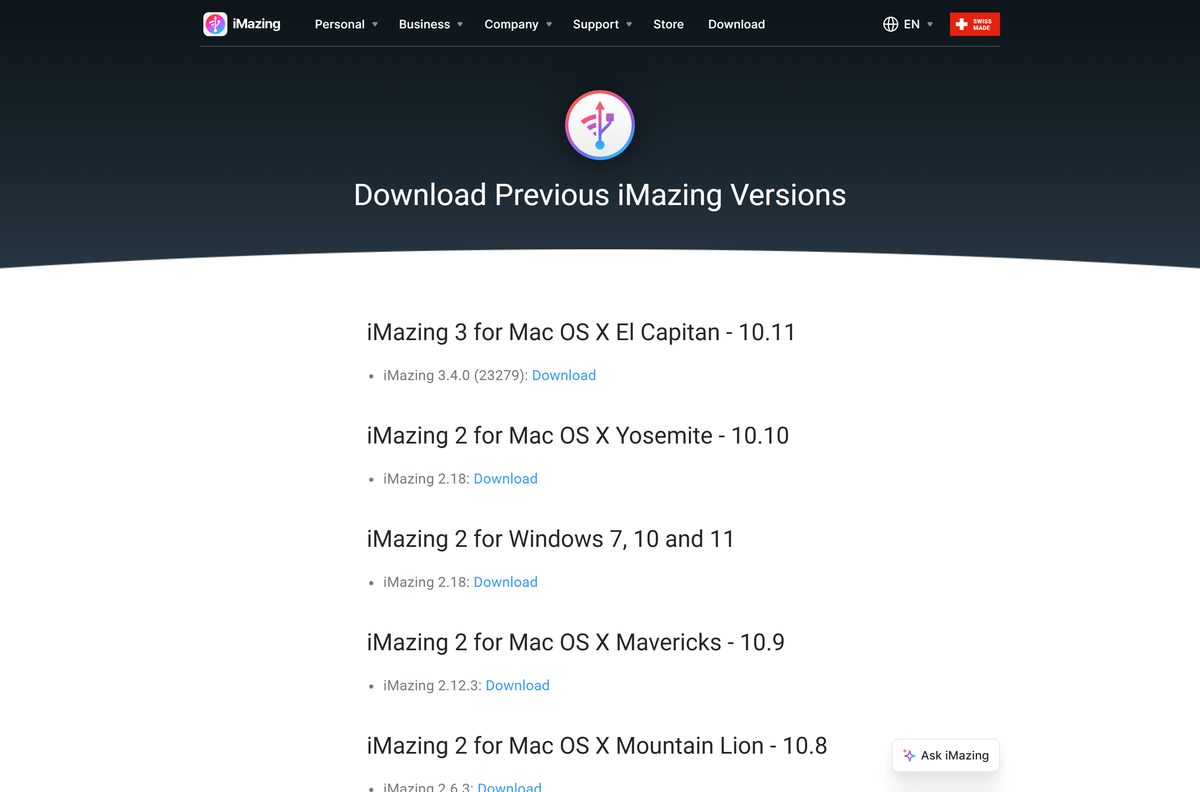
iMazing 3 is the current branch and supports the newest iPhone and iPad models. The previous versions page keeps iMazing 2.18 for Windows 7, 10 and 11 and for OS X Yosemite, plus iMazing 3.4.0 for OS X El Capitan.
Install the current iMazing release on any PC running Windows 7 or later and any Mac on macOS 10.12 or later. The older builds exist only for computers that cannot run the current release, and they do not receive new device support.
Check the iMazing system requirements and specifications
| Specification | Detail |
|---|---|
| Software | iMazing |
| Developer | DigiDNA Ltd. |
| Latest version | 3.6.5 (Windows and Mac, released 2026-09-23) |
| Licence / price | Free trial and free features; paid annual subscription |
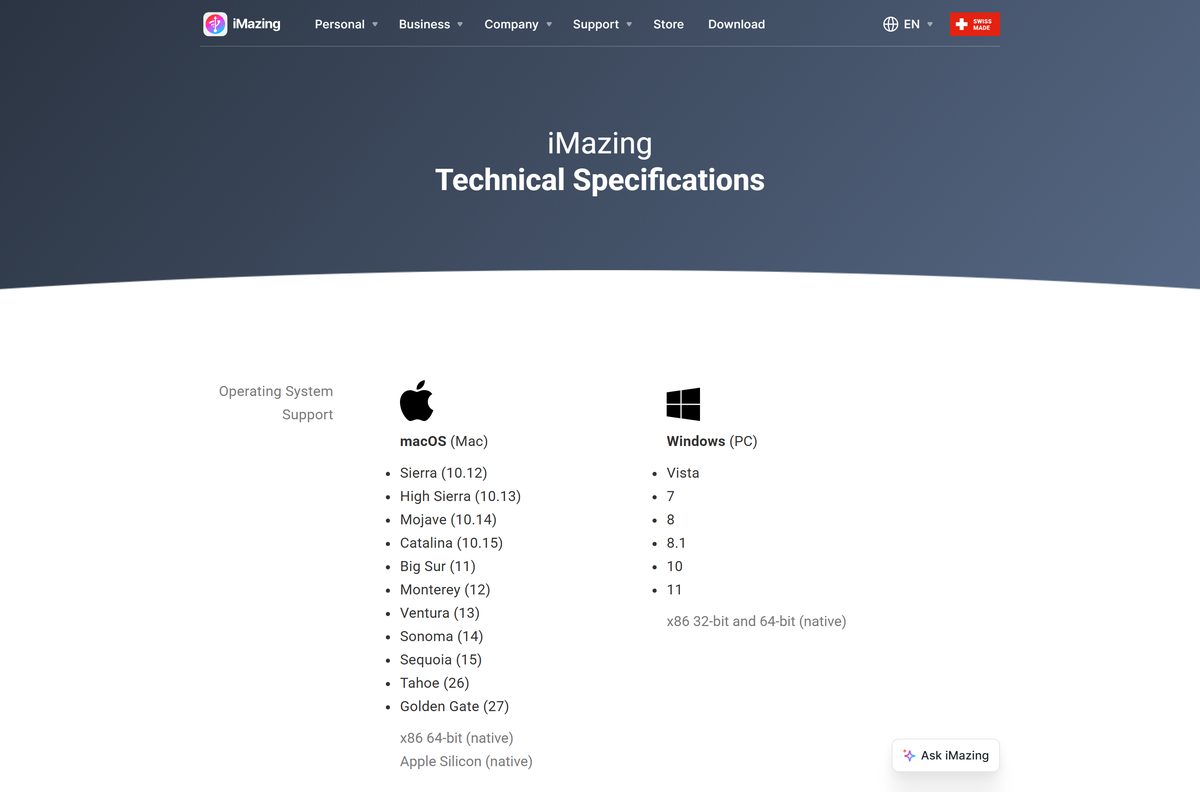
| Windows | Windows 7, 8, 8.1, 10 and 11 |
| Windows architecture | x86 32-bit and 64-bit, native |
| macOS | macOS 10.12 Sierra or later |
| Mac architecture | Intel 64-bit and Apple silicon, native |
| Devices supported | iPhone, iPad and iPod |
| Windows download size | 216.2 MB EXE |
| Mac download size | 323.7 MB DMG |
| Offline installer | Yes, both files are full installers |
| Official download source | imazing.com/download |
| Last verified | 2026-09-25 |
Fix iMazing not detecting your iPhone on Windows 11 or 10
iMazing opens but the iPhone never appears
The phone is locked, has not trusted the PC, or sits behind a USB hub.
- Unlock the iPhone with its passcode, Face ID or Touch ID.
- Select Trust on the phone when it asks about this computer.
- Move the cable to a USB port on the PC itself, on the back panel of a desktop.
- Restart both the phone and the PC, then relaunch iMazing.
The phone still does not show after a restart
The Apple mobile device services on Windows are missing or damaged.
- Open iMazing and select Edit > Preferences > General.
- Select Reinstall Mobile Device Services.
- Wait for the reinstall to finish, then reconnect the phone.
- If it still fails, uninstall iMazing, restart the PC and install it again.
Security software blocks the connection
Antivirus or firewall rules stop the Apple services from reaching the phone.
- Open your security software’s allow list or exclusions page.
- Add iMazing.exe, AppleMobileDeviceService.exe and AppleMobileDeviceProcess.exe.
- Reconnect the phone and relaunch iMazing.
The Mac does not see the iPhone either
An outdated macOS or reset privacy settings on the phone block the pairing.
- Open System Settings > Software Update and install any update.
- On the iPhone, open Settings > General > Transfer or Reset iPhone > Reset.
- Select Reset Location & Privacy, then reconnect and tap Trust again.
How to uninstall iMazing from Windows and Mac
Removing the app does not delete your backups or cancel your subscription. Copy any backups you want to keep before you delete their folder.
- Quit iMazing Mini first: select its icon in the Windows system tray or Mac menu bar, select the three dots, then Quit.
- On Windows, open Settings > Apps > Installed apps.
- Select the three dots next to iMazing, then Uninstall.
- On a Mac, quit iMazing and open Applications in Finder.
- Drag iMazing to the Trash and empty it.
- Keep your licence code, since it activates a fresh install later.
Choose between iMazing and Apple’s free iPhone tools
Apple’s own tools handle full backups, restores and syncing at no cost. iMazing adds item-level export of messages, WhatsApp chats and files, which Apple’s apps do not offer.
| Tool | Platform | Price | Best for |
|---|---|---|---|
| iMazing | Windows and Mac | Free trial, then subscription | Exporting messages, photos and files one item at a time |
| Apple Devices | Windows, Microsoft Store | Free | Backups, restores and syncing on Windows |
| iTunes | Windows | Free | Music library and device sync on older setups |
| Finder | Mac, built in | Free | Backups and syncing with no extra download |
Pick Apple Devices or Finder for whole-phone backups. Pick iMazing when you need to pull specific data off the phone.
Frequently asked questions
Is iMazing free?
iMazing is free to download, and Quick Transfer, app management and personal backups work without paying. The trial caps transfers, such as 50 photos or 25 message threads, and a paid annual subscription removes those limits.
What is the official iMazing download page?
imazing.com/download is the official page from DigiDNA Ltd. It lists the Windows and Mac installers with their version, release date and size, and links a separate page of previous versions for older computers.
Does iMazing work on Windows 11?
Yes. iMazing supports Windows 11 and Windows 10, and the download page lists Windows 7 or higher as the minimum. The installer runs natively on 32-bit and 64-bit Windows.
How big is the iMazing download?
The Windows installer, iMazing3forWindows.exe, is 216.2 MB. The Mac disk image, iMazing3forMac.dmg, is 323.7 MB. Both files are the current release.
Is there an iMazing offline installer?
Yes. The Windows EXE and the Mac DMG are full installers, so you can copy either to a computer with no internet. On Windows, iMazing may still offer to download the Apple drivers it needs if they are missing.
Is iMazing available for Mac?
Yes. The current iMazing runs on macOS 10.12 Sierra and later, natively on Intel and Apple silicon Macs. Macs on OS X El Capitan can install iMazing 3.4.0 from the previous versions page.
Does iMazing support 64-bit and ARM64?
iMazing lists native support for 32-bit and 64-bit x86 Windows and for both Intel and Apple silicon Macs. The tech specs page does not list Windows on ARM64.
Is iMazing safe?
Yes, when you download it from imazing.com. DigiDNA states that iMazing respects Apple’s security mechanisms, does not jailbreak the device and does not affect its warranty. Avoid cracked builds and licence keys from other sites.
What is the latest version of iMazing?
iMazing 3.6.5 is the latest version for Windows and Mac, released on September 23, 2026. The iMazing 3.6 branch added music transfer to iPod classic and support for the iPhone 18 Pro.
Why won’t iMazing install or detect my iPhone?
Most failures come from a locked phone, an untrusted computer or damaged Apple services. Unlock the phone, tap Trust, use a direct USB port, then select Edit > Preferences > General > Reinstall Mobile Device Services on Windows.
Do I need iTunes to use iMazing on Windows?
No. iMazing offers to download the Apple drivers it needs to communicate with an iPhone or iPad, so iTunes and Apple Devices are not required.
Can I install iMazing on more than one computer?
Yes. A subscription lets you install iMazing on any number of Macs and PCs. The licence limits the number of Apple devices you connect, such as 5 a year on the Personal Subscription.