Mozilla to release Firefox 95.0 for Windows, Mac, and Linux Platforms with new features, improvements, and bug fixes. To put it short, the company is bringing novel Sandboxing technology called RLBox to all platforms and is enabling Fission aka Site isolation for all users.
Firefox 95
What’s new:
- Mozilla is shipping a new Firefox version with RLBox Sandboxing to mobile and desktop platforms. This uses WebAssembly to isolate potential-buggy code. For more technical details and in-depth information about what RLBox does when compared to process-based sandboxing, read the Mozilla hacks blog post here.

- In case you don’t know, Firefox is now available for download on Windows Store for Windows 11 and Windows 10.
- For macOS:
This update reduces CPU usage in Firefox and WindowsServer during event processing.
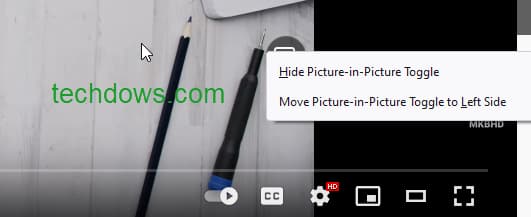
And, the version also brings down the power usage of Software decoded video on macOS for streaming sites such as Netflix and Amazon Prime video, even in fullscreen. - Firefox now allows moving the Picture in Picture button to the left side. When a video is playing, right-click on PiP button and select “Move Picture in Picture Toggle to Left Side” in the context menu.
- In addition to the RLBox security feature, to protect users against side-channel attacks such as Spectre, Mozilla has enabled fission or more popularly known as Site isolation for all users.
Improvements and changes:
- You’ll see a faster content process startup on macOS.
- This version comes with improvements to the memory allocator also.
- Mozilla has improved page load performance by speculatively compiling JavaScript ahead of time.
- For slacks users, this version adds User Agent override to the user more call features and access to Huddles
Known or unresolved issue:
Firefox comes with an issue where command-clicking links in Gmail don’t open a new tab, as a workaround, Mozilla suggests clicking links in Gmail without using the command.
This release includes various stability, functionality, and security fixes, you can check Firefox 95 release notes here.
As usual, expect Mozilla to come up with a blog post later today highlighting new features in version 95.
More about Firefox:
Firefox disables & blocks FVD Speed Dial add-on for intercepting user search queries
Firefox 94: Enable Close Tabs warning
Mozilla Firefox can now open XFA PDFs
Mozilla Firefox introduces ‘Colorways’ themes
Firefox Focus for Android getting UI overhaul





