Opera Software is doing all sorts of things these days. They launched a browser called Opera GX for gaming. Allow users to quickly access social sites and Messengers such as Twitter, WhatsApp, Instagram, Facebook Messenger from the sidebar. Innovation isn’t ending as far as the Opera desktop team is concerned, to the latest, they’ve integrated Music “Player” into Sidebar in Opera 73 dev. The Player currently supports Apple Music, Spotify, and YouTube Music services.
Global Media Controls or Media Hub is so far worked and working for Chrome and Edge browsers only. The opera browser doesn’t have this feature enabled by default.
Music Player in Opera browser Sidebar
Without relying on Chrome’s Media Controls, Opera now built their own player that allows to access and control following music services
- YouTube Music
- Spotify
- Apply Music
To use the player in the Opera browser,
Click on the icon on the sidebar and choose a service to listen to music from.

When if any other open tabs in Opera are playing sound, the player pauses the music automatically and resumes once the sound from other tab stops or is paused.
When the Player is playing music, its sidebar icon turns blue. If the player is inactive, you’ll see the default icon.
Opera says the feature is still being developed and they’ll fix the bugs when they notice.
Disable Player in Opera Sidebar
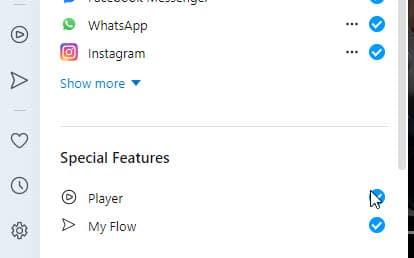
Like other features or Messenger icons, the Opera Player also be can be disabled by configuring the sidebar setup.
- Right-click on sidebar
- Select Sidebar setup
- Under Special features > Player, disable.
What’s your take on Music Player introduced in Opera? Let us know in the comments below.
Related articles:
Opera 68+: reopen recently closed tabs in 3 ways
Opera removes Instant Search and Tab Menu, introduces Search in Tabs
What is Opera Browser Assistant and how to Remove it?
Opera updates Video Pop-Out with Next Track and Timer features




In my latest Opera Version:71.0.3770.271 there is no option like that. Only My Flow inside Special Features
As mentioned in the article, this is available in Dev version.
Download Opera GX for PC, Windows 11/10 & Mac (Free) - Techdows
[…] inherits Opera’s desktop features, including the sidebar music player and the built-in AI […]