macOS 27 Golden Gate is out now: Apple released it on September 14, 2026, and shipped the first bug-fix update, macOS Golden Gate 27.0.1, on September 28, 2026.
This guide covers what changed, which Macs can run it, why Intel Macs are left out, how to turn on Siri AI and how to install the update.
macOS 27 Golden Gate release date
Apple lists the release on its security releases page, which records every macOS version and the day it shipped.
macOS 27 Golden Gate became available on September 14, 2026, and macOS Golden Gate 27.0.1 followed on September 28, 2026. iOS 27 and iPadOS 27 shipped the same day, September 14, 2026, so the whole 27 generation arrived together. Macs that cannot run macOS 27 received macOS Tahoe 26.7 on that date and Tahoe 26.7.1 on September 28.
Siri AI is part of the release but carries a Beta label, and some features are marked for a future software update.
macOS 27 Golden Gate key facts
The essentials of the release in one table, from Apple's macOS page and security releases list.
| Fact | macOS 27 Golden Gate |
|---|---|
| Official name | macOS 27 Golden Gate, the successor to macOS Tahoe 26 |
| Release date | September 14, 2026 |
| Latest update | macOS Golden Gate 27.0.1, September 28, 2026 |
| Supported Macs | Apple silicon Macs (M1 or later) and the MacBook Neo |
| Intel Macs | Not supported; they stay on macOS Tahoe 26.7.1 |
| Headline feature | Siri AI (Beta), in English to start |
| How to install | System Settings > General > Software Update |
macOS Golden Gate: what's new
Apple groups the release into six areas. The table gives each one in a line, with the detail in the sections that follow.
| Area | What changed in macOS 27 | Requirement or catch |
|---|---|---|
| Siri AI | Conversational assistant with personal context, onscreen awareness, world knowledge and a dedicated Siri app | Beta, English first, Apple Intelligence Mac, usage limits |
| Visual Intelligence | Ask Siri about anything in a screenshot, search for similar images or act on what is in the frame | Device language set to a supported English variant |
| Apple Intelligence in apps | Smarter Safari, Mail ranking, photo editing tools, Image Playground, Shortcuts from a description | Some tools have daily usage limits |
| Child safety | Ask to Browse, wider Communication Safety, Time Allowances and Schedules, redesigned parental controls | Ask to Browse needs upgraded Screen Time |
| Design | Refined Liquid Glass with a transparency slider, uniform toolbars, edge-to-edge sidebars | None |
| Performance | Faster AirDrop, network file browsing and Safari start page loading | None |
Design changes in macOS 27
Golden Gate keeps the Liquid Glass look introduced with Tahoe and tunes it for readability rather than replacing it.
| Design change | What you see |
|---|---|
| Liquid Glass refraction and contrast | More uniform refraction and better contrast, so text over glass is easier to read |
| Liquid Glass slider | A new control in Appearance settings sets the glass anywhere from ultraclear to fully tinted |
| Toolbars, sidebars and window shapes | Uniform toolbars, edge-to-edge sidebars and updated window shapes across apps |
| Menu bar icons | Updated menu bar icons for a more consistent look |
| Ultrawide displays | Higher resolutions such as 5K at 120Hz, and display arrangements stay as you left them when you reconnect |
| Swipe down to refresh | Pull down in Safari, Mail, News, Podcasts and Calendar to load new content |
Siri AI on macOS 27
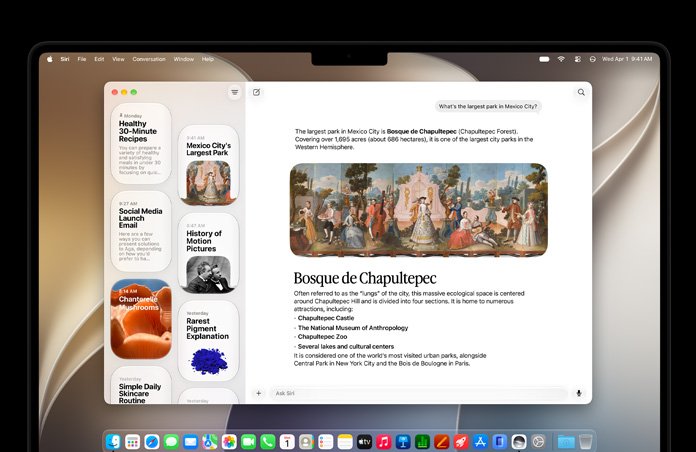
Siri AI is the headline feature. Apple describes it as a conversational assistant powered by Apple Intelligence, with requests processed through Private Cloud Compute so personal data is not stored or made accessible to Apple.
| Capability | What it does | Example request |
|---|---|---|
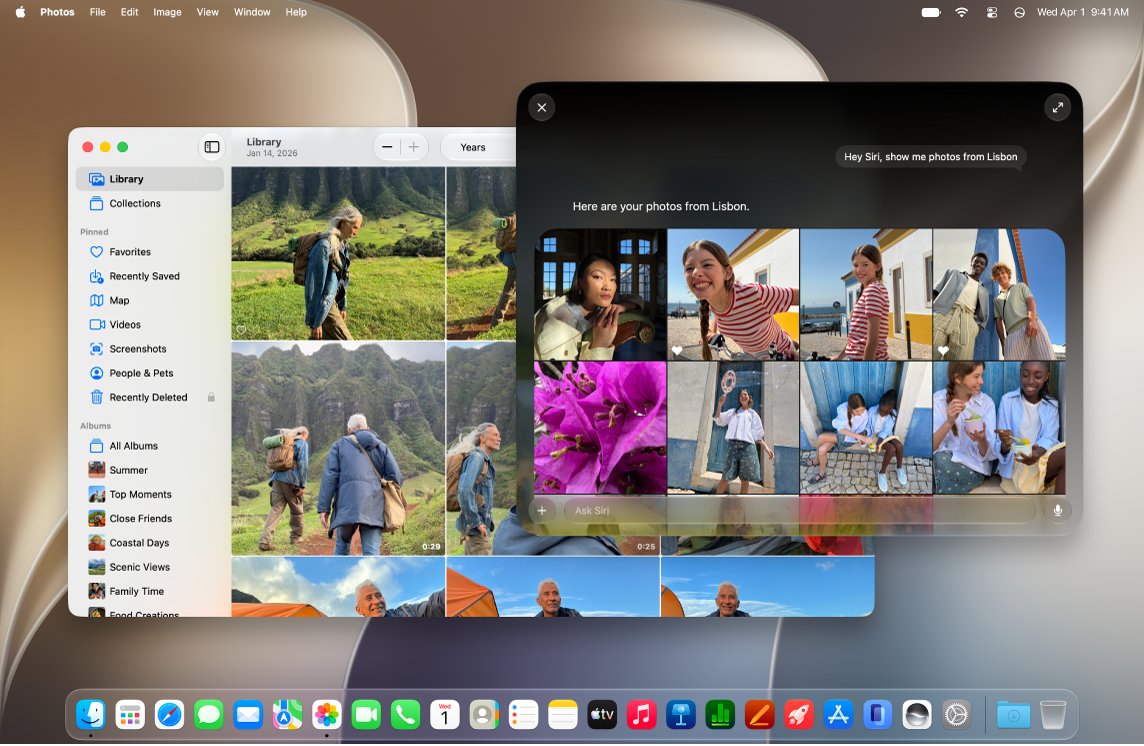
| Personal context | Searches your photos, Mail, Messages, Calendar and notes | "Find photos from my trip to Lisbon" |
| Actions in apps | Takes action in apps such as Messages, Music and Reminders | Edit a message you just sent |
| Broad world knowledge | Answers open-ended questions with up-to-date information from the web | Research a topic or prepare for an interview |
| Write with Siri | Drafts from scratch, proofreads and matches your tone in Messages and Mail | "How's this sound?" |
| Siri app | Keeps every conversation in one place, synced across devices signed in to the same Apple Account | Pin a conversation or start a new one |
| Ask Siri in Spotlight | Offers Ask Siri as the top hit when you search | Type a question into Spotlight |
| Expressive Voices | Pick a voice and adjust expressiveness and pace | Needs an M3 or later Mac with at least 12 GB of unified memory |
Siri AI runs on a MacBook Neo (A18 Pro) or any Mac with M1 or later, with Siri and the device language set to a supported language. It is available in English to start, and Apple says expanded access to server-based features will be offered for a fee in the future.
Siri AI on Mac is not listed among the EU restrictions: Apple's OS overview page notes an EU limit on Siri AI only for iOS, iPadOS and watchOS.
How to turn on Siri AI on a Mac
Siri AI is opt-in even after you install macOS 27.
- Open the System Settings app.
- Click Siri in the sidebar. You may need to scroll down to find it.
- If Siri is off, click Turn On Siri, then choose Try Siri AI (Beta).
- If Siri is already on, click Try Siri AI (Beta).
- Follow the onscreen instructions to finish setup.
Once it is on, open the Siri app to see past conversations, or activate Siri and ask something like "Plan a menu for my watch party on Saturday."
Visual Intelligence on Mac
Visual Intelligence came to iPhone first and now reaches the Mac through screen captures. It works when the device language is set to a supported English variant.
- Open the window, image or PDF you want to ask about.
- Press Command-Shift-Space bar to select a whole window, or Command-Shift-6 to select part of the screen.
- Choose Ask Siri to ask a question about what you captured.
- Choose Search Image to look for similar images online.
- Pick a suggested action instead, such as Look Up Nutrition, when one appears for the content.

App updates in macOS Golden Gate
Most app changes lean on Apple Intelligence. Two of them are not in the first release: Messages suggestions and automatic password fixes arrive in a later software update.
| App | What is new |
|---|---|
| Safari | Tabs group automatically into topics, and Notify Me watches a page for changes such as a price drop or restock |
| A new ranking system puts the most relevant search results first; Suggestions offer quick actions like adding a calendar event | |
| Photos | Spatial Reframing after a shot, an Extend tool for wider framing and a stronger Clean Up tool |
| Image Playground | High-quality images in almost any style, including photorealistic, edited with a description |
| Shortcuts | Describe a task and Shortcuts builds the actions across apps |
| Calendar | Create or edit an event by typing a description |
| Phone calls | Call Context surfaces details such as a confirmation code from Mail when you call a business |
| Podcasts | Switch between watching and listening to video podcasts and resume where you left off |
| Maps | Flyover renders buildings and trees in sharper detail |
| Photos sharing | iCloud Shared Albums support full resolution and are easier to join from Android or Windows on iCloud.com |
| Passwords | Alerts you to weak or compromised passwords and can update them for you (future update) |
| Accessibility | VoiceOver gives richer image descriptions; automatic synced subtitles for any video, with caption translation |
| Genmoji | Press Fn/Globe + E to make an emoji from a description, another emoji or a photo |

What features are still to come in macOS 27
Several features announced for macOS 27 are not in the first release or are still marked as beta. Apple flags them in the footnotes of its macOS 27 page.
| Feature | Status in macOS 27.0 | What Apple says |
|---|---|---|
| Suggestions in Messages conversations | Not yet available | Coming in a future software update; Mail suggestions work now |
| Automatic fixes in Passwords | Not yet available | Updating weak or compromised passwords for you arrives in a future update |
| Siri AI | Beta | Available in English to start, with more languages to follow |
| Expanded access to server-based features | Not yet available | Siri AI, Image Playground and other server-based tools have daily usage limits; expanded access will be offered for a fee in the future |
Performance improvements in macOS 27
Apple names specific speed gains rather than a general percentage.
| Area | Improvement |
|---|---|
| AirDrop | Quicker transfers between devices |
| Network file browsing | Faster browsing of shared folders over the network |
| Safari | Faster loading of start page content |
| Mail search | Relevant results ranked to the top, even for old messages |
| Displays | Saved arrangements restore instantly when you plug in an external display |
AirPods changes in macOS 27
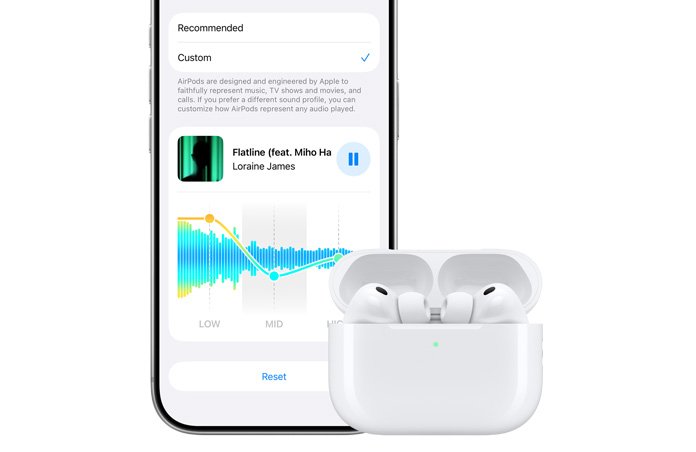
The AirPods change that reaches the Mac is Custom EQ: you can adjust the lows, mids and highs of your AirPods sound in AirPods settings. Apple lists AirPods Custom EQ as available on iPhone, iPad and Mac with the 27 releases, so the tuning is no longer limited to the iPhone.
Parental controls in macOS 27
Parental controls get a redesign in System Settings, so parents can check how a child has used the Mac and change access with one click.
| Feature | What it does |
|---|---|
| Ask to Browse | A child must request permission to open a new website; parents review the request in Messages. Works in Safari and other WebKit browsers after upgrading Screen Time |
| Communication Safety | Blocks nudity in Messages, FaceTime and more, and now also steps in before a child sees gore or violence in shared images and videos |
| Time Allowances | Limits by category, such as Entertainment, Games and Social Media, with age-based guidance |
| Schedules | Chooses which apps a child can use at different times or days of the week |
| Ask to Buy | Parents approve purchases and new apps from a Mac, iPhone or iPad |
| New contacts | Parents can approve new contacts over Messages on iPhone, iPad and Mac |
macOS 27 compatibility: supported Macs
Every Mac on the list uses Apple silicon. Apple Intelligence features need an M1 or later Mac or the MacBook Neo.
| Mac family | Supported models |
|---|---|
| MacBook Neo | MacBook Neo (2026) |
| MacBook Air | Apple silicon, 2020 and later |
| MacBook Pro | Apple silicon, 2020 and later |
| iMac | Apple silicon, 2021 and later |
| Mac mini | Apple silicon, 2020 and later |
| Mac Studio | 2022 and later |
| Mac Pro | Apple silicon, 2023 |
Some features need more than the minimum. Siri Expressive Voices require an M3 or later Mac with at least 12 GB of unified memory.
No Intel Mac support in macOS 27
macOS 27 is the first macOS release with no Intel models on its list. The Intel Macs that ran macOS Tahoe 26 stay on Tahoe, which Apple still updates.
| Intel Mac that ran Tahoe 26 | Can it run macOS 27? | Latest version for it |
|---|---|---|
| iMac (2020) | No | macOS Tahoe 26.7.1 |
| Mac Pro (2019) | No | macOS Tahoe 26.7.1 |
| MacBook Pro (16-inch, 2019) | No | macOS Tahoe 26.7.1 |
| MacBook Pro (13-inch, 2020, Four Thunderbolt 3 ports) | No | macOS Tahoe 26.7.1 |
Apple released Tahoe 26.7.1 on September 28, 2026, the same day as Golden Gate 27.0.1, so Intel Macs still receive fixes for now.
Check if your Mac can run macOS 27
- Click the Apple menu in the corner of the screen.
- Choose About This Mac.
- Read the model name and year under the picture of your Mac, for example MacBook Pro (16-inch, 2021).
- Compare it with the supported Macs table above.
- If the name is not specific enough, hold Option, choose Apple menu > System Information, select Hardware and note the Model Identifier.
How to update to macOS 27 Golden Gate
Back up your Mac before a major upgrade. On a laptop, connect the power adapter.
- Open the System Settings app.
- Click General in the sidebar. You may need to scroll down.
- Click Software Update.
- Choose the macOS 27 Golden Gate upgrade when it is listed and follow the onscreen instructions.
- Let the Mac restart and finish installing before you use it.
To get future Golden Gate point releases automatically, click the info button next to Automatic Updates and turn on Install macOS updates, then click Done.
macOS 27 Golden Gate full installer download
Software Update installs macOS 27 in place. To keep a full installer for several Macs or for a bootable USB drive, download it with Terminal on a compatible Mac running macOS Catalina 10.15 or later.
softwareupdate --fetch-full-installer --full-installer-version 27.0.1Downloads the full macOS Golden Gate 27.0.1 installer to the Applications folder. Run softwareupdate –list-full-installers first to see which versions Apple offers for your Mac model.
You should see: Terminal reports that the install finished successfully, and an Install macOS Golden Gate app appears in Applications.
If Terminal says update not found, that version is not available for your Mac. Open the installer from Applications to upgrade now, or leave it there to create a bootable installer later.
macOS 27 problems: are there any issues with Golden Gate?
Apple shipped macOS Golden Gate 27.0.1 two weeks after launch, so install that update first. The most common problems happen during the upgrade itself; these fixes come from Apple's install troubleshooting guide.
macOS 27 says there is not enough storage space
The installer needs free space on the startup disk to download and prepare the upgrade.
- Free up storage space on the startup disk: delete large files and apps you no longer need.
- Empty the Trash so the space is actually released.
- Run Software Update again.
An error occurred while downloading or preparing macOS 27
The installer needs a stable internet connection to fetch macOS and firmware information for your Mac model, and other software can interfere with installation.
- Check that your Mac is connected to the internet, preferably on a stable network.
- Restart in safe mode and run Software Update again.
- If it still fails, start up from macOS Recovery and reinstall macOS from there.
The macOS 27 installer is damaged or cannot be verified
A previously downloaded installer or a startup disk problem can block verification.
- Start up from macOS Recovery and use Disk Utility to repair the startup disk.
- Delete the old installer from Applications.
- Download the installer from Apple again and run it.
macOS 27 installation keeps failing on an Apple silicon Mac
Rarely, the Mac's firmware needs attention before macOS installs.
- Revive or restore the Mac firmware, as Apple describes for Macs with Apple silicon.
- If that does not help, back up, erase the Mac and reset it to factory settings.
- Contact Apple Support if the installation issue persists.
macOS Tahoe and Golden Gate update release dates
Searches for older point releases are common, so here is every macOS update from Tahoe 26 to Golden Gate 27.0.1, with dates from Apple's security releases page. The full macOS version history goes back to 2001.
| Version | Release date |
|---|---|
| macOS Tahoe 26 | September 15, 2025 |
| macOS Tahoe 26.1 | November 3, 2025 |
| macOS Tahoe 26.2 | December 12, 2025 |
| macOS Tahoe 26.3 | February 11, 2026 |
| macOS Tahoe 26.4 | March 24, 2026 |
| macOS Tahoe 26.5 | May 11, 2026 |
| macOS Tahoe 26.6 | July 27, 2026 |
| macOS Golden Gate 27 and Tahoe 26.7 | September 14, 2026 |
| macOS Golden Gate 27.0.1 and Tahoe 26.7.1 | September 28, 2026 |
macOS 27 Golden Gate FAQ
When is macOS 27 coming out?
macOS 27 is already out. Apple released macOS Golden Gate 27 on September 14, 2026, for Apple silicon Macs and the MacBook Neo. The first update, macOS Golden Gate 27.0.1, followed on September 28, 2026.
Is macOS 27 called Golden Gate?
Yes. Apple's official name is macOS 27 Golden Gate. It follows macOS Tahoe 26, and Apple uses the Golden Gate name on its macOS page, in the Mac User Guide and in its security release notes.
When does iOS 27 come out?
iOS 27 came out on September 14, 2026, the same day as macOS 27. It runs on iPhone 11 and later. Apple released iOS 27.0.1 on September 28, 2026.
Does macOS 27 support Intel Macs?
No. macOS 27 Golden Gate runs only on Apple silicon Macs and the MacBook Neo. Intel Macs that ran macOS Tahoe 26, such as the 2019 16-inch MacBook Pro, stay on Tahoe and received Tahoe 26.7.1 on September 28, 2026.
When was macOS 26 released?
macOS Tahoe 26 was released on September 15, 2025. It supported several Intel models, including the 2020 iMac, the 2019 Mac Pro and the 2019 16-inch MacBook Pro, alongside Apple silicon Macs.
What was the macOS 26.1 release date?
macOS Tahoe 26.1 was released on November 3, 2025. Tahoe 26.2 followed on December 12, 2025, and Tahoe 26.3 on February 11, 2026.
Do all macOS 27 features work on every supported Mac?
No. Siri AI needs a MacBook Neo or an M1 or later Mac with a supported language, and starts in English. Siri Expressive Voices need an M3 or later Mac with at least 12 GB of unified memory.
Is Siri AI finished in macOS 27?
No. Siri AI ships as a beta in macOS 27 and is rolling out in English first. Server-based features such as Siri AI and Image Playground have daily usage limits, and Apple plans paid expanded access later.
What happens to DVD support in macOS 27?
Apple's macOS 27 pages do not mention DVD playback, and its DVD Player User Guide lists versions only up to macOS Tahoe 26, with no macOS 27 edition. Check the DVD Player app on your Mac after upgrading if you rely on it.
Bottom line: should you install macOS Golden Gate?
Install macOS 27 Golden Gate now if your Mac uses Apple silicon, preferably the 27.0.1 update, after a backup. The first bug-fix release is already out, and Siri AI, Visual Intelligence and the new parental controls only exist on 27. Intel Mac owners cannot upgrade and should keep installing Tahoe 26 updates instead.

![Find passwords stored on this computer [3 ways]](https://techdows.com/wp-content/uploads/2026/10/Find-passwords-stored-on-this-computer-3-ways.jpg)