DaVinci Resolve is the best free video editing software for Windows or Mac if you want professional tools, while Clipchamp on Windows and iMovie on Mac are the easiest free editors to start with.
This guide compares those three with CapCut, VN, Blender, browser editors such as Canva and Adobe Express, and the open source editors Shotcut, Kdenlive and OpenShot. It lists what each free version leaves out, which ones export without a watermark and what hardware you need.
The best free video editing software
Use this quick comparison of the best free desktop video editors for Windows and Mac at a glance. Each one is free to download and use, and the free version limit column shows where each stops short of its paid tier.
| Editor | Windows | Mac | Free version limit | Best for |
|---|---|---|---|---|
| DaVinci Resolve | Yes | Yes | 8-bit video up to 60fps at up to Ultra HD 3840 x 2160 | Serious editing, color grading, effects and audio |
| Clipchamp | Windows app or browser | Browser only (Edge or Chrome) | Exports up to 1080p; 4K needs a paid plan | Quick edits, social clips, beginners on Windows |
| iMovie | No | Yes | None stated; edits up to 4K on compatible Macs | Family videos, trailers and beginners on Mac |
| Blender Video Sequencer | Yes | Yes, Apple Silicon | None; free and open source | Users who already use Blender for 3D or animation |
| Shotcut, Kdenlive, OpenShot | See each project's site | See each project's site | None; open source | Users who want an open source timeline editor |
Find the best video editing software for you
To choose free video editing software, start from the computer you have and the kind of video you make, then pick the row that matches. This is who should pick what.
| Your situation | Use this | Why |
|---|---|---|
| Windows 11 PC, first video, no install wanted | Clipchamp | It may already be installed, and the free plan exports watermark-free 1080p |
| Mac, first video or a home movie | iMovie | Free from Apple, with trailer templates, titles and green screen effects |
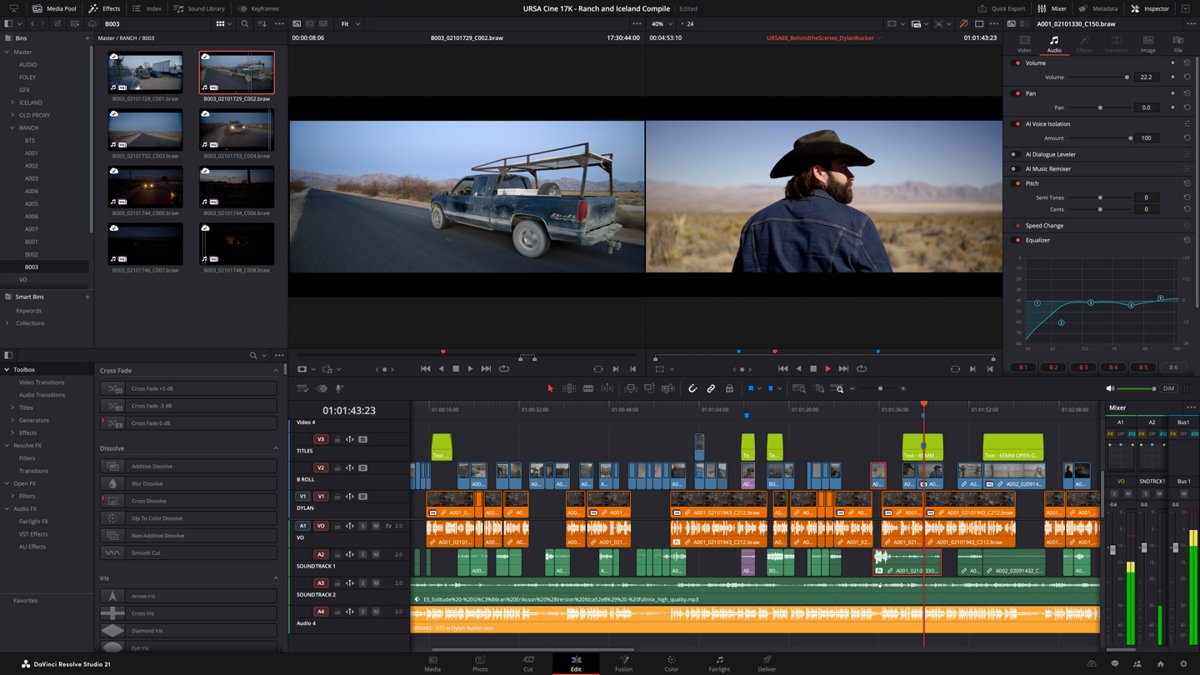
| YouTube creators: long videos, short films or color-graded footage | DaVinci Resolve | Edit, Cut, Color, Fusion and Fairlight pages cover the whole workflow |
| YouTube Shorts, Reels and TikTok clips | CapCut | Auto captions, trending effects and 4K 60fps export, with sharing to TikTok, YouTube and Instagram |
| Professional video production on a budget | DaVinci Resolve | Editing, color, VFX, motion graphics and audio in one app, with multi-user collaboration in the free version |
| Mac owner who has outgrown iMovie | VN Video Editor | Multi-track timeline, keyframes, masks and LUTs, free with no watermark |
| Linux PC, or you only want open source software | Kdenlive, Shotcut or OpenShot | All three are packaged in Debian and free with no paid tier |
| Mac, Linux or Chromebook without installing anything | Clipchamp in Edge or Chrome | The web editor runs in the latest desktop version of either browser |
| You already animate or model in Blender | Blender Video Sequencer | Cut, color grade and mix audio without leaving Blender |
| You need 4K export on Windows at no cost | DaVinci Resolve | The free version handles up to Ultra HD 3840 x 2160; Clipchamp's free plan stops at 1080p |
DaVinci Resolve free version for Windows and Mac
DaVinci Resolve 21 from Blackmagic Design runs on Windows, Mac and Linux. The free version includes the professional Edit page, the faster Cut page, Color grading, Fusion visual effects and Fairlight audio, plus multi-user collaboration and HDR grading.
DaVinci Resolve Studio costs $295 and adds the features in the right-hand column below.
| Feature | DaVinci Resolve (free) | DaVinci Resolve Studio ($295) |
|---|---|---|
| Video formats | Virtually all 8-bit formats | Adds 10-bit video |
| Frame rate | Up to 60fps | Up to 120fps |
| Resolution | Up to Ultra HD 3840 x 2160 | Beyond 4K |
| AI tools | Not included | DaVinci AI Neural Engine, Magic Mask, text-based editing |
| Noise reduction and extra effects | Standard Resolve FX | Temporal and AI spatial noise reduction, film grain, optical blur and dozens more Resolve FX |
If you shoot 8-bit footage on a phone or a typical camera, the free version is enough. You can download DaVinci Resolve for Windows or Mac and move to Studio only when you need 10-bit or AI tools.
Clipchamp: the free video editor in Windows 11
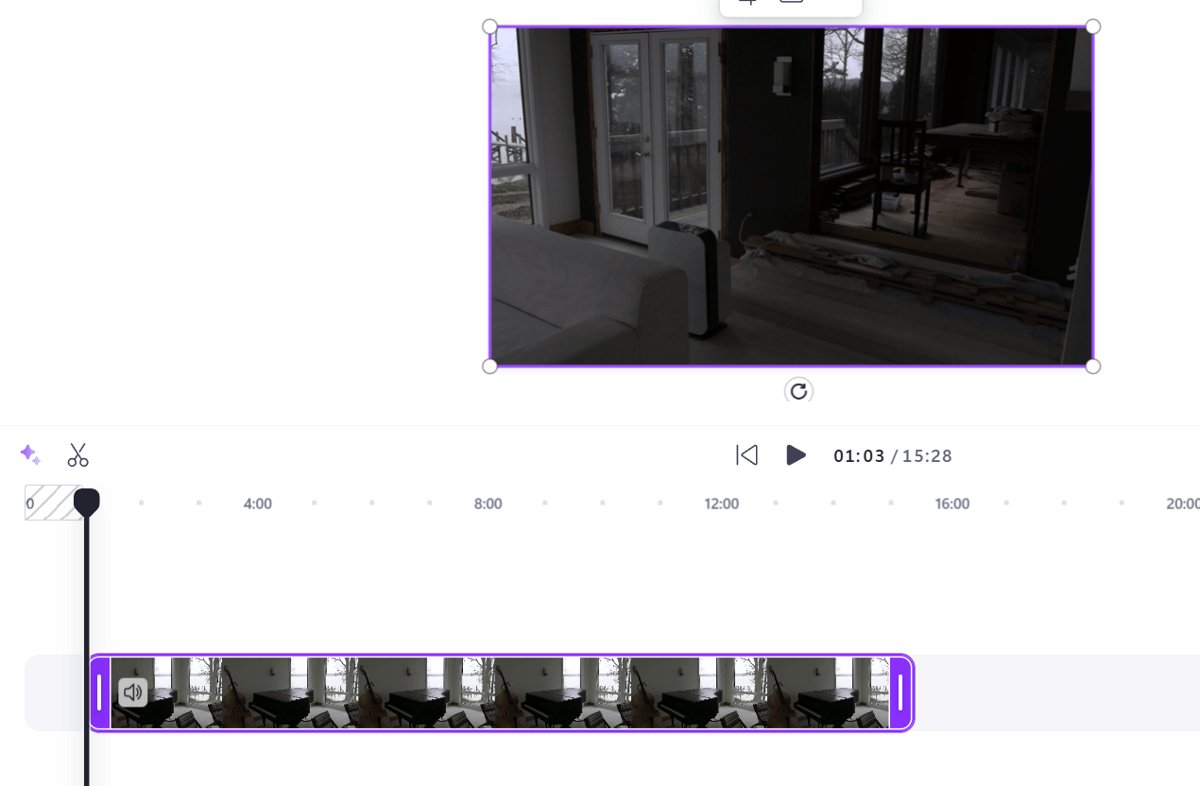
Clipchamp is Microsoft's video editor, built for people with no prior editing experience. Its free plan includes core editing tools, free stock content and watermark-free exports at up to 1080p.
- Search for Clipchamp from Start and open it, or install it from the Microsoft Store if it is missing.
- Select Create a new video on the home screen.
- Open My media on the toolbar and select Import media to add your clips.
- Drag clips onto the timeline, or select the green + button beside each one.
- Drag the green bars at either end of a clip to trim it, or move the seeker and select Split to cut it.
- Add titles from the Text tab and music from Content library > Audio.
- Select Export in the top-right corner and choose 1080p.
On a Mac, Linux PC or Chromebook, the same editor runs at app.clipchamp.com in the latest desktop version of Microsoft Edge or Google Chrome. It does not run in mobile browsers on iPhone, iPad or Android. You can also download Clipchamp for Windows on Windows 10.
iMovie: the free video editor on Mac
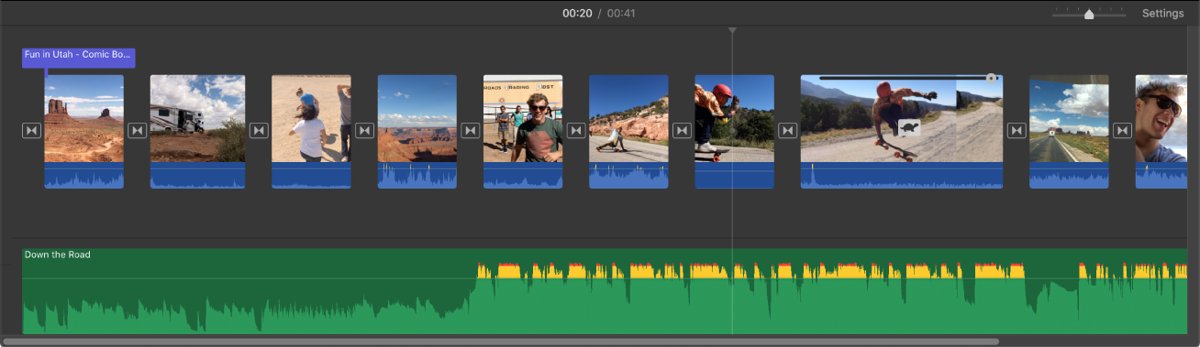
iMovie is free from Apple and edits movies at up to 4K on compatible Macs. Projects started on an iPhone or iPad can be finished on a Mac, and a finished project can move to Final Cut Pro when you outgrow it.
| What you want to make | iMovie feature to use |
|---|---|
| A movie-style trailer | 29 trailer templates with custom studio logos, cast names and credits |
| A home movie with titles and music | Titles, transitions and built-in music and sound effects, plus your own narration |
| A video with a new background | Green screen, picture-in-picture and side-by-side effects |
| Smoother, better-looking footage | One-click Enhance, color controls and video stabilization |
| A slideshow from photos | Ken Burns Effect to zoom in on faces and glide across panoramas |
| A video for YouTube or Facebook | Export a video optimized for popular video destinations |
The current Mac App Store version requires macOS 26.4 or later, 4GB of memory and 3.5GB of free disk space. You can download iMovie from the Mac App Store; there is no Windows version.
CapCut desktop: free video editor for social media content
CapCut from Bytedance is built for short-form social video. The App Store lists it for iPhone, iPad and Mac, and it is also in the Microsoft Store for Windows, so one editor covers your phone and your computer.
It is free with in-app purchases, which is the main reason some lists leave it out: a number of its tools sit behind the paid Pro tier, so check whether a feature is marked Pro before you build a project around it.
| CapCut feature | What it does for Shorts, Reels and TikTok |
|---|---|
| Multi-track timeline | Arrange, trim, split and merge clips, with speed from 0.1x to 100x and speed curves |
| Keyframes, chroma key and stabilization | Animate any setting, remove a background color and steady shaky footage |
| Auto captions and text-to-speech | Generate subtitles from speech and add voiceovers in several languages and voices |
| Background removal | Cut a person out of the background automatically, no green screen needed |
| Export | Custom resolution up to 4K 60fps with smart HDR, then share to TikTok, YouTube, Instagram or Facebook |
The iPhone and iPad app requires iOS 15.0 or later. For long-form YouTube videos with color grading, DaVinci Resolve is the stronger free choice.
VN Video Editor: free Mac editor with more control than iMovie
VN Video Editor from Ubiquiti Labs is a Mac app that is free with no watermark, with optional in-app purchases. It suits Mac users who want a real multi-track timeline without learning DaVinci Resolve.
| VN feature | Why it goes beyond iMovie |
|---|---|
| Frame-accurate trimming | Cuts at 0.05-second precision with up to 30x timeline zoom |
| Overlays and masks | Video, photo, sticker and text layers on a multi-layer timeline, with masks for compositing |
| Keyframes and speed ramps | 19 built-in keyframe effects with adjustable curves, plus curve-based speed control and beat markers |
| Filters and LUTs | Built-in cinematic filters, or import your own LUTs |
| Export | Up to 4K at 60fps, including Dolby Vision HDR |
VN requires macOS 13.0 or later, and projects can move between devices so you can keep editing on your phone.
Blender Video Sequencer for free video editing
Blender is a free and open source 3D creation suite with a built-in video sequence editor. It handles basic cuts and splicing as well as video masking and color grading.
| Blender Video Sequencer feature | What it gives you |
|---|---|
| Up to 32 slots | Layers for video, images, audio, scenes, masks and effects |
| Live preview and scopes | Luma waveform, chroma vectorscope and histogram displays |
| Audio tools | Mixing, syncing, scrubbing and waveform visualization |
| Editing tools | Speed control, adjustment layers, transitions, keyframes and filters |
Blender's interface is built around 3D work, so a newcomer who only wants to cut a video will find Clipchamp, iMovie or DaVinci Resolve quicker to learn.
Shotcut, Kdenlive and OpenShot open source video editors
These three open source editors are packaged in Debian's current stable release. Each project publishes its own builds for other platforms on its homepage.
| Editor | Description | Homepage |
|---|---|---|
| Shotcut | A video editor with 4K resolution support, network stream playback and audio and webcam capture | shotcut.org |
| Kdenlive | A non-linear editing suite with guides and markers, effects and transitions, screen grabbing and export to any format FFmpeg supports | kdenlive.org |
| OpenShot | A free, open source non-linear editor that works with many popular video, audio and image formats | openshot.org |
On Linux, install any of them from your distribution's package manager. Kdenlive's multi-track timeline, guides and markers suit intermediate editors, while OpenShot's shorter feature list keeps it simple for absolute beginners.
Best free video editing software online
A browser-based editor needs no install and keeps projects in your account, which helps on a Chromebook, a work PC or a Mac without much disk space.
| Online editor | Runs in | Video tools | Best for |
|---|---|---|---|
| Clipchamp | Latest desktop Microsoft Edge or Google Chrome at app.clipchamp.com | Timeline, trimming, splitting, text, stock audio, autocaptions | Quick edits with watermark-free 1080p export |
| Canva | Web browser, plus apps for iPhone, iPad and Mac | Captions, slow motion, Beat Sync to music, templates, 5GB of storage for everyone | Video editing plus design: social posts, presentations and branded clips |
| Adobe Express | Desktop browser and mobile phone | Templates, trim and combine clips, text, music, transitions, automatic captions, reframing for social channels, background noise removal | Fast browser-based video editing for social and marketing content |
Canva and Adobe Express are free with paid upgrades; Adobe Express Premium works across the desktop browser and the mobile app.
Best free video editing software for mobile devices
These free mobile video editors run on iPhone and iPad. Mobile browsers cannot run Clipchamp's web editor, so pick an app instead.
| Mobile editor | Price | Requires | Stand-out features |
|---|---|---|---|
| iMovie | Free | iOS 17.6 or later | Magic Movies built from an album, 20 Storyboards, 14 trailer templates, more than 130 soundtracks, send projects to a Mac |
| CapCut | Free with in-app purchases | iOS 15.0 or later | Auto captions, background removal, keyframes, 4K 60fps export |
| Canva | Free with in-app purchases | iOS 15.0 or later | Video editor with captions and Beat Sync alongside design templates |
| Adobe Express | Free with in-app purchases | iOS 18.0 or later | Templates, automatic captions, reframing for social channels |
iMovie projects move between iPhone and iPad with AirDrop or iCloud Drive, and you can send them to a Mac to finish in iMovie or Final Cut Pro.
Free video editor with AI tools
AI features are where the free editors differ most. Clipchamp's personal version builds captions and voiceovers with Microsoft Azure speech services, while DaVinci Resolve keeps its AI tools for the paid Studio version.
| Editor | AI feature | What it does |
|---|---|---|
| Clipchamp | Autocaptions | Detects speech in a video or audio track, writes an editable transcript with timestamps and lets you download it as an .SRT file |
| Clipchamp | Text to speech | Turns typed text into an AI voiceover in many languages, with pitch and pace controls in Advanced settings |
| DaVinci Resolve (free) | None | The DaVinci AI Neural Engine, Magic Mask and text-based editing need DaVinci Resolve Studio |
To try autocaptions, add a clip with speech to the Clipchamp timeline, select the Captions tab on the property panel and choose Transcribe media. Captions only work on clips that include a voice.
CapCut and VN also include auto captions and text-to-speech. If you later need AI tools such as Magic Mask in DaVinci Resolve, the next step up is the $295 Studio license.
Free video editors with no watermark
What about watermarks? A watermark on every export is the most common catch in editors sold as free. These editors state that their free exports carry no watermark.
| Editor | Platform | Free export without a watermark |
|---|---|---|
| Clipchamp | Windows app, or Edge and Chrome on Mac, Linux and Chromebook | Up to 1080p; 4K needs Microsoft 365 Personal or Family, or Clipchamp Premium |
| VN Video Editor | Mac | Up to 4K at 60fps |
Free video editors to avoid are the ones that are really trials: they let you edit freely, then stamp a logo on the export or ask you to pay before saving. Export a short test clip before you spend hours on a project.
What is free video editing software?
Free video editing software lets you cut, arrange and export video without paying. What actually counts as free falls into four types, and the type tells you what the catch is.
| Type | Examples | What to expect |
|---|---|---|
| Free and open source | Shotcut, Kdenlive, OpenShot, Blender | Every feature free, no account, no paid tier |
| Free version of a paid product | DaVinci Resolve | Professional tools with set limits; the paid Studio version adds 10-bit, AI tools and more effects |
| Included with the operating system | Clipchamp on Windows, iMovie on Mac, iPhone and iPad | Free from Microsoft or Apple, aimed at beginners |
| Free with in-app purchases | CapCut, VN, Canva, Adobe Express | Core editing free, selected tools and assets paid |
The core features to expect from any of them are a timeline, trimming and splitting, titles, transitions, music and export to a standard file. The main benefit is learning real skills at no cost: Blackmagic Design offers the free DaVinci Resolve so you can learn the same tools Hollywood artists use, then buy Studio only when your work needs it.
Free video editing software costs and pricing
Every editor in this guide has a free option. This is what the paid upgrade costs or includes if you outgrow it.
| Editor | Free option | Paid upgrade |
|---|---|---|
| DaVinci Resolve | DaVinci Resolve (free) | DaVinci Resolve Studio, $295 |
| Clipchamp | Free plan, 1080p exports | Microsoft 365 Personal or Family, or Clipchamp Premium, for 4K and extra features |
| iMovie | Free | None; move up to Final Cut Pro when needed |
| CapCut, VN, Canva | Free app | In-app purchases for Pro tools and assets |
| Adobe Express | Free app | Adobe Express Premium, shared across desktop browser and mobile |
| Shotcut, Kdenlive, OpenShot, Blender | Free and open source | None |
Is my computer good for video editing?
Memory is the first limit most people hit. Compare your PC or Mac with the published requirements below before you commit to a long project.
| Editor | Memory | Other requirements |
|---|---|---|
| Clipchamp | At least 8 GB, 16 GB or more is better | 64-bit system and browser, a recent graphics card, free disk space larger than your project's video files, an active internet connection |
| iMovie | 4GB | macOS 26.4 or later, 3.5GB of free disk space |
| Blender | 8 GB minimum, 32 GB recommended | Windows 8.1 64-bit or later with a 4-core CPU and 2 GB VRAM; macOS 13 or later on Apple Silicon; Linux with glibc 2.28 or newer |
Older computers can still run these editors but may slow down, freeze or crash on long or 4K projects. Converting 4K clips to 1080p before editing reduces the load.
Free video editing tips for better results
These habits get cleaner results from any free editor and keep it inside its free limits.
- Match the free tier before you shoot: DaVinci Resolve's free version handles 8-bit video up to 60fps at Ultra HD, and Clipchamp's free plan exports at 1080p.
- Convert 4K clips to 1080p before editing on an older PC, so the timeline plays back without freezing.
- Keep free disk space larger than your project's video files.
- Trim each clip to the moment you need before you add titles, music or transitions.
- Add captions with the editor's auto captions tool, then read through the transcript and correct names and terms.
- Export a short test clip first to check quality, sound and that no watermark appears.
What video editor comes with Windows 11 and Windows 10?
Clipchamp is Microsoft's video editor for Windows and replaces the Video Editor that used to live inside the Photos app.
| Windows version | Built-in video editor | How to get it |
|---|---|---|
| Windows 11 | Clipchamp | Often already installed; search for it from Start or install it from the Microsoft Store |
| Windows 10 | Clipchamp (optional app) | Install it from the Microsoft Store, or use app.clipchamp.com in Edge or Chrome |
| Windows 10 or 11 with Photos Legacy | Legacy Video Editor | Photos Legacy still includes the old Video Editor |
If you miss the old app, you can get the Windows video editor back through Photos Legacy.
Free video editing software FAQ
What does a video editor do?
A video editor lets you cut, trim and arrange clips on a timeline, then add titles, music, transitions and effects before exporting a finished video file. Advanced editors such as DaVinci Resolve also handle color grading, visual effects and audio mixing.
Is my computer good for video editing?
Check your memory first. Clipchamp recommends at least 8 GB of RAM, with 16 GB or more preferred, plus a 64-bit system and a recent graphics card. Blender recommends 32 GB, and iMovie needs macOS 26.4 or later with 4GB of memory.
What is the video editor in Windows?
The video editor in Windows is Microsoft Clipchamp. It replaced the Video Editor that was part of the Photos app, and its free plan includes core editing tools, stock content and watermark-free exports at up to 1080p.
What video editor comes with Windows 11?
Windows 11 comes with Clipchamp, and it may already be installed on your PC. Search for Clipchamp from Start; if it is not there, install it free from the Microsoft Store.
What video editor comes with Windows 10?
Windows 10 can run Clipchamp as an optional app from the Microsoft Store, or in the Edge or Chrome browser at app.clipchamp.com. PCs that still have Photos Legacy also keep the older Video Editor.
What video editor comes on an HP laptop?
HP laptops that run Windows 11 use the same built-in editor as any Windows 11 PC: Microsoft Clipchamp. Search for Clipchamp from Start, or install it from the Microsoft Store if it is missing.
Is DaVinci Resolve really free?
Yes. The free version of DaVinci Resolve has no price and includes editing, color, Fusion effects and Fairlight audio. It works with 8-bit video up to 60fps at up to 3840 x 2160, while the $295 Studio version adds 10-bit, higher frame rates and AI tools.
Does Clipchamp add a watermark to free exports?
No. Microsoft states that Clipchamp's free plan gives watermark-free exports at up to 1080p resolution. Exporting in 4K requires a Microsoft 365 Personal or Family subscription or Clipchamp Premium.
Bottom line: the best free video editor for Windows and Mac
Use Clipchamp on Windows or iMovie on Mac for quick, simple videos, and install DaVinci Resolve as soon as you need 4K export on Windows, color grading or more control. Clipchamp and iMovie are free from the companies that make the operating system and need no learning curve, while DaVinci Resolve's free version gives professional editing, color, effects and audio tools on both platforms with no watermark.

![Find passwords stored on this computer [3 ways]](https://techdows.com/wp-content/uploads/2026/10/Find-passwords-stored-on-this-computer-3-ways.jpg)
![7 best open-source PDF editors [Windows, Mac, Linux]](https://techdows.com/wp-content/uploads/2026/10/7-best-open-source-PDF-editors-Windows-Mac-Linux.jpg)