Open outlook.office365.com in any browser for a work or school mailbox, or outlook.live.com for a personal Outlook.com, Hotmail, Live or MSN account.
This guide covers signing in on a computer and a phone, installing the mailbox as a browser app, opening shared mailboxes, and fixing a sign-in that fails.
Use The Correct Outlook Web Address
The address depends on the account type. The wrong one lands on a sign-in page that rejects the credentials you typed.
- Open a current browser: Microsoft Edge, Google Chrome, Firefox or Safari.
- Go to outlook.office365.com for a work or school Microsoft 365 account.
- Go to outlook.live.com instead for a personal Outlook.com, Hotmail, Live or MSN account.
- Type the full email address and select Next.
- Enter the password and select Sign in.
- Approve the verification prompt if the account uses two-step verification.
microsoft365.com also works for work and school accounts. Select the app launcher, then Outlook, once the portal loads.
Which Outlook web address fits your account?
| Your account | Address to open | What loads |
|---|---|---|
| Work or school Microsoft 365 account | outlook.office365.com | The organization mailbox, straight into the Inbox |
| Work or school account, portal route | microsoft365.com | The app launcher; select Outlook to open mail |
| Personal Outlook.com, Hotmail, Live or MSN account | outlook.live.com | The personal mailbox, calendar and contacts |
| Microsoft 365 operated by 21Vianet | login.partner.microsoftonline.cn | The regional sign-in page for that service |
| Office 365 Germany | portal.office.de | The German cloud portal |
A personal Microsoft account cannot sign in at microsoft365.com. Sign out and sign in again with the work or school address.
What you need before you start
| Requirement | Detail |
|---|---|
| A browser | Microsoft Edge, Google Chrome, Firefox or Safari, kept current |
| An account | A work or school Microsoft 365 account, or a personal Microsoft account |
| Your full email address | Sign-in uses the whole address, never a short username |
| A second factor | Work accounts usually need an approval in Microsoft Authenticator or a code |
| A mailbox enabled for the web | An administrator can switch Outlook on the web off per mailbox with the OWAEnabled setting |
| Nothing to install | The mailbox runs in the browser, so no download is involved |
If the mailbox is switched off for web access, only an administrator can turn it back on. See How to Access Microsoft Admin Center for where that setting lives.
What Is Outlook On The Web?
Outlook on the web is the version of Outlook that runs inside a browser tab.
| Question | Answer |
|---|---|
| What it is | Mail, calendar, contacts and tasks in a browser, with nothing installed on the device |
| Who it serves | Work and school Microsoft 365 mailboxes, and personal Outlook.com mailboxes |
| Where the data sits | On Microsoft's servers, so the same mailbox appears from every device you sign in on |
| Other names for it | Older Exchange documentation calls it Outlook Web App |
| Link to the desktop app | New Outlook for Windows only works when Outlook on the web is enabled for that mailbox |
| Cost | It is part of the mailbox, so there is no separate purchase |
How To Access Outlook On The Web From A Computer
Two routes exist: straight to the mailbox, or through the Microsoft 365 portal.
- Open your browser and go to outlook.office365.com to land directly in the mailbox.
- Sign in with the work or school address and password.
- To take the portal route instead, go to microsoft365.com and select Sign in.
- Select the app launcher at the top left of the portal.
- Select Outlook.
- Bookmark the page that loads so the next visit takes one click.
How To Sign In With A Work Or School Account
A work sign-in often redirects to a page carrying the employer's own branding. That page is still the real sign-in step.
- Go to outlook.office365.com.
- Type the work or school email address and select Next.
- Enter the password on the page that appears.
- Approve the request in Microsoft Authenticator, or type the code sent to your phone.
- Clear the Keep me signed in check box if the computer is shared.
- Wait for the Inbox to load; that is the finished state.
Multi-factor prompts vary by organization: an app approval, a number to match, a text message code, or a hardware key.
How To Sign In With A Personal Microsoft Account
- Go to outlook.live.com.
- Select Sign in.
- Type the Outlook.com, Hotmail, Live or MSN address and select Next.
- Enter the password, or approve the sign-in in the Microsoft Authenticator app.
- Confirm your identity if you are travelling or on a new device, which Microsoft asks for after unusual sign-in activity.
- Read the Inbox that loads.
Forgotten the password? Use the Microsoft password reset page rather than creating a second account.
Access Outlook On The Web From A Phone Or Tablet
A mobile browser reaches the same mailbox. The Outlook mobile app suits a phone you use every day.
- Open Safari on an iPhone or iPad, or Chrome on an Android device.
- Go to outlook.office365.com for a work account, or outlook.live.com for a personal one.
- Sign in with the full email address and password.
- Use the navigation bar at the bottom of the screen to switch between email, calendar, contacts and tasks.
- Install the Outlook app from the App Store or Google Play if the phone is your main mail device, then add the same account to it.
- Sign out of the browser session before handing a borrowed device back.
Install Outlook On The Web As An App
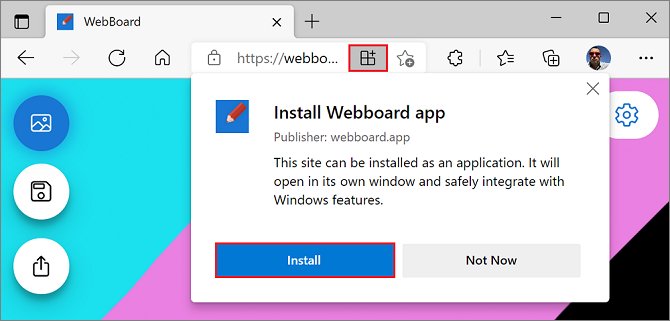
Edge and Chrome can both turn the mailbox into a windowed app that sits in the taskbar and Start menu.
| Browser | What to do | Result |
|---|---|---|
| Microsoft Edge | Open the mailbox, select the App available icon in the address bar, then select Install | Outlook runs in its own window and appears in the taskbar and Start menu |
| Microsoft Edge, pinning it | Select the Pin to Start check box during install, or use Pin to start in the app's Settings and more menu | A Start menu entry for the mailbox |
| Microsoft Edge, opening it at sign-in | Go to edge://apps, select More options on the app, then Auto-start on device login |
The mailbox opens when you sign in to Windows |
| Google Chrome | Select More (three dots), then Cast, save, and share, then Install page as app… | A Chrome app window for the mailbox |
| Removing it later | In Edge go to edge://apps, select Open, then Details |
App information, with the option to uninstall |
Installed web apps are not supported in FSLogix environments. One installed there is gone after you sign out and back in.
Use Outlook On The Web On A Shared Or Public Computer
A private window keeps the session out of the browser history and drops the cookies when the window closes.
- In Microsoft Edge, select Settings and more (the three-dot menu), then New InPrivate window.
- In Google Chrome, select More (three dots), then New Incognito window, or press Ctrl + Shift + N.
- Go to the Outlook address for your account type and sign in there.
- Clear the Keep me signed in check box so the browser does not sign you in again.
- Select your profile picture, then select Sign out, when you finish.
- Close every browser window before you leave the machine.
InPrivate and Incognito hide the session from the next person at that keyboard only. A school, workplace or internet provider can still see which sites were visited.
Find Your Mail, Calendar, People, And Tasks
The modules sit on the narrow vertical bar along the left edge of the Outlook window.
| Module | What it holds | How to reach it |
|---|---|---|
| Inbox, folders, search and message rules | It opens by default; select Mail to return to it | |
| Calendar | Meetings, appointments and shared calendars | Select Calendar on the left bar |
| People | Contacts, plus the company address book on work accounts | Select People on the left bar |
| To Do | Tasks and day planning; To Do is the task app built into Outlook | Select To Do on the left bar |
| My Day | Today's tasks and calendar events side by side with mail | Open the My Day pane from the top of the window |
| Other Microsoft 365 apps | OneDrive and the rest of the suite | Use the app launcher, or the buttons at the foot of the bar |
Tasks live on the Exchange Online server, so the same list shows in To Do and in Outlook. On a phone the module buttons run along the bottom of the screen instead.
Change Basic Outlook Web Settings
Settings opens from the gear icon at the top of the page. The signature and the out-of-office message both live under Accounts.
- Select Settings (the gear icon) at the top of the page.
- Select Accounts, then Signatures.
- Select Add signature, name it, and type the signature in the box below.
- Use the check boxes to apply it to new messages, to replies and forwards, or both, then select Save.
- Go back to Accounts and select Automatic replies to set an out-of-office message.
- Turn on Turn on automatic replies, type the message, and select Save.
- Select Send replies only during a time period and set start and end times if the dates are fixed.
- Return to Accounts > Automatic replies and switch the toggle off to stop the replies early.
Replies with a time period stop on their own; replies without one keep going until you turn them off. For the wider set of options, see How to Put Out of Office on Outlook.
Access Shared Mailboxes And Other Mailboxes
A shared mailbox added this way sits in your own folder list and opens in the same window.
- Sign in to Outlook on the web with your own work or school account.
- Right-click Folders in the left pane. On an Exchange on-premises mailbox, right-click your own mailbox name instead.
- Select Add shared folder or mailbox.
- Type the shared mailbox name or address, such as
[email protected]. - Pick the mailbox from the list that appears and confirm.
- Expand the new entry in the folder list to read its mail.
Permission is granted by an administrator. Without it the mailbox does not open, whatever address you type.
Open another mailbox in a separate window
This route suits a mailbox you monitor alongside your own, because each window raises its own new-mail notifications.
- On the navigation bar, select your name to display the account list.
- Select Open another mailbox.
- Type the email address of the mailbox you need.
- Select Open.
- Work in the separate browser window that opens; it runs its own Outlook on the web session.
How to check it worked
- Select your profile picture at the top right and read the address shown there.
- Confirm it matches the account you meant to use, work or personal.
- Open Calendar and check that your own appointments appear.
- Send a message to yourself and confirm it arrives in the Inbox.
- Check the folder list for any shared mailbox you added.
Troubleshooting: Outlook On The Web Will Not Open
The browser shows a search page or an error instead of the mailbox
The address is wrong, or the address bar autocompleted an old one.
- Type the address in full:
outlook.office365.comfor work mail,outlook.live.comfor personal mail. - Press Enter rather than picking a suggestion from the address bar.
- Delete the stale bookmark and save the working address again.
The mailbox is blank, stuck loading, or shows an out-of-date view
The browser is reusing a stale cached file or cookie.
- In Microsoft Edge select Settings and more, then Settings, then Privacy, search, and services.
- Under Clear browsing data, select Choose what to clear.
- Set Time range, tick Cookies and other site data and Cached images and files, then select Clear now.
- Reload the Outlook address and sign in again.
Outlook on the web opens on one computer but not another
An extension or a browser profile on that machine is blocking the page.
- Open a private window: New InPrivate window in Edge, or New Incognito window in Chrome.
- Sign in there, since extensions are the usual difference between two machines.
- If it loads, turn the extensions back on one at a time to find the one at fault.
- Try a second browser to rule out a damaged profile.
Nothing loads while you are on the company network
The mailbox can be blocked by network policy, or web access can be switched off for it.
- Open the same address on a phone using mobile data.
- If it loads there, the block is on the network, not on the account.
- Ask your IT administrator whether Outlook on the web is enabled for your mailbox.
Troubleshooting: You Cannot Sign In
The address is rejected at the first screen
A short username was typed, or the account type does not match the address you opened.
- Type the full email address, including everything after the @.
- Use
outlook.live.comfor a personal account andoutlook.office365.comfor a work or school account. - Find a forgotten address with the Microsoft account recovery tool.
The password no longer works
The password was changed elsewhere, or the account is locked.
- Reset a personal Microsoft account password on the password reset page.
- Reset a work or school password through your organization's reset page.
- Run the Microsoft sign-in helper if the reset itself fails.
Outlook signs you in as the wrong account
The browser is reusing a session saved from an earlier sign-in.
- Select Account manager, then Sign out.
- Close every browser window.
- Open the correct address again and sign in with the address you meant.
- Clear the Keep me signed in check box so the browser stops signing you back in.
The verification code never arrives
The phone number or alternate address on the account is out of date.
- Choose a different verification option on the sign-in page if one is offered.
- Approve the sign-in in Microsoft Authenticator instead of waiting for a text.
- Use the Microsoft sign-in helper, which walks through code problems.
- Check whether the account has gone unused for more than two years, because Microsoft accounts can be deleted after that and cannot be reopened.
Security Tips For Using Outlook On The Web
- Read the address bar before typing a password, and stop if the domain is not the Microsoft sign-in page you expected.
- Clear the Keep me signed in check box on any device that is not yours.
- Use an InPrivate or Incognito window on a borrowed or public computer.
- Approve an Authenticator prompt only when you started that sign-in yourself.
- Select your profile picture, then Sign out, at the end of the session.
- Close all browser windows after signing out, so no tab keeps the session alive.
- Treat a private window as protection from the next person at that keyboard, not from the network owner.
Outlook On The Web Vs. Outlook Desktop App
Both reach the same mailbox on the same server, so mail read in one shows as read in the other.
| Point | Outlook on the web | Outlook desktop app |
|---|---|---|
| Installation | None; it opens in a browser tab | Installed from the Microsoft Store or an installer |
| Operating system | Any that runs a current browser, including macOS, Linux and ChromeOS | New Outlook needs Windows 10 version 2004 (build 19041) or higher |
| Mailbox requirement | The mailbox itself | Outlook on the web must be enabled for the mailbox first |
| Older features | The browser feature set | Classic Outlook still handles .pst files and Mail merge in Word |
| How you get it | Type the address | Use the Try the new Outlook toggle in classic Outlook, or install it from the Microsoft Store |
| Where it runs | Any computer you can sign in from | Only the device it is installed on |
Frequently Asked Questions
How do I access my Outlook email?
Open outlook.live.com for a personal Outlook.com, Hotmail, Live or MSN address, or outlook.office365.com for a work or school account. Type the full email address, select Next, enter the password, and approve any verification prompt.
How do I access Outlook online without installing anything?
Outlook on the web needs no installation. Open a browser, go to the address that matches your account type, and sign in. The mailbox, calendar and contacts all run inside the browser tab.
How do I access Microsoft Outlook email online at work?
Go to outlook.office365.com, or open microsoft365.com and select Outlook from the app launcher. Sign in with the work address, then complete the multi-factor prompt your organization uses, such as an Authenticator approval.
How do I access work Outlook from a personal computer?
Use the same address, outlook.office365.com, in any browser on the home machine. Clear the Keep me signed in check box if other people use that computer, and sign out from your profile picture afterwards.
How do I give someone access to my Outlook email?
Mailbox permissions are granted by a Microsoft 365 administrator, not from Outlook on the web. Once permission exists, the other person right-clicks Folders, selects Add shared folder or mailbox, and types your address.
How do I access the new Outlook?
New Outlook for Windows installs from the Microsoft Store, or from the Try the new Outlook toggle in classic Outlook. It needs Windows 10 version 2004 or higher, and Outlook on the web enabled for the mailbox.
How do I use Microsoft Outlook on the web day to day?
Switch modules on the left bar: Mail for the Inbox, Calendar for meetings, People for contacts and To Do for tasks. Change the signature and out-of-office message under Settings > Accounts.
How do I access Outlook mail on a phone?
Open outlook.office365.com or outlook.live.com in Safari or Chrome and sign in. The module buttons sit along the bottom of the screen. The Outlook app from the App Store or Google Play suits daily use better.
How do I access my Outlook calendar on the web?
Sign in to the mailbox, then select Calendar on the left bar. Appointments, meetings and any calendars shared with you appear there, on the same account you use for mail.
How do I get access to Microsoft Office online?
Sign in at microsoft365.com with a work, school or personal Microsoft account. The app launcher lists the web apps, including Outlook, so nothing is downloaded to the computer.
Does Microsoft Office come with Access?
Microsoft Access is a separate Windows database program and is not part of Outlook on the web. Whether it is included depends on the plan; see How To Access Microsoft Access In Office 365.
Why does Outlook on the web sign me in automatically?
The Keep me signed in check box was left ticked at the last sign-in. Sign out from Account manager, close all browser windows, sign in again, and clear that check box.

![How to Update Drivers on Windows 11 [Complete Guide]](https://techdows.com/wp-content/uploads/2026/09/NVIDIA-app-Drivers-tab-showing-Game-Ready-Drivers-with-Install-button-600x338.jpg)