Percent-encode an apostrophe in a URL as %27: a percent sign followed by the hexadecimal ASCII value of the character, which is 27.
This covers where %27 belongs in a path and a query string, the separate HTML and JavaScript forms, the encoding calls in four languages, and the fixes for double-encoded and broken links.
The fastest way to encode an apostrophe in a URL
Encode the apostrophe inside the value you are putting into the URL, never the punctuation that builds the URL itself.
- Take the text that carries the apostrophe, such as
O'Brien. - Replace each
'with%27, which givesO%27Brien. - Drop that value into the path or the query string:
https://example.com/search?q=O%27Brien. - Leave the
:,/,?,&and=that structure the URL exactly as they are. - Open the URL and confirm the page loads and the value arrives with one apostrophe in it.
A raw ' usually survives a modern browser and a modern server. %27 is the form that survives every parser between them.
What an Apostrophe Means in a URL
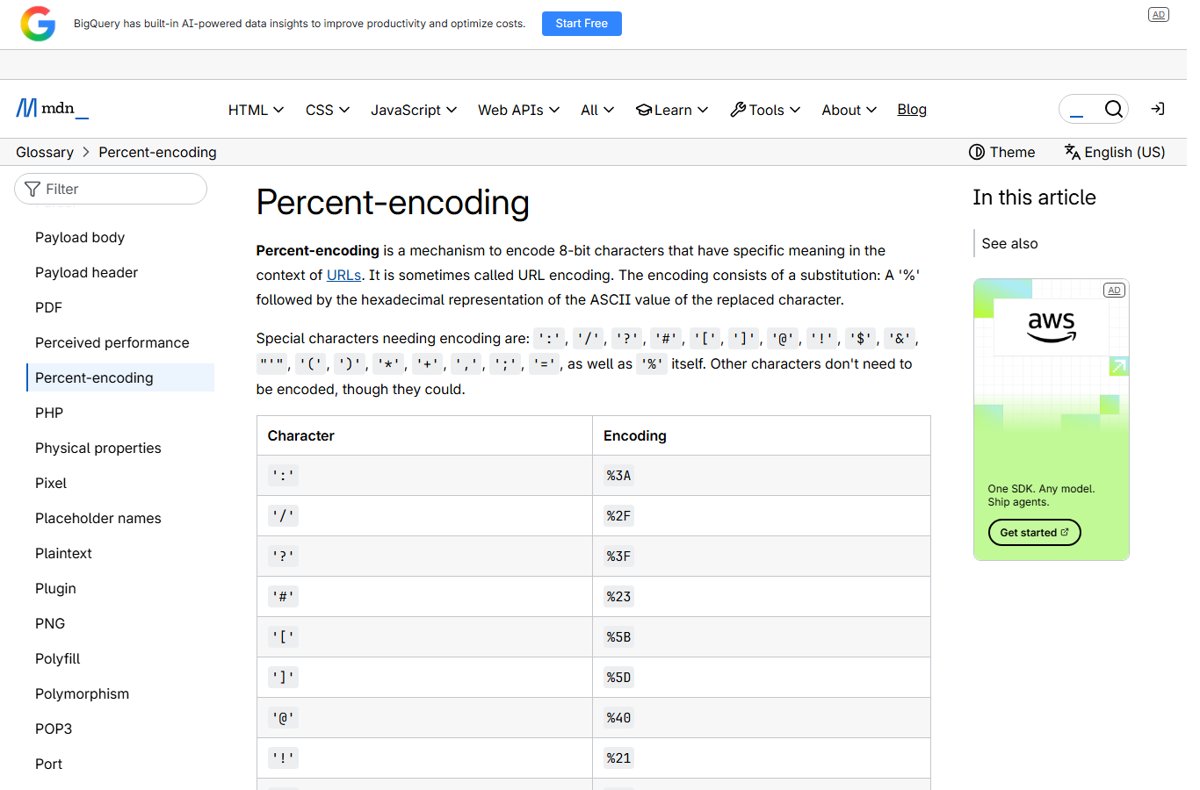
Percent-encoding substitutes a % followed by the hexadecimal representation of the replaced character's ASCII value. MDN lists the apostrophe among the special characters that need encoding, alongside :, /, ?, #, [, ], @, !, $, &, (, ), *, +, ,, ;, = and % itself.
The apostrophe has no structural job in a URL, unlike ? or &. It causes trouble one layer up, in the HTML, SQL or JavaScript that the URL is embedded in.
| Character | Role in a URL | Encoded form |
|---|---|---|
' apostrophe, U+0027 |
No structural role, but listed as a character needing encoding | %27 |
% percent sign |
Opens an escape sequence, so it is never literal | %25 |
& |
Separates one query parameter from the next | %26 |
= |
Separates a parameter key from its value | %3D |
? |
Starts the query string | %3F |
# |
Starts the fragment, which is never sent to the server | %23 |
’ right single quotation mark, U+2019 |
Not ASCII; converted to UTF-8 bytes before escaping | %E2%80%99 |
The last row is why a URL copied out of Word or a CMS sometimes carries %E2%80%99 instead of %27. It is a different character.
The Correct Percent-Encoding for an Apostrophe
%27 is the only form a URL parser decodes back to an apostrophe. Everything else in this table belongs to a different layer or is a mistake.
| Form | Where it belongs | What it decodes to |
|---|---|---|
%27 |
Any part of a URL: path, query string or fragment | ' |
' left as is |
Tolerated by browsers and servers, but not safe in every context | ' |
%2527 |
Nowhere; this is a double-encoded apostrophe | the literal text %27 |
' |
HTML text and attribute values, not the URL string | ' after the HTML parser runs |
' |
HTML, decimal character reference for U+0027 | ' |
' |
HTML, hexadecimal character reference for U+0027 | ' |
\u0027 |
A JavaScript string literal | ' |
%E2%80%99 |
A URL carrying the curly ’ instead |
’, U+2019 |
Uppercase and lowercase hex digits both work, so %27 and %27 are identical; the digits here contain no letters to vary.
Which encoding to use where
| Your situation | Use this | Why |
|---|---|---|
| Writing the URL by hand or in plain text | %27 |
The only escape a URL parser understands |
Writing an <a href> in HTML |
%27 in the URL, double quotes around the attribute |
A raw ' is only dangerous inside a single-quoted attribute |
| Apostrophe in the visible link text | ' or the plain character |
HTML text is not URL-encoded |
| Building a query string in JavaScript | URLSearchParams |
It encodes every code point outside alphanumerics, *, -, . and _ |
| Concatenating a URL in JavaScript | encodeURIComponent(), then replace ' |
encodeURIComponent() deliberately leaves ' unescaped |
| Building the URL server-side | The language's own URL-encoding function | Each one documents its own unreserved set |
| The apostrophe came from a word processor | Check for %E2%80%99 first |
It is U+2019, not U+0027, and no %27 swap will fix it |
Encoding Apostrophes in URL Paths vs Query Strings
%27 means the same thing in both parts. What changes is the other characters that have to be encoded alongside it, and whether a space becomes %20 or +.
| URL part | Example | Also encode |
|---|---|---|
| Path segment | https://example.com/authors/O%27Reilly |
/ as %2F, or the value splits into two segments |
| Path segment with a space | https://example.com/books/it%27s%20mine |
Space as %20; a + stays a literal plus in a path |
| Query string value | https://example.com/search?q=O%27Brien |
& as %26, = as %3D, # as %23 |
| Query string, form-encoded | ?q=it%27s+a+test |
Space as +, and / as %2F under application/x-www-form-urlencoded |
| Fragment | https://example.com/page#O%27Brien |
Nothing extra; the fragment is never sent to the server |
Python's urllib.parse.quote() defaults to safe='/' because it is written for paths. urlencode() routes through quote_plus() instead, which encodes / as %2F and spaces as + for query strings.
Using Apostrophes in HTML Links and JavaScript
An HTML page runs two parsers over the same string. The HTML parser reads ' and stops at an unescaped quote character; the URL parser reads %27 and ignores entities entirely.
- Percent-encode the apostrophe in the URL first:
https://example.com/search?q=O%27Brien. - Wrap the
hrefvalue in double quotes, so an apostrophe inside it cannot close the attribute. - If the attribute has to use single quotes, write the apostrophe as
'or keep it as%27. - Leave apostrophes in the visible link text alone, or write
'if the surrounding markup is generated. - In JavaScript, build the query string with
new URLSearchParams({ q: "O'Brien" }).toString(), which returnsq=O%27Brien. - When concatenating a URL by hand, call
encodeURIComponent(value).replace(/'/g, "%27"), becauseencodeURIComponent()leaves'untouched. - Inside a single-quoted JavaScript string literal, escape the apostrophe as
\'or switch the literal to double quotes.
MDN's own encodeURIComponent() reference ships a helper that post-processes ', (, ) and * into %27, %28, %29 and %2A for exactly this reason.
How to Encode Apostrophes in Common Programming Languages
Every call below produces %27 from an apostrophe except encodeURIComponent(), which is listed so the exception is visible.
| Language | Call | Characters it leaves unencoded |
|---|---|---|
| JavaScript | new URLSearchParams(params).toString() |
Alphanumerics, *, -, ., _; space becomes +, apostrophe becomes %27 |
| JavaScript | encodeURIComponent(value) |
A-Z a-z 0-9 - _ . ! ~ * ' ( ); the apostrophe stays literal |
| JavaScript | new URL(base).searchParams |
Same set as URLSearchParams, but URL.search writes spaces as %20 |
| Python | urllib.parse.quote(value) |
Letters, digits, _.-~ and /; apostrophe becomes %27 |
| Python | urllib.parse.quote_plus(value) |
Letters, digits and _.-~; space becomes +, / becomes %2F |
| Python | urllib.parse.urlencode(params) |
Uses quote_plus unless quote_via=quote is passed |
| Java | URLEncoder.encode(value, StandardCharsets.UTF_8) |
a-z A-Z 0-9 . - * _; space becomes +, apostrophe becomes %27 |
| C# / .NET | Uri.EscapeDataString(value) |
The unreserved set only: RFC 2396 by default, RFC 3986 when IRI parsing is enabled |
The .NET reference defines the exempt set by RFC rather than listing the characters, and the two RFCs disagree about the apostrophe. Print Uri.EscapeDataString("O'Brien") once on your target framework before depending on the result.
How to check it worked
The proof is the decoded value, not the look of the address bar. Browsers display %27 and ' interchangeably.
- Open the page and press F12 to open the browser developer tools, then select the Console tab.
- Run
new URL("https://example.com/search?q=O%27Brien").searchParams.get("q")with your own URL pasted in. - Confirm the console prints
O'Brienwith one apostrophe and no%sign left in it. - Run
decodeURIComponent(location.search)on the live page and check the same value comes back. - Search the returned text for
%27or%25. Either one means the value was encoded twice. - Reload the page and confirm the server returns the expected content rather than a 400 or 404.
Common Mistakes and Troubleshooting
The URL contains ' or ' instead of an apostrophe
An HTML character reference was used as URL encoding. A URL parser has no entity table, so it treats ' as a parameter separator followed by the text apos;.
- Search the generated URL for
','and'. - Replace each one with
%27in the URL string itself. - Keep the character reference only in the surrounding HTML, never inside the
hrefvalue. - Confirm the query string now splits on the parameters you intended, not on a stray
&.
The address bar shows %2527, or the page prints %27 as visible text
The value was percent-encoded twice. The second pass turned the % of %27 into %25, leaving %2527.
- Find every encoding call on the path the value travels, from the form handler to the template.
- Remove all but the last one, so the value is encoded exactly once at the point the URL is assembled.
- Never pass an already-encoded URL to
encodeURIComponent()orquote(); pass the raw value. - Run
decodeURIComponent()on the result once and confirm it returns the apostrophe, not%27.
The link breaks partway through in HTML
The href is wrapped in single quotes and an unescaped apostrophe in the value closes the attribute early.
- Change the attribute delimiter to double quotes.
- Percent-encode the apostrophe inside the URL as
%27. - Escape apostrophes in any inline
onclickhandler as\'or'. - View the rendered source and confirm the
hrefends where the URL ends.
Slashes and colons came back as %2F and %3A
A whole URL was passed to a component encoder. encodeURIComponent() and quote_plus() are written for one value, not for a complete address.
- Encode only the individual value, then concatenate it into the URL.
- Use
encodeURI()rather thanencodeURIComponent()when the input really is a full URL. - In Python, keep
quote()with its defaultsafe='/'for path values. - Check the result still starts with
https://and contains unencoded/between segments.
JavaScript throws URIError: URI malformed
decodeURIComponent() hit a % that is not followed by two hex digits, usually a literal percent sign that was never encoded.
- Log the exact string being decoded and look for a bare
%. - Encode literal percent signs as
%25before the value enters the URL. - Decode the value once, not once per layer.
- Wrap the decode in
try/catchso one bad parameter does not stop the page.
The apostrophe survives the URL but breaks the database query
The decoded value is being concatenated into SQL. URL encoding never protected the query; it is a transport escape, not an input escape.
- Switch the query to a parameterised statement with a bound value.
- Pass the decoded apostrophe straight to the parameter and never into the SQL text.
- Keep
%27in the URL layer and the raw'in the data layer. - Retest with a value such as
O'Brienand confirm one row comes back rather than an error.
Bottom Line
Encode every apostrophe in a URL value as %27, and encode it exactly once. %27 decodes back to ' in a path, a query string and a fragment alike, while ' belongs to HTML and a raw ' depends on whichever parser reads the URL next. The two failures worth watching for are a second encoding pass that produces %2527 and a curly ’ arriving as %E2%80%99.
Frequently Asked Questions
Should an apostrophe in a URL be encoded as %27?
Yes. MDN lists the apostrophe among the characters that need percent-encoding, and %27 is its encoded form. Use it inside path segments, query string values and fragments. It decodes back to a single apostrophe in every URL parser.
Can I leave an apostrophe unencoded in a URL?
Usually it works. Browsers and web servers accept a literal apostrophe in a path or query string. It becomes a problem when the URL is written into a single-quoted HTML attribute or a JavaScript string, where the raw character closes the value early.
Is %27 the same as ' or ' in a link?
No. %27 is URL encoding and is decoded by the URL parser. ' and ' are HTML character references decoded by the HTML parser. Put %27 inside the URL and a character reference only in the surrounding markup.
How should I encode an apostrophe in a query string?
Write it as %27, as in ?q=O%27Brien. Encode &, = and # inside the same value as %26, %3D and %23. Under form encoding, a space in that value becomes + rather than %20.
What causes apostrophes in URLs to break JavaScript or HTML?
A literal apostrophe inside a single-quoted string or attribute terminates it, so the rest of the URL is parsed as markup or code. Percent-encode it as %27, switch the delimiter to double quotes, or escape it as \' in JavaScript.
Does encodeURIComponent() encode an apostrophe?
No. encodeURIComponent() escapes everything except A-Z a-z 0-9 - _ . ! ~ * ' ( ), and the apostrophe is in that exempt list. Chain .replace(/'/g, "%27") onto the result, or build the query string with URLSearchParams instead.
What is the Unicode character for an apostrophe?
The straight typewriter apostrophe is U+0027, decimal 39, which percent-encodes to %27. The curly right single quotation mark is U+2019, a different character that percent-encodes to the three-byte sequence %E2%80%99.
What is the HTML code for an apostrophe?
Three forms work: the named reference ', the decimal reference ' and the hexadecimal reference '. All three produce U+0027. They matter inside attribute values delimited by apostrophes, where a raw ' would end the value.
Why does my URL contain %E2%80%99 instead of %27?
The text carries a curly apostrophe, U+2019, rather than the straight U+0027. Word processors and content editors substitute it automatically. Replace the character in the source text, because swapping %27 into the URL will not match the stored value.