To log in to an Orbi router, join its WiFi network, open orbilogin.local (newer models) or orbilogin.com (older models) in a browser, and sign in with the user name admin and your admin password.
This guide covers the Orbi app, the browser and IP address routes, the default login NETGEAR states, password recovery, and a factory reset when nothing else works.
The fastest way to log in to an Orbi router
These steps work from any phone, tablet or computer that is on your Orbi network.
- Connect your device to your Orbi WiFi network, or plug a computer into the Orbi router with an Ethernet cable.
- Open a web browser and type orbilogin.local in the address bar. On an older Orbi, type orbilogin.com instead.
- Enter admin as the user name and type your admin password. Both are case-sensitive.
- Click Log In. The BASIC Home page opens, and you are in the Orbi settings.
If neither address loads, jump to Method 3 and use the IP address instead.
Which Orbi login method should you use?
| Your situation | Use this | Why |
|---|---|---|
| You manage the network from your phone | Orbi app | One dashboard for devices, speed tests, guest WiFi and firmware, and it works away from home |
| You want the full settings menus, such as ADVANCED | Web browser at orbilogin.local or orbilogin.com | The web interface exposes every router setting |
| You are on a PC or Mac with no smartphone | Web browser | No app or MyNETGEAR sign-in needed |
| The orbilogin address will not load | Router IP address | 10.168.168.1 or 192.168.1.1 skips name lookup |
| You forgot the admin password | Password recovery, then factory reset | Recovery keeps your settings; a reset erases them |
What you need before logging in
Three different passwords exist on an Orbi system, and mixing them up is the most common reason a login fails. NETGEAR explains the split in its credentials article.
| Item | What it is | Where to find it |
|---|---|---|
| A connection to the Orbi network | WiFi or an Ethernet cable to the Orbi router | Your WiFi list; the default network name and password are on the router label |
| Admin user name | Always admin | Fixed by NETGEAR |
| Admin password | Unlocks the router settings | You created it during setup; older systems shipped with password |
| MyNETGEAR account | Email and password for the Orbi app | Created when you first used the app, or at my.netgear.com |
| Router serial number | Needed only for password recovery | Label on the back, bottom or side of the Orbi router |
Method 1: Log in using the Orbi app
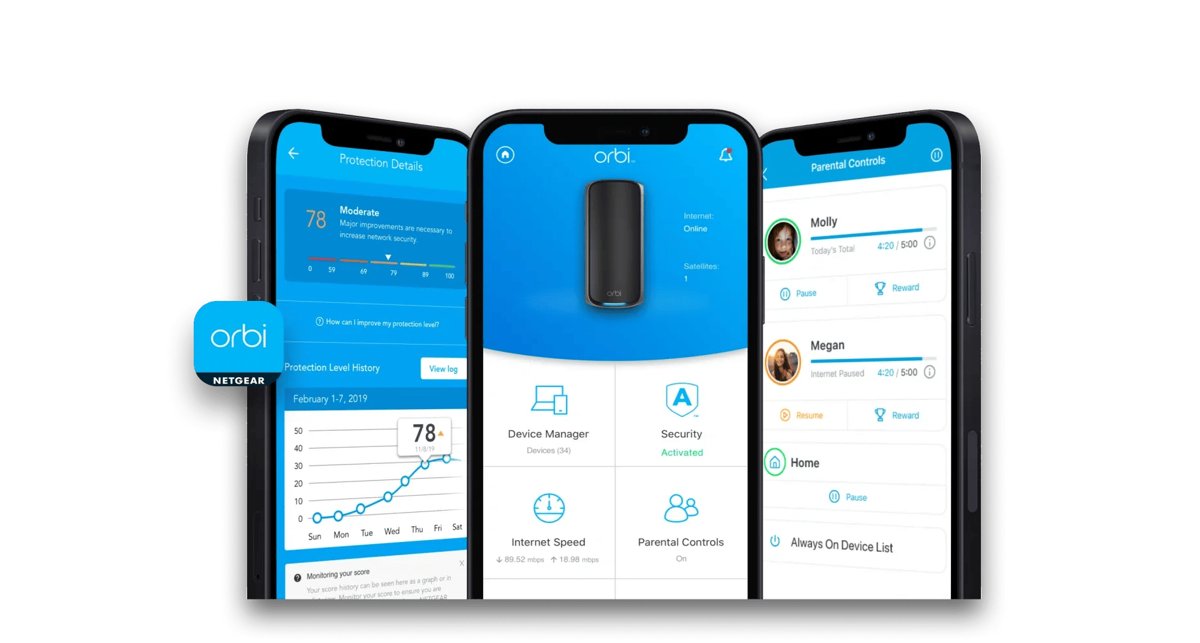
The Orbi app signs you in with your MyNETGEAR account, not the router's admin password. NETGEAR calls it the simplest way to manage an Orbi.
- Connect your phone or tablet to your Orbi WiFi network.
- Install the Orbi app from the App Store or Google Play. NETGEAR also links it from orbi-app.com.
- Open the app and sign in with your MyNETGEAR email and password, then tap SIGN IN.
- On a new or reset system, tap Set up an Orbi and follow the prompts instead.
- Wait for the Dashboard to load. It shows your network status and connected devices.
After the first sign-in, the app can manage the network when you are away from home.
Method 2: Log in using a web browser
Use this route on a Windows PC, Mac or laptop, or whenever you need menus the app does not show. The address depends on the age of your Orbi.
- Connect the computer to the Orbi WiFi network. For the most reliable connection, plug it into a LAN port on the Orbi router.
- Disconnect from any VPN, work network or second WiFi connection on that computer.
- Open Edge, Chrome, Safari or Firefox.
- Type orbilogin.local in the address bar and press Enter. On an older Orbi, type orbilogin.com.
- In the login window, type admin in the user name field and your admin password below it.
- Click Log In. The BASIC Home page displays.
Method 3: Log in using the router IP address
Typing the IP address reaches the same login window when the orbilogin name does not resolve. NETGEAR lists one default address for each Orbi generation.
| Your Orbi | Type this address | If it fails |
|---|---|---|
| Newer Orbi routers (the ones that use orbilogin.local) | http://10.168.168.1 | Try http://192.168.1.1 |
| Older Orbi routers (the ones that use orbilogin.com) | http://192.168.1.1 | Try http://10.168.168.1 |
| Either, if you changed the LAN IP yourself | The address you set | Factory reset restores the default address |
The login window that opens is identical: user name admin and your admin password.
What is the default Orbi login?
NETGEAR's own Orbi article gives admin and password as the defaults. Newer NETGEAR products make you choose a new admin password during first setup, so the default only works on older systems that were never changed.
| Setting | Default value | Notes |
|---|---|---|
| Login address (newer Orbi) | orbilogin.local | IP fallback 10.168.168.1 |
| Login address (older Orbi) | orbilogin.com | IP fallback 192.168.1.1 |
| User name | admin | Cannot be changed |
| Admin password | password | Replaced by the one you chose during setup on newer systems |
| WiFi name and password | Printed on the router label | Not the same as the admin password |
| Orbi app sign-in | Your MyNETGEAR account | There is no default; you create it |
How to check you are logged in
- In a browser, confirm the page title reads BASIC Home and shows the ADVANCED tab.
- Click ADVANCED. The router information and settings menus appear instead of a login prompt.
- In the Orbi app, confirm the Dashboard lists your connected devices and a network status.
A login window that keeps reappearing means the password was rejected, not that the page is broken.
What you can do after logging in
These are the jobs most people log in for. The app handles day-to-day tasks; the browser handles deeper settings.
| Task | Orbi app | Web browser |
|---|---|---|
| Change WiFi name and password | WiFi Settings > WiFi Network Name (SSID) and Network Key (Password) > SAVE | Wireless > Name (SSID) and Password (Network Key) > Apply |
| Change the admin password | Not covered in NETGEAR's app steps | ADVANCED > Administration > Set Password > APPLY |
| Check connected devices and pause them | Device list on the dashboard, with pause and resume | Menu names vary by model; see your user manual |
| Run an internet speed test | Built-in Speed Test | Use the app |
| Update firmware | Supported in the app | Offered at the end of browser setup; see your user manual later |
| Set up or manage guest WiFi | Supported in the app | Menu names vary by model; see your user manual |
| Manage parental controls and security services | Smart Parental Controls and NETGEAR Armor tiles | Use the app |
After a WiFi name or password change, reconnect each device to the new network.
How to fix Orbi login problems
orbilogin.com or orbilogin.local does not load
The device is not on the Orbi network, is on a second network at the same time, or the browser cached an old page.
- Confirm you are connected to the Orbi WiFi, not a neighbour's network or a mobile hotspot.
- Disconnect from VPN, work and other WiFi connections, then reload the page.
- Try the other address: orbilogin.local on newer models, orbilogin.com on older ones.
- Type the IP address from Method 3 instead of the name.
- Clear the browser cache, turn off the pop-up blocker for the page, or try a different browser.
- Switch to a wired Ethernet connection or a different device.
Can't log in to the Orbi app
The app wants your MyNETGEAR account, and people often enter the router admin password there instead.
- Sign in with the email and password of your MyNETGEAR account.
- If you forgot it, open my.netgear.com in a browser and click Forgot password?.
- Enter your account email, tick the reCAPTCHA box and click Reset Password.
- Enter the verification code from the email, type the new password twice, and click Submit.
- Return to the Orbi app and sign in with the new password while connected to your Orbi WiFi.
Cannot log in to Orbi from a computer
Wireless band, adapter or network state on the PC blocks the router page.
- Plug the computer into the Orbi router with an Ethernet cable.
- If you stay on WiFi, switch between the 2.4 GHz and 5 GHz networks.
- Power cycle the network: turn off the modem, router and devices, wait 2 minutes, then turn on the modem first.
- Wait 5 minutes, turn on the Orbi router, then turn the computer back on and retry the login address.
What to do if the Orbi admin password does not work
NETGEAR's Orbi password recovery has two versions. Try the newer one first; if the reset page never appears, use the older one. Both need the router serial number and your security question answers.
Newer Orbi: password rejected
The admin password was changed during setup and has been forgotten.
- Open orbilogin.local or orbilogin.com from a device on your Orbi network.
- Enter wrong credentials three times in a row. The Router Password Reset page displays.
- Type the router serial number and click CONTINUE.
- Answer your two security questions and click CONTINUE.
- Set a new admin password and new security questions, then click NEXT.
- Click LOGIN and sign in with the new password.
Older Orbi: password rejected
Older firmware offers recovery from the login popup instead.
- Open orbilogin.com from a device on your Orbi network.
- Click Cancel on the login popup. If recovery is enabled, a serial number prompt appears.
- Enter the serial number and click CONTINUE, then answer your security questions.
- Set a new admin password and security questions and click NEXT.
- Click LOGIN AGAIN and sign in with the new password.
Default password "password" is rejected
The system was set up with its own admin password, so the default no longer applies.
- Try the admin password chosen during setup, checking capital letters.
- Run password recovery using the steps above.
- Factory reset the Orbi only if recovery fails.
How to reset Orbi if you cannot log in
A factory reset erases the WiFi name, WiFi password, admin password and every custom setting. Use it only after password recovery fails. Active NETGEAR Armor or Smart Parental Controls subscriptions must be reactivated afterwards.
- Make sure the Orbi router is powered on.
- Find the recessed Reset button on the router.
- Press and hold it with a straightened paper clip until the Power LED blinks amber.
- Release the button and let the router restart with factory settings.
- Set the system up again with the Orbi app or a web browser, as shown in the next section.
On a wall-plug satellite, the ring LED blinks amber instead of the Power LED.
How to log in after a factory reset
After a reset the Orbi broadcasts its default WiFi network again, and the first login is the setup wizard. NETGEAR's Orbi setup article has both routes in full.
- Wait for the router LED to turn solid white.
- Connect to the default WiFi network printed on the router label.
- Open the Orbi app and tap Set up an Orbi, or open orbilogin.local in a browser (orbilogin.com or 192.168.1.1 on older models).
- Follow the wizard until it asks for an administrator password, then create one.
- Choose and answer two security questions, which password recovery needs later.
- Create your WiFi name and password, reconnect to that network, and log in with admin and the new admin password.
- Reactivate NETGEAR Armor or Smart Parental Controls from their tiles in the Orbi app if you subscribe.
Important security tips after logging in
- Replace the default admin password under ADVANCED > Administration > Set Password if your Orbi still uses password.
- Tick Enable Password Recovery on that page when it is shown, so a forgotten password does not force a factory reset.
- Use an admin password that differs from your WiFi password, since anyone on WiFi can reach the login page.
- Store the serial number and security question answers somewhere safe.
- Install firmware updates from the Orbi app or web interface when they appear.
- Put visitors on guest WiFi instead of sharing your main network password.
Orbi login FAQ
What is the Orbi login?
The Orbi login is the router's web page at orbilogin.local on newer models or orbilogin.com on older ones. The user name is admin, and the password is the one you set during setup. Older systems that were never changed use password.
How do I log in to my Orbi router on a PC?
Connect the PC to your Orbi WiFi or plug it into the router with Ethernet. Open a browser, go to orbilogin.local or orbilogin.com, and enter admin plus your admin password. If the name fails, type 10.168.168.1 or 192.168.1.1.
How do I get to the Orbi admin page?
Open orbilogin.local or orbilogin.com from a device on your Orbi network and sign in as admin. The BASIC Home page appears first; click ADVANCED for the full admin menus such as Administration and Set Password.
How do I log in to an Orbi satellite?
Log in through the Orbi router rather than a satellite. NETGEAR's login steps use orbilogin.local or orbilogin.com from any device connected to your Orbi network, and the router's settings and the Orbi app manage the whole system.
How do I log in to an Orbi modem router?
Orbi cable modem routers use the same Orbi login. Join the Orbi network, open orbilogin.local or orbilogin.com, and sign in with admin and your admin password. NETGEAR's password recovery and reset steps also apply to Orbi Cable models.
Why can't I log in to the Orbi app?
The Orbi app needs your MyNETGEAR account email and password, not the router admin password. Reset a forgotten MyNETGEAR password at my.netgear.com with Forgot password?, and keep the phone on your Orbi WiFi while you sign in.
How do I connect to Orbi?
Join the Orbi WiFi network with the name and password you created during setup. On a new or reset system, use the default WiFi name and password printed on the router label, then run setup in the Orbi app or at orbilogin.local.
How do I use Orbi after setup?
Use the Orbi app for everyday tasks such as viewing devices, pausing internet access, running speed tests and sharing guest WiFi. Use the web interface at orbilogin.local or orbilogin.com for advanced settings like the admin password.