You can find a device’s MAC address from its network settings or by using a command such as getmac or ipconfig /all on Windows. A MAC address identifies a network adapter, so your Wi-Fi and Ethernet connections usually have different addresses.
A MAC address normally appears as six pairs of letters and numbers, such as 3C-52-82-A1-B4-9F or 3C:52:82:A1:B4:9F. Windows often labels it Physical address, while Apple devices commonly call it a Wi-Fi Address.
This guide covers the quickest ways to find a MAC address on Windows 11, Windows 10, Mac, iPhone, Android, Chromebook, and other network devices, along with the commands you can use when you need the address for Wi-Fi filtering, troubleshooting, device registration, or network administration.
How to Find MAC Address on Windows 11
Windows 11 shows the MAC address directly in Settings, so you do not need Command Prompt for a normal lookup.
Find the Wi-Fi MAC address in Windows 11
- Press Windows + I to open Settings.
- Select Network & internet.
- Click Wi-Fi.
- Open Hardware properties.
- Look for Physical address (MAC).
That value belongs to the computer’s Wi-Fi adapter.
Find the Ethernet MAC address in Windows 11
- Open Settings > Network & internet.
- Select Ethernet.
- Scroll through the network properties.
- Find Physical address (MAC).
If your computer has both Wi-Fi and Ethernet, each adapter has its own MAC address. Make sure you copy the address for the connection you actually need.
How to Find MAC Address on Windows 10
Windows 10 also displays the physical address through its network settings.
Find the Wi-Fi MAC address
- Open Start > Settings.
- Select Network & Internet.
- Click Wi-Fi.
- Select Hardware properties or open the connected network.
- Find Physical address (MAC).
Find the Ethernet MAC address
- Open Settings > Network & Internet.
- Select Ethernet.
- Click the active Ethernet connection.
- Look for Physical address (MAC).
Find MAC Address Using Command Prompt
Command Prompt is faster when you need the MAC addresses for every network adapter installed on a Windows PC.
Use the getmac command
- Press Windows + R.
- Type
cmd. - Press Enter.
- Run:
getmac /vThe Physical Address column shows the MAC address for each adapter. The connection name helps you identify whether the address belongs to Wi-Fi, Ethernet, Bluetooth networking, a VPN, or a virtual adapter.
Use ipconfig /all
You can get more detailed network information with:
ipconfig /allFind the adapter you want and look for:
Physical Address. . . . . . . . . : 3C-52-82-A1-B4-9Fipconfig /all also displays the IP address, DHCP status, DNS servers, gateway, and other network details, which makes it useful when you are troubleshooting a connection rather than looking up only the MAC address.
Find MAC Address Using PowerShell
PowerShell provides a cleaner list of network adapters and their MAC addresses.
- Right-click the Start button.
- Open Terminal or PowerShell.
- Run:
Get-NetAdapterLook under the MacAddress column.
If you want only the adapter name, status, and MAC address, use:
Get-NetAdapter | Select-Object Name, MacAddress, StatusThis is especially useful on computers with several physical and virtual network adapters.
How to Find MAC Address on a Mac
A Mac can have separate addresses for Wi-Fi and Ethernet, just like a Windows PC. Current versions of macOS can also use a private Wi-Fi address for individual wireless networks, so the address a router sees may differ from the hardware address.
Find the Mac Wi-Fi address in System Settings
- Click the Apple menu.
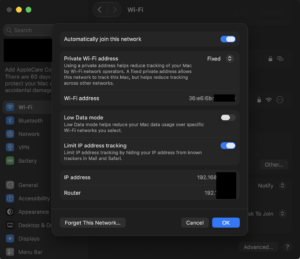
- Open System Settings.
- Select Wi-Fi.
- Open the details for the relevant Wi-Fi network.
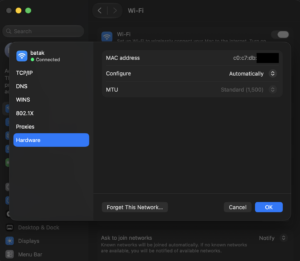
- Look for the Wi-Fi or network address information.
If Private Wi-Fi Address is enabled, the network can see that private address instead of the Mac’s permanent hardware address.
Find the MAC address from Terminal
Open Terminal and run:
networksetup -getmacaddress en0On many Macs, en0 is the Wi-Fi interface. If the command shows the wrong adapter or no useful result, list the available network interfaces with:
networksetup -listallhardwareportsThe output shows each hardware port, its device name, and its Ethernet address.
Use ifconfig on Mac
You can also run:
ifconfig en0 | grep etherThe value beside ether is the MAC address for that interface.
How to Find MAC Address on iPhone or iPad
An iPhone or iPad can show both its hardware Wi-Fi address and the private address it currently uses for a particular Wi-Fi network.
Find the iPhone hardware Wi-Fi address
- Open Settings.
- Select General.
- Tap About.
- Scroll to Wi-Fi Address.
This is the device’s Wi-Fi hardware address.
Find the MAC address your Wi-Fi network sees
- Open Settings > Wi-Fi.
- Tap the information button beside the connected network.
- Find Private Wi-Fi Address.
- Check the address displayed for that network.
Apple uses private Wi-Fi addresses to reduce tracking across different networks. As a result, the MAC address shown in your router’s connected-device list can differ from the hardware Wi-Fi address shown under Settings > General > About.
On current Apple operating systems, Private Wi-Fi Address can use settings such as Off, Fixed, or Rotating, depending on the network and operating system version.
How to Find MAC Address on Android
Android menu names vary between Google Pixel, Samsung Galaxy, OnePlus, Motorola, Xiaomi, and other manufacturers, but the MAC address is usually available under network or device information.
Find the device Wi-Fi MAC address
On many Android phones:
- Open Settings.
- Select About phone.
- Open Status or Status information.
- Look for Wi-Fi MAC address.
Some phones place the same information under Settings > Network & internet > Internet or inside the Wi-Fi network details.
Find the randomized MAC address on Android
Modern Android versions can use a randomized MAC address for Wi-Fi connections. To check the address used by a particular network:
- Open Settings.
- Select Network & internet > Internet or your phone’s Wi-Fi section.
- Open the connected network.
- Look for Randomized MAC address, Privacy, or similar network details.
If you are registering the phone on a school, office, hotel, or managed Wi-Fi network, use the MAC address shown for that specific connection when the network uses randomized addresses.
How to Find MAC Address on a Samsung Phone
Samsung exposes the device MAC address through the phone information screens, while the current Wi-Fi address can also appear inside the connected network’s details.
A common path is:
- Open Settings.
- Select About phone.
- Tap Status information.
- Find Phone Wi-Fi MAC address.
For the MAC address used on the current Wi-Fi network, open Settings > Connections > Wi-Fi, select the connected network, and inspect its details.
How to Find MAC Address on Chromebook
You can find a Chromebook’s Wi-Fi MAC address from ChromeOS network settings.
- Click the time in the lower-right corner.
- Open Settings.
- Select Network.
- Choose Wi-Fi.
- Open the active network or network information.
- Look for the MAC or hardware address.
You can also enter the following address in Chrome:
chrome://systemNetwork information available there can help identify the wireless interface when you are troubleshooting a Chromebook.
How to Find the MAC Address of Another Device on Your Network
If the device is connected to your router, the easiest method is usually the router’s connected-device list. Sign in to the router or mesh Wi-Fi app and look for sections named Connected Devices, Clients, Network Map, or DHCP Clients.
Routers commonly display:
| Device information | Example |
|---|---|
| Device name | DESKTOP-PC |
| IP address | 192.168.1.24 |
| MAC address | 3C:52:82:A1:B4:9F |
| Connection | Wi-Fi or Ethernet |
Private or randomized MAC addresses can make a familiar phone or laptop appear as a different device, so compare the address shown by the router with the address listed for that specific Wi-Fi network on the device.
Find a MAC Address from an IP Address
On your local network, Windows can display MAC addresses it has learned through ARP.
Open Command Prompt and run:
arp -aYou will see entries similar to:
192.168.1.24 3c-52-82-a1-b4-9f dynamicThe first value is the local IP address, while the second is the corresponding physical address known to your computer.
If the device is missing, communicate with it first, for example by pinging its local IP address:
ping 192.168.1.24
arp -a
This method works on the local network. You cannot normally use ARP to discover the MAC address of a remote website or computer elsewhere on the internet because routers do not forward MAC addresses across the internet.
How to Find Your Router MAC Address
Routers often have several MAC addresses because the WAN interface, Ethernet interfaces, and Wi-Fi radios can each use different addresses.
You can usually find them in one of these places:
- The sticker on the bottom or back of the router.
- The router’s web administration page.
- The router manufacturer’s mobile app.
- A page named Status, Internet, WAN, Network, or Device Information.
If your internet provider asks for the router MAC address, confirm whether it wants the WAN MAC rather than one of the Wi-Fi radio addresses.
MAC Address vs IP Address
| MAC address | IP address |
|---|---|
| Identifies a network interface on a local network | Identifies a device’s network connection using Internet Protocol |
| Usually written in hexadecimal pairs | Usually written as IPv4 or IPv6 |
| Example: 3C:52:82:A1:B4:9F | Example: 192.168.1.24 |
| Used mainly at the local network layer | Used for routing traffic between networks |
| Can be hardware-based or randomized | Can change when networks or DHCP assignments change |
If a school, employer, ISP, router, or access-control system asks for a physical address, it usually means the MAC address rather than the IP address.
Why Do I See More Than One MAC Address?
A single computer can have several MAC addresses because each network interface needs its own address. You may see separate entries for Wi-Fi, Ethernet, Bluetooth networking, virtual machines, VPN adapters, docks, and USB network adapters.
For example, a laptop connected through Wi-Fi can show one physical address, while the Ethernet port on a USB-C dock shows another. Register the address for the adapter you intend to use.
Why Does My MAC Address Keep Changing?
Current phones, tablets, and computers can use private or randomized MAC addresses for Wi-Fi. This reduces the ability of Wi-Fi operators to track the same hardware across different networks.
Apple devices use a private Wi-Fi address on supported systems, and current versions provide per-network privacy controls. Android devices also support randomized addresses on Wi-Fi networks.
This matters when a network identifies devices by MAC address. If your phone works one day and appears as an unknown device later, check whether MAC randomization or Private Wi-Fi Address is enabled before changing router settings.
Which MAC Address Should I Give My School, Office, or ISP?
Use the address for the network interface you will actually connect with. If you use Wi-Fi, provide the Wi-Fi MAC address. If you use a wired connection, provide the Ethernet MAC address.
For an iPhone, iPad, Mac, or Android device that uses a private or randomized address, the organization may need the address currently assigned to that Wi-Fi network rather than the permanent hardware address.
If the network specifically requires a fixed hardware MAC address, ask its administrator whether you need to disable private or randomized addressing for that network. Do not disable the privacy feature globally when only one managed network requires it.
Frequently Asked Questions
What is the fastest way to find my MAC address on Windows 11?
Open Command Prompt and run getmac /v. Windows lists the physical address for each network adapter. You can also find it through Settings > Network & internet.
What command shows the MAC address in Windows?
Use getmac, getmac /v, or ipconfig /all. PowerShell users can run Get-NetAdapter.
Is Physical Address the same as MAC address?
Yes. Windows commonly uses the term Physical Address for a network adapter’s MAC address.
Does a laptop have one MAC address?
Not necessarily. A laptop with Wi-Fi and Ethernet has at least two network interfaces and therefore two MAC addresses. Bluetooth, docks, VPNs, and virtual adapters can add more.
Can two devices have the same MAC address?
Network hardware is designed to use unique addresses, but duplicates can occur through manual MAC spoofing, cloning, virtualization, or configuration errors. Duplicate addresses on the same local network can cause connection problems.
Can I find a MAC address from an IP address?
Yes, when the device is on your local network and your computer has learned its address. Run arp -a and match the IP address to the physical address.
Can I find someone’s MAC address over the internet?
No. MAC addresses operate on local network segments and are replaced as traffic passes through routers. A normal website cannot discover the hardware MAC address of a remote visitor through their public IP address.
Why is my iPhone MAC address different on my router?
The iPhone can use Private Wi-Fi Address, which gives that Wi-Fi network a private MAC address instead of exposing the phone’s hardware Wi-Fi address.
Why is my Android MAC address different from the one in About Phone?
Android can use a randomized MAC address for individual Wi-Fi networks. Check the connected network’s details to see the address currently being used.
Does changing Wi-Fi change my MAC address?
The hardware MAC address does not normally change when you join another network, but private or randomized addressing can give different Wi-Fi networks different visible MAC addresses.
Can I find my MAC address without internet access?
Yes. The MAC address belongs to the local network adapter and can be viewed even when the computer or phone has no internet connection.
Is it safe to share a MAC address?
A MAC address is less sensitive than a password, but you should still share it only when there is a reason, such as device registration or network troubleshooting. It can identify a device on a local network and can be used by access-control systems.
Where is the MAC address printed on a device?
Some routers, network adapters, printers, smart TVs, and older laptops print the MAC address on a label. Phones and modern laptops usually expose it through software settings instead.
Do Ethernet and Wi-Fi have the same MAC address?
No. Ethernet and Wi-Fi are different network interfaces, so they normally have different MAC addresses.