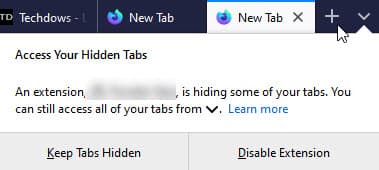
When the number of tabs open in the Firefox browser reaches a certain limit, Firefox puts the excessive tabs that don’t fit on the tab bar in the overflow menu. If you install an extension to hide tabs, then Firefox shows a warning message that an extension has made some tabs invisible and you can access them by clicking the overflow menu icon.
When you open too many numbers of tabs in the Firefox browser, the browser displays the “Lists All Tabs” button at the tab bar end and lets you see and open some of the tabs present behind scroll arrows by clicking that button, Firefox is the only browser that has this feature, Chrome lacks it. Firefox also offers Search tabs option in the All tabs menu.
Here is what the message says and it does nag you whenever you open a new tab:
” Access Your Hidden Tabs. An extension, .., is hiding some of your tabs. You can still access all of your tabs from V (List all tabs button)”. The Notification offers options to “Keep tabs Hidden” and “Disable extension”.

Disable Firefox’s “An extension is hiding some of your tabs” message
This alert from firefox wary users if an extension installed without his knowledge and also makes sense, but this may actually annoy if you’ve actually installed and using an extension intentionally.
While this is not new and Firefox is doing this from the last two years, we came to know about this recently.when we installed an extension to control tabs.
Firefox doesn’t offer hidden pref to disable Access your hidden tabs dialog, you need to click on “Keep Tabs Hidden” to keep using the extension, and doing so, will turn off the alert.
Related articles:





