WhatsApp's 2025 updates added on-device message translation, chat themes, scheduled group calls, voice chats for every group, passkey-encrypted backups, and new apps for iPad and Apple Watch.
This roundup lists every feature WhatsApp announced on its own blog in 2025, month by month, with how to use the main ones and why some may not appear on your phone yet.
WhatsApp's biggest 2025 changes at a glance
Each row is one dated WhatsApp announcement from 2025. Most features rolled out gradually, so the date is when WhatsApp announced it, not when every phone received it.
| Announced | What changed | Where you see it |
|---|---|---|
| January 14 | Camera effects in chats, selfie stickers, sticker pack sharing, double-tap reactions | Chats |
| February 13 | Chat themes with colored bubbles and 30 new wallpapers | Chats |
| March 28 | Music on Status, up to 15 seconds on a photo and 60 seconds on a video | Updates tab |
| April 9 | Group online counts, Highlights notifications, better events, iPhone document scanning, Channel video notes and QR codes | Chats, Calls, Updates |
| April 23 | Advanced Chat Privacy for chats and groups | Chat info |
| May 22 | Voice chat opened to groups of every size | Group chats |
| May 27 | WhatsApp for iPad | App Store |
| June 12 | Animated emojis, animated sticker maker, shared captions, new call filters, Channel photo polls | Chats, Calls, Updates |
| June 16 | Channel subscriptions, promoted Channels and ads in Status | Updates tab only |
| June 25 | Message Summaries with Meta AI, off by default | Chats (select markets) |
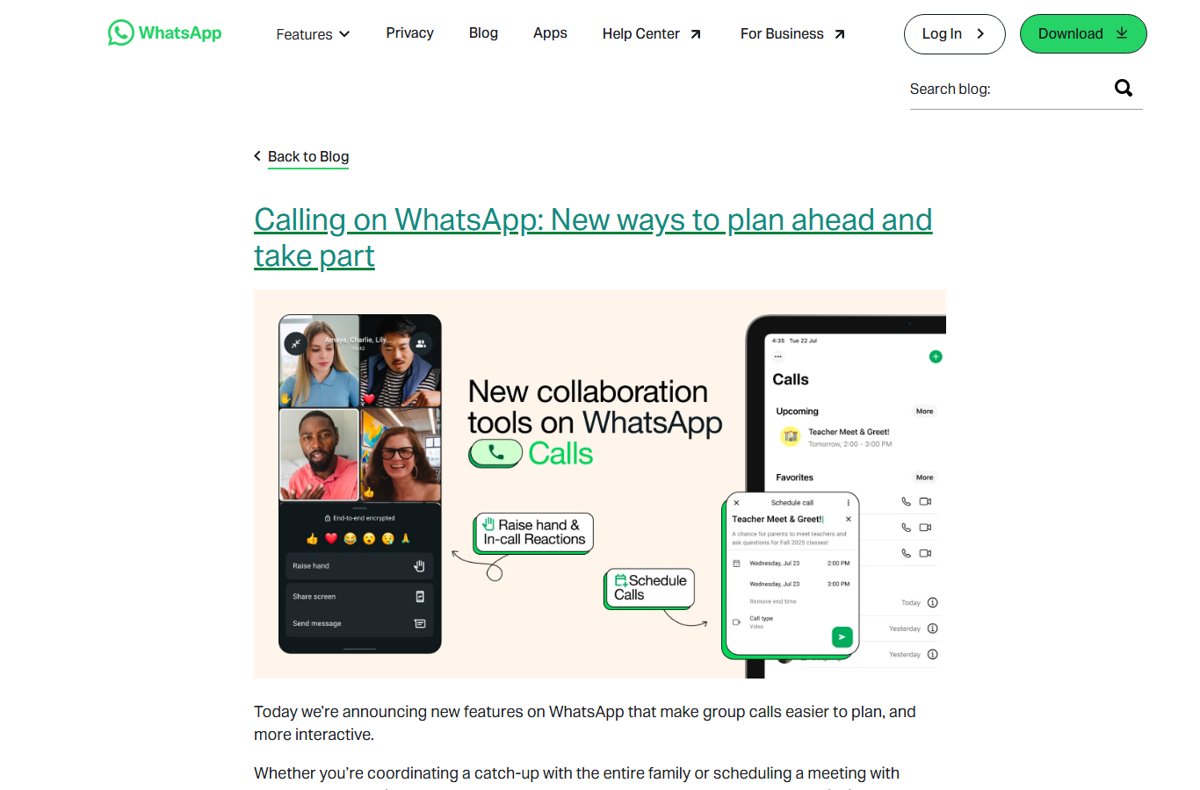
| August 14 | Scheduled calls, raise hand and reactions in group calls | Calls tab |
| August 27 | Writing Help for drafting messages | Chats (English first) |
| September 23 | On-device message translation | Chats, groups, Channels |
| September 29 | Live and Motion photos, Meta AI chat themes and call backgrounds, group search by member, Android document scanning | Chats, Calls |
| October 30 | Passkey-encrypted chat backups | Settings > Chats |
| November 4 | New WhatsApp app for Apple Watch | Apple Watch |
| November 20 | About status returned with an expiry timer | Profile and 1:1 chats |
| December 11 | Missed call messages, speaker spotlight, desktop media tab, Status question and lyrics stickers, questions on Channels | Calls, Chats, Updates |
| December 29 | 2026 sticker pack, video call effects, animated stickers on Status | Chats, Calls, Status |
Chats, Calls and Updates are WhatsApp's three main tabs, and the sections below follow that split.
The best new WhatsApp chat features
These are the 2025 changes you notice inside a normal conversation. Several are platform-specific at launch, which the last column states.
| Feature | What it does | Platform notes |
|---|---|---|
| Message translation | Long-press a message and tap Translate; works in 1:1 chats, groups and Channel updates. Translation runs on your device. | Android launched with English, Spanish, Hindi, Portuguese, Russian and Arabic; iPhone with 19+ languages. Android can auto-translate a whole chat. |
| Chat themes and wallpapers | Changes bubble and background colors for all chats or one chat; only you see your theme. | All platforms announced February 13; Meta AI custom themes added September 29 |
| Live Photos and Motion Photos | Sends the photo with its sound and movement | Live Photos on iPhone, Motion Photos on Android |
| Group search by participant | Search a person's name in Chats to list the groups you share | Chats tab |
| Document scanning | Scan, crop and send a document from the attachment tray | iPhone in April, Android in September |
| Expressive media | Camera effects on photos and videos, selfie stickers, animated emojis, an animated sticker maker from your videos, and new sticker packs | Selfie stickers reached Android first |
| Multi-media captions | One caption for a batch of photos and videos; people can react to the whole set or single items | Chats |
| Group tools | Live 'Online' count under the group name, Notify for > Highlights notifications, groups you can create before adding members | Group chats |
| Events | Events in 1:1 chats, 'maybe' RSVPs, a plus one, end times and pinned events | Chats and groups |
| Message Summaries | Meta AI privately summarizes unread messages using Private Processing | Optional, off by default, select markets |
| Writing Help | Tap the pencil icon while drafting to get rewrites in styles such as professional, funny or supportive | English, starting in the United States |
| Desktop media tab | Finds documents, links and media across chats in one place | Mac, Windows and Web |
The desktop media tab is the main 2025 change for anyone who uses WhatsApp Web in a browser or the WhatsApp desktop apps.
Status and Channels became more visual and more commercial
Status and Channels both live in the Updates tab, which WhatsApp keeps separate from personal chats. In 2025 that tab gained creative tools for everyone and paid or promoted placements for admins and businesses.
| Area | 2025 change | Announced |
|---|---|---|
| Status | Add music: tap the music note icon while creating a Status and pick up to 15 seconds for a photo or 60 seconds for a video | March 28 |
| Status | Mention a whole group; members are notified in the group and can reshare | June 12 |
| Status | Music lyrics, question stickers others can answer, and interactive stickers | December 11 |
| Status | Animated stickers and a 2026 layout for New Year | December 29 |
| Channels | Video notes up to 60 seconds, voice message transcripts and a shareable channel QR code | April 9 |
| Channels | Photos on poll options and starred Channel updates | June 12 |
| Channels | Channel subscriptions for exclusive updates at a monthly fee | June 16 |
| Channels | Promoted Channels in the directory, so admins can raise visibility | June 16 |
| Status | Ads in Status that open a chat with the business | June 16 |
| Channels | Questions that admins post for real-time audience answers | December 11 |
WhatsApp states that ads and promotions appear only in the Updates tab. If you only chat with friends and family, your Chats tab does not change.
Calls and devices: what actually changed
Calling changes in 2025 focused on group calls and on running WhatsApp on more Apple devices.
| Change | Details | Announced |
|---|---|---|
| Voice chat in any group | Swipe up from the bottom of a group chat and hold to start; it rings nobody and stays pinned to the chat | May 22 |
| Scheduled calls | Plan a call from the Calls tab, invite people or groups, and add the link to a calendar; participants are notified when it starts | August 14 |
| Raise hand and reactions | Signal that you want to speak, or react without interrupting a group call | August 14 |
| Call link alerts | The link creator is notified when someone joins | August 14 |
| Add to call from a chat | Add someone to an ongoing 1:1 call from the chat's call icon | April 9 |
| Smoother video calls | Better routing and faster upgrades to HD quality; pinch to zoom on iPhone | April 9 |
| Filters and backgrounds | 6 new filters and 6 effects in June; Meta AI backgrounds in September | June 12, September 29 |
| Missed call messages | Leave a voice or video note in one tap when nobody answers | December 11 |
| Speaker spotlight | The person talking is prioritized in group video calls | December 11 |
| WhatsApp for iPad | Calls with up to 32 people, screen sharing, both cameras, Stage Manager, Split View and Slide Over | May 27 |
| WhatsApp for Apple Watch | Call notifications, full messages, voice messages, reactions, clearer images and more chat history | November 4 |
| Default app on iPhone | Set WhatsApp as the default messaging and calling app under Settings > Default Apps on recent iOS | April 9 |
The Apple Watch app needs Apple Watch Series 4 or later running watchOS 10 or later. WhatsApp's announcement lists call notifications on the watch, not placing calls from it.
Privacy, backup, and anti-scam improvements
Two 2025 changes control where your messages can go, and one makes backup encryption easier to turn on.
| Protection | What it blocks or adds | Where to turn it on |
|---|---|---|
| Advanced Chat Privacy (April 23) | Stops others in the chat from exporting it, auto-downloading its media, or using its messages for AI features | Tap the chat or group name, then Advanced Chat Privacy |
| Passkey-encrypted backups (October 30) | Encrypts the chat backup with your fingerprint, face or screen lock instead of a password or 64-digit key | Settings > Chats > Chat backup > End-to-end encrypted backup |
| Private Processing AI (June 25, August 27) | Message Summaries and Writing Help run without Meta or WhatsApp reading the messages; both are off by default | Optional per feature |
| About visibility (November 20) | Choose whether only contacts or a wider audience sees your About | Privacy settings |
| Strict Account Settings (January 27, 2026) | Locks account settings to the most restrictive options and blocks media from people not in your contacts | Settings > Privacy > Advanced |
Strict Account Settings arrived in January 2026, after this roundup's year, and targets people such as journalists who face sophisticated attacks. It is the closest anti-scam lockdown WhatsApp has announced on its blog.
WhatsApp Business changes: broadcasts, campaigns, and AI
WhatsApp's 2025 blog announcements gave businesses and Channel admins three new ways to reach people, all confined to the Updates tab.
| Tool | Who uses it | How it reaches people |
|---|---|---|
| Ads in Status | Businesses promoting a product or service | An ad in Status lets you start a conversation with the business |
| Promoted Channels | Channel admins and organizations | Paid visibility in the Channels directory |
| Channel subscriptions | Admins offering exclusive content | Followers pay a monthly fee for subscriber-only updates |
Ad targeting uses limited information such as your country or city, language, the Channels you follow and how you interact with ads. Ad preferences from other Meta accounts apply only if you chose to add WhatsApp to Accounts Center.
WhatsApp says it never sells or shares your phone number with advertisers, and personal messages, calls and groups are not used to pick ads. Business app broadcast lists, cross-Meta campaigns and business AI agents are documented on the separate WhatsApp Business site, not in these 2025 consumer announcements.
How to turn on passkey-encrypted WhatsApp backups
Passkey backup encryption rolled out gradually from October 30, 2025, so the option may not appear on every phone yet.
- Update WhatsApp to the latest version from the App Store or Google Play.
- Open WhatsApp and go to Settings.
- Tap Chats, then Chat backup.
- Tap End-to-end encrypted backup.
- Follow the prompts and confirm with your fingerprint, face or screen lock when asked.
How to schedule a WhatsApp group call
- Open the Calls tab.
- Tap the + button.
- Tap Schedule call.
- Invite the people or groups you want on the call.
- Share the call link or add it to your calendar from the upcoming call in the Calls tab.
Everyone invited gets a notification when the call is about to begin, and you see it in your list of upcoming calls.
How to translate a WhatsApp message
- Open the chat, group or Channel with the message.
- Long-press the message.
- Tap Translate.
- Choose the language to translate from or to.
- Download the language when prompted, so future translations work for that language.
On Android you can also turn on automatic translation for a whole chat, so new incoming messages arrive translated.
How to change your WhatsApp chat theme
- To theme every chat and channel, open Settings > Chats > Default chat theme.
- Pick a preset theme or mix bubble and background colors.
- To theme one chat on iPhone, open the chat and tap the chat name at the top.
- To theme one chat on Android, open the chat and tap the 3-dot menu.
- Tap Chat theme and choose a theme or one of the new wallpapers.
Chat themes are visible only to you, so the other person keeps their own colors.
Availability checklist: why your WhatsApp may look different
Most 2025 features rolled out in stages, by platform, language or country. Match what you see to a row below.
A WhatsApp feature announced in 2025 is missing
WhatsApp rolls features out gradually, and some launched on one platform first.
- Update WhatsApp from the App Store or Google Play.
- Check the platform: document scanning reached iPhone before Android, and selfie stickers reached Android before iOS.
- Check again after a few weeks, since WhatsApp described most launches as rolling out over weeks or months.
Message translation offers only a few languages
Translation launched with a short language list on Android.
- On Android, expect English, Spanish, Hindi, Portuguese, Russian and Arabic at launch.
- On iPhone, expect 19 or more languages.
- Download the language pack when prompted, because translation runs on the device.
Message Summaries or Writing Help does not appear
Both are Meta AI features limited by language and country, and both are off by default.
- Check your language: Writing Help launched in English, starting with the United States.
- Check whether the chat has Advanced Chat Privacy on, since it blocks messages from being used for AI features.
- Wait for wider rollout if your country is not yet included.
WhatsApp will not install on an Apple Watch
The new app has a hardware and watchOS minimum.
- Confirm the watch is Apple Watch Series 4 or later.
- Update the watch to watchOS 10 or later.
- Install WhatsApp again after the update.
Ads or promoted Channels appear in WhatsApp
Ads in Status and promoted Channels launched in the Updates tab in June 2025.
- Check which tab you are in: these placements appear only in Updates.
- Expect your Chats tab and personal messages to stay free of ads.
Which 2025 WhatsApp updates matter most to you?
| If you mainly | Start with | Why |
|---|---|---|
| Chat with family abroad | Message translation | Translates on your device across chats, groups and Channels |
| Run or join busy groups | Highlights notifications, voice chat and group search | Fewer alerts, live audio without ringing anyone, and groups found by member |
| Plan meetings or catch-ups | Scheduled calls | Calendar-ready links and a reminder for everyone |
| Share sensitive topics in groups | Advanced Chat Privacy | Blocks exports, media auto-downloads and AI use of the chat |
| Worry about losing your phone | Passkey-encrypted backups | Backup protection without a password or 64-digit key |
| Use an iPad or Apple Watch | The new iPad and Apple Watch apps | A full tablet app and a watch app with voice messages |
| Post on Status or run a Channel | Music on Status and Channel questions | More ways to share and get replies |
New WhatsApp features since 2025
WhatsApp kept shipping after December 2025. These later announcements come from WhatsApp's own blog and sit outside this 2025 roundup.
| Announced | Update |
|---|---|
| January 7, 2026 | Group member tags, text stickers and more for group chats |
| January 27, 2026 | Strict Account Settings |
| February 19, 2026 | Group Message History for new members |
| March 11, 2026 | Parent-managed accounts |
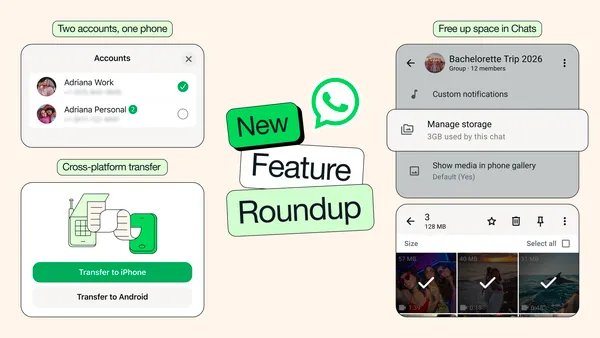
| March 26, 2026 | Free up space, multiple accounts and cross-platform transfer |
| May 13, 2026 | Incognito Chat with Meta AI |
| June 29, 2026 | Username reservation |
| July 22, 2026 | Sign up on iPad and WhatsApp in your car |
| July 28, 2026 | Web calling on WhatsApp |
| August 4, 2026 | Better polls, @all mentions and new groups from existing groups |
| August 25, 2026 | More account security features, with passkeys protecting one billion people |
| September 30, 2026 | Parental controls for teens |
2025 WhatsApp updates: frequently asked questions
What are the new WhatsApp features in 2025?
The main 2025 additions are message translation, chat themes, music on Status, voice chat for every group, scheduled calls, Advanced Chat Privacy, passkey-encrypted backups, Live and Motion photos, and new apps for iPad and Apple Watch. Channels gained subscriptions, photo polls and questions.
What changed in the WhatsApp update in May 2025?
May 2025 brought two headline changes. On May 22 voice chat opened to groups of every size, and on May 27 WhatsApp launched its iPad app with calls for up to 32 people, screen sharing and iPadOS multitasking support.
What was the WhatsApp Web update in 2025?
The December 11, 2025 roundup added a media tab on desktop. It lets you search documents, links and media across all chats in one place on Mac, Windows and WhatsApp Web.
What was the WhatsApp Business update in 2025?
In June 2025 WhatsApp announced ads in Status, promoted Channels and paid Channel subscriptions. All three appear only in the Updates tab, and WhatsApp says personal messages, calls and groups are not used to pick ads.
Did WhatsApp introduce a new universal consumer calling limit in 2025?
No. None of WhatsApp's 2025 blog announcements set a new calling limit. The 2025 calling changes were scheduled calls, raise hand, call reactions, missed call messages and speaker spotlight, plus iPad calls with up to 32 people.
Why can't I see a WhatsApp feature announced in 2025?
Most 2025 features rolled out gradually by platform, language and country. Update WhatsApp first. Some features also started on one platform, such as document scanning on iPhone, and AI features like Writing Help began in English in the United States.
How do I look for passkey-encrypted WhatsApp backups?
Open WhatsApp and go to Settings > Chats > Chat backup > End-to-end encrypted backup. The passkey option rolled out gradually from October 30, 2025, so update the app if it is not shown.
Can WhatsApp calls be made entirely from an Apple Watch?
WhatsApp's Apple Watch announcement lists call notifications, so you can see who is calling, but not placing calls from the watch. The app supports reading full messages, sending voice messages and reactions, and needs Series 4 or later with watchOS 10.
The bottom line on WhatsApp's 2025 updates
Update WhatsApp, then turn on passkey-encrypted backups and try message translation first. Passkey backups protect years of chats with one tap, and translation removes a daily barrier for anyone chatting across languages. Most other 2025 changes are optional extras, and the ads stay in the Updates tab.