Request a refund for an Xbox or PC game on Xbox Support's Request a refund for digital games page, and handle hardware returns and subscription refunds from your Microsoft account.
This guide covers what Microsoft refunds and what it does not, the request steps for Store and Xbox purchases, refund timelines, edge cases from A to Q, and what to do when a request fails.
How to refund a game on Xbox or the Microsoft Store
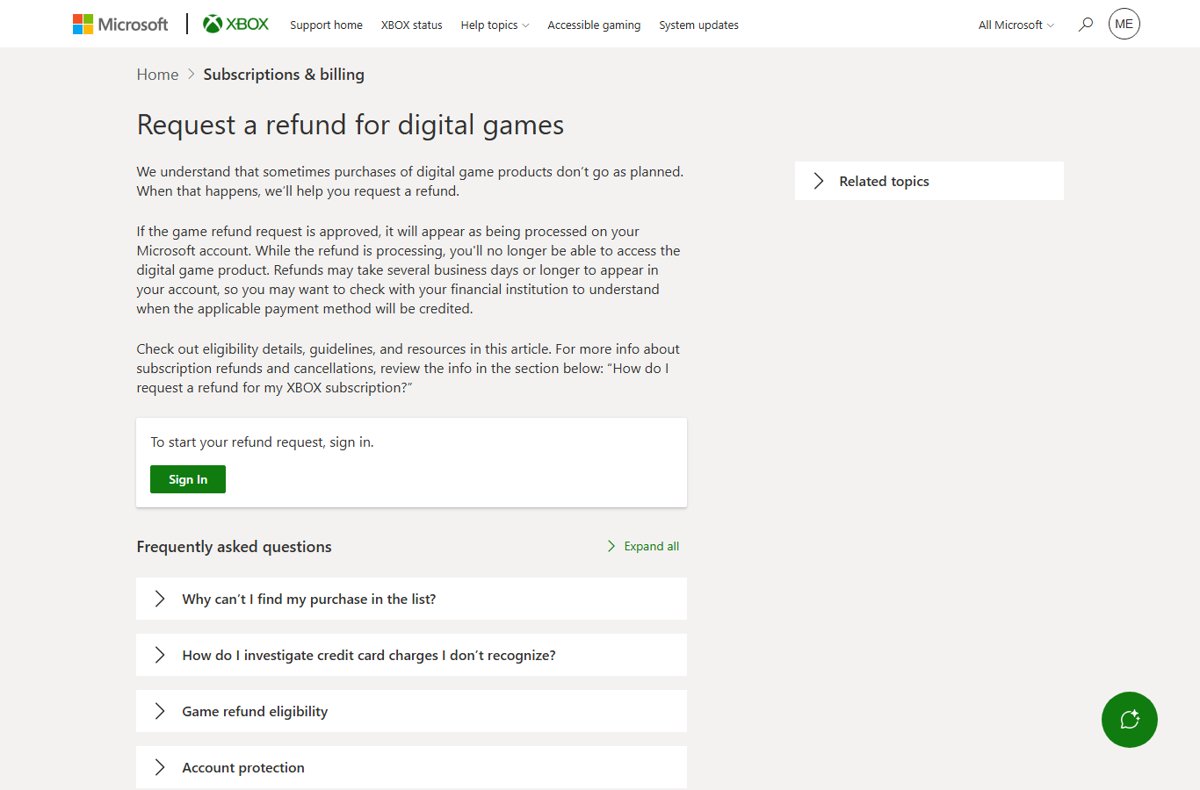
Digital games, add-ons, season passes and in-game currency bought for Xbox or a Windows PC, whether in the Microsoft Store or the Xbox app for PC, all go through one Xbox Support form.
- Open support.xbox.com/help/subscriptions-billing/buy-games-apps/refund-orders in any browser.
- Select Sign In and sign in with the Microsoft account that made the purchase.
- Find the game or add-on in the purchase list and select Request a refund.
- Give your reason for the request and select Next.
- Check the details and select Submit.
Microsoft processes the request within 72 hours and contacts you with updates. You can also follow it on the Refund status tab of the same page.
Ask early. A request made more than 14 days after purchase is not guaranteed a refund, and purchases older than 90 days are not eligible at all.
Which Microsoft refund route fits your purchase
Microsoft splits refunds by product type. Match your purchase to a row and go straight to that route.
| What you bought | Where to ask | Key rule |
|---|---|---|
| Xbox or PC digital game, add-on, season pass or virtual currency | Xbox Support Request a refund for digital games form | Ask within 14 days; nothing after 90 days |
| Microsoft 365, OneDrive or Clipchamp subscription | account.microsoft.com > Services & subscriptions > Manage > Cancel | Eligibility is shown during cancellation; usually within 30 days of purchase |
| Game Pass or another Xbox subscription | Xbox subscription cancellation, on the web or the console | Cancel with a refund where eligible, or turn off recurring billing |
| Surface, Xbox console, controller or other physical item | Microsoft account Order history > Request a return | Like-new condition, original packaging, within the return window |
| Order or pre-order not yet charged or shipped | Microsoft account Order history > Cancel item | No refund needed; the charge never happens |
| Non-game app, movie, TV show or book | Microsoft Store support | Not refundable unless the offer or local law says otherwise |
| Subscription bought through Google Play or the Apple App Store | Google or Apple support | Microsoft cannot refund a purchase billed by another store |
What a Microsoft refund actually covers (and what it usually doesn't)
The Microsoft Store Terms of Sale set the rules. Physical products have a return window, Digital Game Products and Microsoft subscriptions have their own refund policies, and most other digital content is final.
| Product type | Refundable? | Policy that applies |
|---|---|---|
| Digital games, Xbox apps, game bundles, season passes, virtual currency, microtransactions | Yes, on request | Digital Game Products refund request, on Xbox console or PC |
| Microsoft subscriptions (Microsoft 365, Xbox Game Pass) | Yes, within the refund window | Microsoft subscription and Xbox subscription refund policies |
| Physical products such as Surface and Xbox hardware | Yes, if returned in like-new condition | Return policy: 30 days in the Terms of Sale, extended to 60 days for eligible products on the returns page |
| Packaged software and packaged games | Yes, with the seal intact and all media and keys included | Return policy, with an exception for opened packages if you reject the license |
| Other digital apps, in-app content, movies, TV shows | No, unless the offer or law allows it | Listed as ineligible in the Terms of Sale |
| Gift cards and service or subscription cards | No | Listed as ineligible in the Terms of Sale |
| Third-party subscriptions billed through Microsoft | No, unless the offer or law allows it | Purchases are final |
| Personalized items, RAM, clearance or Final Sale items | No | Listed as ineligible in the Terms of Sale |
These rules do not remove any statutory rights you have where you live. Australian buyers keep their remedies under the Australian Consumer Law.
Refund prerequisites you should check first
Five checks settle most refund problems before you open a form.
| Check | What to confirm | Why it matters |
|---|---|---|
| Account | You are signed in with the Microsoft account that paid | The refund list and Order history only show that account's purchases |
| Purchase date | The game was bought within the last 14 days | After 14 days a refund is not guaranteed; after 90 days the purchase is not eligible |
| Seller | You bought from Microsoft, not a retailer, Google Play or Apple | Microsoft does not take returns of products bought from another retailer |
| Product type | The item is a game, subscription or physical product | Most other digital content and all gift cards are final |
| Condition (hardware) | Like-new condition, original packaging, all parts and documents | Returns that miss this are refused |
How to request a Microsoft Store refund (web + Windows)
Microsoft Store refunds start from your Microsoft account in a browser, on any device. The Microsoft Store app on Windows has no separate refund button, so a PC purchase follows the same web route.
On the web (Microsoft Store): hardware and packaged software
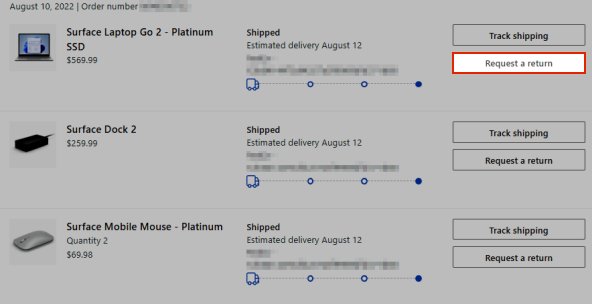
Physical items are returned with a prepaid shipping label from Order history.
- Go to account.microsoft.com/billing/orders and sign in.
- Find the item in Order history.
- Select Request a return next to it. If the button is missing, the item is not eligible online.
- Follow the on-screen steps and print the prepaid shipping label.
- Pack the product in its original packaging with all parts and documentation, and ship it.
On Windows (Order history + support entry point): PC games
PC games bought in the Microsoft Store are Digital Game Products, so they use the Xbox refund form.
- Open Order history at account.microsoft.com/billing/orders and note the game and purchase date.
- Go to the Xbox Support Request a refund for digital games page and select Sign In.
- Select the game and choose Request a refund.
- Enter your reason, select Next, then select Submit.
On Windows: apps, movies and TV shows
These are refundable only if the offer or local law allows it.
- Check the offer terms shown when you bought the item.
- Open Contact Microsoft Support, describe the purchase and select Get Help.
- If the answer does not settle it, select Contact Support to reach a support agent.
Single items from a bundle cannot be returned on their own. Online returns are not available in every market; contact Microsoft Sales support if you cannot start one.
How to request an Xbox refund (digital purchases, subscriptions, and preorders)
Xbox has three refund paths. There is no refund form on the console itself, so use a browser on your phone or PC for game refunds.
Online (Xbox refunds via Microsoft account): games and add-ons
Covers games, season passes, virtual currency and microtransactions bought on console or PC.
- Open the Xbox Support Request a refund for digital games page.
- Select Sign In with the account that made the purchase.
- Select the item and choose Request a refund.
- Give your reasons and select Next.
- Review the details and select Submit.
Subscriptions (Game Pass and Microsoft 365) on the web
Cancelling is how you claim a subscription refund; eligibility is checked automatically.
- Go to account.microsoft.com/services and sign in.
- Find the subscription under Services & subscriptions.
- Select Manage, then Cancel.
- Read the refund offer shown during cancellation and confirm.
On Xbox console (request context from your account): subscriptions
The console shows your plans, expiry dates and billing history.
- Press the Xbox button to open the guide.
- Select Profile & system > Settings > Account > Subscriptions.
- Select the subscription and follow the cancellation prompts.
- For a game refund, switch to the web form above.
Preorders and canceled purchases
A pre-order not yet billed is cancelled, not refunded.
- Open Order history at account.microsoft.com/billing/orders.
- Find the pre-order and select Cancel item.
- Tick the item and select the Cancel item button.
- If Cancel item is missing, you have been billed. Use the Xbox refund form instead.
Turning off recurring billing stops future charges and keeps the benefits until the expiry date. Cancelling immediately with a refund is offered only when the charge qualifies.
Track your refund: timelines, payment methods, and confirmation
An approved game refund shows as processing on your Microsoft account, and the game stops working while it processes.
- For a game, open the Xbox Request a refund for digital games page and select the Refund status tab.
- For hardware or a subscription, open Order history at account.microsoft.com/billing/orders.
- Find the product. Its entry shows the refund status.
- Compare the date with your bank statement. Hardware refunds post in 3–5 business days after the return is accepted.
- If Microsoft shows the refund as issued but your bank does not, wait a few days and then ask your bank.
Refunds go back to the payment method used for the order, unless you choose Store credit. A cancelled subscription with no refund entry was cancelled outside the refund window.
Microsoft refund edge cases that trip people up
These cases produce most of the confused refund requests.
| Case | What happens | What to do |
|---|---|---|
| Pre-order cancelled after billing, before release | Microsoft processes it as a refund | Track it in Order history |
| Pre-order paid with Microsoft account balance | Charged straight away, not at release | Request a refund rather than a cancellation |
| Digital pre-order on a card | Charged up to 10 days before release | Cancel before that point to avoid a charge |
| Pre-order card expires before release | The pre-order is cancelled after failed payment retries | Select Change how you pay in Order history |
| Subscription bought on Google Play or Apple | Microsoft cannot cancel or refund it | Ask Google or Apple |
| Prepaid retail subscription code | Excluded from the Microsoft subscription refund policy | Use the retailer's return policy |
| Microsoft 365 subscription in Canada, France, Korea and some other markets | Prorated refund available when you cancel at any time | Cancel from Services & subscriptions |
| PC game that fails to launch | Often a Store app fault, not a bad purchase | Repair the Store first, then request a refund if it still fails |
Before asking for your money back on a game that will not start, repair or reset the Microsoft Store and try the launch again.
Microsoft refunds A–Z (quick reference)
One line per situation, from account mismatches to playtime.
| Letter | Situation | What to know |
|---|---|---|
| A | Account mismatch | Purchases only appear when you sign in with the paying account |
| B | Bank posting delays | An issued refund takes a few business days to reach your bank |
| C | Chargeback (last resort) | A dispute filed with your bank; use Microsoft's refund routes first |
| D | Digital games (typical constraints) | Request within 14 days; access stops while the refund processes |
| E | Expired requests | Purchases older than 90 days are not eligible |
| F | Fraud or unauthorized purchase | Investigate it on the Manage your payments page, then request a refund |
| G | Gift cards used for purchase | The refund returns to the original payment method, which is your balance |
| H | Hardware return windows | 30 days by default, 60 days for eligible products; Oct 1 – Dec 2, 2026 purchases run to Jan 31, 2027 |
| I | Incomplete checkout | An order cancelled before charging is not billed |
| J | Junior account / family settings | Turn on Ask a parent so children cannot buy without approval |
| K | Key/activation codes | Gift and subscription cards are final; retail codes follow the retailer's policy |
| L | Late refund request | After 14 days a request is accepted but a refund is not guaranteed |
| M | Multiple charges | Contact Microsoft Store Support with your account and order number |
| N | No playtime / minimal use | Microsoft's published terms set date limits, not a playtime figure |
| O | Order not found | Check other accounts, then Guest Order Lookup for guest checkouts |
| P | Preorders | Cancel before billing; after billing, a cancellation becomes a refund |
| Q | Quick playtime check | Ask as soon as you know the game is wrong, well inside 14 days |
When the refund request fails: what to try next
Match what you see to a symptom below.
Your purchase is not in the Xbox refund request list
The purchase is too new, too old, on another account, or a type the form does not handle.
- Wait 24 hours if you bought it today. Very recent purchases do not show yet.
- Check the purchase date. Purchases older than 90 days do not appear.
- Sign out and sign in with every Microsoft account you own.
- For a subscription, cancel it from Services & subscriptions instead.
- For a pre-order, cancel it from Order history.
There is no Cancel item option on an order
You have already been billed, or the order has shipped.
- For a shipped item, wait for delivery and select Request a return in Order history.
- For an Xbox game, use the Xbox refund form.
- For other digital goods, contact Microsoft Store Support.
The Request a return button is missing for hardware
Online returns are not available in your market, or the item is outside the window.
- Confirm the item was bought from Microsoft, not another retailer.
- If you checked out as a guest, find it with Guest Order Lookup.
- Contact Microsoft Sales support to start the return.
The refund shows as issued but no money has arrived
Your bank has not posted the credit yet.
- Wait a few business days. Hardware refunds take 3–5 business days.
- Confirm the card or account in Order history matches the one you are checking.
- Ask your bank when the credit will post.
A cancelled subscription shows no refund
It was cancelled outside the refund window, or you turned off recurring billing.
- Open Order history and look for a refund entry on the subscription.
- If none exists, keep using the benefits until the expiry date.
- In a prorated-refund country, contact Microsoft Support for the last charge.
You see a charge you do not recognize
A family member's purchase, a renewal, or an unauthorized purchase.
- Open the Manage your payments page on your Microsoft account dashboard.
- Find the charge and check what it was for.
- If someone else used your account, secure it before requesting a refund.
Microsoft and Xbox refund FAQs
Does Xbox give refunds?
Yes. Xbox refunds digital games, add-ons, season passes and in-game currency on request through the Request a refund for digital games page. Ask within 14 days for the best chance; purchases older than 90 days are not eligible.
How do you refund on the Xbox Store?
Open the Xbox Support Request a refund for digital games page in a browser and sign in. Select the item, choose Request a refund, give your reason, select Next, then Submit. Microsoft processes requests within 72 hours.
Can you refund a purchase on Xbox from the console?
Not for games. The console has no refund form, so use a browser on a phone or PC. Subscriptions can be managed on the console under Profile & system, Settings, Account, Subscriptions.
How do you refund Xbox items like add-ons and currency?
Use the same Request a refund for digital games form. Season passes, virtual currency and microtransactions count as Digital Game Products, so they follow the same request steps and the same 14-day and 90-day limits as full games.
Can I get a refund on Xbox Game Pass?
Often, yes. Cancel the subscription from Services & subscriptions on your Microsoft account or on the console. If the charge qualifies, the cancellation offers an immediate refund; otherwise recurring billing stops and benefits last until the expiry date.
How long does an Xbox refund take?
Microsoft processes a game refund request within 72 hours. Once approved, the money can take several business days or longer to reach your account, depending on your bank or card issuer.
Can I refund a Microsoft Store app or movie?
Usually not. The Terms of Sale list digital apps, in-app content, movies and TV shows as non-refundable unless the offer or applicable law gives you a refund right. Games and Microsoft subscriptions are the exceptions.
Can you refund an Xbox gift card?
No. Gift cards and service or subscription cards are listed as non-returnable in the Microsoft Store Terms of Sale. A card bought from a retailer is subject to that retailer's return policy instead.
Can you return an Xbox console to Microsoft?
Yes, if you bought it from Microsoft. Select Request a return in Order history, print the prepaid label and ship it in like-new condition in its original packaging. Refunds post 3–5 business days after the return is accepted.
Bottom line on Microsoft and Xbox refunds
Request a game refund on the Xbox form within 14 days, and claim subscription refunds by cancelling from Services & subscriptions. Requests after 14 days are not guaranteed and purchases older than 90 days are not eligible, while subscription refund eligibility is decided automatically at cancellation.