The VMware Remote Console download is free on Windows 11, Windows 10, macOS and Linux. Windows and Linux installers come from the Broadcom Support Portal after a free sign-in, and the Mac build is a free App Store title from VMware, Inc.
VMRC is a standalone console for virtual machines running on remote vSphere and ESX hosts. You open a machine’s screen, connect drives and USB devices from your own PC, install VMware Tools and change RAM, CPU and disk settings.
This guide covers the right file for your machine, the sign-in route to the installer, setup on each platform, silent deployment, requirements and fixes.
Which VMware Remote Console download do you need?
Broadcom ships one installer per platform, and the macOS build comes from Apple rather than the Support Portal.
| Your machine | What to get | What it needs |
|---|---|---|
| Windows 11, Windows 10 or Windows Server PC | VMware-VMRC-version-build.exe from the Broadcom portal | Windows 10 20H1 or later, Windows 11, or Windows Server 2022 or 2025 |
| Mac | VMware Remote Console on the Mac App Store | macOS 15 and above; 26.3 MB; no Broadcom account needed |
| Linux workstation or laptop | VMware-Remote-Console-version-build.x86_64.bundle, from the same portal | Kernel up to 7.0.0-28-generic, an x86_64 processor from 2011 or later, and root access |
| Snapdragon (ARM) PC, or one already running VMware Workstation or Fusion | No usable build | Broadcom lists x86_64 hardware only, and the console shares components with those two products |
Not sure which processor you have? On Windows 11 open Settings > System > About and read System type.
Download VMware Remote Console from the official Broadcom portal
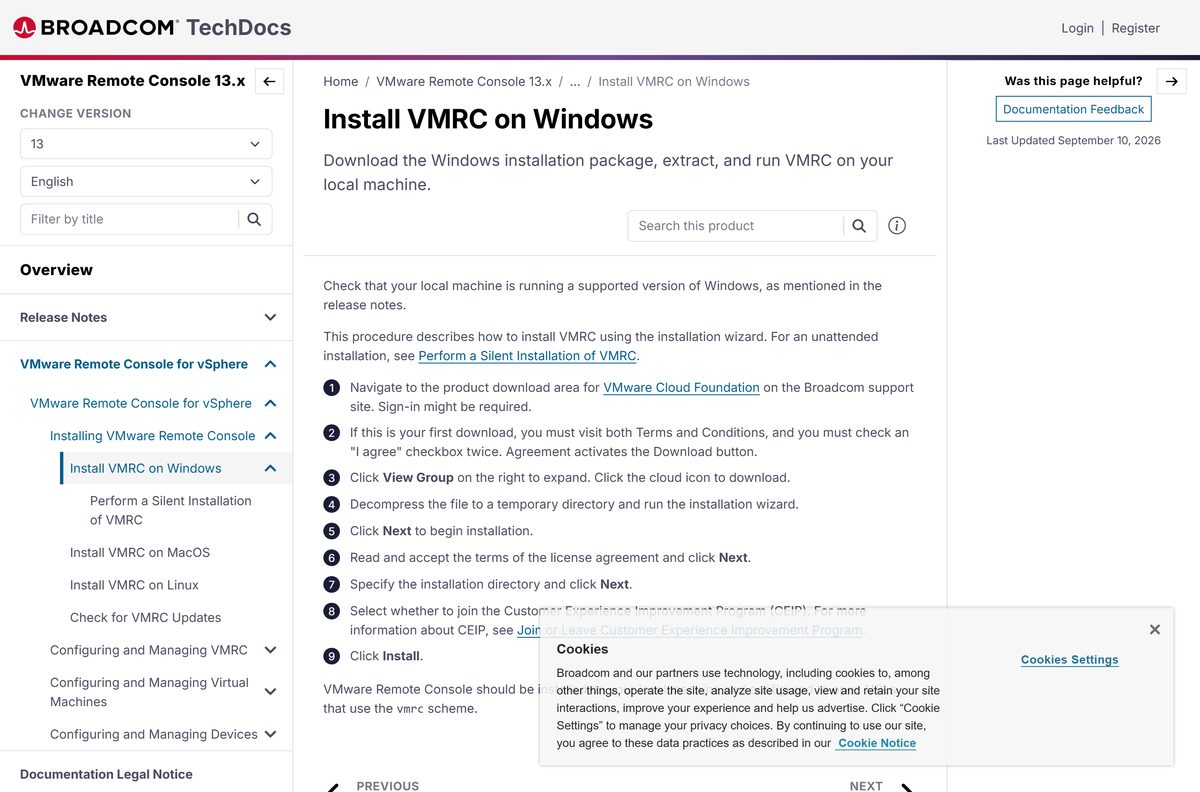
The Windows and Linux installers sit in the VMware Cloud Foundation product files area. The link opens the Broadcom sign-in page first, so register a free account if you do not have one.
On a first download Broadcom asks you to open both terms and conditions pages and tick I agree twice. Then click View Group and click the cloud icon.
- Broadcom Support Portal product files — Windows .exe and Linux .bundle; sign-in required
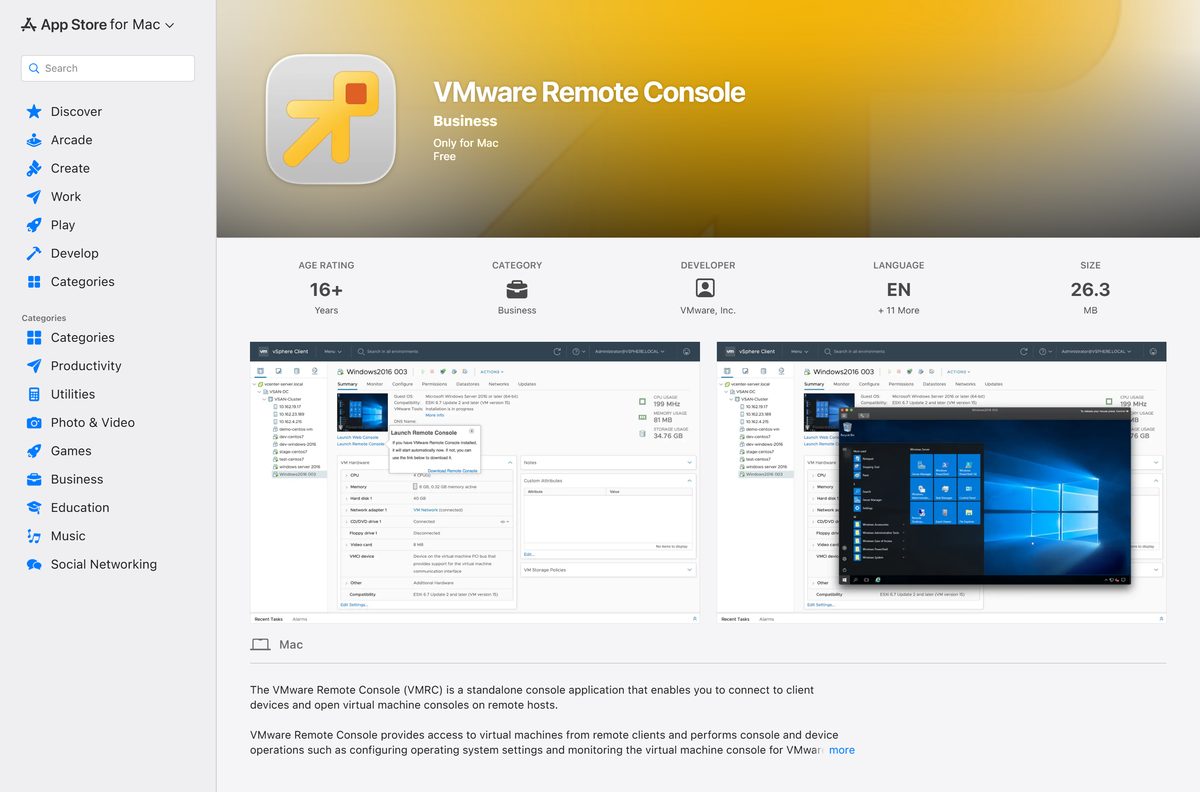
- Mac App Store listing — 26.3 MB · Free, published by VMware, Inc.
- Broadcom’s install guide for Windows — The download and setup walkthrough
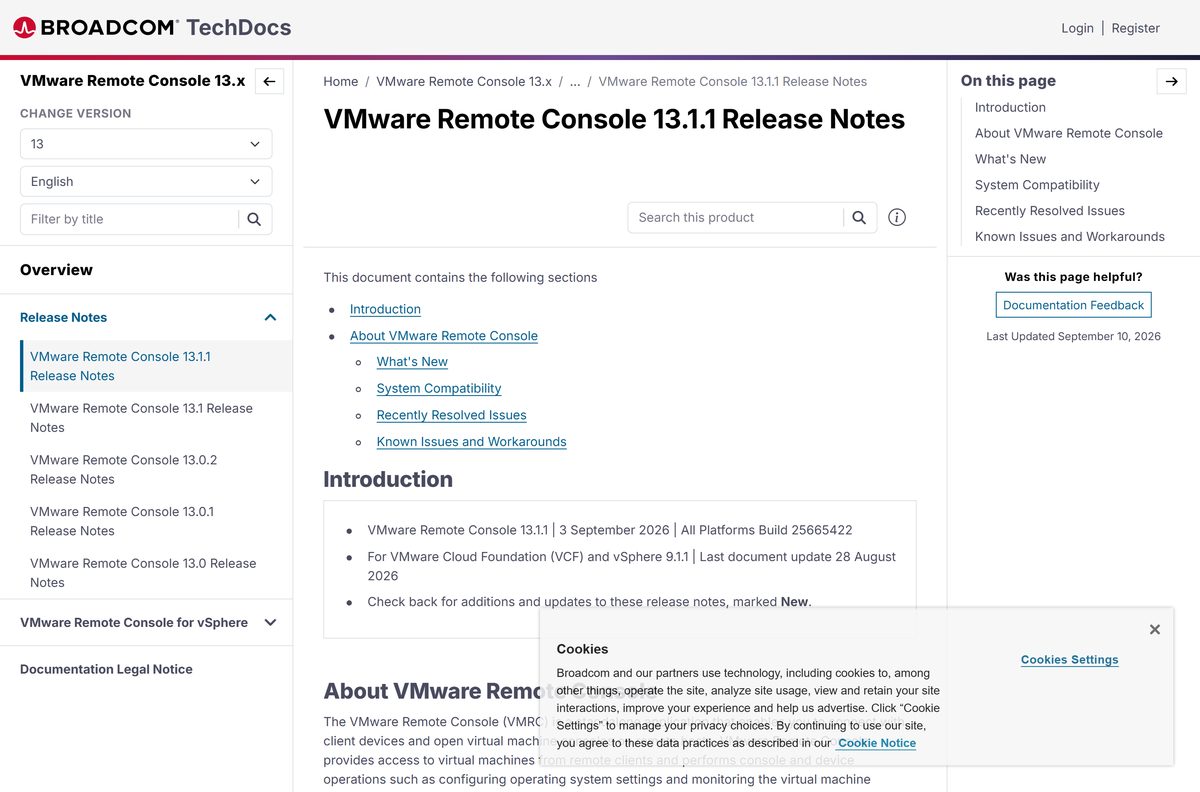
- Release notes for 13.1.1 — Build 25665422, 3 September 2026
Inside the portal the file also sits under My Downloads: pick VMware Cloud Foundation, search for VMware vSphere and open the Drivers & Tools tab.
How to install VMware Remote Console on Windows 11 and 10
The portal hands you a compressed package rather than a bare installer, so unpack it before the wizard will run.
- Open the Broadcom product files page and sign in.
- Tick I agree on both terms and conditions pages if this is your first download.
- Click View Group, then click the cloud icon to download the Windows package.
- Decompress the file to a temporary folder and run the installation wizard.
- Click Next, accept the licence terms and click Next again.
- Set the installation directory and click Next.
- Choose whether to join the Customer Experience Improvement Program.
- Click Install, then close the wizard when it finishes.
- In the vSphere Client, open a virtual machine, click Launch Remote Console on the Summary tab and confirm the browser dialog.
Launching from the vSphere Client needs the Virtual machine Interaction Console interaction privilege on your account.
Which VMRC download do you need for your Mac?
There is no Mac installer in the Broadcom portal. Apple distributes the macOS build, so you install and update it like any other App Store title.
| Your Mac | What to install | Note |
|---|---|---|
| macOS 15 or later | VMware Remote Console 13.1.1, App Store | 26.3 MB; the macOS release Broadcom supports for this version |
| macOS 10.15 through macOS 14 | The same App Store listing | Apple states macOS 10.15.0 or later, but Broadcom’s supported list starts at macOS 15 |
| Any Mac, looking for a .dmg | Nothing to download | The Broadcom portal carries Windows and Linux files only |
Search the App Store for VMware Remote Console and click Get. Proxy settings then live under VMware Remote Console > Settings.
Install VMware Remote Console silently on many PCs
The Windows package supports an unattended install, so a deployment tool can push it with no wizard prompts.
VMware-VMRC-version-build.exe /s /v”/qn EULAS_AGREED=1 DATACOLLECTION=0″ /l “C:\Temp\vmrc-install.log” EULAS_AGREED=1 accepts the licence and 0 stops the installation. DATACOLLECTION=0 declines the Customer Experience Improvement Program. Add INSTALLDIR to move the target folder, which otherwise defaults to C:\Program Files (x86)\VMware\VMware Remote Console . Broadcom documents every switch in Perform a silent installation.
On Linux, run chmod +x VMware-Remote-Console-version-build.x86_64.bundle and execute the bundle as root. Test on one machine and read the log before sending it to a fleet.
Is VMware Remote Console free?
VMware Remote Console costs nothing to download or run. Broadcom serves the Windows and Linux installers to any Support Portal account, and that account is free to create. Apple lists the macOS build at $0 with VMware, Inc. as the seller. The portal does ask for accurate registration details and a trade compliance form, because Broadcom screens downloads for export control.
The console is a client for servers you already run. It includes no vSphere, ESX or host licence.
Choose between VMRC 13 and the older 12.0.5 branch
Install 13.1.1 unless your desktop is too old for it. Release 13.1.1 targets VMware Cloud Foundation and vSphere 9.1.1 and fixes a crash against hosts whose SSL certificate exceeds the console’s buffer. The 12.x branch ended at 12.0.5 on 28 November 2023 and still lists Windows Server 2016 and 2019, macOS 12 to 14 and older Linux builds, so it is the fallback on an older desktop.
From version 11 onwards the console needs direct access to port 443 on ESX hosts. Neither branch works through a path that blocks it.
How to check your VMware Remote Console version and update it
Windows and Linux carry their own updater. macOS leaves the job to Apple.
- Open the console on Windows or Linux and click Help > Check for Updates.
- Wait while it checks for a newer release and downloads what it finds.
- Accept the prompt to install, or close the dialog if it reports that you are current.
- On a Mac, open the App Store and update from the Updates tab.
- Compare your build against 25665422 on the release notes page.
Check for Updates arrived in release 13.0.2. Older builds have no menu entry.
Check the VMware Remote Console system requirements for your PC
The console is a light client, so the network path to your hosts matters more than the hardware in front of you.
| Item | Detail |
|---|---|
| Software | VMware Remote Console (VMRC) |
| Developer | Broadcom Inc. (VMware) |
| Latest version | 13.1.1, build 25665422, released 3 September 2026 |
| Licence and price | Free; a Broadcom account is needed for the Windows and Linux installers |
| Download size | 26.3 MB on the Mac App Store; Broadcom states no size for the other installers |
| Supported OS | Windows 11, Windows 10 20H1 or later, Windows Server 2022 and 2025, macOS 15 and above, Linux kernel up to 7.0.0-28-generic |
| Architecture | x86_64 (AMD64); Linux needs a processor launched in 2011 or later |
| Network | Direct access to port 443 on ESX hosts, from version 11 onwards |
| Conflicts | Cannot share a machine with VMware Workstation or VMware Fusion |
| Works with | VMware Cloud Foundation and vSphere 9.1.1 |
| Offline installer | Yes on Windows and Linux; macOS installs from the App Store |
| Official download source | Broadcom Support Portal |
| Last verified | 2026-09-22 |
Fix VMware Remote Console download and install problems
Setup refuses to install on this computer
The console shares components with VMware Workstation and VMware Fusion and cannot sit beside either one.
- Open Settings > Apps > Installed apps and look for VMware Workstation or VMware Fusion.
- Uninstall the product you do not need and restart the PC.
- Run the console installer again.
Launch Remote Console does nothing in the vSphere Client
The browser has no handler for the link because the application is not installed yet.
- Click the information icon beside Launch Remote Console on the Summary tab, then click Download Remote Console.
- Install the download, return to the vSphere Client and click Launch Remote Console again.
- Check that your account holds the Virtual machine Interaction Console interaction privilege if the link still does nothing.
The console cannot reach the host on a company network
From version 11 the console needs direct access to port 443 on ESX hosts, and a proxy has to be set inside the application.
- Ask the network team to open port 443 from your subnet to the ESX hosts.
- With the application closed, open a browser at vmrc://settings , or use VMRC > Preferences on Windows and File > Remote Console Preferences on Linux.
- Tick the option to enable the connection proxy for remote virtual machines.
- Enter the proxy address, port, user name and password, then click OK or Save.
- Restart the application on macOS, where the settings apply only after a restart.
The console crashes, or the guest screen stays black
Build 25665422 fixed a crash against 9.1.0 hosts with oversized SSL certificates and a black console after a Linux guest switched its monitors off.
- Update through Help > Check for Updates, or reinstall from the portal.
- Download the Linux bundle manually if the updater fails on Ubuntu 26.04, which Broadcom lists as a known issue.
- Click inside a black Linux console and type, because keyboard and mouse input still reach the guest.
- Read Broadcom knowledge base article 442703 if a crash continues against a 9.1.0 host.
How to uninstall VMware Remote Console
Do this before installing VMware Workstation or VMware Fusion on the same machine.
- On Windows, open Settings > Apps > Installed apps.
- Find VMware Remote Console, click the three-dot button and select Uninstall.
- Confirm the prompt and restart the PC when setup asks.
- On a Mac, drag the application from Applications to the Bin, then empty it.
- Delete the temporary folder you unpacked the Windows package into.
Removing the application leaves the virtual machines running on the host.
Choose between the console and the other ways into a virtual machine
| Option | Best for | Where it comes from |
|---|---|---|
| VMware Remote Console | Daily work: local devices, VMware Tools, machine settings and snapshots | Broadcom Support Portal, or the Mac App Store |
| Launch Web Console | A quick look at a screen from a machine where you cannot install software | Built into the vSphere Client; opens in a browser tab |
| VMware Workstation Pro | Running virtual machines on your own PC as well as reaching remote hosts | Broadcom Support Portal; free, and it cannot share a machine with the console |
The web console offers Send Ctrl-Alt-Delete and Full Screen, and releases the pointer with Ctrl+Alt.
Frequently asked questions
Is VMware Remote Console free?
Yes. Broadcom charges nothing and asks for no licence key. The Windows and Linux installers need a free Broadcom Support Portal account, and the macOS build is a free App Store title published by VMware, Inc.
Where is the official VMware Remote Console download page?
The installers sit in the Broadcom Support Portal, in the VMware Cloud Foundation product files area. The vSphere Client links to the same place through the information icon beside Launch Remote Console.
Does VMware Remote Console work on Windows 11?
Yes. Release 13.1.1 supports Windows 11, Windows 10 20H1 or later, and Windows Server 2022 and 2025. It will not install on a PC that already runs VMware Workstation or VMware Fusion.
How big is the VMware Remote Console download?
The Mac App Store lists the macOS build at 26.3 MB. Broadcom publishes no size for the Windows and Linux installers, which are served only after you sign in and accept the terms.
Is there an offline installer?
Yes on Windows and Linux. The portal hands you a full package: a compressed Windows download you unpack and run, or an x86_64 bundle for Linux. macOS has no standalone installer.
Can you install VMware Remote Console on a Mac?
Yes. Search the App Store on your Mac and install it like any other title. The listing shows version 13.1.1 at 26.3 MB, and Broadcom supports macOS 15 and above for that release.
Is there a 64-bit or ARM64 build?
It is an x86_64 application. Broadcom requires a 64-bit processor launched in 2011 or later for the Linux build, and the Windows setup installs into the Program Files (x86) folder. No ARM64 build is listed.
Is the VMware Remote Console download safe?
It is safe when it comes from Broadcom or Apple, because both serve the file directly from the publisher. Skip any site offering a setup file without a Broadcom sign-in.
What is the latest VMware Remote Console version?
Version 13.1.1, build 25665422, released on 3 September 2026. It targets VMware Cloud Foundation and vSphere 9.1.1, adds help links inside the interface and fixes a crash against hosts with large SSL certificates.
Why will VMware Remote Console not install?
The usual cause is VMware Workstation or VMware Fusion already on the machine, because the products share components and setup refuses to run beside them. Remove the other product, restart, then try again.