Recently released Chrome 92 for desktop has replaced the “Search Google for Image” context menu option with Google Lens. Moving forward, Chrome to make the Visual Search tool more useful by allowing users to search for the selected area on a web page with Google Lens. The feature is now available in Chrome 94 Canary
Enable and use the Google Lens Region Search feature in Chrome
- Ensure you’re using the latest Chrome Canary 94, visit chrome://flags
- Search for “Enable Lens Region Search”
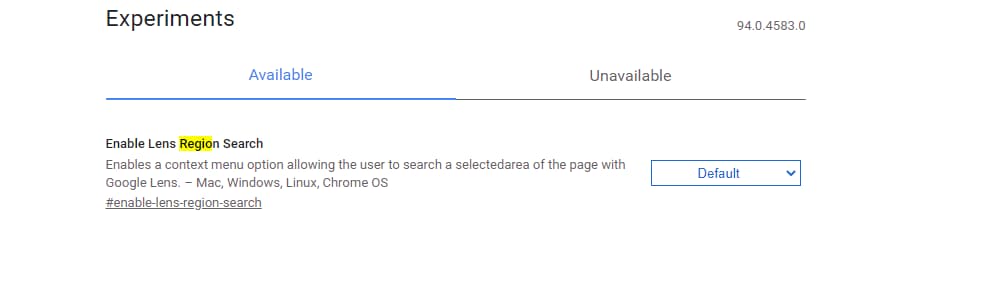
- Select Enabled and restart the browser.
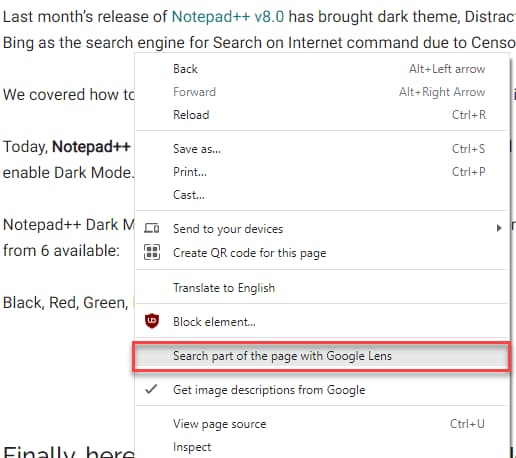
- After that, load a web page, right-click on it, and select “Search Part of the page with Google Lens“
- Immediately draw and select a portion of page with mouse,
- The results for the selected page region appear in a new tab on the Google Lens Website.
While the image search with Google Lens isn’t perfect, the results for selected parts of the Page are also not great.

If the results aren’t what you are looking for, you can try Google Image Search or use the Upload option available on the website.
Let us hope the Chrome team refines the Google Lens search feature for Image and selected Page portions and produces results quite accurately and you may get what you saw on the page in generated results.
What’s your take on the image and selected Page area search with Google Lens in Chrome? Let us know in the comments below.
More on Chrome:
Hands-on Chrome’s HTTPS-First Mode
Chrome to let you revise its Privacy Settings
Chrome Settings Page getting a modern UI
Enable new HTTPS Indicator in Chrome 93 now




