XWorm is a remote access trojan (RAT) for Windows that gives attackers persistent remote control of an infected PC, steals data and installs more malware, and Microsoft Defender detects and removes it under names such as Backdoor:MSIL/XWorm and Trojan:Win32/XWorm.
This guide covers how XWorm spreads, how it works, the indicators that point to an infection, how to remove it with Microsoft Defender, and how to stop it coming back.
How to remove XWorm fast
If you suspect XWorm, scan before you do anything else on the PC. These steps use the Windows Security app built into Windows 11 and Windows 10.
- Save your open files and close your apps.
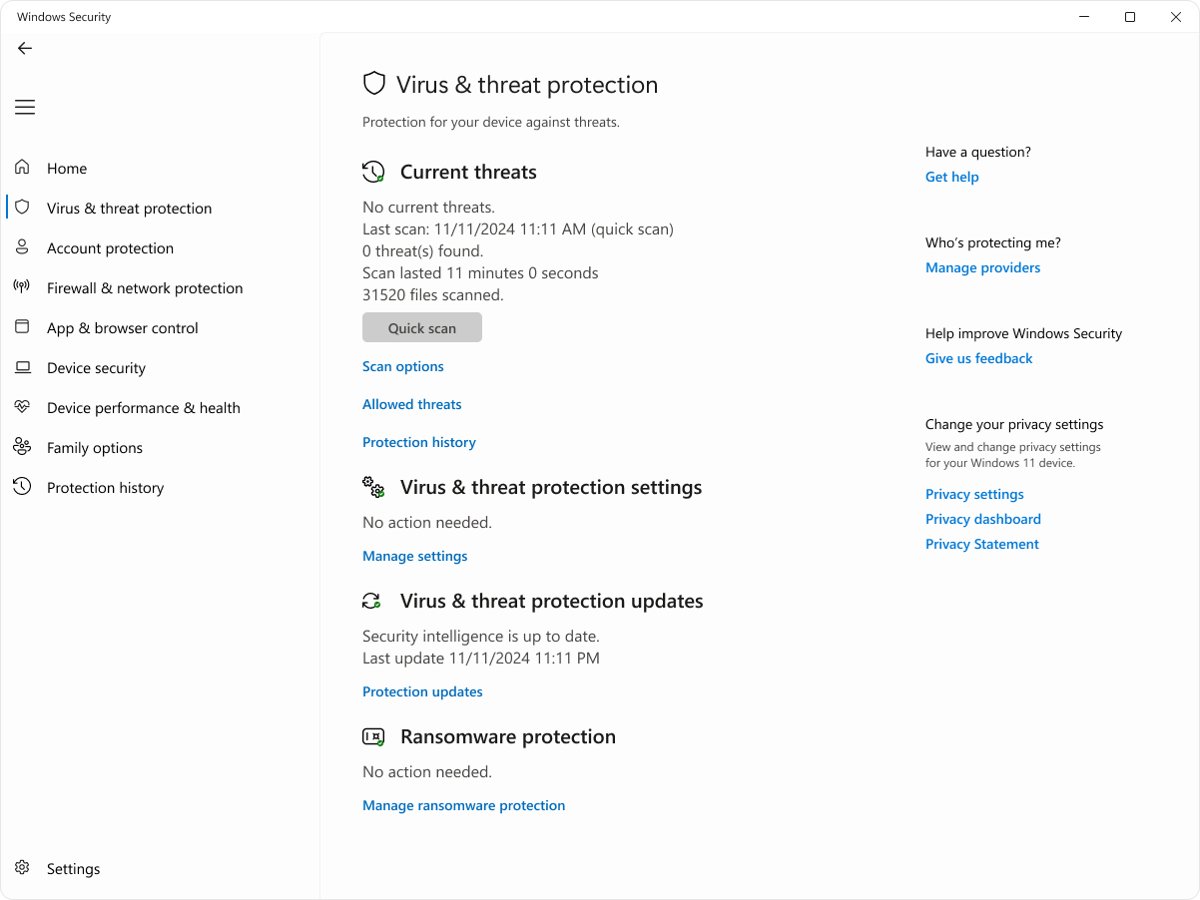
- Open Windows Security and select Virus & threat protection.
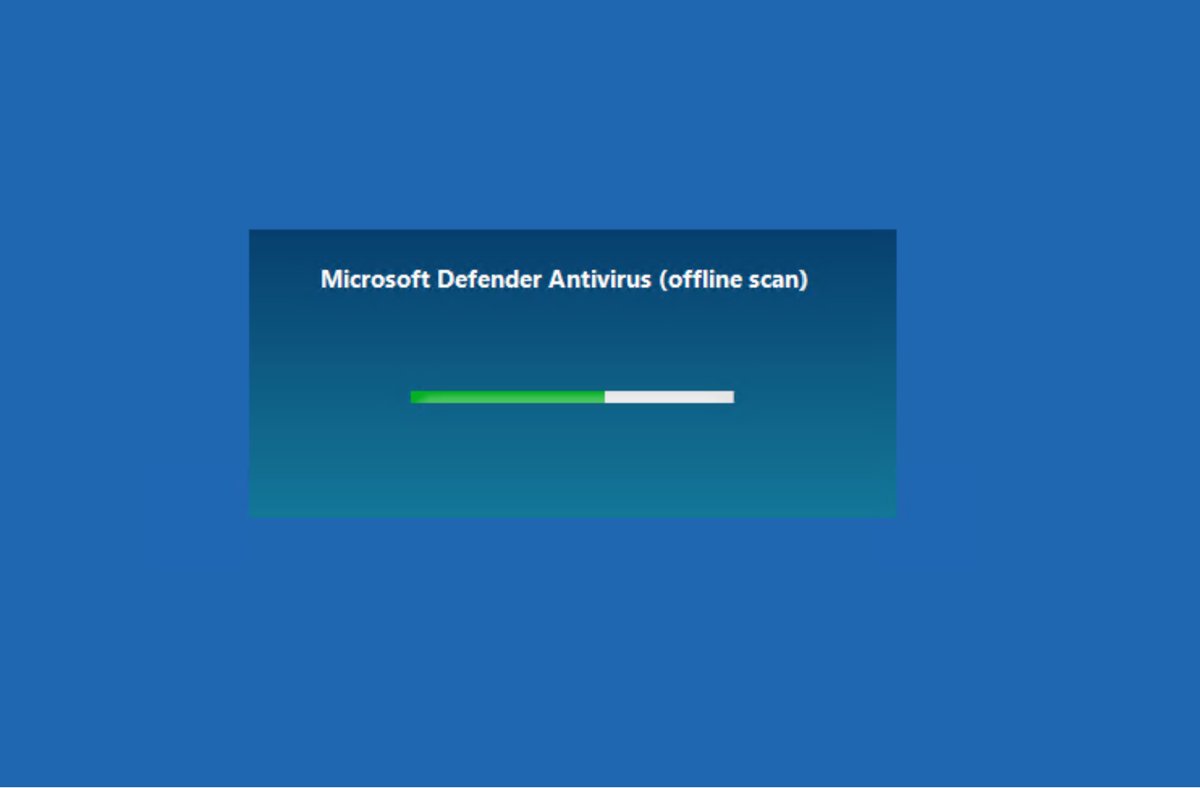
- Select Scan options, choose Microsoft Defender Offline scan, and select Scan now.
- Let the PC restart and scan outside Windows. The scan takes about 15 minutes.
- After Windows loads, open Windows Security and select Protection history to confirm what was removed.
- From a different, clean device, change the passwords for your email, bank and work accounts.
What is XWorm malware?
Microsoft describes XWorm as a remote access trojan built to give attackers persistent access to compromised devices. Despite the name, Microsoft classifies it as a trojan and backdoor, not a self-spreading worm.
| Question | Answer |
|---|---|
| Malware type | Remote access trojan (RAT) and backdoor |
| Platform | Windows; Microsoft's detections cover 32-bit, 64-bit, .NET (MSIL) and VBScript components |
| Main capabilities | Remote control of the PC, data theft and deployment of additional payloads |
| Stealth | Uses techniques to mask its presence and maintain persistence |
| Common delivery | Phishing campaigns, cracked software installers and ClickFix lures |
| Who uses it | Several criminal groups; Microsoft groups it with commodity malware such as AsyncRAT and NetSupport RAT |
When was XWorm first discovered?
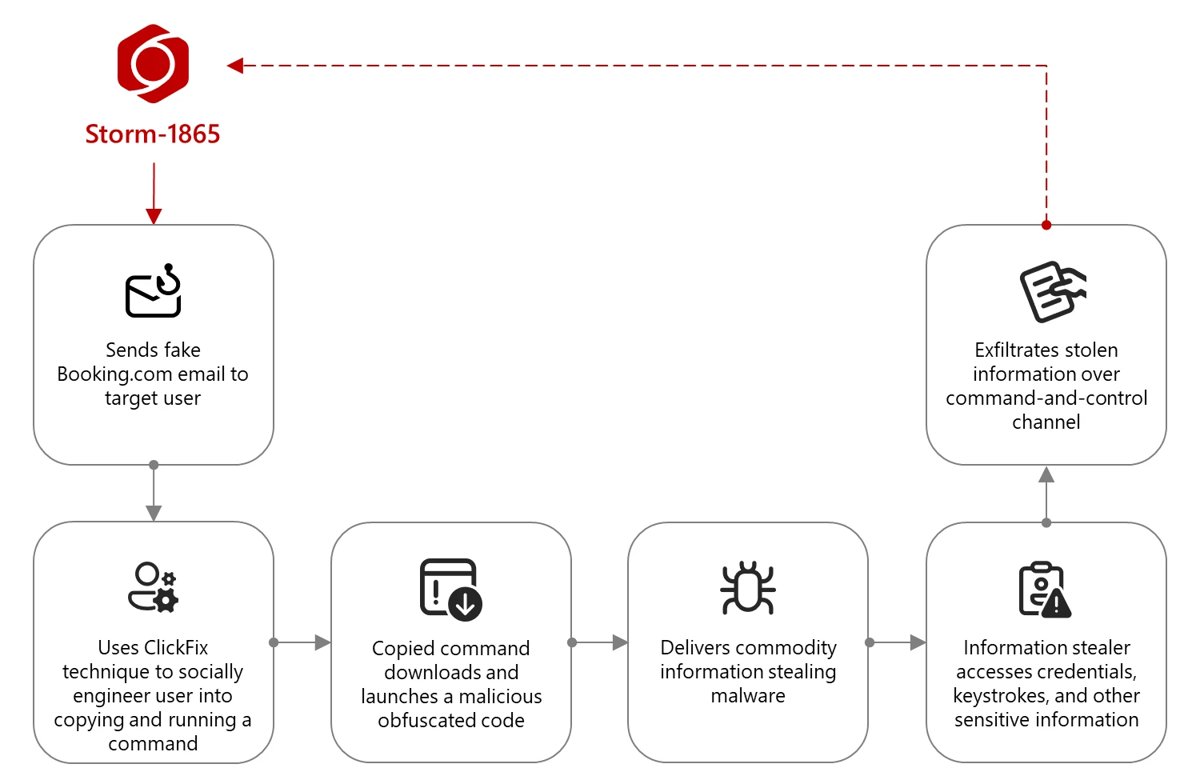
Microsoft's public reporting does not give a first-seen date for XWorm, but it documents XWorm in a phishing campaign that began in December 2024 and in ClickFix campaigns through 2025. Microsoft Threat Intelligence reported that the Storm-1865 campaign impersonating Booking.com started in December 2024 and was still ongoing in February 2025, delivering XWorm among other payloads. Its August 2025 ClickFix analysis lists XWorm among the remote access tools delivered by that technique.
Who created XWorm?
Microsoft does not publicly name XWorm's author; what it documents is the groups that deploy it, such as the phishing cluster it tracks as Storm-1865. XWorm is commodity malware, meaning many unrelated criminals use the same tool. Microsoft notes a market around ClickFix kits that deliver such payloads, with subscriptions sold on hacker forums since late 2024 for US$200 to US$1,500 per month.
What does XWorm target?
XWorm runs on Windows PCs and goes after whatever lets the attacker make money or move further into a network.
| Target | Documented example |
|---|---|
| Credentials and financial data | Storm-1865 payloads, including XWorm, carry capabilities to steal financial data and credentials for fraud |
| Hospitality businesses | Staff at hotels and travel firms likely to work with Booking.com in North America, Oceania, Asia and Europe |
| Corporate networks | RATs such as XWorm let attackers run hands-on-keyboard discovery and lateral movement |
| Home users | Cracked software installers and fake CAPTCHA pages reach anyone who downloads or browses carelessly |
XWorm distribution method
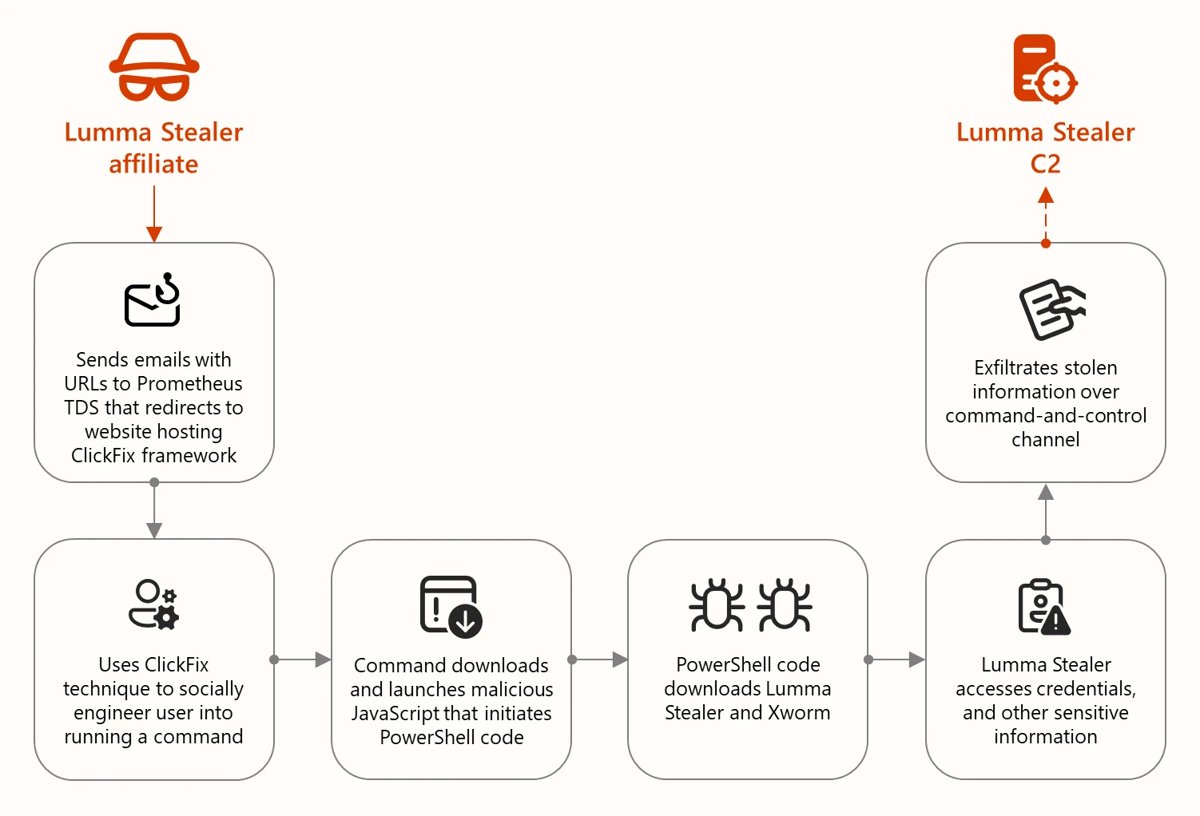
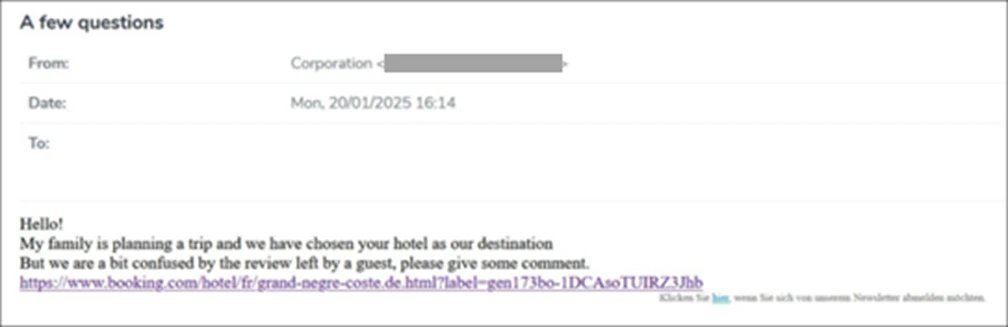
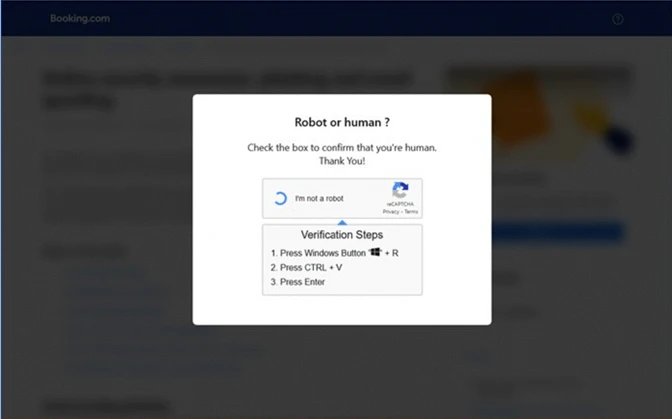
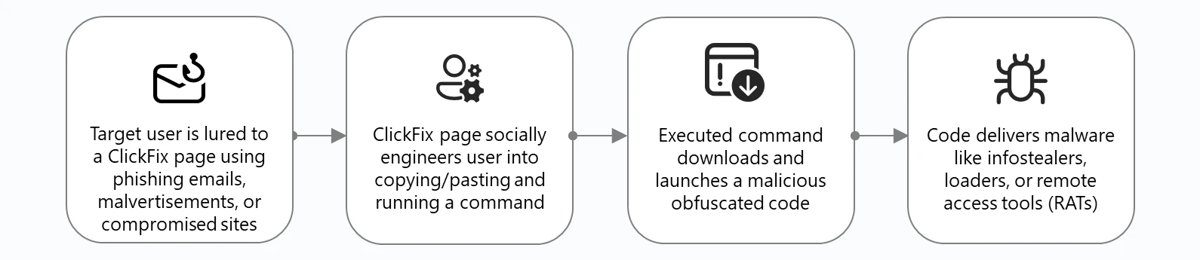
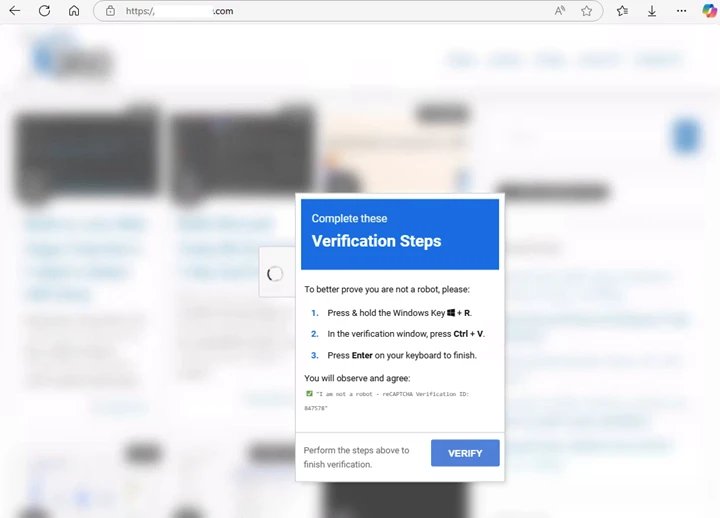
XWorm depends on the victim running something. The most common routes Microsoft has documented are phishing email and the ClickFix trick, where a fake check asks you to paste a command into Windows yourself.
| Route | How it works |
|---|---|
| Phishing email | A message posing as Booking.com cites a bad review or account check and links to a fake page, sometimes inside a PDF attachment |
| ClickFix fake CAPTCHA | The page tells you to press a keyboard shortcut to open the Run dialog, then paste and run a command it already copied to your clipboard |
| mshta.exe download | The pasted command uses mshta.exe to fetch PowerShell, JavaScript or executable payloads |
| Bundled payload | Microsoft found XWorm bundled inside a Lumma Stealer executable delivered through a ClickFix chain |
| Cracked software | Microsoft's encyclopedia lists cracked software installers as a common source |
| ClickFix builder kits | Builders sold on hacker forums since late 2024 generate the lure pages, often alongside LNK, JavaScript and SVG files |
Technical analysis of XWorm malware
Microsoft's detection names show XWorm arrives in several forms: downloaders, VBScript stages, .NET backdoors and native 32-bit and 64-bit trojans. Payloads in ClickFix chains are often fileless.
| Stage | What happens |
|---|---|
| Initial execution | The user runs a command in the Run dialog, Windows Terminal or PowerShell |
| Download | mshta.exe or PowerShell fetches the next stage from an attacker server |
| Loading | Payloads are often loaded in memory as a .NET assembly instead of being written to disk as an .exe or .dll |
| Injection | Malicious code is injected into trusted Windows binaries such as msbuild.exe, regasm.exe or powershell.exe |
| Control | The RAT connects to a command-and-control (C2) server and waits for instructions |
| Follow-on | The attacker steals data, explores the network or installs more malware |
XWorm RAT features and C2 connection
Once XWorm runs, it hands the attacker a remote foothold on the PC. Microsoft's threat descriptions list what every recent variant is designed to do.
| Feature | What it gives the attacker |
|---|---|
| Remote control | Commands run on the infected PC as if the attacker were sitting at it |
| Persistent access | The backdoor keeps working after restarts, so access survives until the malware is removed |
| Data theft | Credentials and financial data can be collected and sent out |
| Additional payloads | More malware can be downloaded and installed through the same backdoor |
| Stealth | Techniques that mask its presence from the user |
| C2 connection | The RAT connects out to an attacker-run command-and-control server for instructions; blocking those addresses cuts the attacker off |
Tactics, techniques and procedures (TTPs)
| Tactic | Technique seen with XWorm delivery |
|---|---|
| Initial access | Phishing email impersonating trusted brands, malvertising and compromised websites |
| Execution | User pastes a command into the Run dialog; mshta.exe and PowerShell launch scripts |
| Defense evasion | Obfuscated commands and scripts, fileless in-memory loading, injection into trusted binaries |
| Persistence | Stealth techniques that keep the backdoor running across restarts |
| Discovery and lateral movement | Hands-on-keyboard activity by the attacker through the RAT |
| Collection and exfiltration | Theft of credentials and financial data |
Indicators of compromise (IoCs)
Indicators change with every campaign, so treat these as examples rather than a complete list. The Defender detection names are the most useful for a home user.
| Indicator | Type | Source campaign |
|---|---|---|
| TrojanDownloader:Win32/XWorm | Defender detection | Storm-1865 (Booking.com lure) |
| Trojan:Win32/XWorm and Trojan:Win64/Xworm | Defender detection | Storm-1865 |
| Trojan:VBS/XWorm and Trojan:MSIL/Xworm | Defender detection | Storm-1865 |
| Backdoor:MSIL/XWorm | Defender detection | Storm-1865 and ClickFix campaigns |
| 92.255.57[.]155 | C2 IP address delivering XWorm | Storm-1865 |
| 185.7.214[.]54 | C2 IP address delivering XWorm | Storm-1865 |
| mshta, powershell, curl or encoded text in the RunMRU registry key | Run dialog history | ClickFix campaigns |
How to know if you're infected with XWorm
XWorm is built to stay hidden, so the absence of symptoms proves nothing. Check these traces instead.
- Think back: if a web page or email ever asked you to press a shortcut, paste a command and press Enter to prove you are human, treat the PC as infected.
- Open Windows Security > Virus & threat protection > Protection history and look for any detection name containing XWorm.
- Run a Full scan from Scan options and wait for it to finish.
- Ask your IT team to search the Microsoft 365 Defender portal for the IoCs above if the PC is a work device managed with Microsoft Defender for Endpoint.
XWorm removal instructions
Let a Microsoft Defender full scan remove XWorm instead of deleting files by hand, because the RAT may have dropped other malware too. Work through the steps in order and stop once scans come back clean.
- Open Windows Security, select Virus & threat protection, then Scan options.
- Choose Full scan and select Scan now. Act on every threat listed so Defender quarantines or removes it.
- Save your work, return to Scan options, select Microsoft Defender Offline scan, and select Scan now. If BitLocker protects the drive, suspend it first or you may be asked for the recovery key.
- After the restart, review Protection history to confirm each XWorm item was removed.
- If the same detection keeps returning, run the offline scan again, then get a second opinion from Microsoft Safety Scanner.
- If the infection persists or has made irreversible changes, back up your files and reset the PC, then restore only from backups made before the infection.
- Install the latest Windows updates, then change every password used on the PC from a clean device and turn on multi-factor authentication.
On a work PC, tell your IT or security team before you start. They may need to isolate the device and investigate other machines the attacker could reach.
Is XWorm still active?
Treat XWorm as an active threat: Microsoft documented it in live campaigns throughout 2025, and Microsoft Defender still carries detections for its current variants. Microsoft's encyclopedia links recent XWorm variants to the ClickFix campaign, and its 2025 analysis says thousands of devices a month ran ClickFix commands even with endpoint protection in place. Because it is sold and shared as commodity malware, new campaigns appear as old ones are blocked.
Mitigation and prevention strategies
Most XWorm infections need you to click a link or paste a command. Breaking that step stops the attack before any malware runs.
| Defence | What to do |
|---|---|
| Never paste commands from a web page | No real CAPTCHA asks you to open the Run dialog, Terminal or PowerShell |
| Check the sender and links | Hover over the sender address and every link; contact the company through its own website, not the email |
| Avoid cracked software | Download programs only from the developer or the Microsoft Store |
| Keep Defender protections on | Leave real-time and cloud-delivered protection turned on in Windows Security, and update Microsoft Defender Antivirus if its signatures fall behind |
| Use a SmartScreen browser | Microsoft Edge with Microsoft Defender SmartScreen blocks many phishing and malware sites |
| Use multi-factor authentication | Stolen passwords are far less useful when accounts need a second factor |
| Businesses: harden devices | Turn on network protection and attack surface reduction rules; remove the Run dialog with the Remove Run menu from Start Menu policy where staff do not need it |
XWorm FAQs
Is XWorm a RAT?
Yes. Microsoft classifies XWorm as a remote access trojan and backdoor. It gives an attacker persistent remote control of an infected Windows PC, lets them steal data and lets them install more malware.
Is XWorm a worm?
No, despite its name. Microsoft's documentation describes XWorm as a trojan and remote access tool that arrives through phishing, cracked installers and ClickFix lures, all of which need the victim to run something.
Can Microsoft Defender detect XWorm?
Yes. Microsoft Defender Antivirus detects XWorm components as TrojanDownloader:Win32/XWorm, Trojan:Win32/XWorm, Trojan:Win64/Xworm, Trojan:VBS/XWorm, Trojan:MSIL/Xworm and Backdoor:MSIL/XWorm. Keep cloud-delivered protection on for the newest variants.
How does XWorm get on a PC?
Usually through the victim's own action. Common routes are phishing emails that link to fake pages, ClickFix pages that ask you to paste a command into the Run dialog, and cracked software installers.
Can XWorm steal my passwords?
Yes. Microsoft notes that the payloads in the campaign that delivered XWorm can steal credentials and financial data. After removing it, change your passwords from a clean device and turn on multi-factor authentication.
Does resetting Windows remove XWorm?
Resetting the PC is Microsoft's fallback when malware has made irreversible changes. Back up your files first and restore only from backups made before the infection, because recent files may have been altered.
Is it safe to download XWorm from GitHub to test it?
No. XWorm is working malware, so running any copy gives someone remote control of that machine. Microsoft Defender will also flag and quarantine it. Malware analysis belongs on an isolated lab machine run by a security team, never on a personal PC.