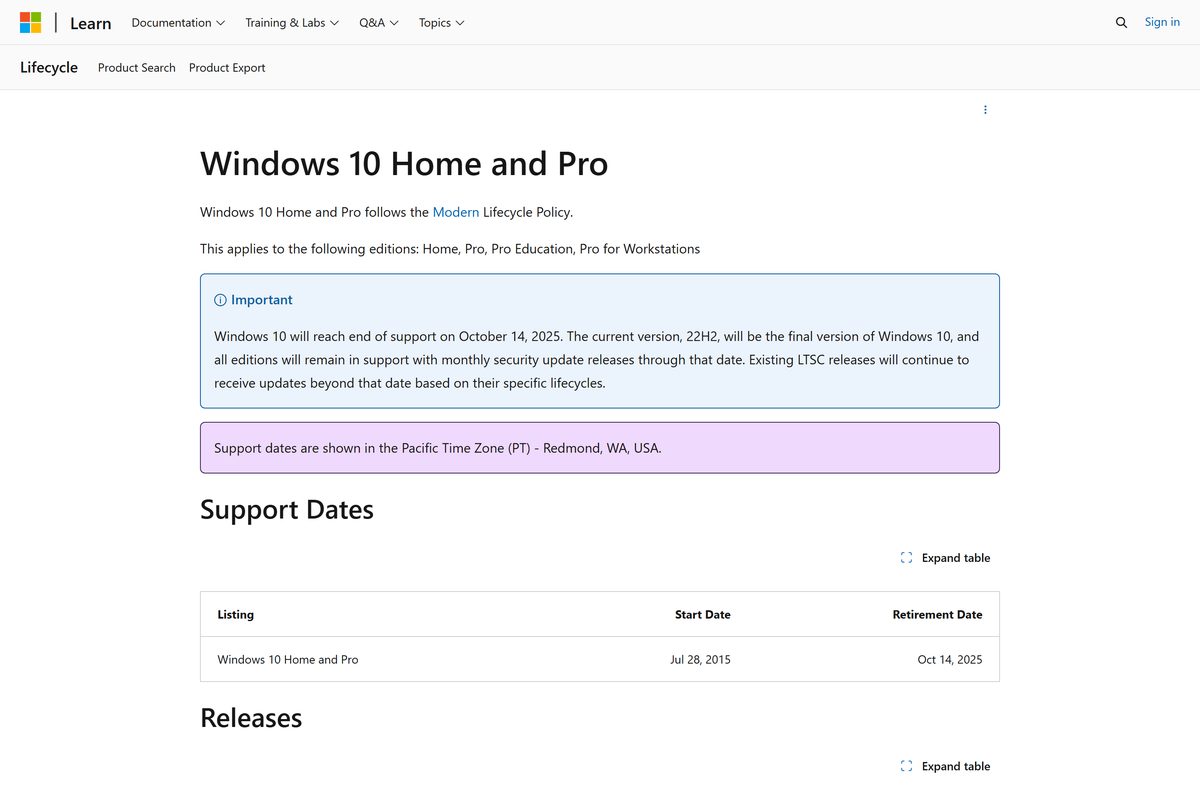
Windows 10 22H2, also called the Windows 10 2022 Update, is the final version of Windows 10, runs OS build 19045, and reached end of support on October 14, 2025.
This guide covers how to install 22H2 from any older version, how to confirm you have it, what changed, how long Extended Security Updates last, the Windows 11 upgrade path and fixes when the update refuses to install.
How to update to Windows 10 22H2
Windows Update is the fastest route on any PC running Windows 10 version 2004, 20H2, 21H1 or 21H2. On those versions 22H2 arrives as a small enablement package that needs a single restart.
- Select Start > Settings > Update & Security > Windows Update.
- Select Check for updates.
- When Feature update to Windows 10, version 22H2 appears, select Download and install.
- Wait for the notification that the update is ready, then save your work.
- Restart the PC when prompted, or pick a restart time that suits you.
If Windows Update offers Windows 11 instead, the PC meets the Windows 11 requirements. You can decline it and still install 22H2.
Which Windows 10 22H2 update method should you use?
The right tool depends on the version you are on now and whether you want to keep your apps.
| Your situation | Use this | Why |
|---|---|---|
| Running 2004, 20H2, 21H1 or 21H2 | Windows Update | Installs the enablement package with one restart |
| Running 1909, 1903, 1809 or older | Update Assistant | Older versions need the full feature update, which takes longer |
| Windows Update keeps failing | Update Assistant | Runs the upgrade outside Windows Update |
| Installing on another PC or doing a clean install | Media Creation Tool | Builds a bootable USB drive or an ISO file |
| PC meets Windows 11 requirements | Windows 11 upgrade | Windows 10 no longer gets free security updates |
Update Assistant and Media Creation Tool
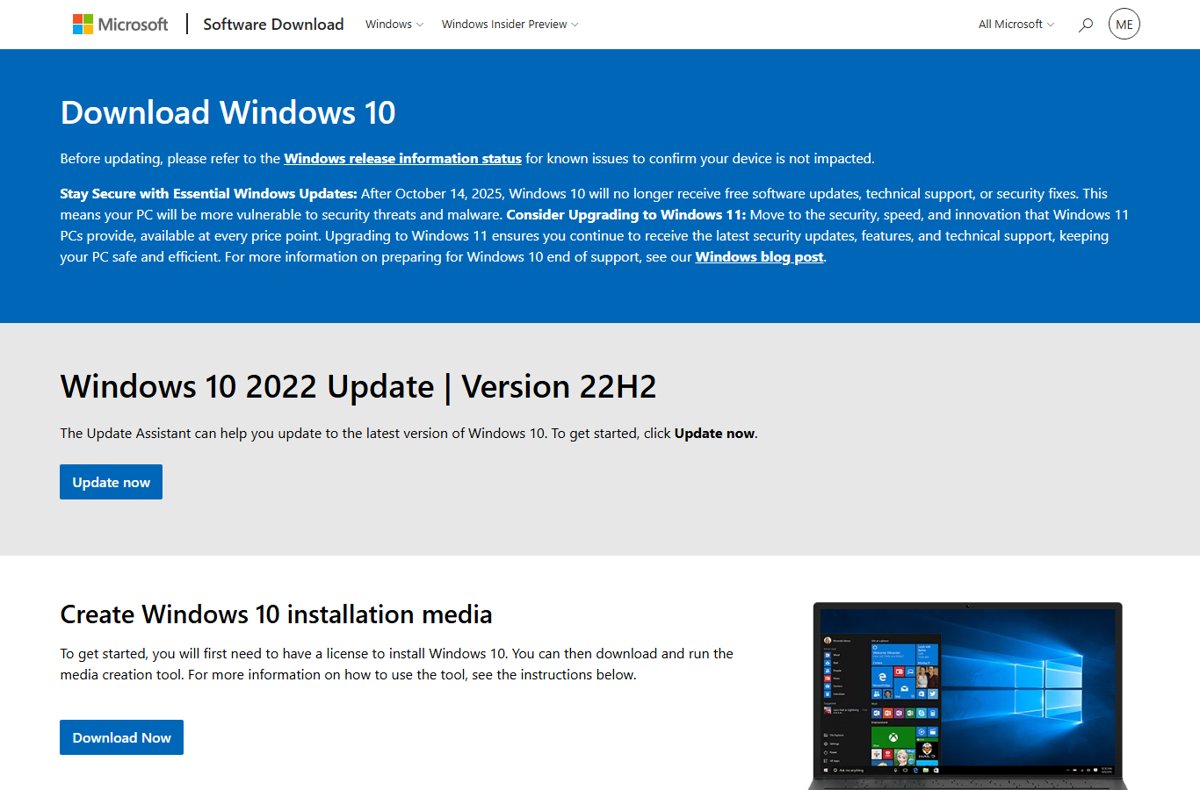
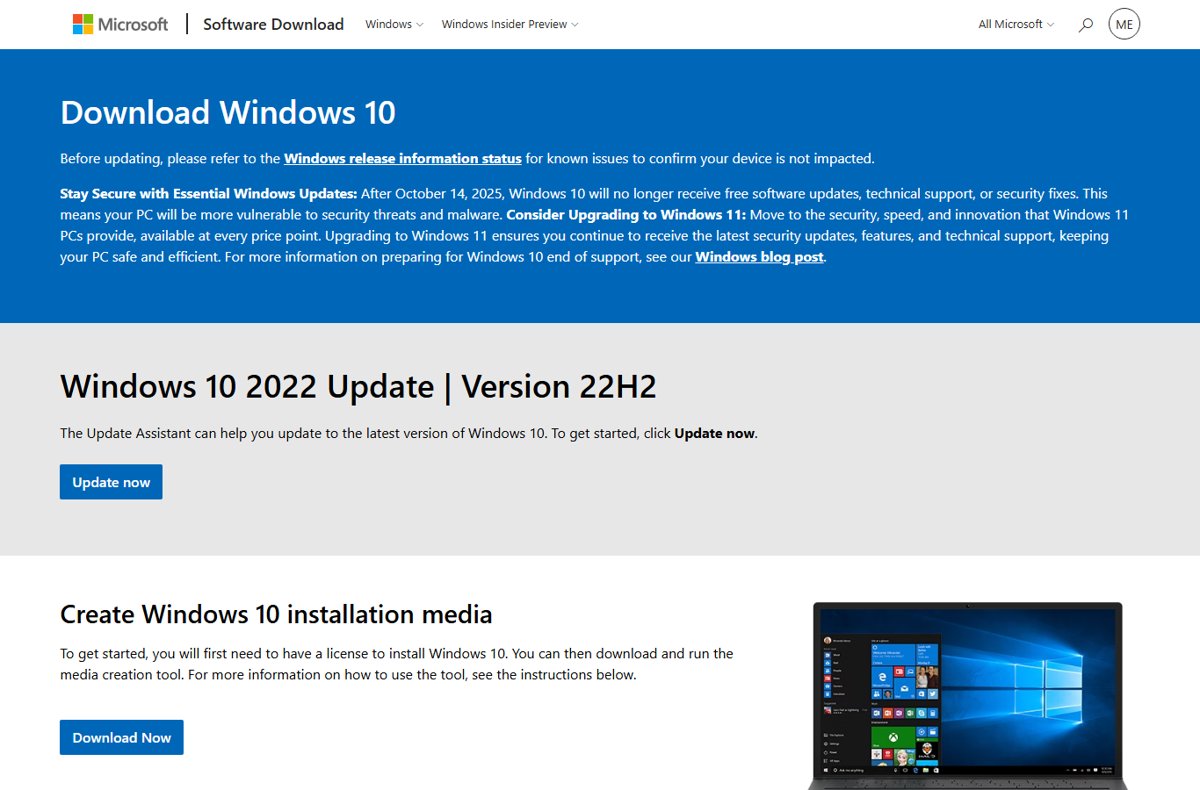
Both tools live on the Windows 10 page of Microsoft's software download site, and both install version 22H2. The Update Assistant upgrades the PC you run it on; the Media Creation Tool can also do that, or build installation media.
- Open
microsoft.com/software-download/windows10in your browser. - Under Windows 10 2022 Update | Version 22H2, select Update now to get the Update Assistant.
- Run the downloaded Update Assistant with an administrator account and follow its prompts.
- To use the Media Creation Tool instead, select Download Now under Create Windows 10 installation media and run the tool.
- Select Accept on the license terms page.
- On What do you want to do?, select Upgrade this PC now, then Next.
- On the summary screen, select Change what to keep and choose Keep personal files and apps.
- Close open apps and select Install; the PC restarts several times.
Microsoft lists a license to install Windows 10 and administrator rights as requirements for the Media Creation Tool.
Download Windows 10 22H2 ISO or create a USB drive
Use this route to install 22H2 on a different PC or to start fresh. You need a blank USB flash drive of at least 8 GB, because its contents are erased.
- Run the Media Creation Tool and select Accept on the license terms.
- On What do you want to do?, select Create installation media for another PC, then Next.
- Choose the language, edition and architecture, either 64-bit or 32-bit, that match the target PC.
- Choose USB flash drive to build a bootable drive, or ISO file to save an image.
- Insert the finished media in the target PC and restart it.
- Boot from the USB drive, changing the boot order in the BIOS or UEFI settings if needed.
- Select Install Windows and follow the setup prompts.
The tool does not offer Windows 10 Enterprise. Pick the same edition the target PC is licensed for, such as Home or Pro.
Windows 10 22H2 ISO editions: how to choose
Every Windows 10 22H2 ISO installs the same build 19045, but where you get it depends on the edition your license covers. Pick the edition the target PC is licensed for, or Windows will not activate.
| Edition | Where to get the 22H2 ISO | Notes |
|---|---|---|
| Home | Media Creation Tool, ISO file option | Choose the language and 64-bit or 32-bit |
| Pro | Media Creation Tool, ISO file option | Same download as Home; the license decides the edition |
| Education | Media Creation Tool or volume licensing | Got 30 months of servicing, like Enterprise |
| Enterprise | Volume Licensing Service Center (VLSC) | The Media Creation Tool does not offer Enterprise |
| LTSC | No 22H2 release | Windows 10 Enterprise LTSC 2021 matches version 21H2, build 19044 |
| N and KN | Pick the N edition matching your license | No media apps or Windows Media Player; add the Media Feature Pack under Optional features |
| Single Language | Media Creation Tool, matching language | Install the edition and language your license covers |
| Insider Preview | Windows Insider Preview ISO page | Needs a Windows Insider account; 22H2 left preview in October 2022 |
On Windows 10 N, open Settings > Apps > Apps & features > Optional features > Add a feature and install the Media Feature Pack. LTSC 2021 stays in mainstream support until January 12, 2027, so it is not a 22H2 build even though it outlives 22H2.
What is Windows 10 22H2?
| Fact | Windows 10 22H2 |
|---|---|
| Marketing name | Windows 10 2022 Update |
| OS build | 19045 (21H2 is 19044) |
| Release | Announced October 18, 2022; Microsoft's lifecycle page lists October 17, 2022 |
| Delivery | Enablement package KB5015684 for versions 2004 to 21H2; full feature update for older versions |
| Architecture | 64-bit and 32-bit editions |
| Editions | Home, Pro, Pro Education, Pro for Workstations, Enterprise, Education |
| Status | Final version of Windows 10; end of support October 14, 2025 |
Versions 2004 through 22H2 share the same core system files. The 22H2 changes already sit in the monthly updates for those versions and stay dormant until the enablement package switches them on.
Windows 10 22H2 upgrade starting October 18
Microsoft began offering 22H2 on October 18, 2022, first to people who chose Check for updates, then automatically to PCs on versions nearing end of servicing. The rollout was announced that day on the Windows Experience Blog.
| Date | What happened |
|---|---|
| July 28, 2022 | First preview, build 19045.1865 (KB5015878), released to the Release Preview Channel of the Windows Insider Program (WIP) |
| October 18, 2022 | 22H2 offered in Windows Update to PCs on 20H2 or later; also released to WSUS, Windows Update for Business and VLSC |
| Late October 2022 | Microsoft started updating Home and Pro PCs on 21H1 to 22H2 |
| December 13, 2022 | All editions of 21H1 reached end of servicing |
| June 13, 2023 | 21H2 Home and Pro reached end of servicing, leaving 22H2 as the only Home and Pro version |
| October 14, 2025 | Windows 10 end of support; the October 2025 update was the last free security update |
| October 12, 2027 | Consumer Extended Security Updates coverage ends |
22H2 launched with 18 months of servicing for Home and Pro and 30 months for Enterprise and Education. Because it became the final version, every edition stayed supported until October 14, 2025.
How to update Windows 10 version 1903 to 22H2
Version 1903 ended support on December 8, 2020, and 1909 or earlier cannot install the 22H2 enablement package on its own. These PCs get 22H2 as a full feature update, so the install takes longer.
- Back up your personal files to an external drive or OneDrive.
- Make sure the system drive has at least 20 GB free on 64-bit Windows, or 16 GB on 32-bit Windows.
- Open the Windows 10 page on Microsoft's software download site and select Update now.
- Run the Update Assistant and follow its prompts.
- Leave the PC plugged in and switched on while it restarts several times.
- Check Settings > System > About afterwards to confirm version 22H2.
What’s new on Windows 10 22H2
22H2 is a scoped release. Microsoft describes it as focused on quality improvements in existing feature areas rather than new headline features.
| Area | What changed in 22H2 |
|---|---|
| Features | A limited scope of new features and functions; focus on quality, productivity and security in existing areas |
| Performance | Quality improvements to existing features rather than new speed features; installs fast from 20H2 or later |
| Security | Security improvements bundled from every 21H2 cumulative update; monthly security updates continued until October 2025 |
| Mobile devices | Phone Link works with Android phones only; iPhone support needs Windows 11 |
| Updates included | Every cumulative update previously released for 21H2 |
| Install time | Fast install from 20H2 or later through servicing technology, with one restart |
| Servicing | Monthly quality updates on the second Tuesday, as before |
| Version role | Final feature update; Microsoft released no Windows 10 23H2 or 24H2 |
| ESU eligibility | Only 22H2 PCs can install Extended Security Updates |
Newer features such as Smart App Control and Phone Link support for iPhone exist only in Windows 11, according to Microsoft's comparison of Windows 11 Home and Windows 10 Home.
How to check Windows 10 version 22H2
- Right-click Start and select Settings.
- Select System, then About.
- Under Windows specifications, check that Version reads 22H2.
- Check that OS build starts with 19045; a build starting with 19044 means 21H2.
- On the same page, read System type to see whether Windows is 64-bit or 32-bit.
The build number after the dot shows your latest monthly update. For example, 19045.7807 is the October 13, 2026 update, KB5126657.

Is Windows 10 22H2 still supported?
Free support ended on October 14, 2025. A Windows 10 22H2 PC keeps working, but it only receives security fixes if it is enrolled in the Extended Security Updates program.
| Who | Security updates until | Notes |
|---|---|---|
| Home users without ESU | October 14, 2025 | No more fixes, security updates or technical support |
| Home users enrolled in consumer ESU | October 12, 2027 | PC must run 22H2 |
| Organizations with ESU | Up to three years after end of support | $61 per device for year one through volume licensing; the price doubles each year |
| Windows 10 virtual machines in Windows 365 or Azure Virtual Desktop | Up to three years | ESU at no extra cost |
| Microsoft 365 apps on Windows 10 | October 10, 2028 | Security updates for the apps only, not for Windows |
| Windows 10 LTSC editions | Per each LTSC lifecycle | Separate support policy |
ESU covers critical and important security updates only. It brings no new features, no non-security fixes and no general technical support.
Pros and cons of the Windows 10 22H2 update: is it right for your computer?
For a PC that cannot run Windows 11, 22H2 is the only Windows 10 version worth running. For a PC or a team of PCs that can upgrade, the trade-offs look different. Use the table to discover which side wins for your hardware.
| Advantages of 22H2 | Disadvantages of 22H2 |
|---|---|
| Fast install from 20H2 or later, with one restart | Very few new features; it is a quality release |
| Includes every 21H2 cumulative update | Free security updates ended October 14, 2025 |
| The only Windows 10 version that can install ESU updates | Consumer ESU ends October 12, 2027 |
| Keeps apps and files in place on older hardware | No Smart App Control or iPhone Phone Link |
Is it good for your team? Organizations can keep 22H2 devices protected with ESU at $61 per device for year one, doubling each year for up to three years. Moving eligible devices to Windows 11 avoids that rising cost.
Can I upgrade Windows 10 22H2 to Windows 11?
Yes, the upgrade is free if the PC meets the minimum Windows 11 requirements. Windows 10 must be version 2004 or later, so a 22H2 PC already qualifies on the software side.
| Requirement | Windows 11 minimum |
|---|---|
| Processor | 1 GHz or faster, 2 or more cores, compatible 64-bit processor or SoC |
| RAM | 4 GB |
| Storage | 64 GB or larger |
| System firmware | UEFI, Secure Boot capable |
| TPM | Trusted Platform Module version 2.0 |
| Graphics | DirectX 12 or later with a WDDM 2.0 driver |
| Display | 720p, larger than 9 inches diagonally, 8 bits per color channel |
Run the PC Health Check app to test the PC; it does not check the graphics card or display. To start the upgrade, go to Settings > Update & Security > Windows Update and select Check for updates. Windows 11 has no 32-bit version, so a 32-bit Windows 10 install needs a clean 64-bit installation.
Windows 10 22H2 vs Windows 11 features
Several features a 22H2 user cares about work on both systems. Use this table to see what you keep and what only arrives with the upgrade.
| Feature | Windows 10 22H2 | Windows 11 |
|---|---|---|
| Copilot app | Available; the free Copilot app runs on Windows 10 | Available; Copilot Vision and Copilot Voice may run better on newer devices |
| Built-in AI features | Copilot app | Copilot app plus AI-assisted tools in apps such as Clipchamp and Paint |
| Copilot+ PCs | Not offered; Copilot+ PCs ship with Windows 11 | Available on new PCs with an NPU rated at more than 40 TOPS |
| Phone Link | Android only | Android and iPhone |
| Smart App Control | Not available | Available |
| Windows Backup | Backup only | Backup and restore to a new PC |
| Security updates | Only with ESU, until October 12, 2027 | Monthly, on supported versions |
Copilot is a desktop app: open it and ask it something by typing, by voice or by sharing your screen with Copilot Vision. On Windows 11, Phone Link passes calls, texts and notifications between your phone and PC on iPhone as well as Android.
Copilot+ PCs ship only with Windows 11, so a new PC is the only way to get one. Windows Backup on Windows 10 saves your files, settings and apps so you can move them to that PC, but only Windows 11 can restore them.
Why won't Windows 10 22H2 install?
Back up your files before trying these fixes. Then match the symptom you see.
Windows 10 won't update to 22H2 or the update is not offered
The PC is on an older version, a prerequisite update is missing, or the connection dropped.
- Go to Settings > Network & Internet and confirm you are connected.
- Select Settings > Update & Security > Windows Update > Check for updates and install every waiting update.
- Restart and check for updates again until nothing new appears.
- If 22H2 still does not show, use the Update Assistant from Microsoft's Windows 10 download page.
Windows 10 22H2 fails to install or rolls back
Low disk space, an outdated driver or attached hardware usually stops setup.
- Free at least 20 GB on the system drive for 64-bit Windows, or 16 GB for 32-bit.
- Unplug external drives, docks, printers and other devices you do not need.
- Install the latest drivers for added hardware from the manufacturer's website.
- Open Device Manager and update or reinstall any device with a yellow exclamation mark.
- Select Settings > Update & Security > Troubleshoot > Additional troubleshooters.
- Under Get up and running, select Windows Update > Run the troubleshooter, then retry.
Windows 10 22H2 download stuck or can't download
Corrupt files in the Windows Update cache or a wrong system clock.
- Go to Settings > Time & Language > Date & time and turn on Set time automatically.
- Press Win + R, type
services.mscand press Enter. - Right-click Windows Update and select Stop.
- Delete the contents of
C:\Windows\SoftwareDistribution. - Right-click Windows Update, select Start, then check for updates again.
Error 0x800F0922 when installing 22H2
The PC could not reach the Windows Update servers, often because of a VPN, or the System Reserved partition is short of space.
- Disconnect from any VPN.
- Check for updates again.
- If the error repeats, run
DISM.exe /Online /Cleanup-image /Restorehealthin an administrator Command Prompt and retry.
Error 0x80070070 or 0xC1900101 during setup
0x80070070 means not enough disk space; 0xC1900101 points to a driver problem.
- For 0x80070070, free space on the system drive and run setup again.
- For 0xC1900101, disconnect every peripheral except the keyboard, mouse and display.
- Get updated drivers from your hardware vendor, then rerun the update.
Windows 10 22H2 FAQ
What is Windows 10 22H2?
Windows 10 22H2 is the Windows 10 2022 Update, build 19045, released in October 2022. It is a scoped quality release and the final version of Windows 10. Every Windows 10 Home and Pro PC needs it to install Extended Security Updates.
Is Windows 10 22H2 the latest version?
Yes. Windows 10 22H2 is the latest and final version of Windows 10. Microsoft released no 23H2 or later feature update for Windows 10; newer versions such as 24H2 and 25H2 belong to Windows 11.
Does Windows 10 23H2 exist?
No. Microsoft confirmed that 22H2 is the final version of Windows 10. Version 23H2 exists only for Windows 11, so an offer labeled 23H2 or 24H2 is a Windows 11 upgrade, not a Windows 10 update.
Is Windows 10 22H2 still supported?
Free support ended on October 14, 2025. Home PCs enrolled in the consumer Extended Security Updates program get security updates until October 12, 2027, and organizations can buy up to three years of ESU.
Is Windows 10 22H2 EOL?
Yes. Windows 10 22H2 reached end of life on October 14, 2025, the same day as every Home, Pro, Enterprise and Education edition of Windows 10. Only ESU-enrolled PCs and LTSC editions still receive updates.
Is Windows 10 22H2 secure?
Only if the PC is enrolled in Extended Security Updates. Without ESU, a 22H2 PC has received no security fixes since October 2025, which Microsoft says leaves it at greater risk from viruses and malware.
Is Windows 10 22H2 newer than 1809 and 2004?
Yes. Windows 10 versions follow release order: 1809 came out in November 2018, 2004 in May 2020 and 22H2 in October 2022. 22H2 is newer than every other Windows 10 version.
Is Windows 10 22H2 32-bit or 64-bit?
Both. Windows 10 22H2 comes in 64-bit and 32-bit editions, and the Media Creation Tool lets you pick either. Check System type under Settings > System > About to see which one you run.
Is Windows 10 22H2 the same as Windows 11?
No. Windows 10 22H2 is the last version of Windows 10. Windows 11 also had a version 22H2, which is a different operating system with stricter hardware requirements such as TPM 2.0 and a 64-bit processor.
Can I upgrade Windows 10 22H2 to Windows 11 for free?
Yes, if the PC meets the Windows 11 minimum requirements. Go to Settings > Update & Security > Windows Update and select Check for updates to see whether the upgrade is offered.
Is Windows 10 22H2 the last feature update?
Yes. Microsoft's lifecycle page states that 22H2 is the final version of Windows 10. After it, Windows 10 received only monthly security updates until October 2025, and ESU updates after that.
How long does the 21H2 to 22H2 update take?
It is short. From 21H2, 21H1, 20H2 or 2004, the update is an enablement package that turns on features already installed, so it needs just one restart. Versions 1909 and older take much longer.
Bottom line: should you stay on Windows 10 22H2?
Move a compatible PC to Windows 11; keep Windows 10 22H2 only on hardware that cannot upgrade, and enroll that PC in Extended Security Updates. Windows 10 stopped receiving free security fixes on October 14, 2025, and 22H2 is the only version that can install ESU updates, which run out for home users on October 12, 2027.


![[Fix] Microsoft Software Protection Platform (sppsvc) high CPU usage](https://techdows.com/wp-content/uploads/2026/10/Fix-Microsoft-Software-Protection-Platform-sppsvc-high-CPU-usage-600x338.jpg)