To get compact XML from Java's Transformer, set OutputKeys.INDENT to "no" and remove any whitespace-only text nodes from the DOM before you call transform().
This guide covers every output property that affects spacing, a safe way to strip formatting nodes, StringWriter versus OutputStream, namespaces and CDATA, canonical XML, and a reusable helper class.
How to use Java’s Transformer to generate XML without unwanted spaces or line breaks
The identity transformer copies the source tree to the result. It only adds whitespace when indentation is allowed, so the leftover spaces almost always come from text nodes already inside your DOM.
- Create a factory with
TransformerFactory.newInstance(). - Call
newTransformer()to get an identity transformer that copies the source to the result. - Set
OutputKeys.INDENTto"no"so the transformer may not add whitespace. - Set
OutputKeys.METHODto"xml"andOutputKeys.ENCODINGto"UTF-8". - Remove whitespace-only text nodes from the DOM if it was parsed from an indented file.
- Call
transform(new DOMSource(doc), new StreamResult(writer))and read the result.
If the DOM was built in code and never contained formatting text, the first four steps are enough.
What does each Transformer output property control?
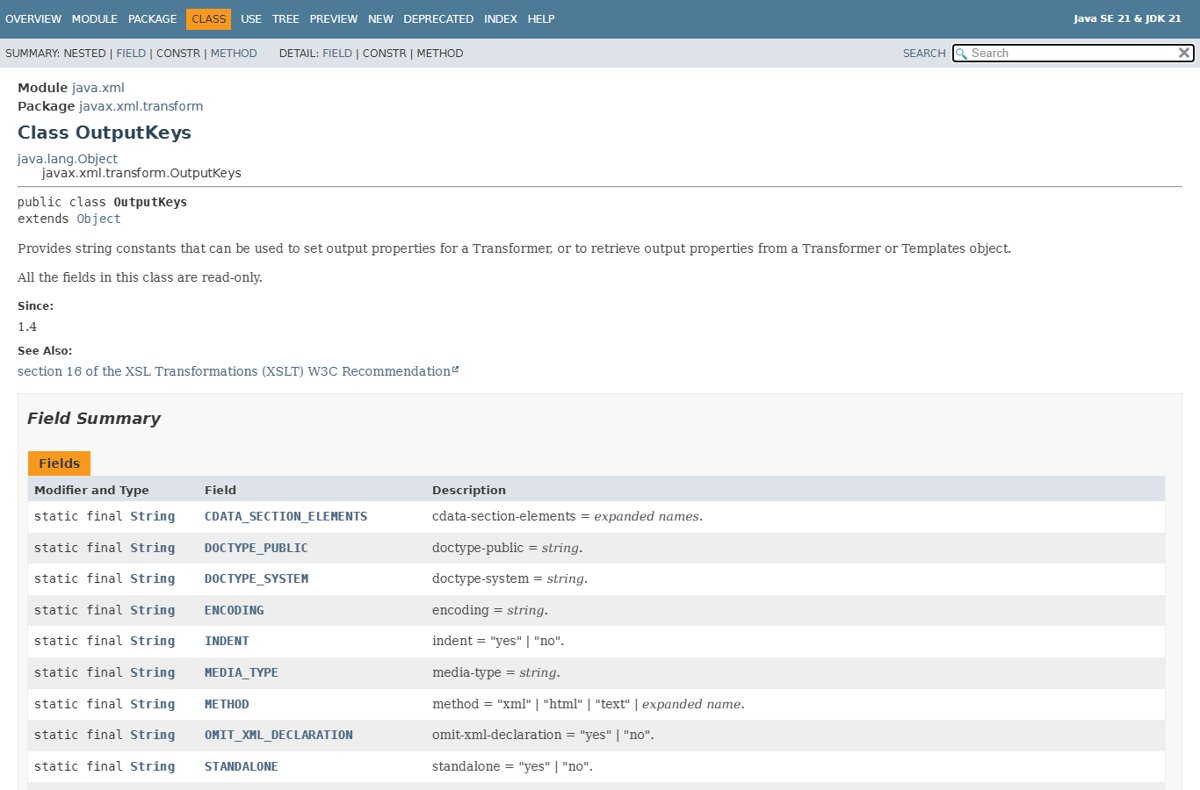
Every key below is a constant on javax.xml.transform.OutputKeys. Set them with setOutputProperty(name, value) before calling transform().
| OutputKeys constant | Allowed values | What it controls | Setting for compact XML |
|---|---|---|---|
INDENT |
yes or no |
Whether the transformer may add extra whitespace to the result tree | no |
OMIT_XML_DECLARATION |
yes or no |
Whether the <?xml ...?> declaration is written |
no to keep it, yes to drop it |
METHOD |
xml, html, text or an expanded name |
The overall output method | xml |
ENCODING |
A charset name such as UTF-8 |
The preferred encoding for turning characters into bytes | UTF-8 |
STANDALONE |
yes or no |
Whether a standalone document declaration is written | Leave unset unless required |
VERSION |
An nmtoken, default 1.0 for XML |
The XML version of the output | Leave unset |
CDATA_SECTION_ELEMENTS |
Whitespace-separated element names | Which elements' text is written as CDATA sections | Only when a consumer needs CDATA |
DOCTYPE_SYSTEM / DOCTYPE_PUBLIC |
Strings | The document type declaration written before the first element | Leave unset unless required |
MEDIA_TYPE |
A MIME type | The media type of the output | No effect on spacing |
An unrecognised key that is not namespace qualified makes setOutputProperty() throw IllegalArgumentException. Properties persist across calls, so a reused transformer keeps the values you set until you call reset().
Why does INDENT = "no" sometimes leave newlines?
INDENT only controls whether the transformer may add whitespace. It never removes whitespace that is already in the source, because the identity transform is a copy.
| Where the newline comes from | Why INDENT does not touch it | Fix |
|---|---|---|
| Whitespace text nodes from parsing an indented file | They are real Text nodes in the DOM, so they are copied | Strip whitespace-only text nodes before transforming |
Text you set with setTextContent() that contains \n |
Element content is data and is copied as is | Trim the string before you set it |
| A pretty-printing serializer later in the pipeline | The transformer output was compact, a later step reformatted it | Check the final writer or library, not the transformer |
| Line breaks inside attribute values | Attribute values are data | Clean the value in code before setAttribute() |
How can you remove whitespace-only DOM nodes safely?
Walk the tree, remove Text nodes whose value is only whitespace, and leave CDATA sections, comments and real text alone. Save the next sibling before removing, so the loop does not lose its place.
static void stripWhitespaceNodes(Node parent) {
    Node child = parent.getFirstChild();
    while (child != null) {
        Node next = child.getNextSibling();
        if (child.getNodeType() == Node.TEXT_NODE
                && child.getNodeValue().trim().isEmpty()) {
            parent.removeChild(child);
        } else if (child.getNodeType() == Node.ELEMENT_NODE) {
            stripWhitespaceNodes(child);
        }
        child = next;
    }
}
Call it as stripWhitespaceNodes(doc.getDocumentElement()) after parsing. Run doc.normalize() first so adjacent Text nodes are merged and each block of text is checked as one node. CDATA sections have the type CDATA_SECTION_NODE, so the check skips them.
You should see: a DOM in which every element-only parent has element children and no blank Text nodes between them.
Mixed content is the one case to protect. In <p><b>Hello</b> <i>world</i></p> the single space between the two child elements is a whitespace-only node, and removing it joins the words. Skip elements such as paragraphs, or limit the walk to elements you know hold only child elements.
The method changes the DOM in place. Work on doc.cloneNode(true) if other code still needs the original layout.
How can you build a compact DOM without adding formatting nodes?
A DOM created in code has no whitespace nodes unless you add them. Append elements and text directly and never insert \n or spaces as Text nodes for layout.
DocumentBuilderFactory dbf = DocumentBuilderFactory.newInstance();
dbf.setNamespaceAware(true);
Document doc = dbf.newDocumentBuilder().newDocument();

Element order = doc.createElement("order");
doc.appendChild(order);

Element item = doc.createElement("item");
item.setAttribute("sku", "A-100");
item.setTextContent("Widget");
order.appendChild(item);
newDocument() returns an empty Document, and each appendChild() call adds only the node you pass. Pass this document to the transformer with INDENT set to no.
You should see: <order><item sku="A-100">Widget</item></order> after the XML declaration, with no line breaks between elements.
If the values come from user input or a file, trim them before setTextContent(). Leading and trailing spaces in element text are content, and the transformer keeps them.
Should you use setIgnoringElementContentWhitespace(true)?
Use it only when the parser validates against a DTD that declares element-only content. Oracle's DocumentBuilderFactory documentation states that only whitespace directly inside element-only content is removed, and that the setting relies on the content model, so the parser must be in validating mode. Without setValidating(true) and a DTD, the flag does nothing to your indented input, and the DOM keeps every whitespace node. For schema-less files, strip the nodes in code instead.
Both settings default to false. Validation here means DTD validation; a W3C XML Schema set through setSchema() is a separate mechanism.
What is the difference between StringWriter and OutputStream?
StreamResult accepts a character stream (Writer) or a byte stream (OutputStream). Oracle's docs say a byte stream should normally be used so the transformer controls the encoding, while a StringWriter is useful when you need the XML as a string.
| Target | Constructor | Who produces the bytes | Best for |
|---|---|---|---|
StringWriter |
new StreamResult(new StringWriter()) |
Your code, when it later encodes the string | Logging, tests, API payloads built as strings |
OutputStream |
new StreamResult(outputStream) |
The transformer, using the ENCODING property |
Files, sockets and HTTP bodies |
File |
new StreamResult(new File("out.xml")) |
The transformer | Writing straight to disk |
Neither target changes whitespace. If a string result is later written with a different charset than the declaration names, the file is wrong for encoding reasons, not spacing reasons.
What is the difference between compact and pretty XML output?
| Your situation | Use this | Why |
|---|---|---|
| Sending XML to another service or storing it | Compact: INDENT = no, whitespace nodes stripped |
Smaller payload and no stray text nodes for the receiver to handle |
| Comparing output in unit tests | Compact output | Byte-for-byte comparisons do not break on indentation |
| People will read or edit the file | Pretty: INDENT = yes |
Indentation makes the structure readable |
| Documents with mixed content, such as XHTML | Compact, without stripping inside text elements | Indentation and stripping can both change the visible text |
Pretty printing adds whitespace text nodes to the output. A program that parses that file later sees those nodes unless it removes them again.
Why should you avoid regex cleanup such as replaceAll(">\s+<", "><")?
A regular expression works on characters, not on XML structure. It cannot tell formatting whitespace from data that happens to sit between two tags.
| Input | What the regex does | Why it is wrong |
|---|---|---|
<p><b>Hello</b> <i>world</i></p> |
Removes the space between </b> and <i> |
The visible text becomes "Helloworld" |
| `<code><![CDATA[a > < b]]></code>` |
Removes the line break inside the CDATA section | CDATA content is data and must stay byte for byte |
<pre> or xml:space="preserve" content |
Collapses whitespace the author meant to keep | The meaning of the document changes |
<a title="x > < y"/> |
Edits the attribute value | Attribute data is silently altered |
Strip whitespace nodes in the DOM instead. That approach sees node types, so it skips CDATA, comments and attribute values.
How do namespaces, comments, CDATA, and attributes behave in compact output?
| Item | Behavior with the identity Transformer | Parser setting that affects it |
|---|---|---|
| Namespaces | Copied with the nodes; prefixes and URIs are kept | setNamespaceAware(true); the default is false |
| Comments | Copied as comment nodes, including any line breaks inside them | setIgnoringComments(true) drops them at parse time |
| CDATA sections | Copied as CDATA; inner whitespace is data | setCoalescing(true) turns them into Text nodes |
| Attributes | Copied with their values; whitespace inside a value is kept | None; clean values in code |
| Forcing CDATA on output | Use the CDATA_SECTION_ELEMENTS output property |
Not a parser setting |
Turn on namespace awareness whenever the input uses prefixes. A parser without it treats ns:item as a plain name, which causes problems if you later build nodes with createElementNS().
When does compact XML differ from canonical XML?
Compact output only means no added indentation. Canonical XML is a defined serialization used for digital signatures and exact comparison, and Java exposes it through javax.xml.crypto.dsig.CanonicalizationMethod.
| Aspect | Compact Transformer output | Canonical XML |
|---|---|---|
| Purpose | Smaller output without formatting whitespace | One fixed byte form for signing or comparing documents |
| XML declaration | Written unless OMIT_XML_DECLARATION is yes |
Not written; the DOM canonical-form parameter turns xml-declaration off |
| Pretty printing | Controlled by INDENT |
Off; canonical-form sets format-pretty-print to false |
| Java API | Transformer with OutputKeys |
XML Digital Signature API with CanonicalizationMethod.INCLUSIVE or EXCLUSIVE |
| Comments | Kept unless removed | Separate algorithms with and without comments |
Use compact output for transport and storage. Use canonicalization only when a signature or a strict equality check requires it.
When should you use another serializer or Transformer implementation?
TransformerFactory.newInstance() uses the JAXP lookup mechanism, and the javax.xml.transform.TransformerFactory system property names a different implementation class. newInstance(String factoryClassName, ClassLoader classLoader) picks one explicitly.
| Your situation | Use this | Why |
|---|---|---|
| You only need DOM to compact text | The built-in identity Transformer |
No extra dependency and full OutputKeys support |
| You want the DOM serializer's own options | LSSerializer from DOM Load and Save |
format-pretty-print is off by default and xml-declaration can be turned off |
| You need a specific XSLT engine for stylesheets | newInstance(factoryClassName, classLoader) |
Selects that implementation without changing global settings |
| You need a line break after the declaration with the JDK serializer | setOutputProperty("jdk.xml.xsltcIsStandalone", "yes") |
JDK 17 added it to write a newline after the XML declaration |
Implementation-specific properties, including the indent behaviour of a third-party engine, vary between engines. Read that engine's documentation before relying on its defaults.
Compact XML with LSSerializer instead of Transformer
DOM Load and Save writes a node without the XSLT layer. Get it by casting the document's DOMImplementation to DOMImplementationLS, as the binding allows.
DOMImplementationLS ls = (DOMImplementationLS) doc.getImplementation();
LSSerializer serializer = ls.createLSSerializer();
serializer.getDomConfig().setParameter("format-pretty-print", Boolean.FALSE);
serializer.getDomConfig().setParameter("xml-declaration", Boolean.FALSE);
String xml = serializer.writeToString(doc);
format-pretty-print false is the default and stops added whitespace. xml-declaration false drops the <?xml ...?> line. writeToString() returns a UTF-16 string.
You should see: a single-line string when the DOM holds no whitespace text nodes.
Like the Transformer, LSSerializer keeps whitespace nodes that are already in the DOM, so strip them first.
Reusable compact XML helper
This class combines node stripping and a compact transformer. Create a new Transformer per call or per thread, because Oracle's docs state a single instance may not be used by several threads at once.
import java.io.StringWriter;
import javax.xml.transform.OutputKeys;
import javax.xml.transform.Transformer;
import javax.xml.transform.TransformerException;
import javax.xml.transform.TransformerFactory;
import javax.xml.transform.dom.DOMSource;
import javax.xml.transform.stream.StreamResult;
import org.w3c.dom.Node;

public final class CompactXml {

    private CompactXml() { }

    public static void stripWhitespaceNodes(Node parent) {
        Node child = parent.getFirstChild();
        while (child != null) {
            Node next = child.getNextSibling();
            if (child.getNodeType() == Node.TEXT_NODE
                    && child.getNodeValue().trim().isEmpty()) {
                parent.removeChild(child);
            } else if (child.getNodeType() == Node.ELEMENT_NODE) {
                stripWhitespaceNodes(child);
            }
            child = next;
        }
    }

    public static String toCompactString(Node node, boolean omitDeclaration)
            throws TransformerException {
        Transformer t = TransformerFactory.newInstance().newTransformer();
        t.setOutputProperty(OutputKeys.METHOD, "xml");
        t.setOutputProperty(OutputKeys.INDENT, "no");
        t.setOutputProperty(OutputKeys.ENCODING, "UTF-8");
        t.setOutputProperty(OutputKeys.OMIT_XML_DECLARATION,
                omitDeclaration ? "yes" : "no");
        StringWriter out = new StringWriter();
        t.transform(new DOMSource(node), new StreamResult(out));
        return out.toString();
    }
}
Parse the file, call doc.normalize(), then CompactXml.stripWhitespaceNodes(doc.getDocumentElement()), and finally CompactXml.toCompactString(doc, false). Pass true to drop the XML declaration.
You should see: the full document on one line, with the declaration first when omitDeclaration is false.
To write a file instead of a string, replace the StringWriter with new StreamResult(outputStream) so the transformer encodes the bytes as UTF-8.
How to check the Transformer output is compact
- Print
t.getOutputProperty(OutputKeys.INDENT)and confirm it returnsno. - Search the result with
xml.contains("\n")andxml.contains("\r"); both should befalsefor an element-only document. - Parse the result again with
DocumentBuilder.parse()to confirm it is still well formed. - Compare the text of a mixed-content element, such as a paragraph, before and after, and confirm the words still have their spaces.
- Check that CDATA sections and attribute values are unchanged.
A newline that survives step 2 is either inside text, a comment, CDATA or an attribute value. Find which one before changing any setting.
What should you check when unwanted whitespace remains?
Line breaks between elements even with INDENT set to no
The DOM was parsed from an indented file and still holds whitespace text nodes.
- Call
doc.normalize()on the parsed document. - Run
stripWhitespaceNodes(doc.getDocumentElement())beforetransform(). - Transform again and repeat the newline check.
setIgnoringElementContentWhitespace(true) changes nothing
The parser is not validating, or the document has no DTD that declares element-only content.
- Confirm
dbf.isValidating()returnstrue. - Confirm the document references a DTD that declares the content model.
- Without a DTD, remove the flag and strip whitespace nodes in code.
setOutputProperty throws IllegalArgumentException
The key is not a recognised output property and is not namespace qualified.
- Use the
OutputKeysconstants instead of typed strings. - Write implementation-specific keys in the
{namespace-uri}local-nameform. - Check the spelling of
yesandno; no other values are valid forINDENT.
Words run together after stripping whitespace
The strip method removed a space between two inline elements in mixed content.
- Skip elements that hold text and inline markup, such as paragraphs.
- Strip only inside elements you know contain child elements and no text.
- Re-run the mixed-content check from the verify section.
Settings from an earlier run still apply
A reused Transformer keeps its output properties between transformations.
- Call
t.reset()to return the transformer to its original configuration. - Set the compact properties again before the next
transform()call.
Java Transformer compact XML: frequently asked questions
Does Java Transformer INDENT="no" remove all whitespace from XML?
No. INDENT set to no only stops the transformer from adding whitespace. Whitespace text nodes already in the DOM, text content, comments, CDATA and attribute values are copied unchanged, so strip formatting nodes from the DOM first.
How do I keep the XML declaration but remove element indentation?
Set OutputKeys.OMIT_XML_DECLARATION to no and OutputKeys.INDENT to no, then strip whitespace-only text nodes from the DOM. The declaration is written first and the elements follow without added line breaks.
How do I remove the XML declaration but keep compact XML?
Set OutputKeys.OMIT_XML_DECLARATION to yes alongside INDENT set to no. With LSSerializer, set the xml-declaration parameter to false on its DOM configuration instead.
Is setIgnoringElementContentWhitespace(true) a universal XML whitespace fix?
No. It removes whitespace only inside element-only content defined by a DTD, and it requires a validating parser. Most documents without a DTD keep all their whitespace nodes with this flag set.
Is compact XML the same as canonical XML?
No. Compact XML only lacks added formatting. Canonical XML is a fixed serialization for signatures and exact comparison, available in Java through CanonicalizationMethod in the XML Digital Signature API.
What is javax.xml.transform.Transformer?
It is the abstract JAXP class that transforms a source tree into a result tree. You get an instance from TransformerFactory.newTransformer(), which with no stylesheet returns an identity transformer that copies the source to the result.
What does the transform method do in Java?
transform(Source xmlSource, Result outputTarget) processes the XML source and writes the result to the target, such as a StreamResult around a Writer or OutputStream. It throws TransformerException if an unrecoverable error occurs.
Is a Java Transformer thread safe?
No. Oracle's documentation states that a Transformer may not be used by several threads at once. Use a separate instance per thread; different transformers can run concurrently, and one instance can be reused sequentially.
The bottom line on compact XML with Java's Transformer
Set INDENT to no and strip whitespace-only text nodes from the DOM before you transform. The transformer never deletes whitespace that is already in the tree, so the output property alone cannot fix a parsed, indented file. Node-level stripping respects CDATA, comments and attributes, which regex cleanup does not, and skipping mixed-content elements keeps visible text intact.