To download TV shows and movies to watch offline, open your streaming service's own app on a supported phone, tablet or computer, find a title with a Download button, and tap it while you are on Wi-Fi.
This guide covers the official download features in Netflix, YouTube Premium, the Apple TV app and HBO Max, which devices each one supports, quality and storage settings, expiry limits, and fixes when a download fails.
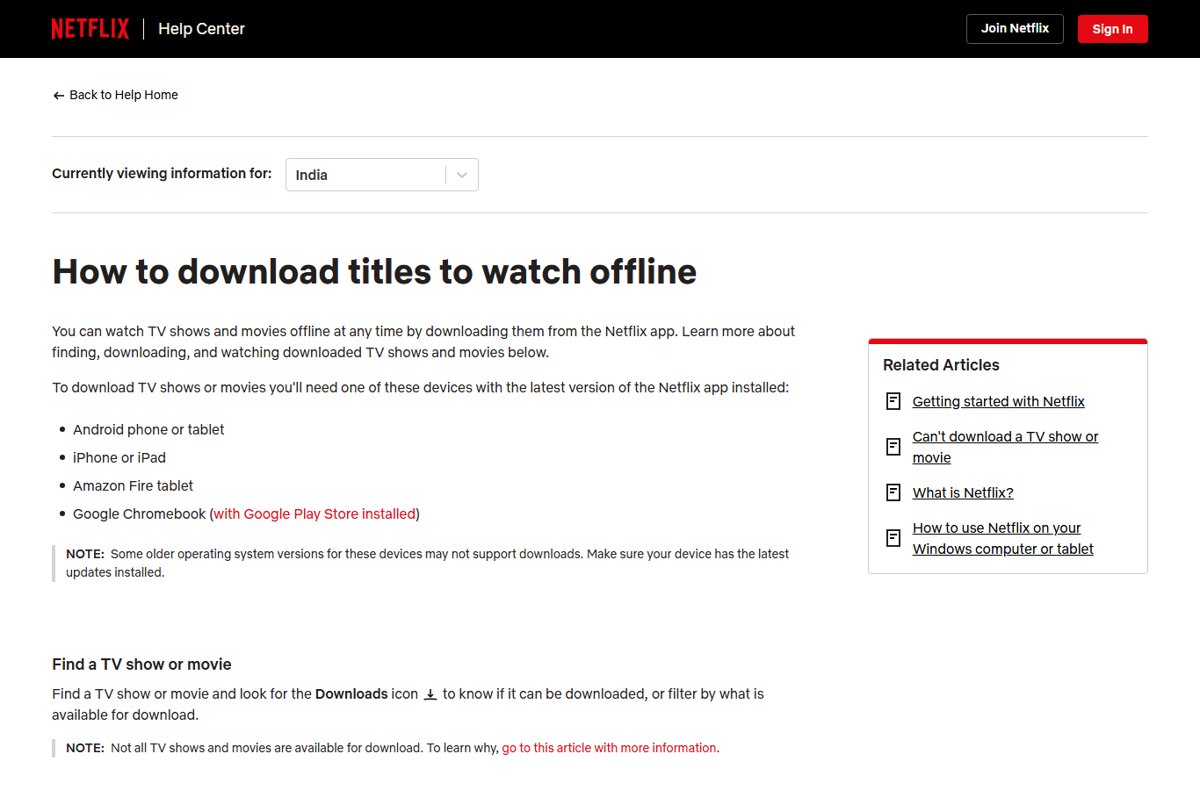
The fastest way to download a TV show or movie for offline viewing
Every major service follows the same pattern inside its own app. Downloads stay inside that app and play only there, on the device that saved them.
- Connect your phone or tablet to Wi-Fi and update the streaming app to its latest version.
- Open the app and sign in to the account that has the subscription.
- Open the movie or TV show you want and look for the Download icon on its page.
- Tap Download for a movie, or tap the download icon next to an episode for a TV show.
- Wait for the progress icon to finish, then open the app's Downloads (or Library > Downloaded) list.
- Select the title and press Play to confirm it opens before you go offline.
No download icon on a title means the service or your device does not allow that title offline. The table below shows where each service supports downloads.
Which streaming services support offline downloads?
Offline downloads are supported only in each service's official app, and only on the devices each service lists. Smart TVs and TV streaming boxes stream but do not download.
| Service | What you need | Devices that can download | Devices that cannot |
|---|---|---|---|
| Netflix | A Netflix membership and the latest Netflix app | Android phones and tablets, iPhone, iPad, Amazon Fire tablets, Chromebooks with the Google Play Store | Windows and Mac computers are not on Netflix's download list; TVs stream only |
| YouTube | A YouTube Premium membership, where Premium is available | YouTube app on phones and tablets; youtube.com in Chrome, Edge, Firefox or Opera on a computer | Other browsers; YouTube TV is a separate service not included in Premium |
| Apple TV app | Apple TV subscription, an Apple TV channel, or titles you bought or rented | iPhone, iPad, Mac, Windows PC, Android devices, Apple Vision Pro | Apple TV 4K, Apple TV HD, smart TVs, streaming devices and tv.apple.com |
| HBO Max | A Standard or Premium plan (Basic with Ads allows 0 downloads) | iPhone, iPad, iPod Touch, most Android phones and tablets, Amazon Fire tablets | Computers and TV devices |
Not every title is downloadable even on a supported device. Netflix says some titles cannot be offered for download because the download rights belong to another company or are not available to buy from the content provider.
Download movies and TV shows on mobile devices with the Netflix app
Netflix downloads work on Android, iPhone, iPad and Fire tablets. You can have up to 100 active downloads at a time per device, based on the number of devices in your Netflix plan.
- Open the Netflix app and connect to Wi-Fi to save mobile data.
- Tap My Netflix > Downloads > See What You Can Download to list only downloadable titles.
- Open the movie or TV show you want.
- For a movie, tap Download.
- For a TV show, tap the download button next to an episode, or tap Download Season to save every episode of that season.
- To watch offline, open Downloads, find the title and tap Play.
Downloads play on the device that saved them and from any profile on the account. If you would rather pick something first, you can browse all Netflix movies and TV shows by genre before you download.
How to download HBO Max shows and movies on a phone or tablet
HBO Max downloads need a Standard or Premium plan, enough free storage, and an iPhone, iPad, Android or Fire device. Set your subtitle and audio language before downloading, because the download keeps that choice.
- Open HBO Max and sign in on a Wi-Fi connection.
- Start the title, tap the Audio and Subtitles icon in the player, and choose your languages.
- Go back to the title's description screen.
- Tap the Download icon beside the description and watch the progress indicator.
- To watch, tap the Downloads icon and choose the title.
To cancel a download in progress, tap the progress icon and choose Cancel.
How to download YouTube videos offline with YouTube Premium
YouTube downloads are a YouTube Premium benefit. They work in the YouTube app and on youtube.com in Chrome, Edge, Firefox and Opera, and you must be signed in to the Premium account.
- Sign in to your Premium account in the YouTube app, or at youtube.com in a supported browser.
- Go to the watch page of the video you want to save.
- Select Download below the video; the icon turns black when the download is complete.
- On a phone or tablet, tap your profile picture, open Library, tap the Downloaded filter and open Downloads.
- On a computer, click Downloads in the left menu at youtube.com.
If the connection drops mid-download, YouTube resumes the download automatically once you reconnect.
How to download movies and TV shows in the Apple TV app
The Apple TV app downloads titles from your Apple TV subscription, Apple TV channels, and your purchases or rentals. Some channels do not allow downloads at all.
- Open the Apple TV app on your iPhone, iPad, Mac or Windows PC.
- Browse or search for the movie, show or event you want.
- For a movie, select the Download button.
- For a TV show on iPhone or iPad, choose the season, then download the whole season or single episodes; on a Mac or PC, find the episode, click the More button, then click Download.
- Go to the Library tab and choose Downloaded to play it.
- On a PC with no Downloaded entry, click More > Edit Library Sidebar and turn Downloaded on.
To save new episodes automatically on iPhone or iPad, open Settings > Apps > TV and turn on Automatic Downloads. The next two episodes you start in Continue Watching then download over Wi-Fi and delete after you finish them.
How to download TV shows and movies on a laptop or tablet
Laptops have far fewer options than phones. Match your device to a row to see which official apps can save content for offline use.
| Your device | Official apps that download | What will not download |
|---|---|---|
| Windows laptop or tablet | Apple TV app; YouTube Premium at youtube.com in Chrome, Edge, Firefox or Opera | Netflix (Windows is not on its download list) and HBO Max (computers unsupported) |
| MacBook | Apple TV app; YouTube Premium at youtube.com in Chrome, Edge, Firefox or Opera | Netflix and HBO Max |
| Chromebook | Netflix from the Google Play Store; YouTube Premium in Chrome | Netflix on a Chromebook without the Google Play Store |
| iPad | Netflix, YouTube, Apple TV app, HBO Max | Nothing from this list |
| Android tablet | Netflix, YouTube, Apple TV app, HBO Max | Titles a service has not licensed for download |
| Amazon Fire tablet | Netflix, HBO Max | Services not listed by their own help pages |
A Chromebook is the only laptop Netflix lists, so downloading Netflix movies on a laptop means the Chromebook app or a phone or tablet instead.
How to check a downloaded show will play offline
Test a download before you lose your connection, not on the plane. A title that plays in airplane mode is stored on the device.
- Confirm the download icon shows a finished state, such as the black YouTube icon or the HBO Max check mark.
- Turn on Airplane mode and turn off Wi-Fi.
- Open the app's downloads list: Downloads in Netflix and HBO Max, Library > Downloaded in the Apple TV app or YouTube.
- Play the first minute of the title.
- Turn Wi-Fi back on once it plays, so the app can sync licences before you travel.
Change download video quality, storage and data usage settings
Higher quality takes longer to download and uses more storage and data. HBO Max says an hour-long download at Good quality can take 1-2 GB.
| Service | Where the setting is | Quality options | Data and storage controls |
|---|---|---|---|
| Netflix (Android, iPhone, iPad) | My Netflix > profile name > App Settings > Download Video Quality | Standard (SD, smaller) or High/Higher (up to 1080p) | Download on Wi-Fi; delete watched titles; Smart Downloads (not on ad-supported plans) |
| YouTube app | Profile picture > Settings > Background & downloads > Download quality | Default quality you choose | Higher quality uses more data and space |
| YouTube on a computer | Settings > Downloads > Download quality | Default quality you choose | Higher quality takes longer to appear in Downloads |
| HBO Max | Profile > App Settings > Download Settings > Video Quality | Good (default), Better or Best | Download Over Wi-Fi Only toggle in the same menu |
| Apple TV app | Settings > Apps > TV (iPhone, iPad) | Not documented on the download page | Automatic Downloads run over Wi-Fi only |
The Netflix and HBO Max settings apply to every profile on that phone or tablet. Netflix cannot change quality on Android and Fire devices that do not support HD playback.
Do downloaded movies expire? Expiration dates and viewing limits by service
Downloads are licences, not files you own. Each service sets how long a title lasts offline and how many you can hold at once.
| Service | How long downloads last | Download limits |
|---|---|---|
| Netflix | Expire after a period that varies by title; watch as often as you like before then | Up to 100 active downloads per device; some titles limit downloads per year; cancelling the membership deletes downloads |
| YouTube Premium | Up to 29 days offline, then reconnect; 48 hours in some countries or regions | Plays only while signed in to the same account |
| Apple TV app | Up to 30 days for most channels; some subscription titles expire 48 hours after you start playing or 30 days after download, whichever comes first | Some channels cap simultaneous downloads and devices; the app alerts you at the limit |
| HBO Max | 48 hours to finish once you start; unwatched downloads expire after 30 days | Standard 30, Premium 100 across all devices; 25 episodes per series; 30 movies at a time |
Reconnect before a long trip so expired titles can be renewed. A title that has left the service cannot be renewed or downloaded again.
How to delete downloaded shows and movies to free up storage
Deleting a download frees space on the device and releases a slot against your download limit.
- Netflix: open Downloads, tap the download status icon next to the title, then tap Delete Download.
- HBO Max: open Downloads, tap the check mark icon, then choose Delete Download; for a series, tap Edit and tap the X beside episodes.
- Apple TV app on iPhone: open Library > Downloaded, swipe left on the item, then tap Delete.
- Apple TV app on iPad: tap Downloaded, tap Edit, select the item, then tap Delete.
- Apple TV app on Mac or Windows: select the More button on the item, then choose Remove Download.
Signing out of HBO Max does not delete downloads, and switching to Basic with Ads deletes them.
Fix common offline download problems
No download button on a show or movie
The device or plan does not support downloads, or the title is not licensed for download.
- Check your device against the support table above; computers and TVs are excluded by Netflix and HBO Max.
- On HBO Max, confirm you are not on Basic with Ads, which allows no downloads.
- Install the latest app and system updates, since Netflix says some older operating system versions do not support downloads.
- In Netflix, use See What You Can Download to pick a title that offers it.
Downloaded title says 'Expired'
The offline licence period ended, or the device clock is wrong.
- On iPhone or iPad, open Settings > General > Date & Time and turn on Set Automatically.
- Reconnect to the internet.
- In Netflix, open Downloads, tap the download status icon, tap Delete Download, then download the title again.
- In HBO Max, tap the clock icon on the title and choose Renew Download.
A download will not play offline
The download expired, or the app is not signed in.
- Connect to the internet and renew or re-download the title.
- Make sure you are signed in to the same account that downloaded it.
- Close the app, turn on Airplane mode, turn off Wi-Fi, then reopen the app and try again.
- On Android, clear the app cache under Settings > the app > Storage & cache > Clear cache, then sign in again.
'Download Limit Reached' or can't download more titles
The account or device holds the maximum number of downloads.
- Delete titles you have finished on this device.
- Check other phones and tablets on the account for old downloads and delete them.
- In the Apple TV app, delete episodes or movies from one of your or your family's devices, then try again.
'Storage Limit Reached' or download failed
The device is out of space, or the download dropped on a cellular connection.
- Free up storage or download a single episode instead of a season.
- Lower the download quality to Standard (Netflix) or Good (HBO Max).
- Switch from cellular data to Wi-Fi and start the download again.
Offline TV show and movie downloads FAQ
How do you download TV shows and movies?
Use the official app of the service you subscribe to. Open a title on a supported phone, tablet or computer, tap the Download icon, and play it later from the app's Downloads or Library section. The file stays inside that app and cannot be moved to other players.
Can I download movies and TV shows from every streaming service?
No. Each service decides which devices and plans can download, and many titles are excluded by licensing. Netflix, YouTube Premium, the Apple TV app and HBO Max all support downloads, but HBO Max's Basic with Ads plan allows none, and TVs never download.
How do I download TV shows on Netflix?
Open the Netflix app on Android, iPhone, iPad, a Fire tablet or a Chromebook. Tap My Netflix, Downloads, See What You Can Download, open a show, then tap the download button next to an episode or tap Download Season for the whole season.
How do I download TV shows on a PC?
On a Windows PC, use the Apple TV app for Apple TV subscription, channel, bought or rented titles, or YouTube Premium at youtube.com in Chrome, Edge, Firefox or Opera. Netflix does not list Windows as a download device, and HBO Max does not support computers.
Can I download TV shows on my laptop?
Yes, with the right app. A Windows laptop or MacBook can download through the Apple TV app and YouTube Premium in a supported browser. A Chromebook with the Google Play Store can also download from the Netflix app.
How do I download a whole TV series?
Download one season at a time. In Netflix, tap Download Season on the show's page. On iPhone or iPad, the Apple TV app lets you choose a season and download all of it. HBO Max may cap a series at 25 downloaded episodes.
How do I download YouTube TV shows?
YouTube Premium downloads cover videos in the YouTube app and on youtube.com. YouTube TV is a separate subscription and is not included in YouTube Premium benefits, so Premium downloads do not apply to YouTube TV channels.
How much storage do offline movies and TV episodes use?
It depends on quality. HBO Max says an hour-long download at Good quality can take 1 to 2 GB. Netflix's Standard setting uses less space than High, and YouTube's higher download quality takes more space and data.
Do downloaded movies and shows expire?
Yes. YouTube downloads need a reconnect after 29 days, HBO Max and most Apple TV channel downloads last 30 days, and HBO Max gives 48 hours to finish a title once you start. Netflix expiry varies by title.
What should I do if a download will not play offline?
Reconnect to the internet and renew or re-download the title, because it has probably expired. Check you are signed in to the same account, and on iPhone or iPad confirm the date and time are set automatically.
Bottom line: where to download TV shows and movies for offline viewing
Download on a phone or tablet with the official app of the service you already pay for, on Wi-Fi, a day before you travel, and test each title in airplane mode. Phones and tablets are the only devices every service here supports, and every download carries an expiry and a count limit that only a reconnect can reset. On a laptop, the Apple TV app and YouTube Premium are the routes that work on Windows and Mac.

![Allow apps to access your microphone Windows 11 [tutorial]](https://techdows.com/wp-content/uploads/2026/10/Windows-10-Privacy-Microphone-page-with-the-apps-access-switch-on.jpg)