To recover deleted text messages on Android, open the Trash folder in Google Messages or Samsung Messages and restore the conversation; Google Messages keeps trashed chats for 30 days.
If the Trash is empty, this guide covers restoring texts from a Google or Samsung Cloud backup, what your carrier can and cannot give you, how to judge recovery apps, and how to stop losing texts again.
Recover deleted text messages from the Google Messages Trash
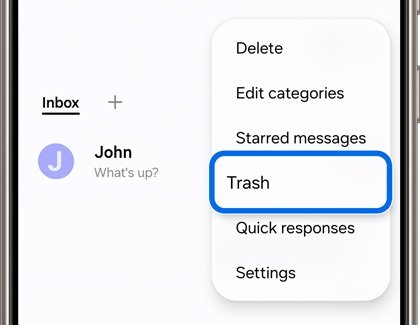
Google Messages is the default texting app on Pixel phones and many other Android phones. Its Trash folder holds deleted conversations for 30 days, and each trashed chat shows a counter with the days left.
- Open Google Messages.
- Tap your profile picture or More at the top right, then tap Trash.
- Touch and hold the conversation you want back. Touch and hold more chats to select several.
- Tap Restore at the top.
- To bring back everything in the folder, tap Restore without selecting any conversation first.
The restored conversation returns to your inbox with its messages. To read a trashed chat, you have to restore it first; the Trash does not open conversations.
A conversation you delete from the Trash itself is gone for good. Google states that permanently deleted chats cannot be recovered.
Which Android text message recovery method fits your phone?
| Your situation | Use this | Why |
|---|---|---|
| Google Messages, deleted within 30 days | Google Messages Trash | One tap, nothing else on the phone changes |
| Samsung Messages app on a Galaxy phone | Samsung Messages Trash | Restores single messages or whole threads in place |
| Chat vanished but you never deleted it | Archived or Spam & blocked folder | Archiving and spam reports hide chats without deleting them |
| Trash is empty, Google backup ran before the deletion | Google backup restore after a factory reset | Texts restore only during phone setup |
| Galaxy phone with a Samsung Cloud backup | Samsung Cloud Restore data | Lets you pick Messages as the only data type |
| Verizon customer with Verizon Cloud on Android | Ask Verizon about Verizon Cloud texts | Verizon Cloud syncs Android texts, but deletions sync too |
| No Trash copy and no backup | Carrier records, then a vetted recovery tool | Low odds; carriers usually give logs, not message text |
Check whether the deleted messages are still recoverable
Before you reset anything, rule out the places a text hides without being deleted. A missing chat is often archived or filed as spam rather than erased.
| Where to look | How to open it | What it means |
|---|---|---|
| Google Messages archive | More > Archived, then touch and hold the chat and tap Unarchive | Archived chats leave the home screen but stay readable |
| Google Messages spam | Profile picture > Spam & blocked, select the contact, tap Unblock | Unblocking returns the chat to the home screen and removes the spam report |
| Google Messages Trash | Profile picture or More > Trash | Restorable for 30 days from deletion |
| Samsung Messages Trash | More options (three dots) > Trash | Restore single messages or the whole folder |
| Phone Link on a Windows PC | Open Messages in Phone Link | Shows Android texts from the last 30 days; it cannot delete or restore them |
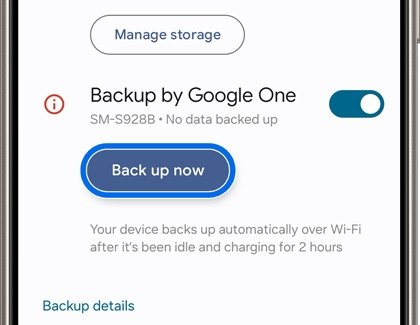
| Google backup | Settings > Google > Backup, scroll to Backup details | Shows whether SMS and MMS are in your backup |
| Samsung Cloud | Settings > your Samsung account name > Samsung Cloud | Lists device backups you can restore |
If a text appears in Phone Link on your PC but not on the phone, copy the wording out before the next sync. Phone Link mirrors the phone, so it is a viewer rather than a backup.
Recover deleted text messages on Samsung from the Samsung Messages Trash
Galaxy phones that use Samsung Messages have their own Trash, separate from Google Messages. Samsung lets you restore individual messages as well as whole conversations.
- Open Samsung Messages.
- Tap More options (the three vertical dots).
- Tap Trash.
- Touch and hold a message to select it, or tap All to select everything.
- Tap Restore, or Restore all to bring back the whole folder.
If your Galaxy phone uses Google Messages as the default texting app, use the Google Messages Trash instead. Each app only keeps its own deleted messages.
Recover deleted text messages using Google backup
Android's Google backup includes SMS and MMS messages, and RCS chats when you use Google Messages. The catch is that messages restore only while you set up a phone, so an existing phone has to be factory reset first.
A factory reset erases everything currently on the phone. Anything you received after the backup ran is lost unless you save it elsewhere first.
- Open Settings, tap Google > Backup, and scroll to Backup details to confirm SMS messages are listed.
- Leave backup turned on. Google deletes your backup data when you turn off backup on the device.
- Copy photos, files and recent chats you need to another place, because the reset wipes them.
- Make sure you know the password for the Google Account on the phone. If you changed it recently, wait 24 hours before resetting.
- Reset the phone to factory settings from the Settings app. The exact menu differs by manufacturer.
- During setup, sign in with the same Google Account and choose the backup to restore when prompted.
- Follow the on-screen steps and keep the phone on Wi-Fi and charging. Google says a full restore can take up to 24 hours.
This only helps if the backup ran before you deleted the texts. Google does not offer a way to pick an older dated backup or to restore messages alone on a phone that is already set up.
Two version rules apply. You cannot restore a backup from a higher Android version onto a phone running a lower one, and backups from a phone unused for 57 days are erased, except photos and videos.
Restore messages from a Samsung Cloud or manufacturer backup
Samsung Cloud backs up messages, call logs, contacts, settings and other data on Galaxy phones. Unlike Google backup, it lets you choose Messages as the only data type to restore.
Samsung notes that Samsung Cloud is not available on Verizon phones or tablets, or in some countries.
- Open Settings on the Galaxy phone.
- Tap your Samsung account name at the top, then tap Samsung Cloud. On some software versions the path is Accounts and backup.
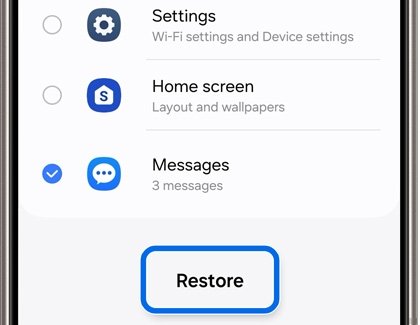
- Tap Restore data.
- Choose the source device whose backup holds the texts.
- Select Messages only, so other data is left alone.
- Tap Restore, then tap Done when it finishes.
Samsung deletes all Samsung Cloud data that has not been used for more than 12 months. A backup you delete yourself cannot be recovered.
Other manufacturers handle this differently. The table below covers the backup routes for messages that the vendors document.
Compare manufacturer backup options for Android text messages
| Backup | Phones | Includes texts | How texts come back |
|---|---|---|---|
| Google backup (Google One) | Most Android phones with a Google Account | SMS, MMS, and RCS through Google Messages | Only during setup after a reset or on a new phone |
| Samsung Cloud | Galaxy phones, not Verizon models | Messages, call logs, contacts and more | Restore data, with Messages selectable on its own |
| Smart Switch backup | Galaxy phones, to a PC, Mac, SD card or USB drive | Messages | Restore in Smart Switch, then pick messages |
| Verizon Cloud | Verizon Android phones | Texts, sync only | Restored when you move to a new phone; deletions sync |
A Smart Switch backup on a computer cannot be read on the computer. Samsung says the messages become readable only after they are restored to the phone.
Contact your mobile carrier for message recovery options
Carriers keep usage records, but that is not the same as the text of your messages. Verizon, for example, shows text history with dates and numbers on your bill and does not describe a way to retrieve deleted message content.
- Write down the phone number, the other person's number and the approximate date of the missing texts.
- Sign in to your carrier account online and open the usage or bill details to confirm the texts were sent or received.
- If you use Verizon Cloud on an Android phone, ask Verizon whether the texts were synced before you deleted them.
- Ask the carrier's support team directly whether it stores message content and for how long.
- Request any records in writing if you need them for a dispute or legal matter.
Verizon Cloud stores Android texts, but they cannot be read in the Verizon Cloud app, website or My Verizon. Deleting a text in your messaging app also removes it from Verizon Cloud at the next sync, so act before the phone syncs again.
Use Android SMS recovery software safely
Desktop and app-based SMS recovery tools promise to pull deleted texts from phone storage. Results vary widely, and the tool gets deep access to every message and contact on the phone.
- Try the Trash folders and backups first. They are free and have no privacy cost.
- Install apps only from Google Play or the developer's own website.
- On the Google Play listing, read the Data safety section and tap See details to see what the app collects and shares.
- Never type your Google Account password into a recovery tool. Restoring a Google backup only happens on the phone itself.
- Avoid any tool that asks you to turn off Google Play Protect or other security protection.
- Do not pay until a free scan shows the actual messages you want, with their text visible.
When you are done, uninstall the recovery app completely so it no longer has access to your messages.
How to check restored text messages on Android
- Open your default texting app and find the restored conversation in the main inbox, not in Archived or Trash.
- Open the thread and scroll to the date of the missing text to confirm the message itself is back.
- Check that pictures and videos in MMS messages open, not just the text.
- After a Google backup restore, keep the phone on Wi-Fi and charging, then check again later. The restore can take up to 24 hours.
- Open Settings > Google > Backup and confirm backup is on, so the restored texts are saved again.
Prevent future message loss with automatic backups
Turn on at least one automatic backup today. The Trash folders only protect you for a limited window.
| Backup | How to turn it on | Good to know |
|---|---|---|
| Google backup | Settings > Google > Backup, turn on backup, then tap Back up now | Use a PIN, pattern or password lock; 15 GB of Google storage is free |
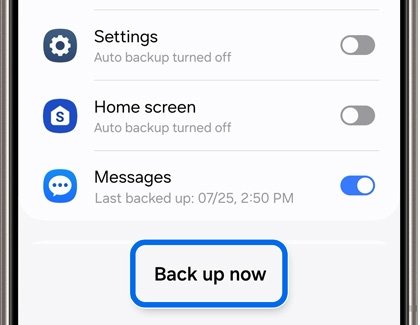
| Samsung Cloud | Settings > Samsung account name > Samsung Cloud > Back up data, turn on Messages, tap Back up now | Samsung says automatic backups run every 24 hours while charging on Wi-Fi with the screen off |
| Smart Switch to a PC or Mac | Connect the phone by USB and run a backup in Smart Switch | Gives you an offline copy that cloud deletions cannot touch |
| Google Messages Trash | Built in; no setup | Gives you 30 days to undo a deletion |
Check Backup details once a month to confirm the last backup date is recent. A backup that stopped running months ago will not hold this week's texts.
Fix Android text message restore problems
Texts were permanently deleted from the Trash
Emptying the Trash, or waiting past 30 days in Google Messages, removes the conversation for good.
- Check Backup details in Settings > Google > Backup to see if a backup ran before the deletion.
- On a Galaxy phone, open Samsung Cloud > Restore data and look for an older device backup.
- Check whether the other person still has the conversation and can forward it or send screenshots.
A Google backup restore did not bring back deleted texts
The backup ran after the texts were deleted, or messages were skipped during setup.
- Confirm SMS messages are listed under Backup details before you reset again.
- Check the Android version: a backup from a newer version will not restore onto an older one.
- Keep the phone on Wi-Fi and charging, because the restore can take up to 24 hours to finish.
Samsung Cloud has no Restore data option on a Verizon Galaxy phone
Samsung Cloud is not available on Verizon phones or tablets.
- Use the Samsung Messages Trash for recent deletions.
- Use the Google backup route instead.
- Ask Verizon whether the texts were synced to Verizon Cloud before you deleted them.
Recovered texts appear in the Trash but not in the inbox
Google Messages cannot show the messages of a trashed chat until it is restored.
- Touch and hold the conversation in Trash.
- Tap Restore at the top.
- Return to the inbox and open the conversation.
Recover deleted text messages on Android FAQ
Can I recover deleted text messages on Android without a backup?
Yes, if the text is still in the Trash of Google Messages or Samsung Messages, which needs no backup. Google Messages keeps trashed chats for 30 days. Once the Trash is emptied and no backup exists, your only options are the other person's copy or a recovery tool, and success is not likely.
How do I recover deleted text messages on Samsung?
Open Samsung Messages, tap More options (three dots), then Trash. Select the message or tap All, then tap Restore. If the Trash is empty, restore Messages from Samsung Cloud under Settings, your Samsung account name, Samsung Cloud, Restore data.
How do I recover deleted text messages in Google Messages?
Tap your profile picture or More, then Trash, touch and hold the conversation and tap Restore. Google Messages keeps deleted conversations for 30 days. A chat deleted from the Trash itself cannot be restored by Google.
How do I recover deleted text messages on a Motorola phone?
If your Motorola phone uses Google Messages for texting, use its Trash folder: tap your profile picture or More, then Trash, and restore the chat. Without a Trash copy, restore from a Google backup during setup after a factory reset.
Can Verizon or T-Mobile recover deleted text messages?
Carriers usually provide usage records such as dates and numbers, not message text. Verizon Cloud does sync Android texts, but a text deleted in your messaging app is removed from Verizon Cloud at the next sync. Ask your carrier's support directly what it keeps and for how long.
Can you recover permanently deleted text messages?
Only from a backup made before the deletion. Google states that conversations deleted from the Google Messages Trash cannot be recovered. Check Google backup details or Samsung Cloud for an older copy, or ask the other person to forward the conversation.
Will restoring a Google backup bring back my deleted text messages?
Only if the backup ran before you deleted them and you restore it during phone setup. Google restores messages only at setup, so an existing phone needs a factory reset, which erases anything newer than the backup.
How do I recover recently deleted text messages on iPhone?
On an iPhone, open Messages, open the conversation list menu and tap Recently Deleted, select the conversations and tap Recover. Apple keeps deleted texts for up to 30 days. Copies may also sit on a Mac if you set up text message forwarding on the iPhone.
Are Android SMS recovery apps safe to use?
Some are, but they get access to every message and contact on your phone. Install only from Google Play or the developer's site, read the Data safety section, never enter your Google password, and never pay before a free scan shows the texts you want.
Bottom line: can you recover deleted text messages on Android?
Check the Trash in Google Messages or Samsung Messages first, then the Archived and Spam folders, and only then a Samsung Cloud restore or a Google backup reset. The Trash restores a chat in seconds with nothing lost, Samsung Cloud can restore Messages alone, and a Google backup restore needs a full factory reset that wipes newer data.

![How to copy and paste on Chromebook [text & image shortcut]](https://techdows.com/wp-content/uploads/2026/10/Open-Chromebook-laptop-showing-its-keyboard-touchpad-and-ChromeOS-desktop-600x338.jpg)