You can set up a Kanopy download on a Windows 11 or Windows 10 PC in about a minute. Open kanopy.com in Microsoft Edge, install it as an app, and it gets its own window, Start menu entry and taskbar icon.
On a Mac, Safari adds the same site to the Dock. iPhone, iPad and Android devices get the full Kanopy app free from the App Store and Google Play, and smart TVs have their own Kanopy app.
Below are the official links, the setup steps for each device, how library cards and monthly tickets work, and fixes for films that will not play.
Which Kanopy download do you need?
Match the device in front of you to a row. One Kanopy account, linked to your library, works on all of them.
| Your device | What to get | What it needs |
|---|---|---|
| Windows 11 or Windows 10 PC | kanopy.com installed as an app from Edge | Latest Edge, Chrome or Firefox |
| MacBook, iMac or Mac mini | kanopy.com added to the Dock from Safari | Latest Safari, Chrome or Firefox |
| iPhone or iPad | Kanopy on the App Store | iOS or iPadOS 14.0 or later, 108.2 MB |
| Android phone or tablet | Kanopy on Google Play | Android 7.1 or later |
| Smart TV or streaming stick | Kanopy supported devices list | The TV’s own app store |
Phones and tablets need the app, because Kanopy does not play video in mobile browsers.
Download Kanopy from its official sources
Every official copy comes from Kanopy through one of these addresses.
- Kanopy on the web — the PC and Mac route, and the page to install as an app
- Kanopy supported browsers and devices — Kanopy’s own list of browsers, mobile apps and TV apps
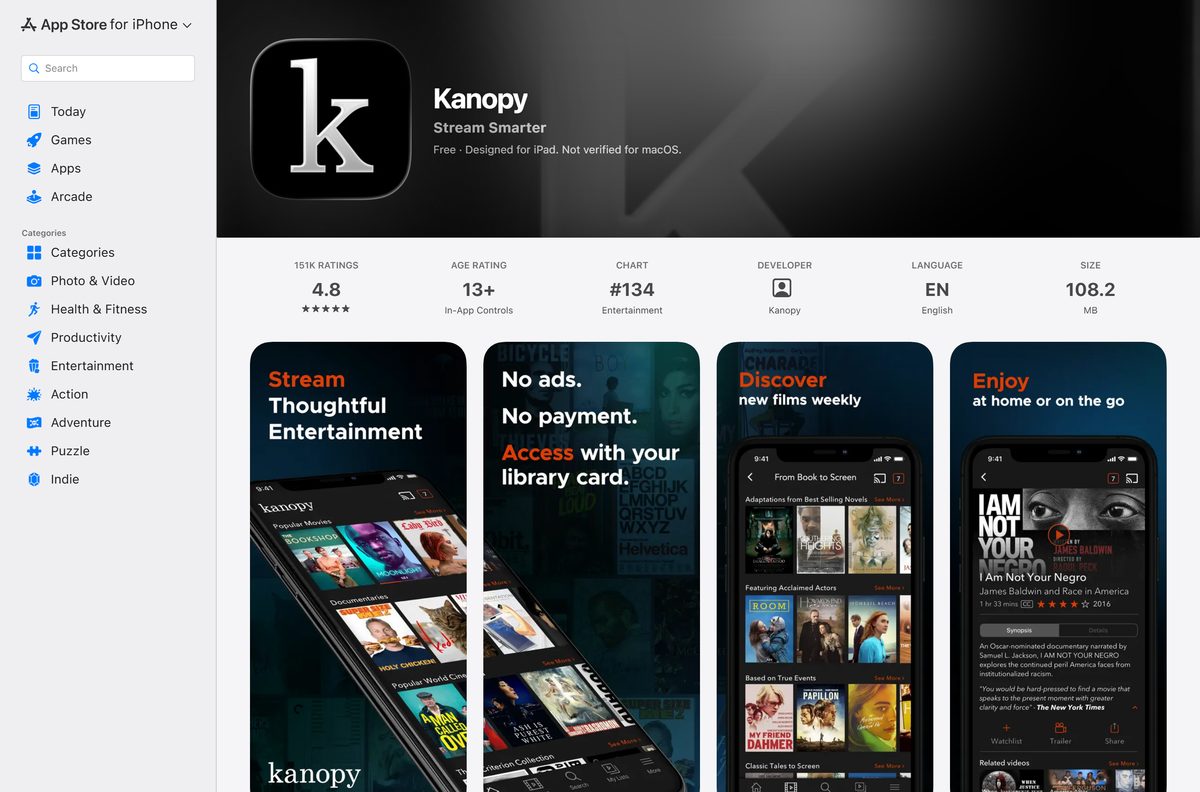
- Kanopy on the App Store — 108.2 MB · iPhone, iPad and Apple TV, seller KANOPY LLC
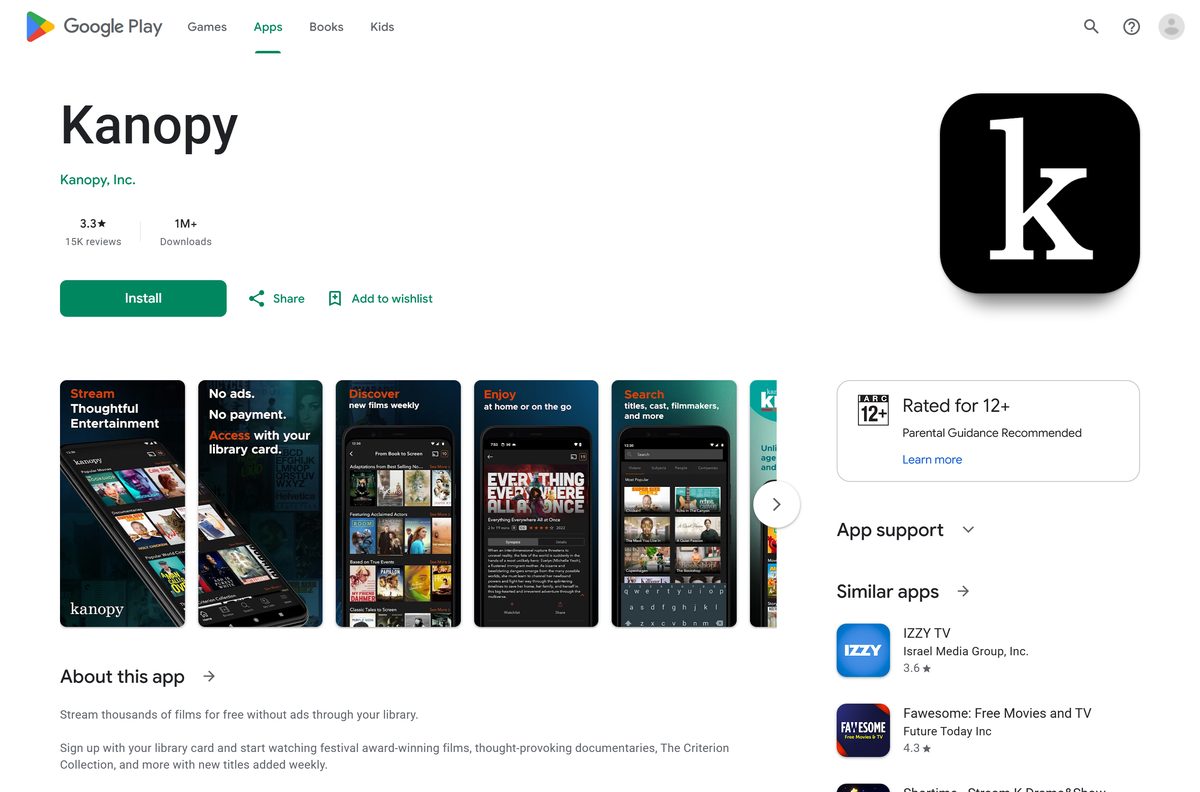
- Kanopy on Google Play — Android phones and tablets, developer Kanopy, Inc.
A Kanopy .exe or .dmg offered on any other site does not come from Kanopy. Start at kanopy.com instead.
Check the Kanopy requirements before you sign up
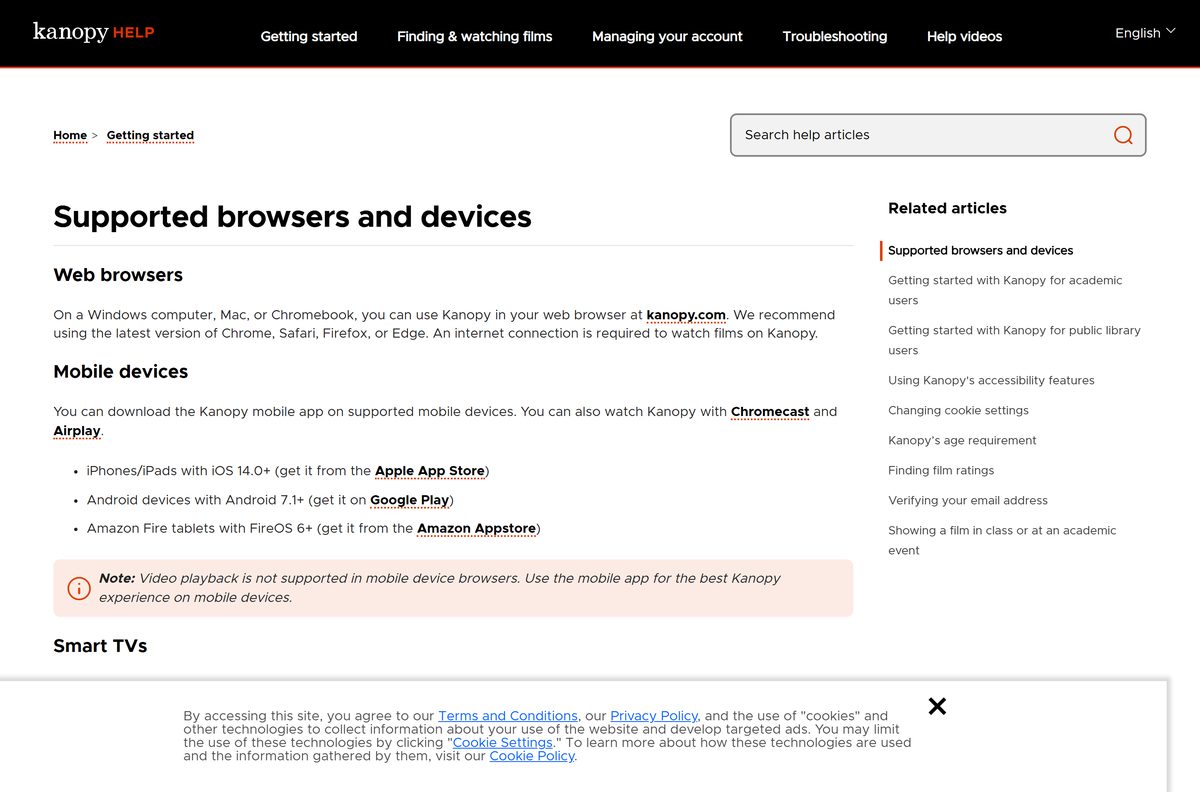
The desktop route needs only a current browser and an internet connection.
| Field | Value |
|---|---|
| Software | Kanopy |
| Developer | Kanopy, an OverDrive company |
| Latest version | 6.24 on iPhone and iPad; the web app updates itself |
| License | Free with a participating library card or university login |
| Supported OS | Windows 11 and 10, macOS and ChromeOS in a browser; iOS 14.0+; Android 7.1+ |
| Browsers | Latest Chrome, Safari, Firefox or Edge |
| Architecture | Browser-based on PC and Mac: x64, ARM64, Intel and Apple silicon |
| Download size | No desktop file; 108.2 MB on iPhone and iPad |
| Offline installer | No |
| Mac app | None; add kanopy.com to the Dock from Safari |
| Category | Film and TV streaming |
| Last verified | 25 September 2026 |
How to install Kanopy on Windows 11 and 10
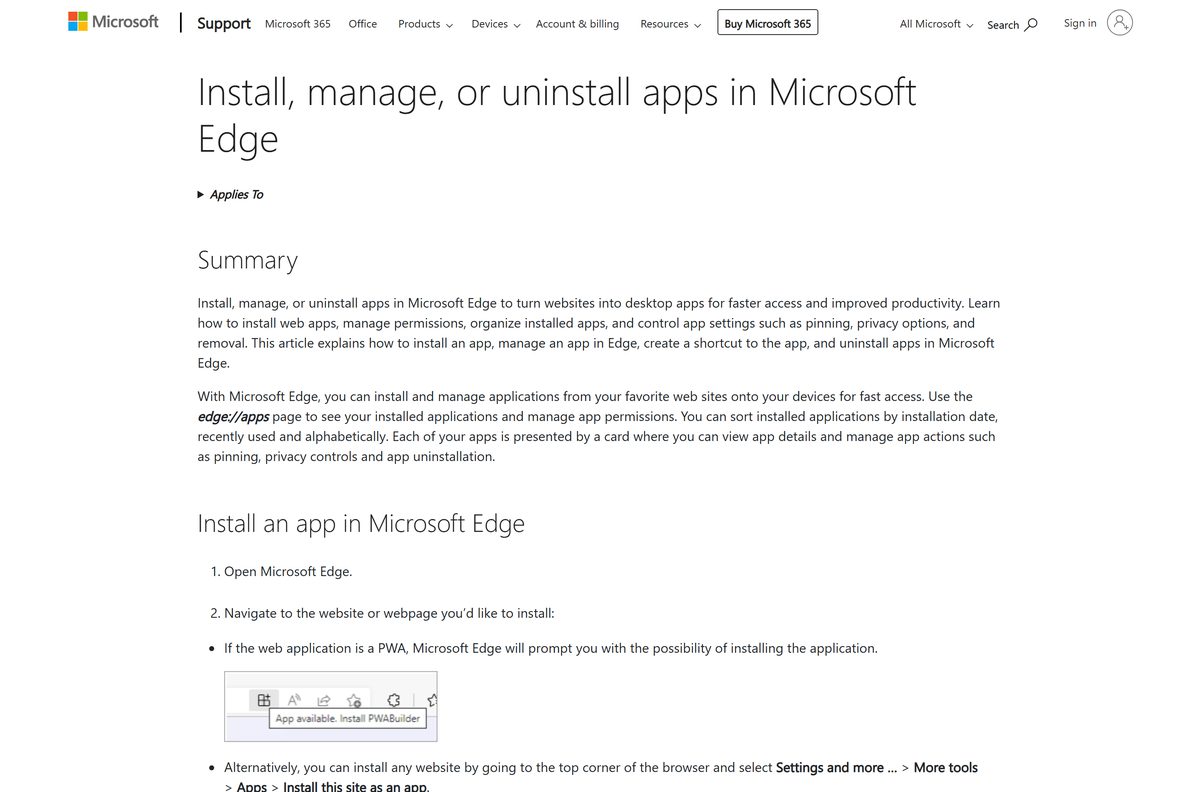
Microsoft Edge turns kanopy.com into an installed app with its own window.
- Open Microsoft Edge and go to kanopy.com.
- Select Settings and more (the three dots) at the top right of the browser.
- Select More tools, then Apps, then Install this site as an app.
- Select Install in the dialog that opens.
- Right-click the new Kanopy icon on the taskbar and select Pin to taskbar.
- Select Log in if you already have an account, or Get started to create one with your library card.
In Google Chrome, open the three-dot menu, then Cast, save and share, then Install page as app. The installed app shows up under edge://apps in Edge.
How to sign up and watch Kanopy in a browser
A browser tab plays the full catalog on any PC, Mac or Chromebook. You only need your library card number and PIN.
- Go to kanopy.com and select Get started.
- Select Find your library, then search by library name, city or zip code.
- Pick your library and select Select this library.
- Enter your library card number and PIN or password, then select Continue.
- Confirm you are over 18 and accept the terms.
- Enter your name, email and password and select Sign up, or choose Sign Up with Apple or Sign Up with Google.
Some libraries sign you in through their own site. In that case select Log in to your library and follow its prompts.
If your library does not appear, it does not offer Kanopy. Try another library card you hold, or a university login.
Which Kanopy download do you need for your Mac?
Kanopy has no macOS build. The App Store listing covers iPhone, iPad and Apple TV and marks the iPad app as not verified for macOS.
| Your Apple device | What to do | What it needs |
|---|---|---|
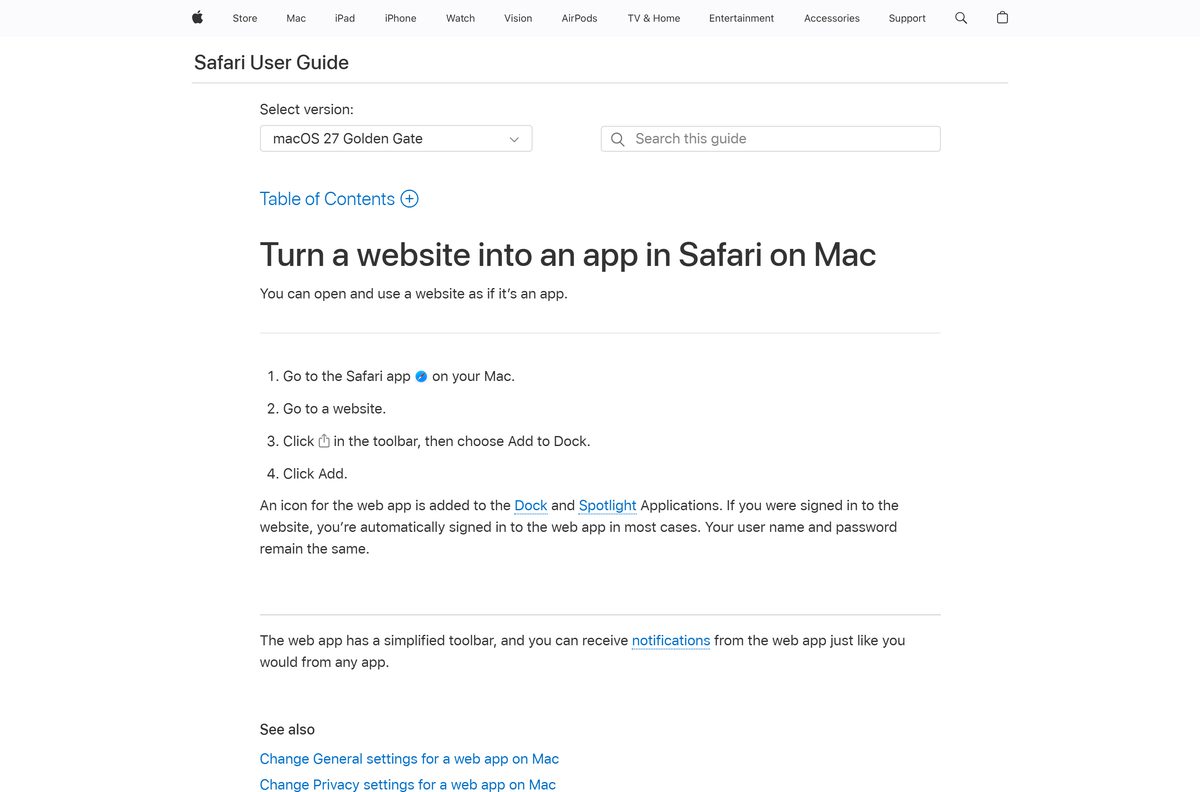
| Mac on macOS Sonoma 14 or later | Open kanopy.com in Safari, then Share and Add to Dock | Safari |
| Older Mac, Apple silicon or Intel | Watch at kanopy.com in a browser tab | Latest Safari, Chrome or Firefox |
| iPhone, iPad or Apple TV | The App Store listing | iOS 14.0 or tvOS 13.0 or later |
To add it on a Mac, open kanopy.com in Safari, click Share, choose Add to Dock and click Add.
Install the Kanopy app on iPhone, iPad and Android
The phone and tablet apps are free and play the same catalog, including Kanopy Kids.
- On an iPhone or iPad, open App Store, search for Kanopy and check that the seller reads KANOPY LLC.
- Tap Get to install it.
- On Android, open Google Play, open the Kanopy listing from Kanopy, Inc. and tap Install.
- Open Kanopy and tap Get started.
- Tap Find a public library, pick yours and tap Select this library.
- Enter your library card number and PIN, tap Continue, then sign up.
The iPhone and iPad build needs iOS 14.0 or later. Amazon Fire tablets on FireOS 6 or later get Kanopy from the Amazon Appstore.
Is Kanopy free?
You pay nothing. Your public library or university pays for the service.
Kanopy is free and ad-free, but only with a card from a participating library or a login from a participating university. The App Store and Google Play list Kanopy as a free install, and kanopy.com costs nothing to open. Public library users get a set number of tickets each month to play films. Tickets reset on the first day of the month, and unused tickets do not roll over. Kanopy Kids videos never use tickets. Access runs through your library or university, so a site selling a Kanopy pass or cracked build is not selling anything real.
Your remaining tickets show at the top right of the Kanopy homepage. The ticket cost and viewing window appear on each title before you press play.
Check which TVs and devices run Kanopy
Beyond computers and phones, Kanopy ships a TV app for these platforms.
| Device | Minimum version |
|---|---|
| Android TV and Google TV | Android 7.1 |
| Apple TV | tvOS 13.0 |
| Amazon Fire TV | FireOS 6 |
| Roku | Roku OS 12.5 |
| Samsung smart TV | Tizen 6.5 |
| Amazon Fire tablet | FireOS 6 |
Without a TV app, cast from the phone app with Chromecast or AirPlay.
How to check your Kanopy version and update it
An outdated app can refuse to play protected films, so keep the mobile and TV apps current.
- On a PC or Mac, reload kanopy.com. The web app always loads the current version.
- On an iPhone or iPad, open App Store, tap your profile picture and check the Upcoming Automatic Updates list for Kanopy.
- Compare the version on the Kanopy listing; the current iPhone and iPad release is 6.24.
- On Android, open Google Play, tap your profile picture, then Manage apps & device and Update all.
- On a smart TV, check for system updates and apply them, then reopen Kanopy.
Fix Kanopy not playing on Windows 11, 10 or Mac
Most playback failures come from the connection, a browser extension or DRM settings.
The film buffers or will not start in a browser
- Check that your connection gives at least 5 Mbps.
- Close other apps and tabs that use the network.
- Turn off browser extensions and ad blockers for kanopy.com.
- Clear the browser cache with Ctrl + Shift + Del on Windows or Command + Shift + Del on Mac.
Error PLAYER_ERR_DASH_DRM_KEY_SESSION
- In Chrome, open chrome://settings/content/protectedContent and allow sites to play protected content.
- In Firefox, open about:preferences and turn on Play DRM-controlled content and the Widevine plugin.
- On a Mac, turn off AirPlay and try the film again.
The film is not available or shows a region error
- Turn off any VPN, because the film may not be licensed in the country your VPN reports.
- Check that your display runs at 720p or higher, since lower resolutions may not support DRM-protected films.
The library card is rejected
- Re-enter the card number and PIN exactly as your library issued them.
- If your library signs you in through its own site, select Log in to your library instead.
- Contact your library if the card has expired.
If nothing works, try Kanopy on another device, then report the device, browser and error to Kanopy support.
How to uninstall Kanopy
- On Windows, open Microsoft Edge and go to edge://apps .
- Select Details on the Kanopy card, then select Uninstall.
- Choose whether to clear app history and data, then select Uninstall again.
- On a Mac, drag the Kanopy icon out of the Dock, then delete it from the Applications folder in your home folder.
- On an iPhone or iPad, press and hold the icon, then tap Remove App and Delete App.
- On Android, press and hold the icon and tap Uninstall.
Kanopy’s help center has a separate Deleting your account guide if you want to close the account itself.
Which other library app should you install?
Two more library apps pair well with Kanopy, and both work with the same library card.
| App | Pick it when | Where to get it |
|---|---|---|
| Libby, the library app | You want ebooks, audiobooks and magazines from your library | App Store |
| Hoopla: Your Library Anywhere | Your library offers Hoopla for movies, music, comics and audiobooks | App Store |
| kanopy.com | You only watch on a computer and want nothing installed | kanopy.com |
Libby comes from OverDrive, the same company that owns Kanopy.
Frequently asked questions
Is the Kanopy app free to download?
Yes. Kanopy installs free from the App Store and Google Play, and kanopy.com costs nothing to open. To watch, you need a card from a participating public library or a login from a participating university.
Where is the official Kanopy download for PC?
The official route on a Windows PC is kanopy.com. Open it in Microsoft Edge and choose Install this site as an app to get a desktop icon. Kanopy does not publish a Windows setup file or a Microsoft Store app.
Does Kanopy work on Windows 11?
Yes. Kanopy runs in the latest Edge, Chrome or Firefox on Windows 11 and Windows 10. Installed from Edge, it opens in its own window with a Start menu entry and a taskbar icon.
Is there a Kanopy app for Mac?
No. The App Store listing covers iPhone, iPad and Apple TV only. On a Mac, open kanopy.com in Safari, then click Share and Add to Dock on macOS Sonoma 14 or later.
How big is the Kanopy download?
On a PC or Mac there is no file to download, because Kanopy runs from kanopy.com. The iPhone and iPad app is 108.2 MB and needs iOS or iPadOS 14.0 or later.
Can I download Kanopy films to watch offline on a PC?
No. Kanopy offers no offline installer, .exe or .dmg for Windows or Mac, and an internet connection is required to watch films. Any Kanopy setup file on another site does not come from Kanopy.
How many films can I watch on Kanopy each month?
It depends on your library. Each library sets a monthly number of tickets, which reset on the first day of the month and do not roll over. Kanopy Kids videos never use tickets.
What if my library does not offer Kanopy?
Search for another library where you hold a card, or sign in with a university login. You can also contact your library to ask it to add Kanopy.
What is the latest version of Kanopy?
The iPhone and iPad app is version 6.24, released on 10 September 2026. The Android app was updated on 16 September 2026. The PC and Mac route always loads the current kanopy.com.
Can I watch Kanopy on my TV?
Yes. Kanopy has TV apps for Roku, Apple TV, Fire TV, Android TV, Google TV and Samsung smart TVs. You can also cast from the phone app with Chromecast or AirPlay.