Hold Alt and type 0176 on the numeric keypad to put a degree symbol (°) into any Windows text box.
This guide covers the Windows, Mac, iPhone and Android routes, the codes for Word, Excel, Google Docs and AutoCAD, and the fixes when a shortcut produces the wrong character.
The fastest way to type the degree symbol
The Alt code is an ASCII entry method built into Windows, so it works in the same way across Windows programs that accept typed text.
- Click where the symbol should go.
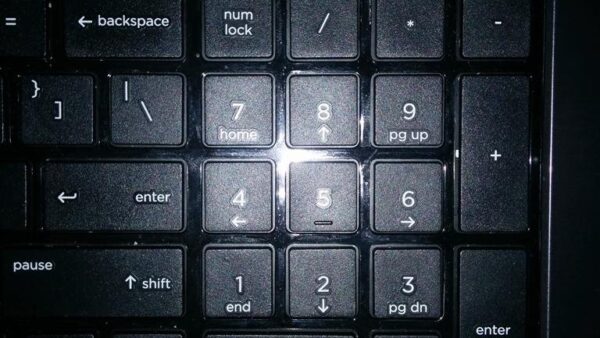
- Turn on Num Lock if your keyboard needs it to type numbers on the numeric keypad.
- Press and hold Alt, type
0176on the numeric keypad, then release Alt. - Check that the result is ° and not º.
The numbers along the top row do not work for this. Microsoft's own documentation states that the numeric keypad is required.
Which method should you use?
| Your situation | Use this | Why |
|---|---|---|
| Desktop keyboard with a numeric keypad | Alt + 0176 |
One key combination, no menus |
| Laptop with no numeric keypad | Windows key + . , then Symbols | Alt codes cannot be typed without the keypad |
| Writing in Word | Type 00B0, then press Alt + X |
Word converts the code in place |
| Working in PowerPoint | Copy ° from Character Map | PowerPoint cannot convert Unicode codes to characters |
| On a Mac | Control + Command + Space bar | Character Viewer inserts the character at the cursor |
| On iPhone, iPad or Android | Touch and hold 0 on the number keyboard | No extra app or setting needed |
| Inside an Excel formula | =UNICHAR(176) |
Builds the symbol into a calculated string |
| Writing a web page | ° or ° |
The browser renders the character from the entity |
What Is the Degree Symbol and When Is It Used?
The degree sign is a single Unicode character, U+00B0, used for temperature, angles and arc measurements.
| Use | Example | Convention |
|---|---|---|
| Temperature | 10 °C | The BIPM, ISO and the US Government Printing Office prescribe a space between the number and the symbol |
| Angles and bearings | 30° | No space between the number and the symbol |
| Arc minutes and seconds | 30° 12′ 5″ | Spaces between the sexagesimal parts, none between a number and its unit |
| Kelvin | 273.16 K | The degree sign was abolished for kelvin by the 13th CGPM in 1967 |
| The character itself | U+00B0 ° | Different from º (U+00BA) and ˚ (U+02DA), which look similar and mean other things |
Typesetting practice splits on the temperature spacing. Several university presses print 10°C with no spaces at all.
How to Type the Degree Symbol on Windows
The emoji panel is the route for keyboards without a numeric keypad, and it carries a Symbols category alongside emoji and kaomoji.
- Click where you want the symbol.
- Press Windows key + . (period) to open the emoji panel.
- Select Symbols in the category row.
- Type
degreein the search field, then press Enter. - Select ° to insert it at the cursor.
Windows key + ; (semicolon) opens the same panel.
Insert the degree symbol from Character Map
Character Map is the fallback for programs that ignore Unicode codes, and it is the only Windows route that names the character before you paste it.
- Press the Windows key, type
Character Map, then press Enter. - Select the Advanced view check box, or press Alt + V.
- Set Character set to Unicode.
- Type
00B0in the Go to Unicode box and press Enter. - Click the highlighted °, click Select, then click Copy.
- Press Ctrl + V where you want the symbol.
The Search for box finds the same character by name. Type degree and press Enter, then click Reset to clear the filter afterwards.
How to Type the Degree Symbol on Mac
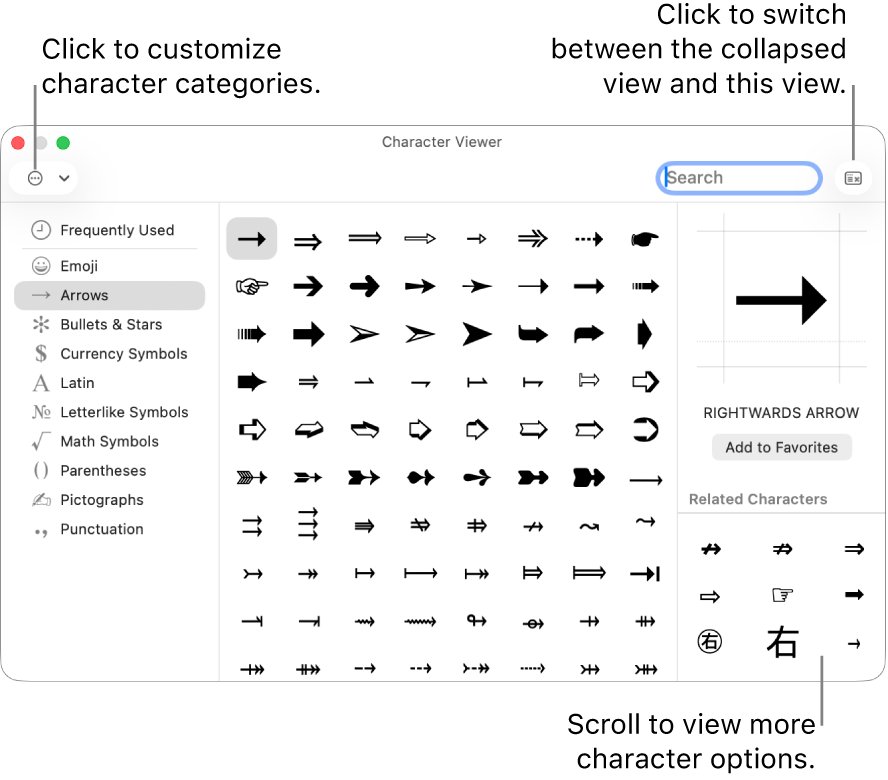
macOS puts every symbol behind the Character Viewer, which opens over the app you are typing in and inserts at the cursor.
- Click where you want the symbol.
- Choose Edit > Emoji & Symbols, or press Control + Command + Space bar.
- Type
degreein the search field at the top of the Character Viewer. - Click the degree sign to insert it into your text.
Fn + E or Globe + E opens the same viewer. Drag it onto the desktop to keep it open while you work.
To find which physical keys carry symbols on your layout, open the Keyboard Viewer from the Input menu in the menu bar, then hold Option, Shift, or both.
How to Type the Degree Symbol on iPhone, iPad, and Android
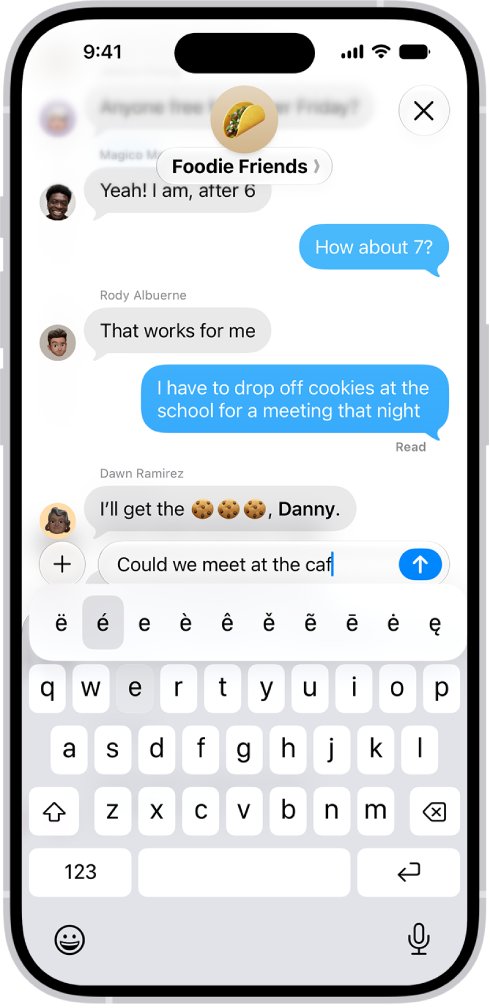
Both mobile keyboards hide the symbol behind the zero key rather than giving it a key of its own.
- Tap the text field so the onscreen keyboard opens.
- Tap 123 to switch to the numbers and symbols keyboard.
- Touch and hold 0 until the extra characters appear.
- Slide your finger to ° and release.
Gboard on Android uses the same gesture: touch and hold a key to reach the characters stacked behind it.
In Google Docs on a phone or tablet, paste the character in rather than hunting for a picker.
How to Insert the Degree Symbol in Microsoft Word, Google Docs, and Excel
Each app accepts a different code, and one of them refuses codes altogether.
| App | Do this | Result |
|---|---|---|
| Microsoft Word | Type 00B0, then press Alt + X |
The code turns into ° at the cursor |
| Microsoft Word, alternative | Hold Alt and type 0176 on the numeric keypad |
Same character, nothing to convert |
| Google Docs and Slides | Click Insert > Symbols > Special characters, then enter the Unicode value 00B0 |
Click the character to add it to the file |
| Google Sheets | Copy ° from a Google Doc, then paste it into the cell | Special characters cannot be inserted directly in Sheets |
| Microsoft Excel | Enter =UNICHAR(176) in a cell |
Returns the Unicode character for that number |
| Microsoft PowerPoint | Copy ° from Character Map and paste it | PowerPoint cannot convert Unicode codes to characters |
| Microsoft Outlook | Press Windows key + . and pick ° from Symbols | The character lands in the message body |
=UNICHAR(176) is worth using in Excel when the symbol has to join a calculated string, for example =A2&UNICHAR(176)&"C".
Copy-and-Paste Method and Unicode Options
Copying ° from the table below works everywhere, including apps that accept no codes at all.
| Code | Where it works | What it does |
|---|---|---|
| U+00B0 | Any Unicode input box | The official code point for the degree sign |
00B0 then Alt + X |
Word and other Office programs that convert Unicode | Replaces the typed code with the character |
Alt + 0176 |
Windows programs, numeric keypad required | ASCII entry from the Windows code page |
Alt + 0186 |
Windows | Produces º, the masculine ordinal indicator, not the degree sign |
° |
HTML | The named character entity |
° |
HTML | The numeric entity for the same character |
=UNICHAR(176) |
Excel | Returns ° from its Unicode number |
\U+00B0 |
AutoCAD text | A Unicode string, preceded by a backslash |
Alt + 248 |
Code page 437 contexts such as the console | The older DOS Alt code for the same sign |
Paste-only routes have one advantage over every code: the character arrives intact even when the program has its own idea of what Alt does.
Type the degree symbol in AutoCAD and PDF markup tools
AutoCAD does not read Windows Alt codes inside drawing text. It uses control codes of its own.
- Start a text or mtext command and place the cursor in the In-Place Text Editor.
- Type
%%dwhere the symbol belongs. - Press Enter or click outside the editor, and AutoCAD draws °.
- For the Unicode form instead, type
\U+00B0. - To pick the symbol from a list, right-click in the editor and choose Symbol, or click Symbol on the Text Editor ribbon tab.
Symbol > Other opens Character Map, so the copy-and-paste route is available inside AutoCAD too.
In Bluebeam Revu, paste a copied ° into a Text Box or Typewriter markup; the character comes from Windows, not from Revu.
Alt codes for the yen sign and other symbols you may need next
The degree sign is one entry in a table of Windows Alt codes. Every code below needs Num Lock and the numeric keypad.
| Symbol | Name | Windows Alt code |
|---|---|---|
| ° | Degree sign | Alt + 0176 |
| º | Masculine ordinal indicator | Alt + 0186 |
| ¥ | Yen sign | Alt + 0165 |
| £ | Pound sign | Alt + 0163 |
| ¢ | Cent sign | Alt + 0162 |
| € | Euro sign | Alt + 0128 |
| µ | Micro sign | Alt + 0181 |
| ½ | One half | Alt + 0189 |
| © | Copyright sign | Alt + 0169 |
| ® | Registered sign | Alt + 0174 |
Characters that do have a key of their own follow different rules — see how to type a forward slash on a keyboard.
How to check you typed the right character
Three characters in the Windows fonts look close enough to pass at reading size, so compare the shapes at a known reference rather than trusting the glyph.
- Select the character you typed and press Ctrl + C.
- Press the Windows key, type
Character Map, then press Enter. - Select the Advanced view check box.
- Type
degreein the Search for box and press Enter. - Click the degree sign in the character grid and read the Unicode value Character Map reports for it.
- Paste your character beside it and compare: a true degree sign matches U+00B0 exactly.
If the pasted character is wider and sits lower, it is º, the masculine ordinal indicator from Alt + 0186.
Troubleshooting Keyboard Shortcuts That Do Not Work
Alt + 0176 does nothing
The digits went in on the top number row, or Num Lock is off, or the keyboard has no numeric keypad at all.
- Press Num Lock and watch for its indicator light.
- Retype the code on the numeric keypad, not the top row, while holding Alt.
- On a keyboard with no keypad, press Windows key + . and pick ° from Symbols instead.
- To get a keypad on screen, go to Start > Settings > Accessibility > Keyboard and turn on On-Screen Keyboard, then open Options and select Turn on numeric keypad.
The character came out as º instead of °
Alt + 0186 produces the masculine ordinal indicator, a different Unicode character that looks similar at small sizes.
- Press Ctrl + Z to undo the wrong character.
- Retype the code as
0176, checking each digit as you press it. - Confirm the result against Character Map before you save the file.
Alt + X does not convert the code
Some Office programs, PowerPoint among them, cannot convert Unicode codes to characters.
- Delete the
00B0text you typed. - Open Character Map, find the degree sign, and click Copy.
- Press Ctrl + V in the slide or text box.
Alt + X converted the wrong characters
Word reads the digits immediately before the cursor, so it can swallow a number that belongs to your sentence.
- Press Ctrl + Z to reverse the conversion.
- Select just the four characters
00B0, then press Alt + X. - Alternatively, type
U+00B0and press Alt + X, which forces Word to read only the code that followsU+.
The Mac shortcut does not open anything
The Character Viewer opens only where text can be entered, and the shortcut does nothing outside a text field.
- Click inside a document or text box so a cursor appears.
- Choose Edit > Emoji & Symbols from the menu bar to confirm the app supports it.
- Choose Apple menu > System Settings, click Keyboard, go to Text Input, click Edit, then turn on Show Input menu in menu bar.
- Open the Character Viewer from the Input menu instead of the keyboard shortcut.
Frequently Asked Questions
How do I type a degree symbol on Windows?
Hold Alt and type 0176 on the numeric keypad, with Num Lock on. Microsoft documents this as the ASCII entry method for the degree sign. On a keyboard with no numeric keypad, press Windows key + period and choose ° from the Symbols category of the emoji panel.
How do I type a degree symbol in Word?
Type 00B0 where the symbol belongs, then press Alt + X. Word replaces the code with °. The Windows Alt code, Alt + 0176 on the numeric keypad, produces the same character and leaves no code on the page to convert.
How do I type a degree symbol in Excel?
Enter =UNICHAR(176) in the cell. UNICHAR returns the Unicode character referenced by the number you give it. Alt + 0176 on the numeric keypad also works while editing a cell, and it is the better choice when the symbol is plain text rather than part of a formula.
How do I type a degree symbol in PowerPoint?
Copy it from Character Map and paste it. Microsoft states that some Office programs, including PowerPoint, cannot convert Unicode codes to characters, so Alt + X will not work there. The Windows Alt code and the emoji panel are the other two routes.
How do I type a degree symbol in Outlook?
Press Windows key + period in the message body, select the Symbols category, then choose °. The emoji panel is part of Windows rather than Outlook, so it behaves the same in every message window. Alt + 0176 on the numeric keypad also works.
How do I type a degree symbol in AutoCAD?
Type %%d inside the In-Place Text Editor. Autodesk lists %%d as the control code that draws the degree symbol, with \U+00B0 as the equivalent Unicode string. You can also right-click in the editor and choose Symbol to pick it from a list.
How do I type a degree symbol in Bluebeam?
Copy ° from Character Map or the Windows emoji panel, then paste it into a Text Box or Typewriter markup. The character comes from Windows rather than from Revu, so any of the Windows routes on this page produces it.
How do I type a degree symbol on a laptop with no numeric keypad?
Press Windows key + period and pick ° from the Symbols category. Alt codes require the numeric keypad, so they cannot be typed on a compact keyboard. Character Map and the On-Screen Keyboard with its numeric keypad turned on are the other options.
What is the code for the degree symbol?
The degree sign is U+00B0 in Unicode. In HTML it is ° or °. On Windows the Alt code is 0176 on the numeric keypad, in Excel it is UNICHAR(176), and in AutoCAD text it is the control code %%d.
How do I type a degree symbol on a Mac?
Press Control + Command + Space bar, or choose Edit > Emoji & Symbols, to open the Character Viewer. Search for degree, then click the character to insert it at the cursor. Fn + E or Globe + E opens the same viewer.
Bottom Line
Learn two shortcuts and ignore the rest: Alt + 0176 on Windows and Control + Command + Space bar on a Mac. Between them they cover every program that accepts typed text, and Character Map, the emoji panel and the app-specific codes only exist for the keyboards and programs that refuse those two.