Open Crossposting in your Instagram settings and turn off the toggle next to Your Instagram story to stop stories reaching Facebook.
This guide covers that switch, the Accounts Center route, single-story sharing options, posts and reels, and how to unlink the two accounts entirely.
Steps to Stop Instagram Story Sharing to Facebook
These steps use the Instagram app for Android, iPhone or iPad. Story sharing to Facebook is not available on a computer.
- Open Instagram and tap Profile or your profile picture in the bottom right.
- Tap Menu in the top right.
- Tap Crossposting, below Who can see your content.
- Below Share to Facebook as, tap Accounts Center.
- Below Automatically share, tap the toggle next to Your Instagram story so it is off.
New stories now stay on Instagram. Stories already sitting on Facebook are not removed by this switch.
Which method should you use?
| Your situation | Use this | Why |
|---|---|---|
| Every story keeps landing on Facebook | Turn off Your Instagram story under Crossposting | One toggle, and it applies to all future stories |
| Your settings show Accounts Center instead of Crossposting | Connected experiences then Sharing across profiles | Same setting, reached through the Accounts Center menu |
| Only this one story should stay off Facebook | Sharing options on the story screen | Controls the story you are posting right now |
| Posts and reels are crossposting too | Each toggle below Automatically share | Stories, posts and reels have separate switches |
| You want nothing shared between the two apps | Remove the account from Accounts Center | Ends crossposting and the other connected experiences |
What you need before you start
| Requirement | Detail |
|---|---|
| Device | The Instagram app for Android, iPhone or iPad |
| Account link | The Instagram and Facebook accounts sit in the same Accounts Center |
| Settings name | Meta is moving people to Meta Accounts, so the screen reads Accounts Center or Meta Account settings |
| Computers | Sharing a story to Facebook is not offered on instagram.com, so the story toggle is set from the app |
Second method: turn off automatic sharing in Accounts Center
Use this route when your settings list Accounts Center rather than Crossposting.
- Tap Profile or your profile picture in the bottom right.
- Tap Menu in the top right.
- Tap Accounts Center, then tap Connected experiences.
- Tap Sharing across profiles.
- Tap the account to Share from, then tap the account to Share to.
- Below Automatically share, tap each toggle you want off.
Accounts Center opens on a phone, tablet or computer, so this screen is also reachable in a browser.
Third method: keep one story off Facebook while you post it
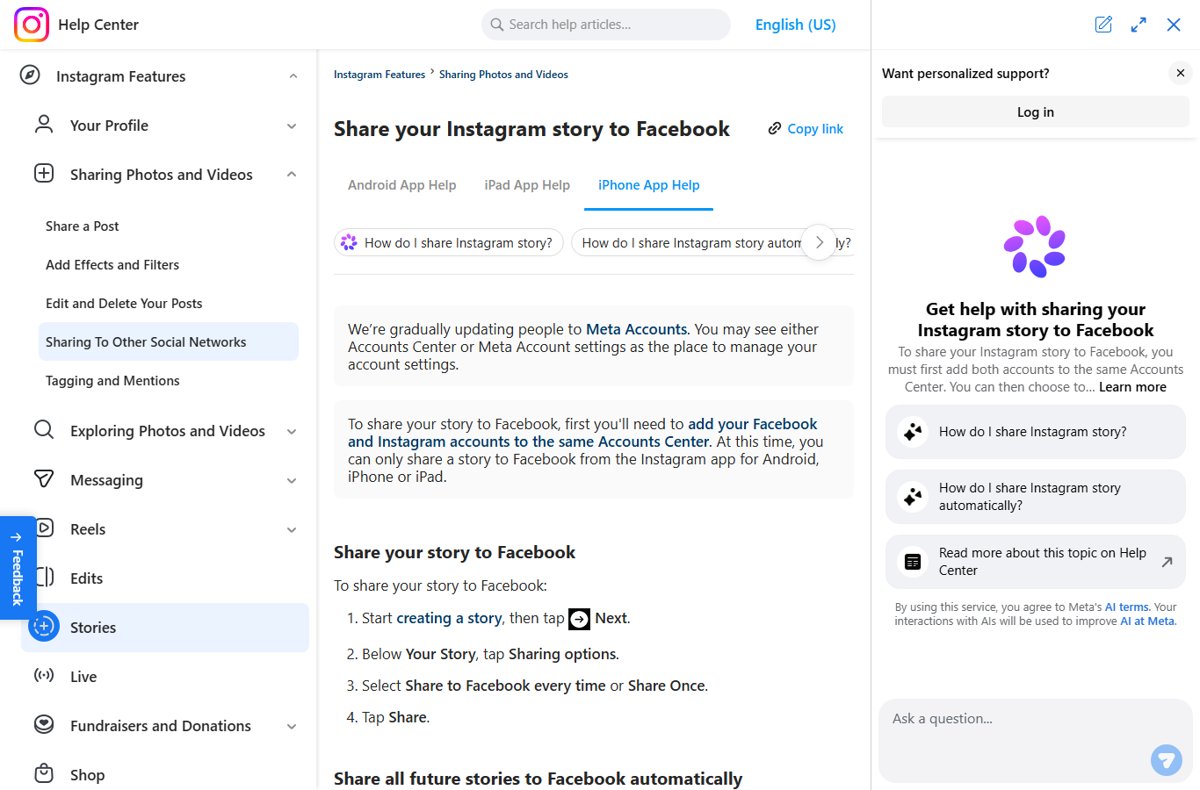
The sharing options sit on the story screen itself, one tap before the story goes out.
- Start creating a story, then tap Next.
- Below Your Story, tap Sharing options.
- Leave Share to Facebook every time unselected.
- Tap Share Once only when you do want that single story on Facebook.
- Tap Share to post the story.
Share to Facebook every time sets the automatic toggle, so selecting it once keeps every later story crossposting.
Fourth method: stop Instagram posts and reels sharing to Facebook automatically
Stories, posts and reels cross to Facebook through separate switches on the same screen.
- Tap Profile or your profile picture in the bottom right.
- Tap Menu in the top right.
- Tap Accounts Center, then tap Connected experiences.
- Tap Sharing across profiles.
- Tap the account to Share from, then tap the account to Share to.
- Tap the toggle next to Your Instagram posts so it is off, then turn off any other entry below Automatically share.
- While uploading a single post, check Also share on… and leave the Facebook toggle off.
Fifth method: unlink the accounts by removing one from Accounts Center
Removing an account ends crossposting along with the other connected experiences between the two profiles.
- Go to Accounts Center.
- Tap or click Accounts or Manage accounts.
- Tap or click Remove next to the account you want out.
- Confirm the removal on the screen that follows.
Any profiles tied to that account leave the Accounts Center with it, and synced profile information stops syncing.
How to check it worked
- Reopen Crossposting and confirm the toggle next to Your Instagram story shows as off.
- Post a short test story on Instagram.
- Open Facebook and look at the top of your Feed, where a shared Instagram story would appear as your Facebook story.
- Confirm no new story sits there, then delete the test story from Instagram.
Understanding Instagram and Facebook Connectivity
Crossposting runs on Accounts Center, the shared settings hub for Meta accounts. Nothing crosses between the apps until both accounts sit in the same Accounts Center.
| What Accounts Center controls | What it means for your story |
|---|---|
| Sharing across profiles | Stories, posts and reels can copy from Instagram to Facebook automatically |
| Where a shared story lands | It appears as a story at the top of your Facebook Feed |
| Who sees it | Your existing Facebook story audience sees the Instagram story |
| Viewer list | Views from Facebook show that person's Facebook name and profile picture |
| Logging in with accounts | Login details can work across the accounts in the same Accounts Center |
| Profile syncing | Name, username, profile picture and avatar can match across profiles |
The Benefits of Separating Instagram and Facebook Content
Separating the two feeds is mostly about audience. The people who follow you on Instagram and the friends who see your Facebook story are rarely the same list.
| Reason to separate | What changes once sharing is off |
|---|---|
| Different audiences | Your Facebook story audience no longer receives Instagram stories |
| Audience settings are inherited | A shared story uses your Facebook story audience, not your Instagram one |
| Work and personal split | Colleagues on Facebook stop seeing casual Instagram stories |
| Viewer privacy | Facebook names and profile pictures stop appearing in your Instagram story viewer list |
| Cleaner Facebook profile | Instagram posts stop appearing as posts in your Facebook Feed and profile |
| Full separation | Removing the account from Accounts Center also ends profile syncing and shared login |
How to control who can reshare your story on Instagram
This is a separate setting from crossposting. It decides whether people you mention can put your story on theirs.
- Tap your profile picture in the bottom right to go to your profile.
- Tap Menu in the top right.
- Below How others can interact with you, tap Sharing and reuse.
- Below Allow others to share your content, tap the toggle next to Stories in messages.
- Leave it off to stop other people sharing your story, or on to allow it.
While that toggle is on, the followers of anyone who reshares your story can view it, even on a private account.
How to turn story sharing back on
- Tap Profile or your profile picture in the bottom right.
- Tap Menu in the top right.
- Tap Crossposting, below Who can see your content.
- If no Facebook account is listed, tap Add account next to Facebook and tap Continue, then tap Allow and finish adding.
- Below Automatically share, tap the toggle next to Your Instagram story so it is on.
Fix Instagram story sharing when it will not stop
The story is still on Facebook after the toggle was turned off
The setting governs future stories, so one already crossposted stays up until it is deleted.
- Go to your story by tapping Your story at the top of Feed.
- Tap Options in the bottom right of the photo or video.
- Tap Delete, then choose Delete from both to clear it from Instagram and Facebook.
- Confirm the deletion.
There is no Crossposting entry in your Instagram settings
Accounts are moving to Meta Accounts, so the same controls appear under a different name.
- Tap Menu in the top right of your profile.
- Tap Accounts Center or Meta Account settings.
- Tap Connected experiences, then tap Sharing across profiles.
- Tap the account to Share from and the account to Share to, then turn off the toggles below Automatically share.
Instagram story sharing is not working at all
The two accounts are not in one Accounts Center, or the app being used does not support it.
- Open Instagram on an Android phone, iPhone or iPad, since the feature is not offered on a computer.
- Tap Menu, then Accounts Center, then Accounts or Manage accounts.
- Check that the Facebook account is listed there; tap Add accounts and follow the instructions if it is missing.
- Return to Sharing across profiles and set the toggles the way you want them.
In Conclusion
Turn off Your Instagram story below Automatically share and leave both accounts in Accounts Center. That single toggle stops every future story at the source while login, recovery and the other connected experiences keep working.
Frequently Asked Questions
How do you stop sharing Instagram to Facebook?
Open Accounts Center, tap Connected experiences, then tap Sharing across profiles. Pick the account to share from and the account to share to, then turn off each toggle below Automatically share. Stories, posts and reels have their own switch.
How do you share an Instagram story to Facebook?
Both accounts must be in the same Accounts Center. Start a story, tap Next, tap Sharing options below Your Story, then select Share to Facebook every time or Share Once and tap Share.
How do you allow story sharing on Instagram?
Tap Menu on your profile, tap Sharing and reuse below How others can interact with you, then turn on the toggle next to Stories in messages. People you mention can then reshare your story to their own.
Why can't people share my Instagram story?
The toggle next to Stories in messages under Sharing and reuse is off, so resharing is blocked. Resharing someone's story to your own story also requires that account to be public.
How do you reshare a story on Instagram?
You can only reshare someone's story to your own story when their account is public. Stories you are mentioned in can be reshared while the author keeps Stories in messages turned on.
How do you disable your Instagram story?
Delete it. Tap Your story at the top of Feed, tap Options in the bottom right, then tap Delete. If the story also went to Facebook, choose Delete from both to remove both copies.
Does turning off crossposting remove stories already on Facebook?
No. The setting applies to stories posted afterwards. A story that already crossed over stays on Facebook until you delete it and choose Delete from both.
Can you stop Instagram story sharing from a computer?
Sharing a story to Facebook is only offered in the Instagram app for Android, iPhone and iPad. Accounts Center itself opens on a computer, so the Sharing across profiles toggles can be changed in a browser.
Does unlinking the accounts delete anything?
No posts or stories are deleted. Removing an account from Accounts Center takes its profiles out too, ends crossposting, and stops synced names, usernames and profile pictures from matching across the apps.