You can get the SketchUp download for Windows 11 and Mac straight from Trimble, and the browser version costs nothing. SketchUp 2026.2 is the current desktop release.
The desktop modeler runs on a subscription, with a 7-day Pro trial that asks for no credit card. SketchUp Free works in Chrome, Edge or Firefox with no installer at all.
Below are the official installers and their sizes, install steps for Windows and Mac, the Windows 10 situation, system requirements and fixes for setup problems.
Which SketchUp download do you need?
Trimble publishes one installer per platform, plus two older releases for machines the current build has left behind. Match your machine to a row.
| Your machine | File to get | Size |
|---|---|---|
| Windows 11, 64-bit, normal broadband | SketchUp-2026-2-243-76.exe | 1.02 GB |
| Windows 11 with a slow or metered link, or several PCs to set up | SketchUpFull-2026-2-243-76.exe | 1.82 GB |
| Windows 10, 64-bit | SketchUp-2025-0-660-288.exe | 998.3 MB |
| Mac on macOS 14 Sonoma, 15 Sequoia or 26 Tahoe | SketchUp-2026-2-242-76.dmg | 1.39 GB |
| Mac on macOS 13 Ventura | SketchUp-2025-0-659-288.dmg | 1.60 GB |
| No subscription, or a PC that misses the hardware bar | SketchUp Free in the browser | No download |
Download SketchUp for Windows 11 and Windows 10
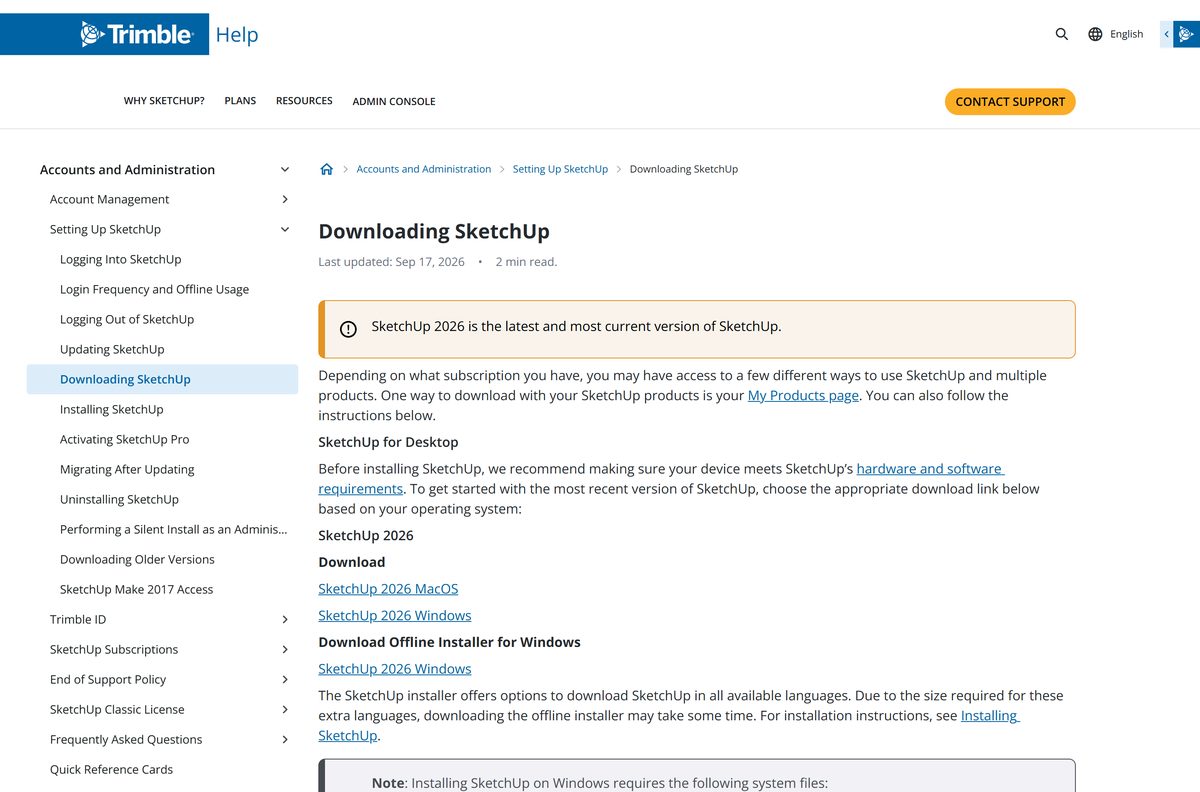
Start at the Trimble help page that carries the live installer links, or use the direct files below. Nothing here routes through a mirror.
- Downloading SketchUp (official page) — always points at the current release
- Windows online installer — 1.02 GB · pulls .NET Framework 4.5.2 and the Visual C++ 2015 redistributable during setup
- Windows offline installer — 1.82 GB · includes every language pack
- Mac disk image — 1.39 GB · macOS 14 or later
- Older supported versions — 2025 and 2024 builds for Windows and Mac
- Start the 7-day trial — full Pro toolkit, no credit card
How to install SketchUp on Windows 11 and 10
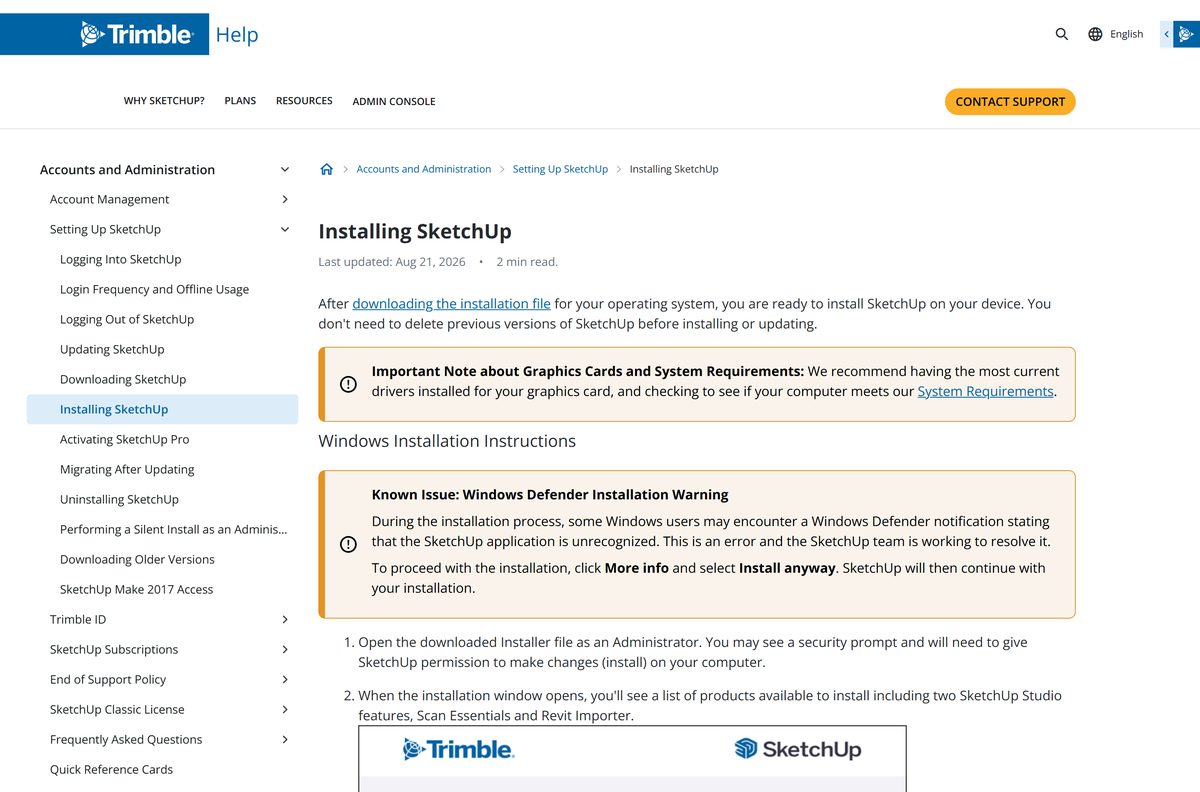
The Windows setup is an InstallShield wizard. Run it elevated so it can write to Program Files and register the redistributables.
- Open help.sketchup.com/en/downloading-sketchup and select the Windows installer.
- Right-click the downloaded file and select Run as administrator.
- Select Yes at the User Account Control prompt.
- Select Change… beside Install Languages if you need a language other than English.
- Select Change… beside Destination Directory to move the install off the system drive, or leave the default.
- Select Install and leave the progress window alone until it finishes.
- Select Finish when the wizard shows SketchUp is Ready to Go!
- Launch SketchUp and sign in with your Trimble ID to authorize the subscription or trial.
A Windows Defender SmartScreen notice can appear on the installer. Select More info, then Install anyway.
Keep the program on the main internal drive. Performance drops on external and network volumes.
Install SketchUp on several PCs from the command line
Windows installers accept a silent switch, so a lab or office rollout needs no clicking. macOS has no silent equivalent.
SketchUp-2026-2-243-76.exe /silent /FEATURES=fr,scan_essentials,revit_importer /INSTALLDIR=C:\Apps\SketchUp2026 Runs setup with no windows. /FEATURES= adds language packs and extras, /INSTALLDIR= sets the path, and both are optional. Drop them for a plain silent install. Setup writes InstallShield.log into the install directory, which is where a failed rollout explains itself. Trimble documents the full syntax in Performing a Silent Install as an Administrator, and the installer itself comes from the official download page.
Test the command on one machine before pushing it. Each seat still signs in with its own Trimble ID afterwards.
Which SketchUp download do you need for your Mac?
Open the Apple menu and select About This Mac to read your macOS version, then match it below.
| Your Mac runs | Disk image | What to know |
|---|---|---|
| macOS 26 Tahoe | SketchUp-2026-2-242-76.dmg | Tahoe support arrived with the 2026 release |
| macOS 15 Sequoia or 14 Sonoma | SketchUp-2026-2-242-76.dmg | Same 1.39 GB image, Apple silicon or Intel |
| macOS 13 Ventura | SketchUp-2025-0-659-288.dmg | The 2026 build refuses macOS 13 and older |
| macOS 12 Monterey or older | SketchUp Free in the browser | No supported desktop build remains |
Quit any running copy first, mount the .dmg, then drag the SketchUp folder into Applications.
The new graphics engine needs Metal 2. Older Intel Iris and Intel HD 5000 and 6000 GPUs fall back to the classic renderer.
Run SketchUp without installing it
SketchUp Free is the browser edition, and it needs no installer, no admin rights and no subscription. It is the route for a locked-down work PC.
- Open app.sketchup.com in Chrome, Microsoft Edge or Firefox.
- Sign in with a Trimble ID, or select Create account and make one.
- Select Create New Model to start in the browser.
- Select the folder icon to import an existing SKP, JPG or PNG file.
- Save models to Trimble Connect, which gives free accounts 10 GB of storage.
- Select Download in the file menu to export SKP, PNG or STL to your PC.
The browser edition wants 4 GB of RAM, a 2.1 GHz processor and 700 MB of free disk space. Trimble recommends 8 GB of RAM.

Is SketchUp free?
Two things carry the SketchUp name: a free browser modeler and a paid desktop one. The confusion in search results comes from that split.
SketchUp Free is genuinely free in the browser, and the desktop modeler is a subscription with a 7-day trial. Trimble prices Go at $10.75, Pro at $33.25 and Studio at $71.58 per user per month, billed annually, with Studio limited to Windows. Pro Scan is $41.58 and Pro Advanced Workflows is $49.92 on the same terms. Students and educators pay $55 a year, and SketchUp for Schools costs nothing with a Google Workspace for Education or Microsoft Education account. Any site offering a free full Pro installer, a patched build or a serial generator is distributing an altered file, not a Trimble one.
The trial covers desktop, web and iPad and needs no card. Files you make during it stay reachable in the browser afterwards.

Which SketchUp release should you install, 2026 or 2025?
Windows 10 is the deciding factor. Trimble dropped it at the 2026.1 release, which splits the choice cleanly.
Install the 2026 build on Windows 11 and on macOS 14 or later, and the 2025 build on Windows 10 or macOS 13. SketchUp 2024, 2025 and 2026 all remain supported, and 2023 and older do not. The 2025 release still runs on Windows 10 and macOS 13, so it is the last stop for those machines rather than a downgrade. Every supported release opens the same .skp files, so moving up later costs nothing.
Version numbers always start with the release year, and support runs for three years from that year.
How to check your SketchUp version and update it
There is no in-app updater that replaces a major release. Check the build first, then run the new installer over the old one.
- Open the Help menu on Windows, or the SketchUp menu on a Mac.
- Select About SketchUp and read the year and build number.
- Compare it with the current build on the official download page.
- Download the newer installer if the year differs.
- Close SketchUp, LayOut and Style Builder before running it.
- Run the installer and let it place the new year alongside the old one.
- Open the new version and sign in with your Trimble ID.
- Uninstall the previous year once your extensions and templates have migrated.
The Migrate Extension tool moves extensions across without a restart from the 2026.2 release onward.
What are the SketchUp system requirements?
The graphics card matters more than the processor here. A discrete GPU is the difference between smooth orbiting and a slideshow.
| Item | Detail |
|---|---|
| Software | SketchUp |
| Developer | Trimble Inc. |
| Latest version | SketchUp 2026.2 (Windows build 2026-2-243-76, Mac build 2026-2-242-76) |
| License | Free browser edition; paid desktop subscription with a 7-day trial |
| Price | $10.75 Go, $33.25 Pro, $71.58 Studio, per user per month billed annually |
| File size | 1.02 GB Windows online, 1.82 GB Windows offline, 1.39 GB Mac |
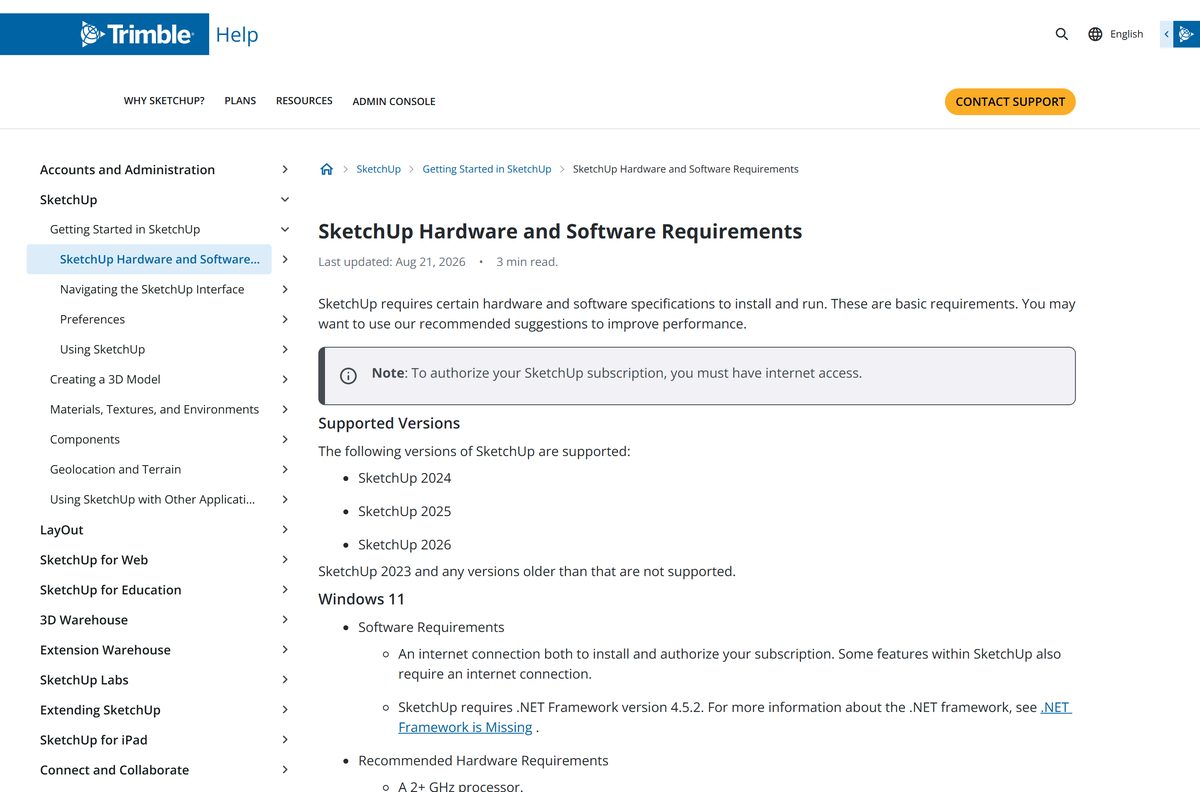
| Supported OS | Windows 11 (64-bit); macOS 14 Sonoma, 15 Sequoia or 26 Tahoe |
| Architecture | 64-bit only, no 32-bit and no native ARM64 |
| Processor | 2 GHz or faster on Windows; 2.1 GHz or an Apple M1 or later on Mac |
| Memory | 8 GB of RAM |
| Disk space | 6 GB free |
| Graphics | Discrete GPU with 8 GB of VRAM; OpenGL 3.1, or DirectX 12 feature-level 11.0 for the new engine |
| Other software | .NET Framework 4.5.2 on Windows; a 3-button scroll-wheel mouse |
| Offline installer | Yes, on Windows |
| Official download source | Trimble (sketchup.com) |
| Last verified | 2026-09-22 |
Models built with PBR texture maps, ambient occlusion and image-based lighting want 32 GB of VRAM.
Remote Desktop, Parallels, VMware and external GPUs are all unsupported, and 5K displays are out.
What SketchUp can open and export
File support is one of the real differences between the browser edition and a Pro seat.
| Task | Free browser edition | Pro subscription |
|---|---|---|
| Import | SKP, JPG, PNG | SKP, JPG, PNG, plus IFC and DWG |
| Export | SKP, PNG, STL | SKP, PNG, STL, plus IFC and DWG |
| 3D Warehouse models | Yes | Unlimited downloads |
| Extensions | No | 1000+ through Extension Warehouse |
| 2D documentation | No | LayOut |
| Revit import and point clouds | No | Studio and the Pro Scan plans only |
Fix SketchUp not installing on Windows 11 or 10
Most failed setups trace to one of four causes. Work down the symptom that matches.
The installer will not start, or stops with a .NET error
Setup needs .NET Framework 4.5.2 and the Visual C++ 2015 redistributable in place.
- Close the installer and disconnect nothing else.
- Use the online installer rather than the offline one, because it fetches both components.
- Right-click the file and select Run as administrator.
- Select Yes at the User Account Control prompt.
- Restart the PC and run setup again if the error repeats.
Windows blocks the file with a SmartScreen warning
Windows Defender flags newly published installers it has not seen often.
- Select More info in the blue notice.
- Select Install anyway.
- Leave Defender and SmartScreen switched on throughout.
Setup finishes but the program will not authorize
A subscription is validated online, so the sign-in needs a working connection.
- Confirm the machine is online.
- Launch the program and sign in with the Trimble ID that holds the subscription.
- Sign out of an unused device if the seat limit is reached.
- Retry the sign-in after the browser window closes.
The installer refuses on a Windows 10 PC
Windows 10 support ended at the 2026.1 release.
- Download SketchUp-2025-0-660-288.exe instead.
- Run it as administrator.
- Use app.sketchup.com in a browser if you need the current feature set.
An existing install crashes or behaves oddly
A damaged install repairs itself without a full removal.
- Open Settings, then Apps.
- Find the SketchUp entry and select the … menu.
- Select Modify, then choose Repair.
- Restart the PC when it finishes.
How to uninstall SketchUp
Windows removes everything through Settings. macOS needs four folders cleared by hand.
- Quit every open instance, including LayOut and Style Builder.
- On Windows, open the Start menu and select Settings, then Apps.
- Find the SketchUp entry, select the … menu and select Uninstall.
- On a Mac, delete the SketchUp folder from Macintosh HD > Library > Application Support.
- Delete the SketchUp folder from your own Library > Application Support folder.
- Delete the application folder from Applications.
- Delete com.sketchup.SketchUp.
.plist , com.sketchup.LayOut. .plist and com.sketchup.StyleBuilder. .plist from your user Preferences folder. - Empty the Trash.
Hold Option and select Go in the Finder menu bar to reach the hidden Library folder.
Which free route into SketchUp fits you?
Several free routes still exist, and two often-recommended ones no longer do.
| Route | Cost | Status |
|---|---|---|
| SketchUp Free in the browser | Free | Current, 10 GB of Trimble Connect storage |
| 7-day Pro trial | Free | Current, desktop, web and iPad, no card |
| SketchUp for Schools | Free | Needs a Google Workspace for Education or Microsoft Education account |
| Student or educator plan | $55 a year | Current, full desktop toolkit |
| Make 2017 | Was free | Withdrawn, built for Windows 7 and macOS 10.10 to 10.12 |
| Viewer for Desktop | Was free | Withdrawn on 22 April 2025 |
Downloads of Make 2017 still circulate on third-party sites. Those files are unsigned by Trimble and unpatched since 2017.
Frequently asked questions
Is SketchUp free?
SketchUp Free is free in the browser and includes 10 GB of Trimble Connect storage. The desktop modeler is a subscription: Go costs $10.75, Pro $33.25 and Studio $71.58 per user per month, billed annually. A 7-day Pro trial needs no credit card.
Where is the official SketchUp download page?
Trimble publishes the installers at help.sketchup.com/en/downloading-sketchup, and older supported releases at help.sketchup.com/en/downloading-older-versions. The browser edition opens at app.sketchup.com. Files served anywhere else are not Trimble’s.
Does SketchUp work on Windows 11?
Yes. Windows 11 is the only Windows release Trimble supports for the 2026 build. Setup also wants .NET Framework 4.5.2, 8 GB of RAM, 6 GB of free disk space and a discrete graphics card.
Does SketchUp still work on Windows 10?
Not the current build. Windows 10 support ended with the 2026.1 release. Install SketchUp-2025-0-660-288.exe instead, which is still a supported version, or use the browser edition, which only needs Chrome, Edge or Firefox.
How big is the SketchUp download?
The Windows online installer is 1.02 GB and the offline installer is 1.82 GB. The Mac disk image is 1.39 GB. Allow 6 GB of free disk space for the installed program on either platform.
Is there an offline installer?
Yes, for Windows. SketchUpFull-2026-2-243-76.exe is 1.82 GB and carries every language pack, so it needs no downloads during setup. Signing in to authorize a subscription still requires an internet connection.
Is SketchUp available for Mac?
Yes. The Mac disk image covers macOS 14 Sonoma, 15 Sequoia and 26 Tahoe on Apple silicon and Intel. Macs on macOS 13 Ventura need the 2025 release, and macOS 12 has no supported desktop build.
Is SketchUp 32-bit or 64-bit?
64-bit only, on both Windows and macOS. Trimble ships no 32-bit installer and no native ARM64 build. An ARM64 Windows 11 PC can emulate x64, but Trimble does not support that configuration.
Is the SketchUp installer safe?
The installers on Trimble’s own help pages are the genuine files. Windows Defender may show a SmartScreen notice on a new release; select More info, then Install anyway. Leave your antivirus running.
What is the latest SketchUp version?
SketchUp 2026.2, with build 2026-2-243-76 on Windows and 2026-2-242-76 on Mac. It adds Advanced Shadows analysis, point cloud visibility in scene properties and a rebuilt Extension Manager.
Is SketchUp Make 2017 still available?
No. Trimble only publishes the last two major versions, so Make 2017 was withdrawn. It has had no security updates since 2017 and targets Windows 7 and 8 and macOS 10.10 to 10.12, all of which are unpatched themselves.
Why will SketchUp not install on my PC?
The four usual causes are a missing .NET Framework 4.5.2, running setup without administrator rights, a Windows 10 machine trying the 2026 build, and a damaged existing install. Repair from Settings, Apps, Modify handles the last one.