Mozilla is to release Firefox version 110 today Feb 14, 2023, for Windows, Mac, and Linux. The version provides the ability to disable third-party modules that trouble Firefox from about:third-party modules page and loses Colorways themes in the add-ons manager. The update as usual comes with other new features, improvements, and bug fixes.

Firefox 110
What’s new
Firefox’s about:third-party modules page
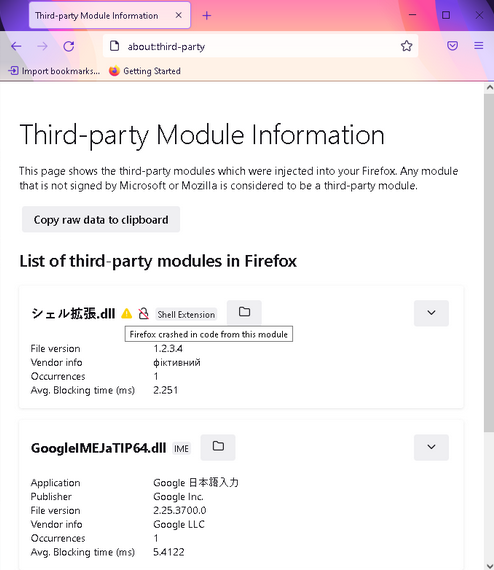
Windows Apps such as Antivirus and others inject their modules into the Firefox browser process. These may harm Firefox and cause it to crash, degrade browser performance or cause compatibility issues.
Identifying such modules is a difficult task. Mozilla is providing the ability for users to block them in Firefox with version 110.
All you need to do is visit about:third-party in the address bar and press enter
The page lists modules other than those signed by Microsoft or Mozilla injected into the browser.

It shows the following information for each module
- Publisher/Application name
- File version
- Vendor information
Number of occurrences - Average blocking times in milliseconds.
- Depending on the module, the page shows,
Unsigned icon for module if the module has not been digitally signed.
warning triangle icon represents it is causing firefox to crash with the current profile.
The page offers a folder icon to open files location in File Explorer.
How to block modules that cause Firefox to crash
- Load about:third-party in Firefox
- Identify the module causing Firefox to crash,
- Click the block icon next to the module, this will disable the problematic third-party module.
- You need to Restart Firefox for the changes to apply. If this helps, you can use Firefox without the need to uninstall a third-party module.
Other changes in verison 110:
- Firefox now allows importing bookmarks and data from Opera, Opera GX, and Vivaldi.
- Colorways theme introduced in Firefox is no longer available in the Add-ons manager if you’ve not saved and activated it in the past, however, you can download it from AMO.
- This update enables GPU Sandboxing on Windows.
You can download Firefox 110 from here and here is its release notes link (not yet live).
Summary: Antivirus or any other Windows App crashing Firefox through its injected module in the browser? Firefox has got you covered now and allows you to block such from about:third-party page from version 110 onwards.
What’s your take on this? Are you happy with the feature Firefox provides to block third-party app modules that trouble Firefox? Let us know in the comments below.





