After Google Chrome stable, Microsoft Edge in Canary version is now blocking Third-Party cookies by default in InPrivate windows.
Cookies are an essential part of the user’s browsing experience. Whenever you visit or sign in to a website, that information will be stored on your computer as a text file to recognize you.

Deleting the cookies makes you need to login to the websites again by entering your credentials. There are two types of cookies:
- First-party cookies
- Third-party cookies.
1st party cookies are the cookies generally created by websites you visit.
3rd party cookies are created by other sites and have some content on the website you’re browsing in the form of ads, images, or sharing buttons. These cookies are used by advertisers to track you and serve personalized ads.
Google recently announced and released new Privacy tools for Chrome browser such as revamped privacy and security settings and Safety check.
Recently updated Chrome 84 blocks third-party cookies by default.

Microsoft Edge 86 in Canary version also doing that now InPrivate windows, but unlike Chrome, it doesn’t offer a global toggle to disable 3rd party cookie blocking in private mode.
To see the changes on your own.
1. Launch Microsoft Edge browser
2. Click on ellipsis icon and select “New InPrivate window”
3. Visit any website
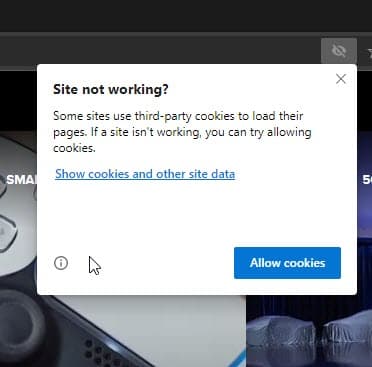
4. After the site is fully loaded, you can notice crossed eye icon in the address bar, which when clicked, displays the number of third-party cookies that were blocked on the site
If you notice any issues with the website, click on “Site not working” and click “Allow Cookies”, or select “Show cookies and other site data” to block or remove cookies for that site from the “Cookies in use” dialog.
What’s your take on this new privacy measure taken by Microsoft in the new Edge browser. Let us know your comments below.
Related articles:
Microsoft Edge Canary allows keeping cookies for specific sites when you close the browser
Google Chrome Canary now lets you remove all Third-Party Cookies
Firefox: How to delete Cookies for a Single Site?





