Google made a commit to enable Touch to Fill feature by default in Chrome 84 for Android.
Recently Google has released Chrome 84 for Android. Soon Chrome will autofill the password when you touch the username field. The Touch to Fill UI for Passwords has been behind the flag for some time, Chromium team today has enabled it by default.
Touch to Fill
Here is how the feature works.
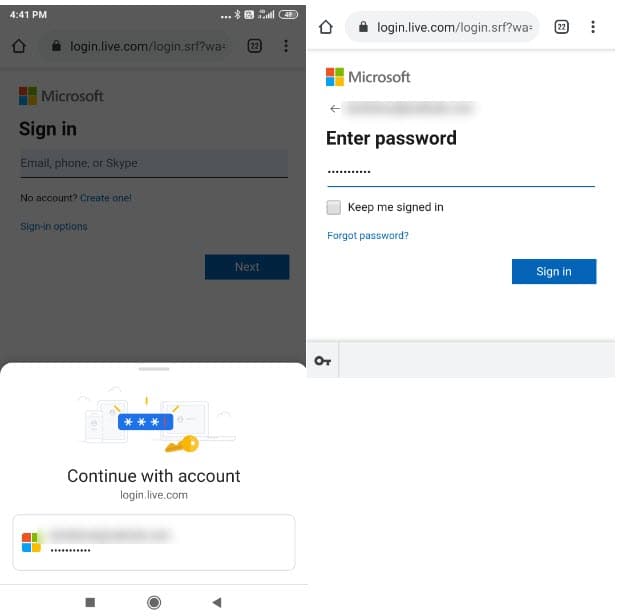
When you visit any website with the feature enabled, when you click on the username field, an overlay appears from the bottom to “Continue with account”.
When you tap on username and then further tap on the Next button, the password will be auto-filled in the next step, you’ll see an option to manage passwords at the bottom. Tapping on “Sign in” will logs you into your account.
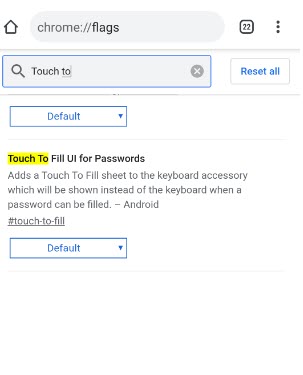
Google defines the feature flag as like this: “Add a Touch to Fill sheet to the keyboard accessory which will be shown instead of the keyboard when a password can be filled”.
“This change enables Touch to Fill by default. TTF will be launched in M84, so this change also cleanup experimentation code and removes branding messages, which will no longer be needed”. the commit change reads.
As of writing the article, the TTF is not enabled by default, but you can test the feature right now by enabling the “Touch to fill UI for Passwords” flag in chrome://flags page.
Related articles:
Google redesigns Chrome Passwords Export and Import feature
Chrome for Android is getting a new Security feature
Microsoft Edge on Android soon let you try new Chrome features


