Google Chrome allows us to create shortcuts for websites where you can run each site in a seperate window by using the shortcut created, Firefox hasn’t suppported this feature till now, but thanks to Mozilla for making site specific browsing (SSB) possible in Firefox right now, latest Firefox 73 in Nightly allows users to launch a site as a Site Specific Browser via a button present in Page Action menu. The website launched this way appears without toolbars, navigation menus and browser chrome, here you should not be confused with kiosk mode and Full screen mode.

What is Site Specific Browser?
Site Specific Browser or SSB means running a single site in a seperate browser instance and is not tied to a browser session. SSB’s minimalistic interface without toolbars lets you focus on content.
In the past, Mozilla Labs introduced Prism based on SSB concept and discontinued it later on. According to Mozilla “Prism is a simple XULRunner based browser that hosts web applications without the normal web browser user interface”. By using Prism in the past you were to create shortcuts to websites and run as SSBs.
Though you can create desktop shortcut to launch website as SSB, the process is not intuitive, you need to add a command line switch to Firefox shortcut like “–ssb https://www.google.com” (without quotes), the total String then should be
"C:Program FilesFirefox Nightlyfirefox.exe" --ssb https://www.google.com
Without this hassle, you can open a site as SSB through Firefox interface, for this, you should be running latest Nigthly verison.
Launch a website as a Site Specific Browser in Firefox
1. Ensure you’re using latest Nightly verison
2. Visit a website in the browser address bar, click on Page Action menu and select ” Launch Site Specific Browser ” option
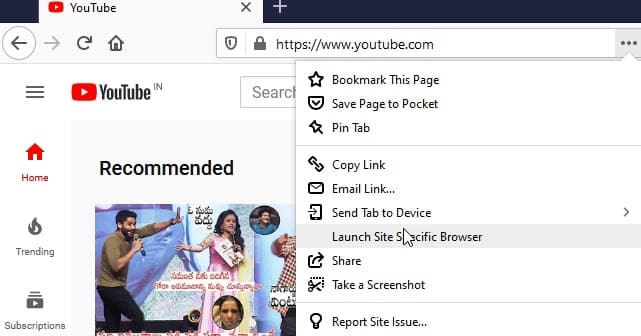
3. Done.
Related articles:
Chrome is turning tabs in focus mode into PWAs
Google Chrome may get focus mode in a Future Update





