Easily set Adobe Reader or other as default PDF Reader in Windows 10. In Windows 10, Microsoft Edge is not only the default browser, but it is also the default PDF Viewer. Yes! Windows Reader introduced in Windows 8 is no longer part of the new Windows OS, but you can always install it any time by visiting the Store.
This brings us another interesting situation, Edge has joined the Web PDF Viewers list with Firefox, Chrome and other web browsers.
If you’re using any desktop PDF program on your computer like Adobe Reader or Foxit, if you want to set it as default PDF Reader in Windows 10, here is how you can do that.
READ: How to make Adobe Reader as Default PDF Handler in Windows?
Changing the Default PDF Viewer in Windows 10
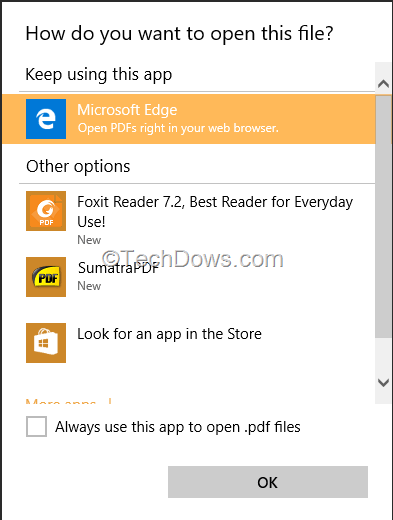
1. Right click on any PDF file on your computer, select ‘open with’,
2. When ‘How do you want to open this file?’ popup dialog appears, under ‘other options’, select the app, check ‘Always use this app to open .pdf files’ and click ‘OK’.
Will you use Edge as a default PDF Viewer with other desktop PDF programs installed on your computer? Have you faced any difficulty in doing this?

Google Chrome: How to Always Open PDFs with System Viewer? - Techdows
[…] READ: How to Change the Default PDF Viewer in Windows 10 […]