Chrome has a built-in ability to display a list of open and recently closed tabs. Google is now making finding those tabs easier with Fuzzy Search in Tab Search UI the Canary version.
Tab Search is one of Google’s answers to the tab overflow problem in Chrome apart from scrolling tab strip and Tab Groups.
If you’ve plenty of tabs open, finding the tab you’re looking for can be difficult. in Chrome, you need click on the down arrow on the toolbar to see all tabs you have open and you can search for the desired.
Tab Search layout displays and let you search through recently closed tabs also. Looks as if Chrome may add Fuzzy Search to the feature.
What is Fuzzy Search?
When you search for a specific word or phrase, a list of matching results will be displayed. For instance, in the case of Tab Search, if you type “yt”, the YouTube tab result will be displayed.

Enable Fuzzy Search for Tab Search in Google Chrome
- Launch Chrome
- Visit chrome://flags
- Search for “fuzzy”, in the dropdown arrow for “Fuzzy Search for Tab Search“, select Enabled and restart the browser.
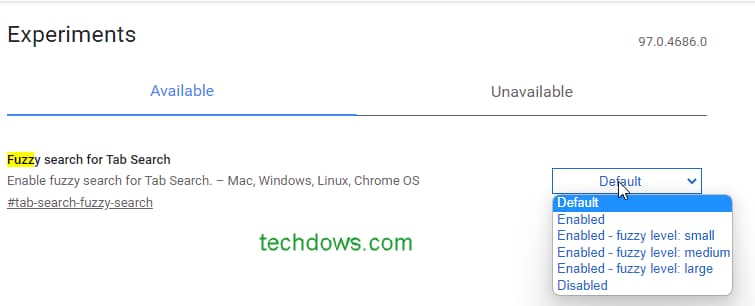
Google is offering small, medium, and Large options for Fuzzy level, so choose a fuzzy level to your liking.
Now to use it
- Open Chrome
- Visit some websites and press ctrl+Shift+A or click on the down arrow on the toolbar
- Type query related to a website you have opened in tabs, fuzzy search results will be displayed for the same.
With normal Tab Search, you may not find what you’re looking for, Fuzzy search finds and displays matching everything without any specific order.
For example, if tab search is already populated with YouTube, typing “Yt” won’t give you any results, whereas, with fuzzy search enabled, YouTube tab result will be displayed.
What’s your take on Tab Search’s new feature? Let us know in the comments below?
More on Google chrome:
Chrome is killing the underused Stacked Tabs feature
Chrome is integrating its PWAs into Windows 11 & 10 for uninstall
Chrome gets Windows 11 design improvements for Menus
Chrome on Android can now always open desktop Sites by default
