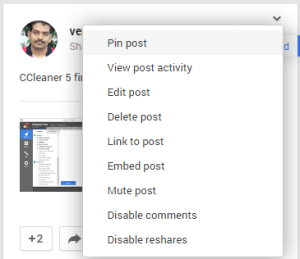
Similar to Twitter, Google+ now lets you pin any post on your Profile or page at the top, so that if anyone visits your G+ profile or Page it appears first. To get started, when you’re viewing the posts tab of your profile or page in a desktop browser, click the arrow in the right-corner of your post and select ‘Pin post’, you need to refresh the page for it to appear.
To unpin that post, you need to select ‘Unpin post’ from the drop down menu or pin another one. For now, desktop and Android users can see your pinned posts, support for iOS will be added soon.
How to Unblock blocked People in Google Plus?
Are you using Google+? What’s your take on this change? Like it or not? Let us know in the comments.
Source: Google+




