On Verizon, dial \*72 plus the 10-digit number to enable call forwarding and \*73 to disable it; on AT&T, T-Mobile and US Cellular iPhones, use the Call Forwarding switch in Settings.
This guide covers each carrier, conditional forwarding for busy or unanswered calls, how to confirm forwarding is active, and what to do when callers hear a busy tone.
Call forwarding codes and settings by carrier
Find your carrier in the left column, then use the method on the same row. Replace the sample number with the full 10-digit number, area code included.
| Carrier | Turn call forwarding on | Turn call forwarding off |
|---|---|---|
| Verizon | Dial *72 + 10-digit number (all calls) or *71 + 10-digit number (busy or unanswered calls) |
Dial *73 |
| AT&T | iPhone: Settings > Apps > Phone > Call Forwarding. Conditional: *61*number#, *62*number#, *67*number# |
Turn the Call Forwarding switch off, or dial ##61#, ##62#, ##67# |
| T-Mobile | iPhone: Settings > Apps > Phone > Call Forwarding; Android: Phone app settings | Turn the Call Forwarding switch off |
| US Cellular | iPhone: Settings > Apps > Phone > Call Forwarding, if the option is listed | Turn the Call Forwarding switch off, or ask US Cellular to remove it |
Dial star codes from the phone whose calls you want to forward. Verizon says you cannot manage call forwarding without your mobile phone, so a landline or a second phone will not work.
Understanding call forwarding
Call forwarding sends calls meant for your mobile number to another phone number, which can be a mobile or a landline. The type you choose decides whether your own phone still rings first.
| Forwarding type | When calls are forwarded | Does your phone ring? |
|---|---|---|
| Immediate (unconditional) | Every incoming call | No |
| No answer | You do not pick up; on Verizon after 3 to 6 rings | Yes, first |
| Busy | You are already on a call | No, the caller is redirected |
| Unreachable | Your phone is off or has no signal (AT&T code *62) |
No |
Conditional forwarding replaces your voicemail for the calls it catches. Immediate forwarding stops your phone from ringing at all until you turn it off.
General precautions before managing call forwarding
| Check | Why it matters |
|---|---|
| The destination is an active, voice-capable US number | Verizon requires a 10-digit US number and does not forward to international numbers |
| You are inside your carrier's coverage area | Star codes may not work outside Verizon coverage, and an iPhone must be in cellular range when you set forwarding |
| Your plan has unlimited minutes | Without unlimited minutes, Verizon bills forwarded calls against your plan |
| You trust the request | iPhone blocks links that ask you to turn on call forwarding because scammers use them to take over your calls |
| You know which line to forward on a Dual SIM phone | iPhone asks you to choose a line before you enter the number |
Call forwarding on Verizon
Verizon handles forwarding with star codes dialed from your own phone. There is no monthly fee on most plans, though some older plans may charge one.
- Open the Phone app on your Verizon phone and switch to the keypad.
- To forward every call, dial \*72 followed by the 10-digit number, for example
*72 999 555 4567, and press Call. - To forward only busy or unanswered calls, dial \*71 followed by the 10-digit number instead.
- Listen for a series of beeps or a confirmation message, then wait for the call to end on its own.
- To disable call forwarding, dial \*73 and press Call.
- Wait for the confirmation tone, which can sound like a busy signal, and let the call end.
If you do not have your phone or the code fails, Verizon Customer Service can turn call forwarding on or off. Verizon lists 800-922-0204 for this.
Call forwarding on AT&T
On an AT&T iPhone, the built-in Call Forwarding switch forwards every call. For forwarding only when you are busy, unreachable or do not answer, AT&T uses separate codes.
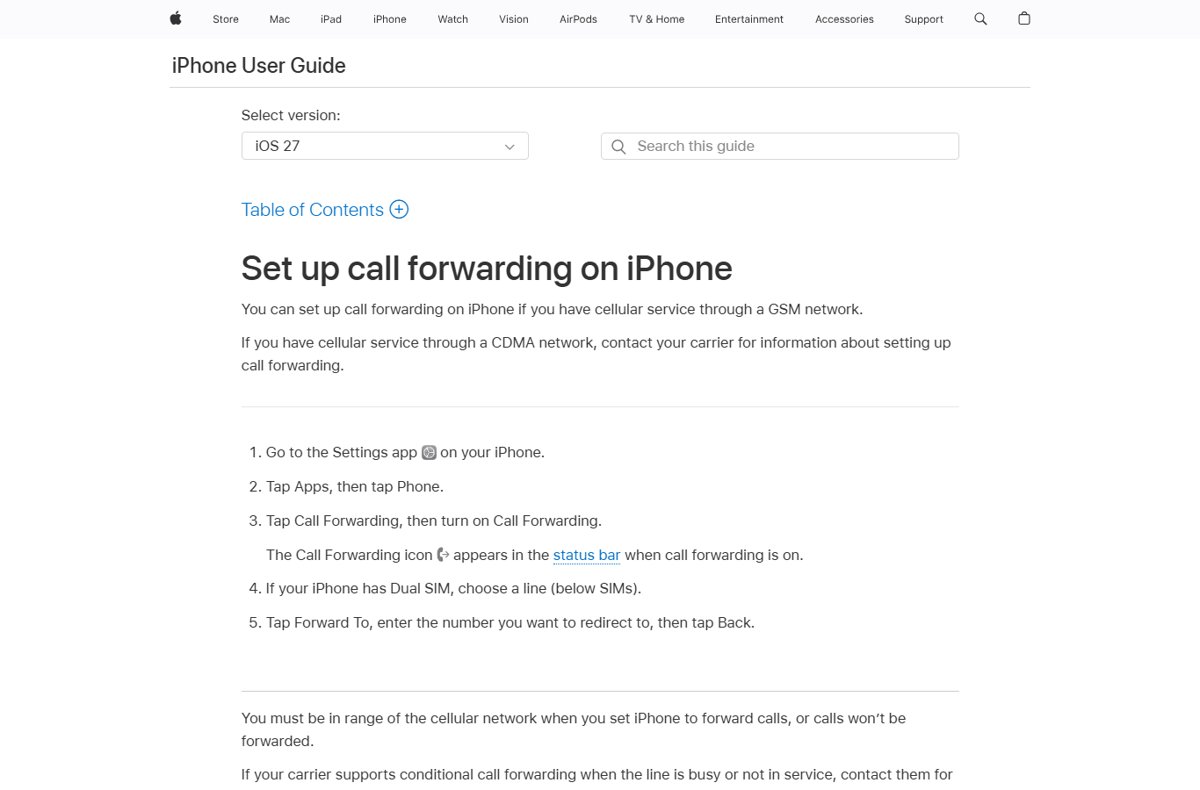
- Open Settings, tap Apps, then tap Phone.
- Tap Call Forwarding and turn on Call Forwarding.
- Tap Forward To, enter the 10-digit number, then tap Back.
- For conditional forwarding, open the keypad and dial
*61*+ number +#for unanswered calls,*62*+ number +#for unreachable, or*67*+ number +#for busy. - Enter one code at a time and wait for the confirmation before you dial the next.
- To disable it, turn Call Forwarding off in Settings, or dial
##61#,##62#and##67#to remove each conditional rule.
Call forwarding on T-Mobile
T-Mobile iPhones use the same Call Forwarding switch. On Android, the forwarding option sits inside the Phone app's settings, and its exact name differs between phone makers.
- On iPhone, go to Settings > Apps > Phone > Call Forwarding.
- Turn on Call Forwarding, choose a line if your iPhone has Dual SIM, then tap Forward To and enter the number.
- On Android, open the Phone app, tap More, then tap Settings and look for the call forwarding entry.
- Enter the destination number and confirm it.
- To disable call forwarding, return to the same screen and turn the switch off or clear the number.
- If no forwarding option appears, contact T-Mobile and ask which codes your plan supports.
Call forwarding on US Cellular
Apple supports the iPhone Call Forwarding switch on GSM networks and sends everyone else to their carrier. If the switch does not work on your US Cellular line, US Cellular has to set forwarding up for you.
- Open Settings, tap Apps, then tap Phone.
- Check whether Call Forwarding is listed under the calling options.
- If it is, tap it, turn on Call Forwarding, tap Forward To and enter the 10-digit number.
- If it is not listed, contact US Cellular and ask for the call forwarding codes for your line.
- Ask separately for busy and no-answer forwarding, because Apple notes these conditional types are set up through the carrier.
- To disable it, turn the switch off, or ask US Cellular for the cancel code that matches the code you used.
How to check call forwarding is on
- On iPhone, look for the call forwarding icon in the status bar; it appears only while forwarding is on.
- On Verizon, confirm you heard the beeps or confirmation message before the call ended.
- Call your mobile number from a different phone.
- With immediate forwarding, confirm the destination phone rings and your own phone stays silent.
- With conditional forwarding, let your phone ring without answering and confirm the call moves to the destination instead of voicemail.
Additional tips for managing call forwarding
| Tip | Detail |
|---|---|
| Texts are not forwarded | Call forwarding moves calls only; text messages still arrive on your own phone |
| Set it up before you travel | Verizon forwarding cannot be set up outside its coverage area, but a rule set before you start roaming, for example on a Verizon TravelPass trip, should keep working |
| Watch your minutes | On plans without unlimited minutes, forwarded calls are billed like calls you answer |
| Forwarding to Google Voice | Use the conditional codes so Google Voice takes your missed calls, and set them on every phone linked to the Google Voice number |
| Leaving Google Voice | Turn conditional forwarding off so missed calls go back to your carrier voicemail |
| Resellers and prepaid brands | Carriers' subsidiaries and resellers may not support conditional call forwarding |
Troubleshooting common call forwarding issues
Callers hear a busy tone after you forward calls
The number was entered wrongly, often with an extra key pressed during setup.
- Dial \*73 on Verizon to clear the current rule.
- Dial \*72 plus the full 10-digit number, area code included, with no extra digits.
- Call your number from another phone to test it.
The star code does nothing or the call fails
You are outside your carrier's coverage area, or the code is not supported on your plan.
- Move to an area with your carrier's own coverage and dial the code again.
- Check that you used your carrier's codes; Verizon and AT&T codes are different.
- Contact your carrier's customer service to turn forwarding on or off for you.
iPhone has call forwarding on but calls are not forwarded
The iPhone was out of cellular range when you set the rule, or the wrong Dual SIM line was chosen.
- Go to Settings > Apps > Phone > Call Forwarding and turn it off.
- Wait until you have cellular signal.
- Turn Call Forwarding back on, pick the correct line and re-enter the number under Forward To.
Calls still go to voicemail instead of the forwarding number
Only conditional forwarding was set, or a voicemail service such as Google Voice still holds the rule.
- Remove the old conditional rule with your carrier's cancel code, such as
##61#on AT&T or \*73 on Verizon. - Set immediate forwarding if you want every call forwarded.
- Test by calling your number from another phone.
iPhone shows an alert about a call forwarding link
A message, email, webpage or app asked you to turn on call forwarding, and iPhone blocked it as a possible scam.
- Ignore the alert; no further action is needed.
- Do not dial any forwarding code that came in an unexpected message.
- Set forwarding yourself from Settings only when you want calls sent to a number you trust.
When to disable call forwarding
| Situation | Why turn it off |
|---|---|
| You are back at your desk or home | Immediate forwarding keeps your own phone silent, so you miss calls you could answer |
| You did not set forwarding up yourself | An unexpected rule can send your calls, including verification calls, to a stranger |
| You stopped using Google Voice or another voicemail service | Missed calls keep going to the old service instead of your carrier voicemail |
| You are on a plan without unlimited minutes | Every forwarded call uses plan minutes |
| The destination number is no longer yours | Callers reach someone else, or hear a busy tone |
Use \*73 on Verizon, or turn the Call Forwarding switch off in iPhone Settings on AT&T, T-Mobile and US Cellular.
Carrier call forwarding FAQ
What does enable and disable call forwarding mean?
Enabling call forwarding tells your carrier to send incoming calls to another number. Disabling it removes that rule, so calls ring on your own phone and unanswered ones go to your voicemail again.
How do I disable incoming calls by forwarding them?
Set immediate call forwarding to another number. On Verizon, dial *72 plus the 10-digit number; on an iPhone with AT&T or T-Mobile, turn on Call Forwarding in Settings. Your phone stops ringing until you turn forwarding off.
Does call forwarding forward text messages?
No. Call forwarding moves voice calls only. Text messages still arrive on the phone that holds your number, so you need that phone to read them.
How much does call forwarding cost on Verizon?
Most Verizon plans have no monthly fee for call forwarding, though some older plans may charge one. Without unlimited minutes, forwarded calls are billed against your plan like calls you answer.
Can I forward calls to an international number?
Not on Verizon. The destination must be an active, voice-capable US number entered as 10 digits including the area code. Forwarding to international numbers is not available.
Does call forwarding work while I am roaming?
On Verizon, you cannot set up call forwarding outside its coverage area or while traveling abroad. A forwarding rule you set before you start roaming should keep working during the trip.
Can I turn off call forwarding without my phone?
Not with star codes, because they must be dialed from the forwarded phone. Verizon Customer Service can turn call forwarding on or off for you if you do not have your device.
What is the difference between *72 and *71 on Verizon?
*72 forwards every call immediately, so your phone does not ring. *71 forwards only calls you do not answer within 3 to 6 rings or that arrive while you are busy. *73 turns both off.