The Git LFS download for Windows 11 and Windows 10 is a free setup file from git-lfs.com, the project’s official site. Run it, type git lfs install once, and Git starts storing large files such as videos, datasets and PSDs outside your repository.
Git LFS also installs on Intel and Apple silicon Macs and on Linux, and costs nothing to use.
Below: which file to pick, Windows, winget and Mac installs, GitHub storage quotas, first-time setup, fixes and a clean uninstall.
Which Git LFS download do you need?
git-lfs.com shows one button per system. Match your computer to a row, then click the button with the same label.
| Your computer | Button on git-lfs.com | File you get |
|---|---|---|
| Windows 11 or Windows 10 PC | Download (Windows) | Setup .exe with a wizard |
| Mac with an Intel processor | Download (Mac – Intel Silicon) | ZIP for amd64 |
| Mac with an Apple M-series chip | Download (Mac – Apple Silicon) | ZIP for arm64 |
| Linux on x86-64 | Download (Linux – x86-64) | tar.gz archive for amd64 |
| Linux, with a package manager | Install via PackageCloud (Linux) | A .deb or .rpm repository |
Already using Git for Windows 2.55.0(5)? It already ships with the current Git LFS, so you only need to run git lfs install .
Download Git LFS from the official site
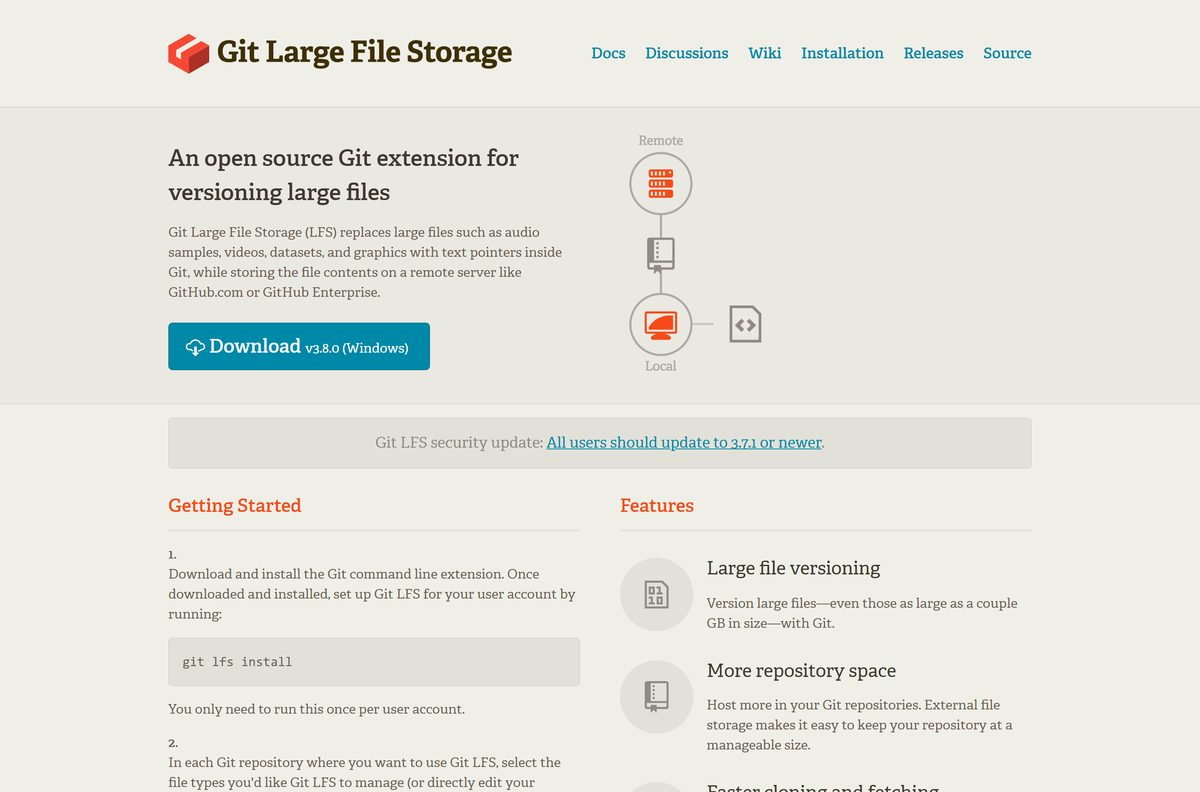
Get Git LFS from git-lfs.com or from GitHub’s own documentation. The download buttons point at the project’s official GitHub releases, with no sign-up in front of them.
- Git LFS official download page — Windows, Mac and Linux builds of the current release
- GitHub Docs: Installing Git Large File Storage — GitHub’s install guide for Windows, Mac and Linux
- Git for Windows latest release — Git itself, which bundles Git LFS
- winget manifest for GitHub.GitLFS — package ID and installer checksum
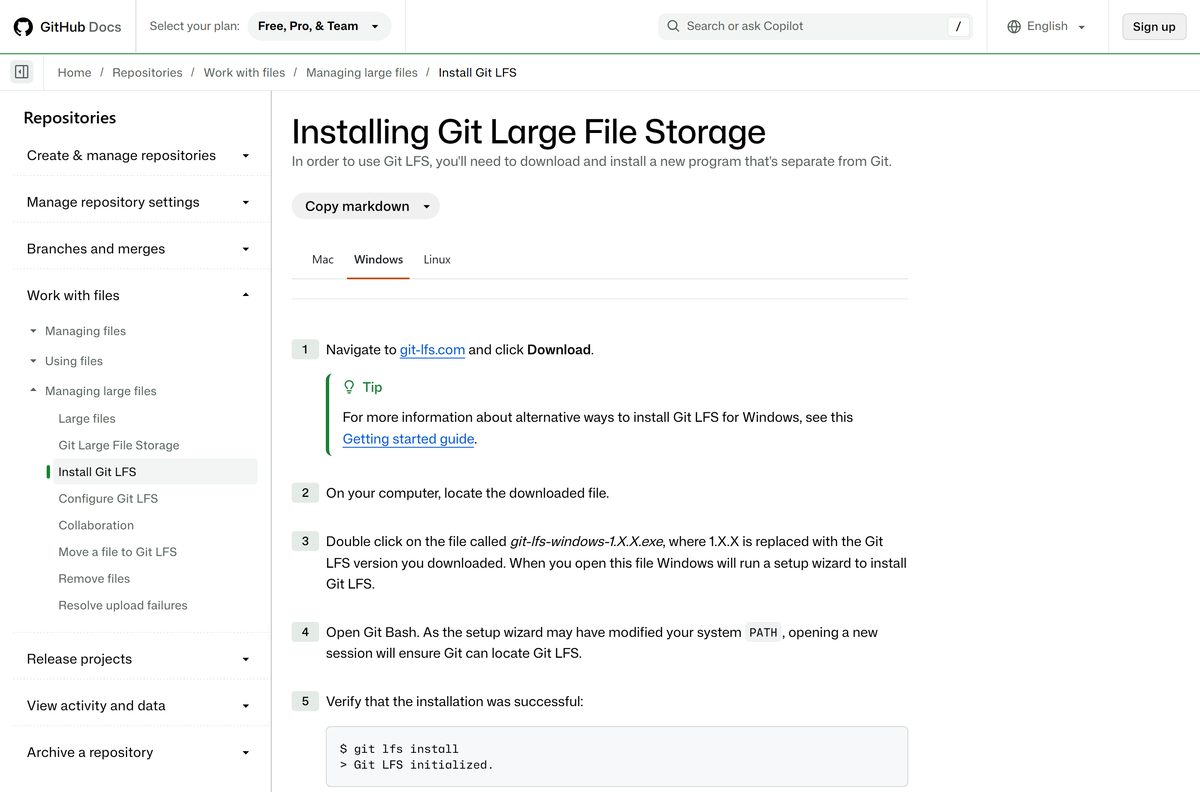
How to install Git LFS on Windows 11 and 10
- Install Git for Windows first if git –version does not work in a terminal.
- Open git-lfs.com and click the Windows download button.
- Double-click the git-lfs-windows setup file in your Downloads folder.
- Click Yes at the User Account Control prompt; the setup installs for all users.
- Follow the setup wizard with its default options and click Finish at the end.
- Open a new Git Bash window so it picks up the updated PATH.
- Run git lfs install and wait for the reply Git LFS initialized.
You run git lfs install once per user account, not once per repository.
Install Git LFS with winget, Homebrew or MacPorts
Package managers fetch the same release and make later updates a single command.
- On Windows, open Windows Terminal and run winget install –id GitHub.GitLFS -e .
- On a Mac with Homebrew, open Terminal and run brew install git-lfs .
- On a Mac with MacPorts, run sudo port install git-lfs .
- On Linux, follow the PackageCloud (Linux) link on git-lfs.com to add the repository, then install the git-lfs package.
- Run git lfs install in a new terminal window to finish setup.
The winget package lists Git as a dependency, so winget expects Git to be present or installs it first.
Which Git LFS download do you need for your Mac or Linux PC?
On a Mac, click the Apple menu and choose About This Mac. The Chip or Processor line tells you which row applies.
| Your system says | What to install | Where |
|---|---|---|
| Chip: Apple M1, M2, M3 or later | The Apple Silicon ZIP, or Homebrew | Download (Mac – Apple Silicon) |
| Processor: Intel | The Intel ZIP, or Homebrew | Download (Mac – Intel Silicon) |
| Linux on x86-64 | The tar.gz archive or PackageCloud packages | Download (Linux – x86-64) |
To install an archive, unzip it, open Terminal, cd into the extracted folder and run ./install.sh . Use sudo ./install.sh if the script is refused.
Then run git lfs install to add Git LFS to your global Git config.
How to verify the Git LFS installer on Windows
The winget manifest for the current Git LFS release records the SHA-256 hash of the Windows setup file. Compare yours against it before you run the file.
- Open PowerShell in your Downloads folder.
- Run Get-FileHash .\git-lfs-windows-v3.8.0.exe -Algorithm SHA256 .
- Compare the result with AA2D69214905D6B348F1B038BEB2D68E4828342F9B3FE47DAE5A5F023823FE92 .
- Delete the file and download it again from git-lfs.com if the two strings differ.
Is Git LFS free?
There is no license key, trial or account inside Git LFS itself. Any site selling a Git LFS key or a premium build is not the project.
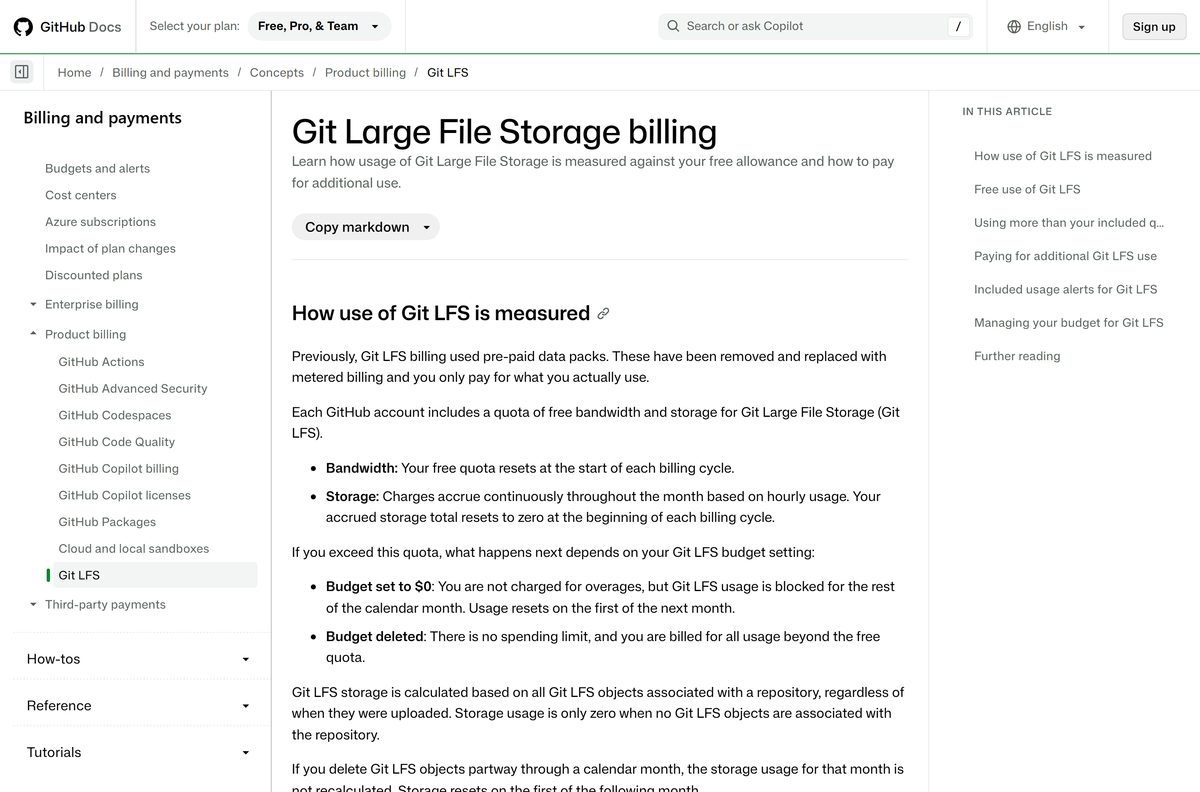
Install Git LFS for free. Watch your host’s storage quota, because that is where costs appear. The Git LFS client is open source with no paid edition. GitHub bills only for Git LFS storage and bandwidth above the quota included with your plan.
On GitHub, a $0 budget blocks Git LFS use for the rest of the month once you pass the quota, instead of charging you.
Should you install standalone Git LFS or use the copy in Git for Windows?
Mac and Linux have no Git bundle that includes it, so install Git LFS there from git-lfs.com, Homebrew, MacPorts or PackageCloud.
Use the Git LFS that comes with Git for Windows. Install the standalone setup only when git-lfs.com has a newer release than your Git bundle. Git for Windows 2.55.0(5) already ships with Git LFS 3.8.0, the same version git-lfs.com offers. Updating Git keeps both current in one step.
How to check your Git LFS version and update it
- On Windows, run winget list GitHub.GitLFS to see the installed version.
- Run winget upgrade –id GitHub.GitLFS -e to move to the newest release.
- If Git LFS came with Git for Windows, update Git for Windows from its latest release page instead.
- On a Mac with Homebrew, run brew upgrade git-lfs .
- For a manual install, download the current build from git-lfs.com and install it over the old one.
git-lfs.com tells every user to run 3.7.1 or newer. That release fixed CVE-2025-26625.
Check the Git LFS system requirements before you install
| Field | Value |
|---|---|
| Software | Git Large File Storage (Git LFS) |
| Developer | GitHub and the Git LFS open source project |
| Latest version | 3.8.0 |
| Released | 27 August 2026 |
| License | Free and open source |
| Needs | Git installed on the same machine |
| Windows | One setup .exe for Windows 11 and Windows 10 |
| Mac | Separate ZIPs for Intel and Apple silicon; Homebrew and MacPorts |
| Linux | x86-64 tar.gz archive; PackageCloud packages |
| winget ID | GitHub.GitLFS |
| Offline installer | Yes |
| Official download source | git-lfs.com |
| Last verified | 2026-09-25 |
Check how large a file Git LFS can push to GitHub
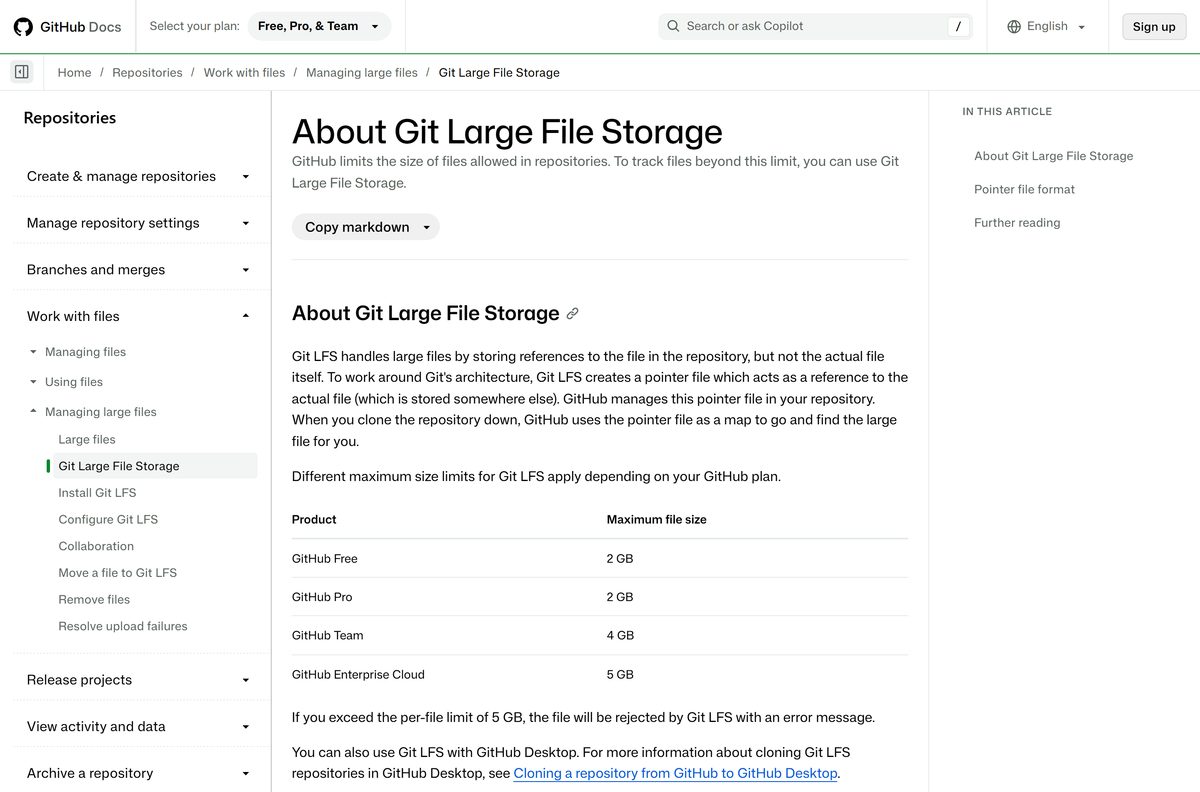
GitHub caps each Git LFS file by plan and includes a free monthly allowance of storage and download bandwidth.
| GitHub plan | Max file size | Free storage | Free bandwidth |
|---|---|---|---|
| GitHub Free | 2 GB | 10 GiB | 10 GiB |
| GitHub Pro | 2 GB | 10 GiB | 10 GiB |
| GitHub Team | 4 GB | 250 GiB | 250 GiB |
| GitHub Enterprise Cloud | 5 GB | 250 GiB | 250 GiB |
Git LFS rejects any file over 5 GB with an error. It also does not work with GitHub Pages sites or template repositories.
How to start tracking large files with Git LFS
- Open Git Bash on Windows or Terminal on Mac and Linux.
- Change to the repository you want to use with Git LFS.
- Run git lfs track “.psd” , replacing .psd with your file type.
- Run git add .gitattributes so collaborators get the same tracking rules.
- Add a matching file with git add file.psd .
- Commit with git commit -m “Add design file” and push with git push .
Tracking a file type does not convert files already in your history. The git lfs migrate command handles that.
Fix Git LFS not installing or not working
Git does not recognise the lfs command after install
The open Git Bash window still has the old PATH, or Git is missing.
- Close every Git Bash window and open a new one.
- Run git lfs install again.
- If it still fails, install Git for Windows, then rerun the Git LFS setup.
install.sh is refused on Mac or Linux
The script needs permission to write to system folders.
- Run sudo ./install.sh from the extracted folder.
- Enter your password, then run git lfs install .
A push is blocked by the Git LFS integrity check
Some referenced Git LFS files were never uploaded.
- Run git lfs install to reinstall the client hooks.
- Run git lfs push –all origin to upload every referenced file.
Clones contain small pointer files instead of the real files
The account has passed its Git LFS quota, or Git LFS is not set up on this machine.
- Run git lfs install on the machine, then clone again.
- Check your GitHub Git LFS usage, and add a payment method or wait for the next month if you are over quota.
How to uninstall Git LFS
- Open Git Bash or Terminal and run git lfs uninstall to remove Git LFS from your Git config.
- On Windows, open Settings > Apps > Installed apps.
- Find the Git LFS entry, click the three-dot menu and select Uninstall.
- Or run winget uninstall –id GitHub.GitLFS -e if you installed it with winget.
- On a Mac with Homebrew, run brew uninstall git-lfs .
Uninstalling Git LFS leaves large files already stored on GitHub untouched. Remove them from the repository history first if you want them gone.
Choose how to get Git LFS on your machine
| Option | Best for | Link |
|---|---|---|
| Git LFS setup from git-lfs.com | The newest release on any system | git-lfs.com |
| Git for Windows | One install that includes Git and Git LFS | Git for Windows release |
| GitHub Desktop | Cloning Git LFS repositories without the command line | About Git LFS |
Choose Git for Windows on a new PC. Add the standalone setup only when you need a Git LFS release ahead of your Git bundle.
Frequently asked questions
Is Git LFS free?
Yes. Git LFS is a free, open source Git extension with no license key or paid edition. What can cost money is storage: GitHub Free and Pro include 10 GiB of Git LFS storage and 10 GiB of bandwidth, and usage above that is billed by the hour and gigabyte.
What is the official Git LFS download page?
The official page is git-lfs.com. Its buttons fetch the Windows installer, separate Mac builds for Intel and Apple silicon, and a Linux x86-64 archive, and it lists the Homebrew, MacPorts and PackageCloud install options.
Does Git LFS work on Windows 11?
Yes. The Git LFS Windows setup file installs on Windows 11 and Windows 10 through a normal setup wizard. Install Git for Windows first, because Git LFS is an extension to Git and needs it to run.
How big is the Git LFS download?
git-lfs.com does not list a file size for any of its downloads. The Windows build is a single setup .exe, and the Mac and Linux builds are compressed archives that you unpack before running the install script.
Is there a Git LFS offline installer?
Yes. The Windows .exe from git-lfs.com carries the whole program and runs its setup wizard without fetching anything else. The Mac and Linux archives also install offline through the install.sh script inside them.
Is there a Git LFS version for Mac?
Yes. git-lfs.com has one ZIP for Intel Macs and one for Apple silicon Macs. You can also run brew install git-lfs with Homebrew or port install git-lfs with MacPorts, then run git lfs install.
Is Git LFS available for 64-bit and ARM64?
On Mac, yes: there are separate Intel (amd64) and Apple silicon (arm64) builds. On Windows, git-lfs.com offers one setup file, which the winget manifest lists as x86, and it installs on 64-bit Windows.
Is Git LFS safe to download?
Yes, from git-lfs.com or through winget, Homebrew or Git for Windows. The project is maintained on GitHub, and git-lfs.com tells every user to run version 3.7.1 or newer because of a security fix.
What is the latest version of Git LFS?
Git LFS 3.8.0 is the current release, offered for Windows, Mac and Linux. Git for Windows 2.55.0(5) also ships with it.
Does Git for Windows include Git LFS?
Yes. Recent Git for Windows releases come with Git LFS built in, and version 2.55.0(5) includes the current Git LFS release. Install the standalone Git LFS setup only when you need a newer version than your Git bundle carries.
How do I install Git LFS with winget?
Open Windows Terminal and run winget install –id GitHub.GitLFS -e. The winget package lists Git as a dependency, so install Git first. Then open Git Bash and run git lfs install once.
Why won’t Git LFS install or work?
Usually Git is missing, or an old Git Bash window still uses the previous PATH. Install Git first, close every Git Bash window, open a new one, and run git lfs install. On Mac or Linux, run sudo ./install.sh if permission is denied.