Visual Studio Professional covers the full IDE for small teams at $99.99 per user per month on an annual plan, while Enterprise adds advanced debugging, testing and architecture tools, more Azure credit and more support for $499.92 per user per month on an annual plan.
This comparison covers each edition's features, licensing and prices from Microsoft's own pages, support benefits, performance tooling and which teams need which edition.
Professional or Enterprise: the short answer
Buy Visual Studio Professional unless your team needs IntelliTrace, Live Unit Testing, Microsoft Fakes, the Snapshot Debugger, editable code maps or Azure DevOps Test Plans. Both editions run the same IDE for the same platforms. Enterprise costs about five times as much in the first year, and its extra value sits in those tools plus a larger Azure credit, four support incidents instead of two, and more dev/test software.
Overview of Visual Studio Editions
| Edition | Who Microsoft aims it at | Licensing |
|---|---|---|
| Visual Studio Community | Students, open-source contributors, individual developers, classroom learning and academic research | Free; up to five users in non-enterprise organizations |
| Visual Studio Professional | Small-team commercial development | Paid subscription (annual or monthly) or a one-time IDE standalone purchase |
| Visual Studio Enterprise | Teams of any size with demanding quality and scale needs | Paid subscription, annual or monthly |
Microsoft defines an enterprise organization as one with more than 250 PCs or more than $1 million in annual revenue. Such organizations cannot use Community beyond open source, academic research and classroom scenarios, so they need Professional or Enterprise.
Key Features Comparison
The core IDE, editors, refactoring, debugger and platform workloads are shared. The differences sit in development tools for testing, diagnostics and architecture, plus DevOps and collaboration benefits.
| Feature | Professional | Enterprise |
|---|---|---|
| IntelliTrace (recorded execution history) | No | Yes |
| Live Unit Testing | No | Yes |
| Microsoft Fakes (unit test isolation) | No | Yes |
| IntelliTest | No | Visual Studio 2022 only, .NET Framework; deprecated in Visual Studio 2026 |
| Code coverage | Yes in Visual Studio 2026; Enterprise-only in 2022 and earlier | Yes |
| Snapshot Debugger for live Azure apps | No | Yes |
| Code maps | Read, filter and add generic nodes only | Create and edit |
| Dependency diagrams and validation | Read only | Create, edit and validate |
| Code clone detection | No | Yes |
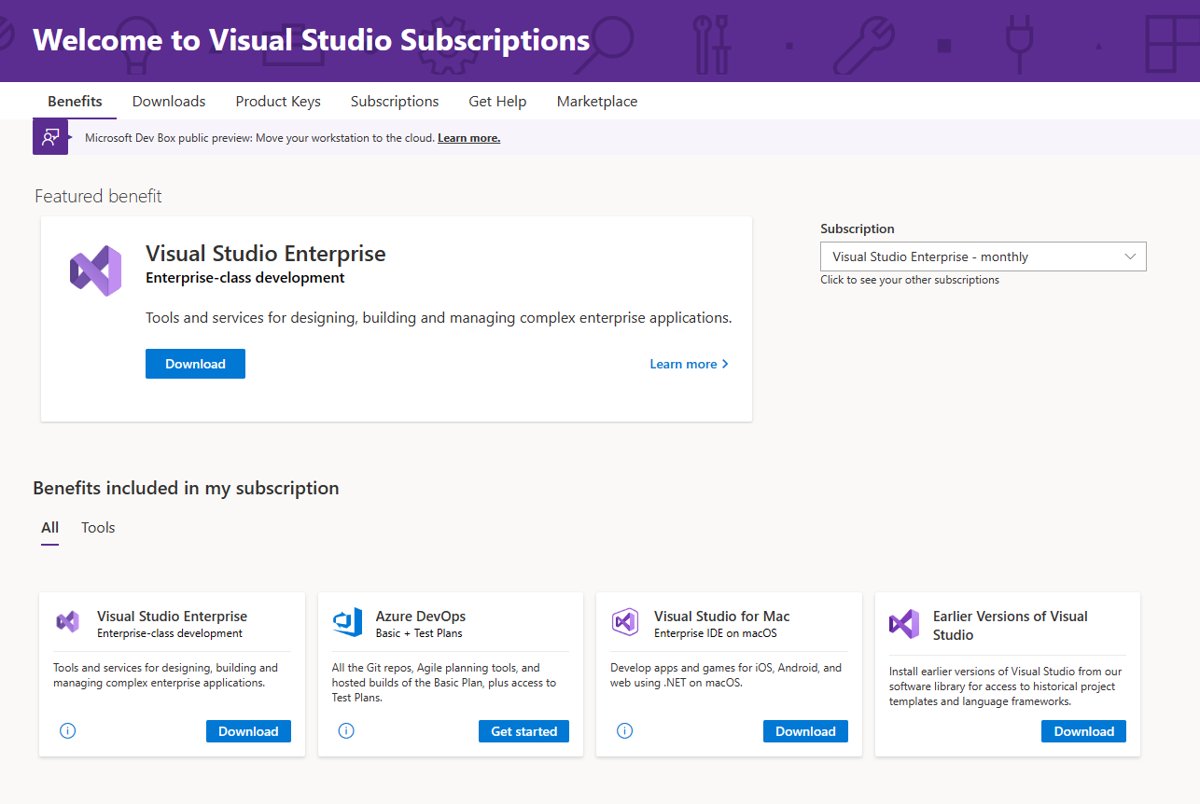
| Azure DevOps | Basic plan | Basic plus Test Plans |
| Monthly Azure dev/test credit (annual plan) | $50 | $150 |
Licensing and Pricing Comparison
Prices below are Microsoft's US list prices per user. Volume licensing through Open Value or an Enterprise Agreement changes them.
| Plan | Professional | Enterprise |
|---|---|---|
| Standard subscription, first year | $99.99 per month, paid annually | $499.92 per month, paid annually |
| Standard subscription, renewal | $66.59 per month after the first year | $214.09 per month after the first year |
| Monthly subscription | $45 per month | $250 per month |
| One-time IDE purchase | $499 IDE standalone, perpetual, no subscription benefits | Not offered |
| Dev/test software | Basic | Premium |
| Power BI Pro | No | Included with Enterprise standard |
| GitHub Enterprise bundle | Available through Enterprise Agreements | Available through Enterprise Agreements |
Monthly plans include the IDE and Azure DevOps access but fewer of the standard plan's benefits. Microsoft notes that subscription benefits can change over time.
Customer Support and Resources
| Benefit | Professional standard | Enterprise standard |
|---|---|---|
| Technical support incidents | 2 per year | 4 per year |
| What incidents cover | Break-fix issues in non-production environments | Break-fix issues in non-production environments |
| Training | Training and support benefits | Extended training and support benefits |
| Community help | Developer Community, Microsoft Q&A, Tech Community | Developer Community, Microsoft Q&A, Tech Community |
Subscriptions from programs such as Not For Resale or Microsoft Certified Trainer do not receive support incidents, whatever the level.
Performance and Scalability
Microsoft publishes no difference in IDE speed between the editions; both run the same Visual Studio build. What scales differently is how far each edition helps you diagnose and test large codebases.
| Need | Professional | Enterprise |
|---|---|---|
| Replay what happened before an exception | Not available | IntelliTrace |
| Debug a production Azure app without stopping it | Not available | Snapshot Debugger |
| Run affected tests automatically as you type | Not available | Live Unit Testing |
| Enforce architecture rules across a large solution | Read dependency diagrams only | Live dependency validation |
| Measure test coverage | Visual Studio 2026 and later | All supported versions |
Use Cases for Professional vs. Enterprise
| Your situation | Choose | Why |
|---|---|---|
| Solo developer or open-source work in a small organization | Community | Free for up to five users outside enterprise organizations |
| Commercial team in an enterprise organization, standard web, desktop or cloud apps | Professional | Full IDE and Azure DevOps Basic at a fifth of Enterprise's first-year price |
| You want to own the IDE outright | Professional IDE standalone | One-time $499, perpetual licence |
| Large .NET codebase with heavy unit testing | Enterprise | Live Unit Testing and Microsoft Fakes |
| Hard-to-reproduce production bugs in Azure apps | Enterprise | Snapshot Debugger and IntelliTrace |
| Architects enforcing layer rules | Enterprise | Create and validate dependency diagrams and code maps |
| QA team using Azure DevOps Test Plans | Enterprise | Test Plans are included |
| Only need a contractor seat for a few months | Monthly Professional or Enterprise | No annual commitment |
Frequently asked questions
What is the difference between Visual Studio Professional and Enterprise?
Both share the same IDE. Enterprise adds IntelliTrace, Live Unit Testing, Microsoft Fakes, the Snapshot Debugger, full code map and dependency validation tools, Azure DevOps Test Plans, $150 monthly Azure credit instead of $50, and four support incidents instead of two.
How much does Visual Studio Professional cost compared with Enterprise?
On Microsoft's US price list, Professional standard costs $99.99 per user per month paid annually and Enterprise standard costs $499.92. Monthly plans are $45 and $250. Renewals drop to $66.59 and $214.09 per month.
Is Visual Studio 2026 Professional different from 2022 Professional?
Yes. Code coverage, which was Enterprise-only in Visual Studio 2022 and earlier, is available in Professional and Community in Visual Studio 2026. IntelliTest, an Enterprise feature in 2022, is deprecated in 2026.
Does Visual Studio Professional include a perpetual license?
Only the Professional IDE standalone does. It costs $499 once and includes perpetual use rights but none of the subscription benefits. Enterprise is sold only as an annual or monthly subscription.
What happened to MSDN subscriptions?
Microsoft now sells Professional and Enterprise as Visual Studio subscriptions. MSDN Platforms is still listed as a separate subscription on Microsoft's subscriptions page, alongside Visual Studio Test Professional.
Can a company use Visual Studio Community instead of Professional?
Only within limits. Non-enterprise organizations can let up to five users use Community. Organizations with more than 250 PCs or more than $1 million in annual revenue cannot, except for open source, academic research and classroom use.
Does Visual Studio Professional have code coverage?
Yes, from Visual Studio 2026. Microsoft's documentation states code coverage is available in Enterprise, Professional and Community, and that it was limited to Enterprise in Visual Studio 2022 and earlier versions.
Conclusion
Start with Professional and move to Enterprise only when a named Enterprise tool would save your team real debugging or testing time. The editions share the IDE, and Visual Studio 2026 moved code coverage into Professional, so Enterprise's premium now buys IntelliTrace, Live Unit Testing, Fakes, the Snapshot Debugger, architecture validation, Test Plans and larger subscription benefits.