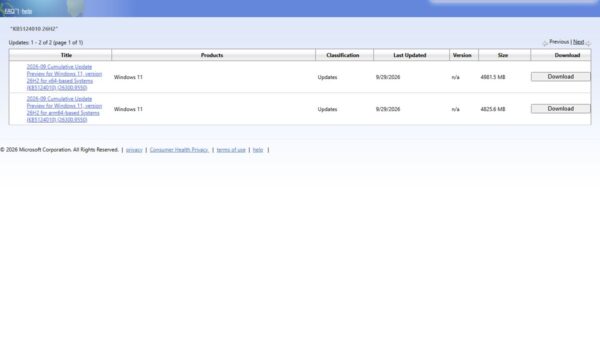
Windows 11 26H2 has three official releases so far, all dated September 29, 2026: the enablement package KB5121794, the launch build 26300.9457 and the latest build 26300.9550 from KB5124010.
This page lists every 26H2 build and KB, the Insider builds that led up to launch, how to read and check your build number, the servicing dates and the open known issues. It is updated as Microsoft ships each monthly release.
Windows 11 Update History
These are the Windows 11 version 26H2 (OS build 26300) releases that Microsoft lists. Newest first.
| Release date | OS build | KB | Update type |
|---|---|---|---|
| 2026-09-29 | 26300.9550 | KB5124010 | 2026-09 D non-security preview; same KB gives 26200.9550 on 25H2 and 26100.9550 on 24H2 |
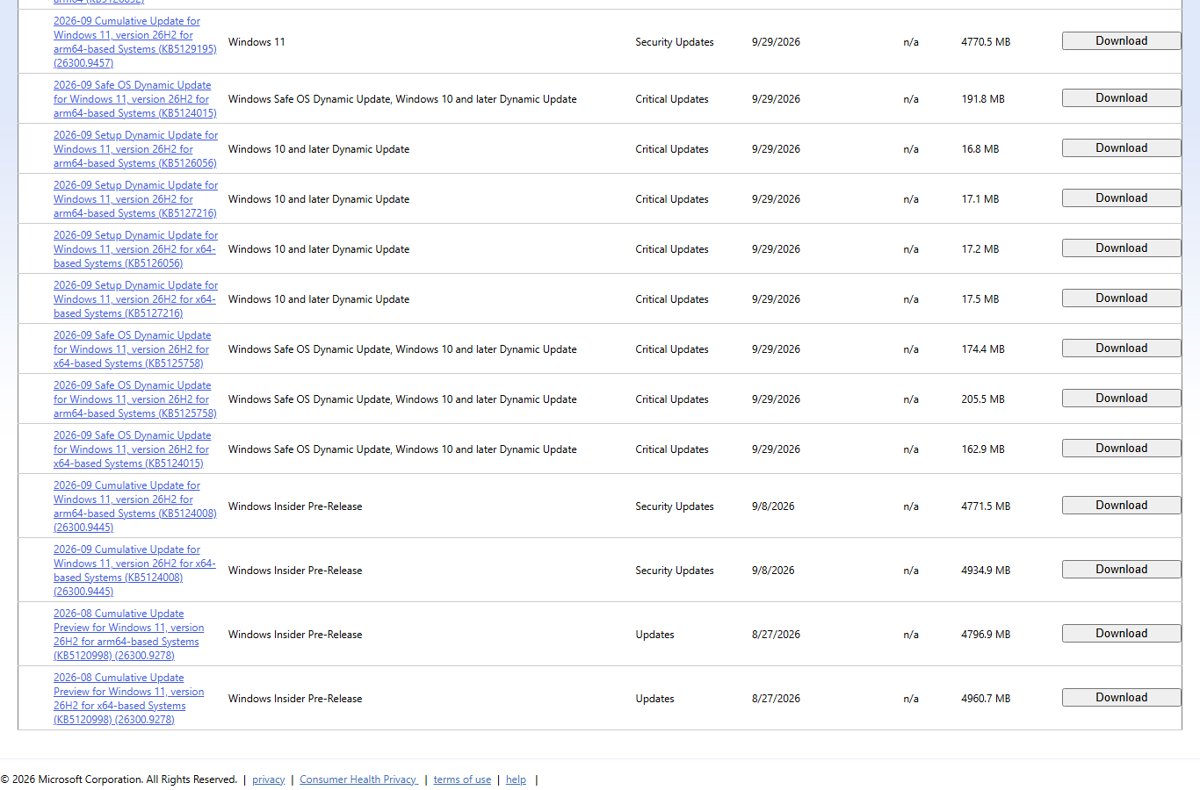
| 2026-09-29 | 26300.9457 | KB5129195 in the Microsoft Update Catalog; no KB shown on the release information page | Launch build, carrying the September 14 out-of-band security fixes |
| 2026-09-29 | Moves 26200 or 26100 to 26300 | KB5121794 | Enablement package that turns a 24H2 or 25H2 PC into 26H2 |
The next scheduled release is the October 2026 security update. Microsoft's hotpatch calendar marks it as a baseline update that needs a restart. How the enablement package works is covered in what KB5121794 does.
About Windows 11 Releases
Windows 11 gets one feature update a year, in the second half of the calendar year, plus monthly updates. Microsoft labels each monthly release by year, month and week.
| Label | Meaning | 26H2 example |
|---|---|---|
| B | Security update, released the second Tuesday of the month (Patch Tuesday) | 2026.10 B is the next scheduled release |
| D | Optional non-security preview, released the fourth week of the month | 2026-09 D, KB5124010, build 26300.9550 |
| OOB | Out-of-band update released outside the normal schedule to fix a specific problem | KB5129195 on 24H2 and 25H2, shipped as the 26H2 launch build |
| Hotpatch | Security-only update installed without a restart, in the two months after each quarterly baseline | November and December 2026 are scheduled hotpatch months |
| Feature update | The annual version change, delivered to 24H2 and 25H2 as an enablement package | KB5121794 |
Windows 11 Versions vs. Build Numbers
Each Windows 11 version has its own build series. The number before the dot identifies the version, so a 26H2 PC always starts with 26300.
| Version | OS build series | Availability date | Latest build as of September 30, 2026 |
|---|---|---|---|
| 26H2 | 26300 | 2026-09-29 | 26300.9550 |
| 26H1 | 28000 | 2026-02-10 | 28000.3086 |
| 25H2 | 26200 | 2025-09-30 | 26200.9550 |
| 24H2 | 26100 | 2024-10-01 | 26100.9550 |
| 23H2 | 22631 | 2023-10-31 | 22631.7584 |
| 22H2 | 22621 | End of updates | End of updates |
| 21H2 | 22000 | End of updates | End of updates |
26H2, 25H2 and 24H2 share one servicing branch, so they receive the same monthly KB with the same revision number. The 26300, 26200 and 26100 build series explained goes deeper on why.
Insider builds before 26H2 shipped
Microsoft's Flight Hub lists 26H2 preview builds from January 2026. Experimental builds were delivered on top of 25H2 with an enablement package that raised the build to 26300.
| Date | Build | Channel | Note |
|---|---|---|---|
| 2026-01-27 | 26300.7674 | Experimental | First 26H2 build on Flight Hub |
| 2026-06-19 | 26300.8697 | Experimental | Microsoft announces 26H2 and its enablement package the same day |
| 2026-07-31 | 26300.9032 | Experimental | Last 26300 Experimental build before the move to 26340 |
| 2026-08-17 | 26340.9212 | Experimental | Experimental channel moves to the 26340 series |
| 2026-08-27 | 26300.9278 | Release Preview | 26H2 released to Release Preview; catalog lists KB5120998 for it |
| 2026-09-08 | 26300.9445 | Insider pre-release | Catalog lists KB5124008 for 26H2 under Windows Insider Pre-Release |
| 2026-09-10 | 26300.9539 | Release Preview | KB5124010 preview for 24H2, 25H2 and 26H2 |
| 2026-09-25 | 26340.9577 | Experimental | Latest Experimental build on Flight Hub |
Checking the Build Number and Version of your Windows 11
- Right-click Start and select Settings.
- Select System, then About.
- Under Windows specifications, check that Version reads 26H2.
- Read OS build and compare it with the update history table above. 26300.9550 means KB5124010 is installed.
A PC that still shows 26200 or 26100 is on 25H2 or 24H2. It needs the enablement package, which Microsoft is rolling out in phases over the next few months.
Read the full version string with the ver command
verRun it in Command Prompt. It prints the operating system version in major.minor.build.revision format, the same format Intune compliance policies use.
You should see: A line in the form Microsoft Windows [Version 10.0.<build>.<revision>]. On a 26H2 PC the build part reads 26300.
Windows 11 Major Minor Build Rev Details
Microsoft writes the full Windows version as major.minor.build.revision. Its own Intune examples for Windows 11 24H2 use values such as 10.0.26100.1742.
| Part | Value on the latest 26H2 build | What it tells you |
|---|---|---|
| Major | 10 | Windows 11 still reports major version 10 |
| Minor | 0 | Unchanged across Windows 11 versions |
| Build | 26300 | The version: 26300 is 26H2, 26200 is 25H2, 26100 is 24H2 |
| Revision | 9550 | The monthly update level; it rises with each cumulative update |
Windows 11 Servicing Timeline and Lifecycle
Home and Pro editions get 24 months of updates per version; Enterprise and Education get 36. Dates are from Microsoft's Windows 11 release information page.
| Version | Availability | End of updates: Home, Pro, Pro Education, Pro for Workstations | End of updates: Enterprise, Education, IoT Enterprise |
|---|---|---|---|
| 26H2 | 2026-09-29 | 2028-10-10 | 2029-10-09 |
| 26H1 | 2026-02-10 | 2028-03-14 | 2029-03-13 |
| 25H2 | 2025-09-30 | 2027-10-12 | 2028-10-10 |
| 24H2 | 2024-10-01 | 2026-10-13 | 2027-10-12 |
| 23H2 | 2023-10-31 | End of updates | 2026-11-10 |
26H2 is also the last version that supports PCs with Snapdragon 850 processors. The 26H2 end-of-support timeline explains what happens on each date.
Known Issues
Microsoft's 26H2 release health page lists three open issues as of September 30, 2026, all marked mitigated. Fixes for each are in the 26H2 known issues guide.
| Issue | Who it hits | Status |
|---|---|---|
| USB audio devices fail to start (Code 10) or produce no sound | Some USB Audio Class 1.0 devices | Mitigated; a full fix is planned for a future update |
| Domain-joined devices lose their trust relationship with the domain | Credential Guard protected machine accounts with Machine Identity Isolation enforcement, where domain controllers are below Windows Server 2025 level | Mitigated; workaround is to disable Machine Identity Isolation |
| Black screen or desktop not loading after sign-in | Mainly Azure Virtual Desktop hosts using FSLogix | Mitigated with a Known Issue Rollback for KB5124010 |
Resolved Issues
Microsoft's resolved issues page for 26H2 lists no resolved issues yet. The launch build 26300.9457 is the KB5129195 level, so it already includes the fixes Microsoft shipped to 24H2 and 25H2 in September.
| Problem | Fixed by | Included in 26H2 launch build |
|---|---|---|
| Remote Desktop Services unstable after the September 8 update | KB5129195 | Yes |
| Plan9 host folder shares missing in Hyper-V Linux VMs such as WSL | KB5129195 | Yes |
| USB audio failing in 8-channel or 3D audio modes | KB5129195 | Yes; other USB audio symptoms remain open |
| Teams and new Outlook failing to launch on Arm-based PCs | KB5124008 | Yes |
| Desktop background turning black after the August preview | KB5124008 | Yes |
| File History failing to back up or restore | KB5124010 | Only on 26300.9550 |
The full month is broken down in the September 2026 update guide.
Frequently Asked Questions
What is the latest Windows 11 26H2 build?
The latest Windows 11 26H2 build is 26300.9550, delivered by KB5124010 on September 29, 2026. It is an optional non-security preview. The launch build without it is 26300.9457.
What is the KB number for Windows 11 26H2?
The feature update itself is KB5121794, the enablement package that moves Windows 11 24H2 and 25H2 PCs to 26H2. The first monthly update on 26H2 is KB5124010, which brings the build to 26300.9550.
What build number is Windows 11 26H2?
Windows 11 26H2 uses the 26300 build series. 25H2 uses 26200 and 24H2 uses 26100. The digits after the dot are the revision, which rises with each cumulative update, for example 26300.9550.
Where are the Windows 11 26H2 release notes?
Microsoft publishes release notes for each 26H2 update as a support article per KB, such as KB5124010, and lists every build on its Windows 11 release information page. Insider builds have their own notes on the Windows Insider section of Microsoft Learn.
Do 24H2, 25H2 and 26H2 get the same monthly updates?
Yes. They share a servicing branch, so one KB covers all three. KB5124010, for example, installs as build 26300.9550 on 26H2, 26200.9550 on 25H2 and 26100.9550 on 24H2.
Does Windows 11 26H2 support hotpatch updates?
Yes. Microsoft's hotpatch calendar for 26H2 lists October 2026 as a baseline update that needs a restart, followed by hotpatch updates in November and December 2026 that install without one. Hotpatching is not available on Windows 11 26H1.
When does Windows 11 26H2 stop getting updates?
Home, Pro, Pro Education and Pro for Workstations editions of 26H2 get updates until 2028-10-10. Enterprise, Education, IoT Enterprise and Enterprise multi-session editions get them until 2029-10-09.
Why does my PC still show build 26200 or 26100?
The PC is still on Windows 11 25H2 or 24H2. Microsoft is rolling out 26H2 in phases over the next few months and may hold back PCs with known compatibility issues. Turning on Get the latest updates as soon as they're available puts the PC early in line.