Soundtrap now installs as a desktop app on Windows 11, Windows 10 and Mac. Create a free account, sign in at soundtrap.com, and the download link sits on your home page. No subscription is needed to get the file.
The same account also opens the studio in Chrome, Edge, Firefox or Safari, and on the iPhone and Android apps. Projects live in the cloud, so a song started on a phone opens on the PC.
Below are the official links, the Windows and Mac setup, what every plan costs, and fixes for crackling audio and a dead microphone.
Which Soundtrap download do you need?
Match the machine in front of you to a row. One free account covers every route.
| Your machine | What to get | What it needs |
|---|---|---|
| Windows 11 or Windows 10 PC | Download for Windows, on your home page | A signed-in account |
| MacBook, iMac, Mac mini or Mac Studio | Download Soundtrap for Mac, on the same page | A signed-in account |
| Chromebook or a Linux laptop | The browser studio at soundtrap.com | Chrome, latest version |
| A work PC that blocks installers | The browser studio in Chrome, Edge, Firefox or Safari | Latest browser version |
| iPhone or iPad | Music Making Studio on the App Store, 108.9 MB | iOS or iPadOS 16.6 |
| Android phone or tablet | Music Making Studio on Google Play | Current Android, or two back |
| No account yet | Sign up on the free plan | An email address |
The desktop links only appear once you are logged in, so sign up before you go looking for them.
Download Soundtrap from its official pages
Every link below is published by Soundtrap or by the store that distributes its phone app.
- Your Soundtrap home page, where both desktop links sit — sign in first; no subscription required
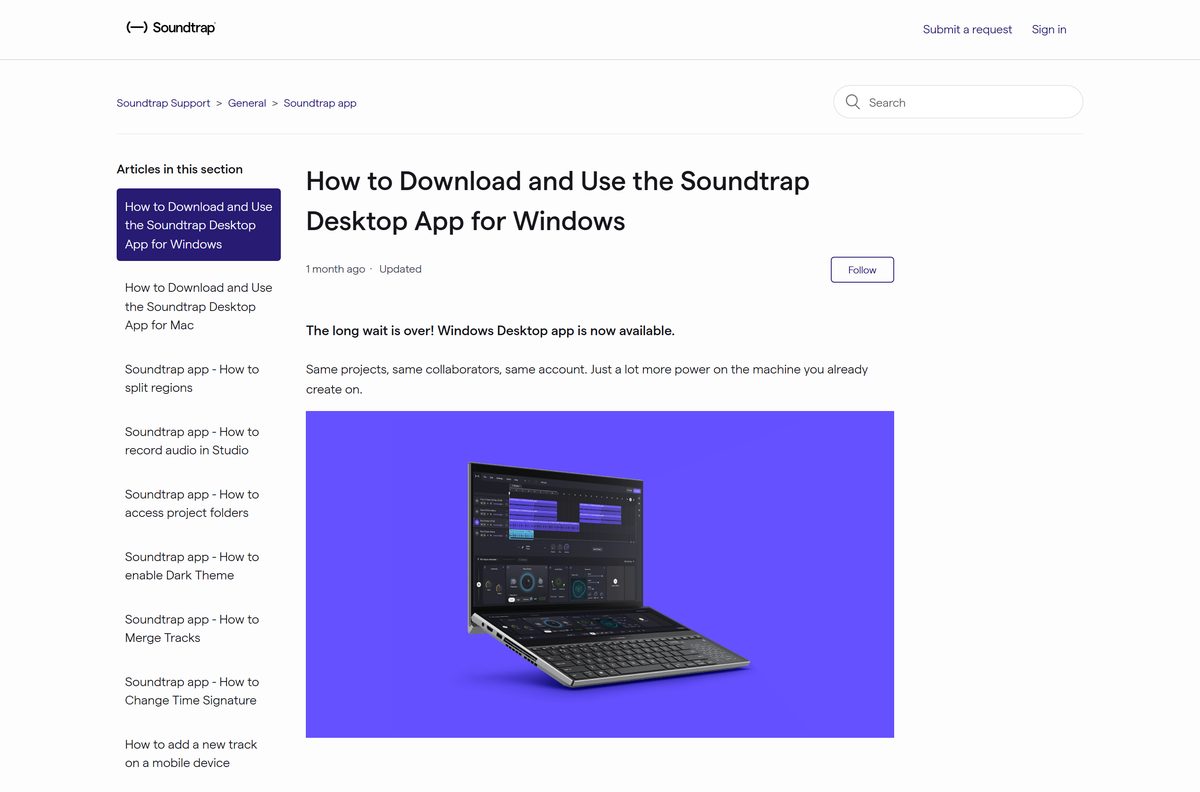
- The desktop app for Windows, official guide — real-time monitoring, low latency, no track limit
- The desktop app for Mac, official guide — same projects, same account as the web studio
- Music Making Studio on the App Store — 108.9 MB · seller Soundtrap AB; needs iOS or iPadOS 16.6 or later
- Music Making Studio on Google Play — package com.soundtrap.studioapp; 1M+ downloads
- Soundtrap pricing, free plan and paid plans — individual and education tiers
- Supported browsers in the Soundtrap Help Center — monitoring, audio input and MIDI per platform
A site offering its own Soundtrap setup file is not Soundtrap. The installers come from the signed-in home page and nowhere else.
How to install Soundtrap on Windows 11 and 10
The Windows app is the newest of the three routes. It adds real-time monitoring, lower latency and no track limit.
- Open Google Chrome or Microsoft Edge and go to soundtrap.com.
- Select Get started to create a free account, or Log in if you already have one.
- Open your home page once the account is active.
- Select Download for Windows.
- Run the file your browser saves and follow the installer.
- Open the app and sign in with the same account.
- Right-click the new Start menu entry and choose Pin to taskbar.
A paid plan is not required for the download. The free plan opens the desktop app the same way.
Which Soundtrap download do you need for your Mac?
The Mac app comes from the same signed-in page, not from the Mac App Store. Apple lists no Soundtrap build of its own.
| Your Apple device | What to do | Note |
|---|---|---|
| MacBook Air, MacBook Pro, iMac, Mac mini or Mac Studio | Select Download Soundtrap for Mac on your home page | Apple silicon and Intel both run it |
| A Mac you would rather not install anything on | Open the studio in Safari or Chrome | Safari needs the jazz plugin for MIDI |
| iPhone or iPad | Music Making Studio on the App Store, 108.9 MB | iOS or iPadOS 16.6 or later |
| You searched the Mac App Store and found nothing | That is expected; use the home page link | No Mac App Store listing exists |
Both Mac routes open the same cloud projects, so you can switch between them mid-song.
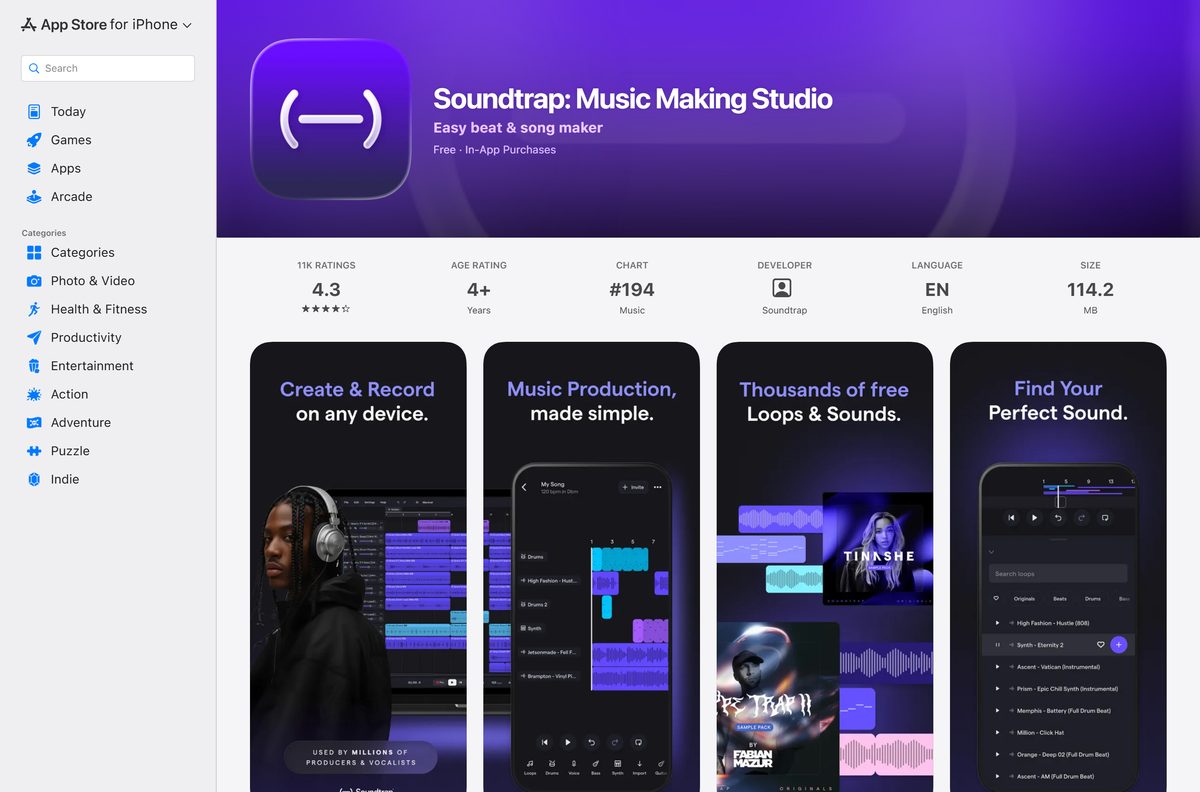
Install the Soundtrap app on a phone or tablet
The phone apps are native builds, free to install, and signed in with the same account.
- On iPhone or iPad, open the App Store listing and select Get.
- Confirm with Face ID, Touch ID or your Apple Account password.
- On Android, open Google Play and select Install.
- Open the app and sign in with the account you use on the desktop.
- Tap a project to carry on from where the PC left off.
Automation, MIDI input, transcripts, the sampler and time stretch are all absent from the phone apps.
Check the Soundtrap system requirements before you sign up
The floor is a current browser and an internet connection. Soundtrap publishes no processor, memory or disk figure, because the heavy lifting happens in the cloud.
| Field | Value |
|---|---|
| Software | Soundtrap |
| Developer | Soundtrap AB |
| Latest version | 5.10.0 (App Store build; the desktop apps are not publicly versioned) |
| License | Free plan, plus paid individual and education plans |
| Windows | Windows 11 and Windows 10, desktop app or browser studio |
| macOS | Desktop app or browser studio |
| Other desktop | Chromebook and Linux through Chrome |
| Mobile | iOS and iPadOS 16.6 or later; Android current version plus two back |
| Browsers | Latest Chrome, Firefox, Edge and Safari; Chrome or Edge recommended |
| Architecture | Follows the machine: x64, ARM64 and Apple silicon |
| Desktop download size | Not published by Soundtrap |
| App Store size | 108.9 MB |
| Offline installer | No |
| Last verified | 2026-09-22 |
Schools running the education tier have to allow-list freesound.org, cdn.contentful.com, resolver.confidence.dev and the Soundtrap domains by name, never by IP address.
Is Soundtrap free?
The free plan is a permanent tier, not a countdown. The paid tiers buy a bigger library and better vocal tools.
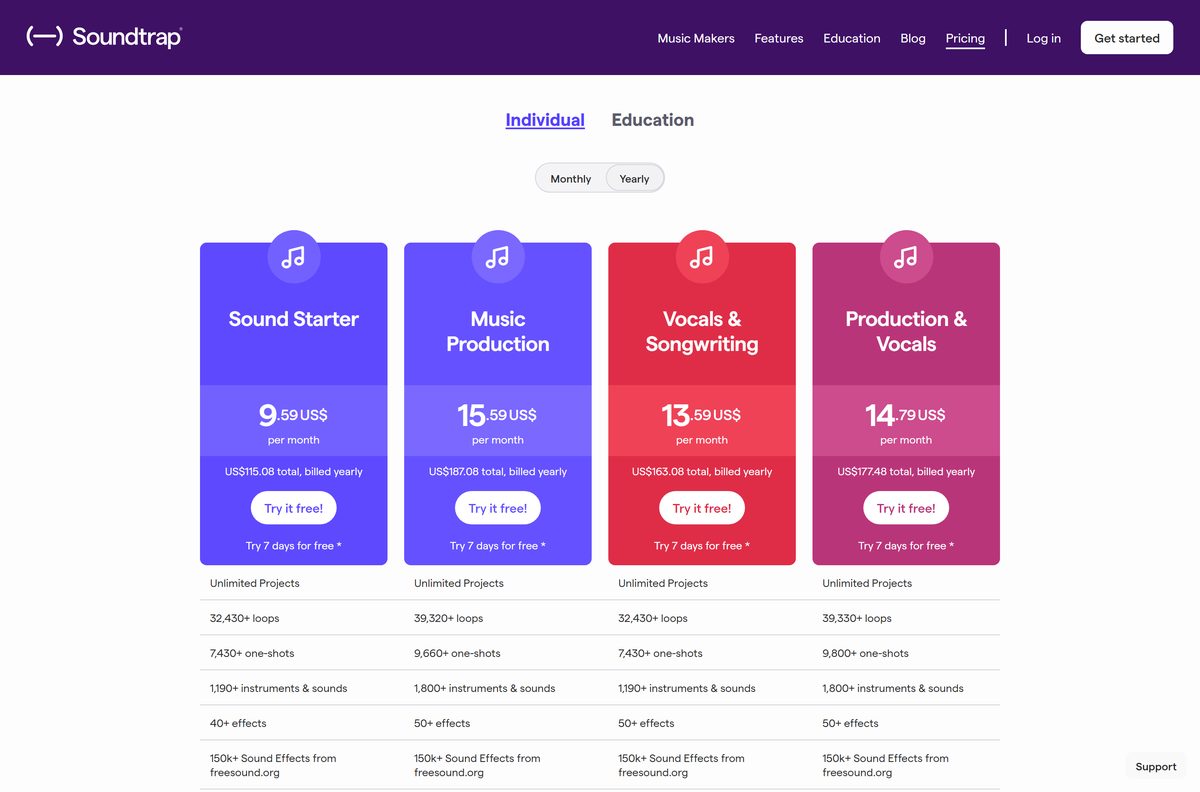
Yes, the free plan costs nothing and keeps unlimited projects, and the paid plans start at $9.59 a month. Free accounts get 7,640+ loops, 1,480+ one-shots, 450+ instruments and sounds, 20+ vocal presets and the essential effects. Billed yearly, Sound Starter is $9.59 a month, Vocals & Songwriting $13.59, Production & Vocals $14.79 and Music Production $15.59. Each carries a 7-day free trial, which is closed to anyone who has already tried a paid plan. Education seats run $7.98 or $9.98 per year, sold in blocks from 50.
Prices are the rates listed on the Soundtrap pricing page, before tax.
Which Soundtrap plan should you pick, Sound Starter or Production & Vocals?
All four individual tiers unlock unlimited projects. They split on the sound library and on how far the vocal chain goes.
Take Sound Starter to make beats, and Production & Vocals if you sing or record podcasts. Sound Starter is the cheapest way to reach 32,330+ loops, the 808 with glide, the sampler, automation and three mastering styles. Production & Vocals adds realtime vocal tuning, 150+ vocal presets, 50+ effects, eight mastering styles, priority mixing, 8 hours of interactive transcripts and podcast publishing to Spotify. Music Production sits between them at $15.59 a month with the largest library and no vocal tuning.
High quality downloads are paid-only, so exports from a free account stay at the standard quality.
What Soundtrap runs in, browser by browser
Chrome and Edge Chromium are the two Soundtrap recommends. Monitoring and MIDI are where the others fall short.
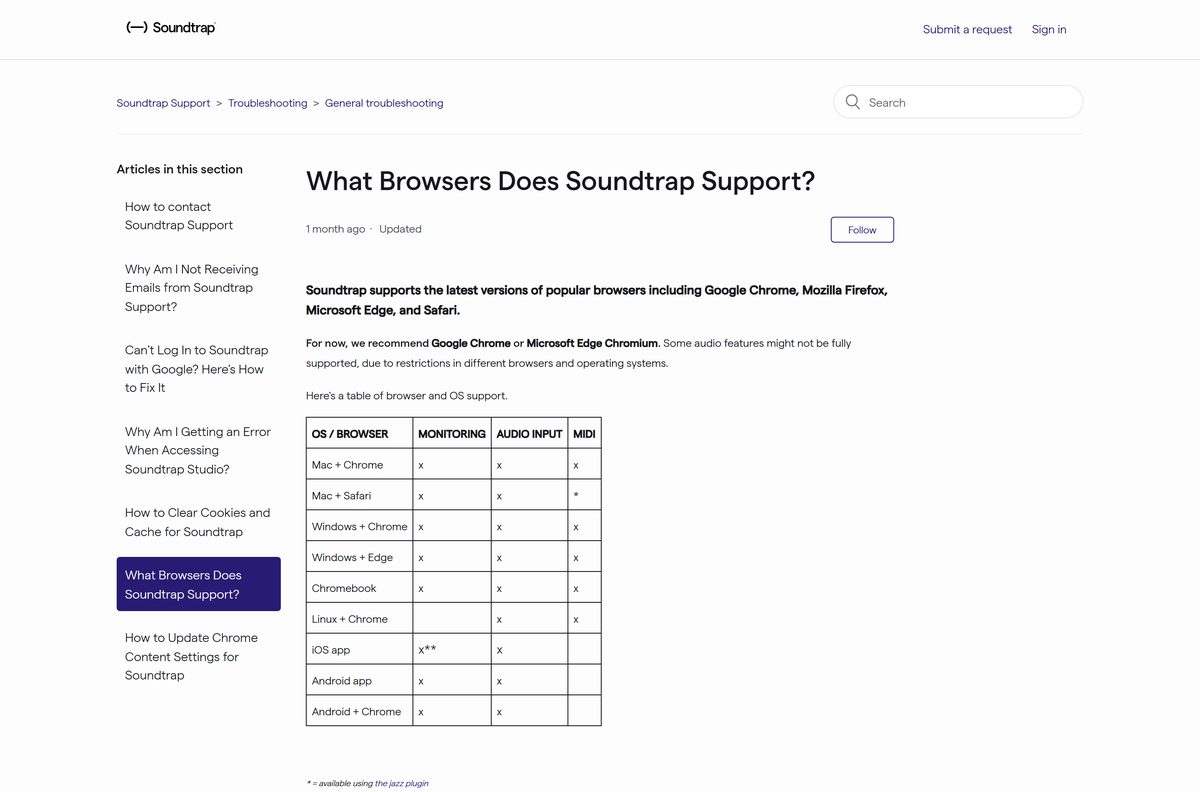
| Where you run it | Monitoring | Audio input | MIDI |
|---|---|---|---|
| Windows + Chrome | Yes | Yes | Yes |
| Windows + Edge | Yes | Yes | Yes |
| Mac + Chrome | Yes | Yes | Yes |
| Mac + Safari | Yes | Yes | Jazz plugin only |
| Chromebook | Yes | Yes | Yes |
| Linux + Chrome | No | Yes | Yes |
| iPhone and iPad app | Direct only, no effects | Yes | No |
| Android app | Yes | Yes | No |
| Android + Chrome | Yes | Yes | No |
Recording through a browser adds delay, so what you hear lags behind what you play.
How to check your Soundtrap version and update it
The browser studio and the desktop apps update themselves. Only the phone apps carry a version number you can read.
- On iPhone or iPad, open the App Store, tap your account picture and select Update beside the app.
- Compare the number with 5.10.0, the build Apple currently lists.
- On Android, open Google Play, tap your profile, then Manage apps & device, then Update.
- In a browser, reload the studio page to load the current build.
- Update the browser itself from its About page, which Soundtrap asks you to keep current.
Nothing is lost in an update. Every project is stored in the cloud against your account.
Fix Soundtrap not working on Windows 11 or 10
Four failures cover most support traffic. Work down the group that matches your symptom.
The studio crackles, glitches or falls silent
The processor has run out of headroom.
- Open Settings, then Sound quality, and select Low.
- Select the ellipses menu in a track header and choose Freeze track (free up CPU).
- Close other tabs, downloads and heavy programs.
- Update the browser, then clear its cache and cookies.
The studio will not load, or returns a 502 or 503 error
The fault usually sits on the service side, not on your PC.
- Open status.soundtrap.com and look for an active incident.
- Reload the page.
- Restart the browser, then the computer.
- Clear cache and cookies, then sign in again.
- Contact Soundtrap support if the status page is clear.
The microphone records nothing in Chrome
Chrome has blocked microphone access for the site.
- Select the ellipsis icon at the top right, then Settings.
- Select Privacy and security, then Site settings, then Microphone.
- Switch on Sites can ask to use your microphone.
- Remove soundtrap.com from Not allowed to use your microphone.
- Go back to the studio and select Allow at the prompt.
Your voice lags behind the backing track
Monitoring latency follows the microphone, the ports and the operating system.
- Swap Bluetooth headphones for a wired pair.
- Switch on Low Latency Mode in the Settings menu.
- Plug a USB 3.0 microphone into a USB 3.0 port.
- Set the audio interface buffer between 64 and 128 samples.
- Use the interface for both input and output.
Real-time monitoring delay never drops to zero in a browser. The Windows desktop app is the shortest path to lower latency.
How to uninstall Soundtrap
Removing the app is a local change only. The account and the projects stay where they are.
- On Windows 11, open Settings, select Apps, then Installed apps.
- Find the Soundtrap entry, select the three dots and choose Uninstall.
- On a Mac, open Applications in Finder and drag the app to the Bin.
- On iPhone or Android, press and hold the icon, then choose Remove App or Uninstall.
- Sign in at soundtrap.com in any browser to reach the same projects.
A paid plan keeps billing after the app is gone. Cancel it in your account settings first.
Frequently asked questions
Short answers to the questions that come up most around a Soundtrap download.
Is there a Soundtrap download for Windows 11 or Windows 10?
Yes. Soundtrap ships a Windows desktop app, and the Download for Windows link sits on your home page once you sign in. It adds real-time monitoring, lower latency and no track limit over the browser studio.
Is Soundtrap free to download?
Yes. No subscription is needed to download the Windows or Mac app, and the free plan costs nothing. It includes unlimited projects, 7,640+ loops, 450+ instruments and sounds and the essential effects.
What is the official Soundtrap download page?
The desktop links live on your own home page at soundtrap.com after you log in. The phone apps come from the App Store and Google Play, and the help centre hosts the official setup guides.
How big is the Soundtrap download?
Soundtrap publishes no size for the Windows or Mac installer, because the file is served only to signed-in accounts. The App Store build is 108.9 MB, and the browser studio installs nothing at all.
Is there a Soundtrap offline installer?
No. There is no standalone setup file to keep on a USB stick, and the studio itself needs a connection. Projects are stored in the cloud rather than on the drive.
Is Soundtrap available for Mac?
Yes. A Mac desktop app downloads from the same signed-in home page as the Windows one. There is no Mac App Store listing, so the home page link is the only route.
Does Soundtrap have a 64-bit or ARM64 build?
Soundtrap publishes no separate architecture downloads. The desktop apps and the browser studio follow the machine underneath, so x64, ARM64 and Apple silicon all work.
Is Soundtrap safe to download?
The app is published by Soundtrap AB, a Spotify company, and served from soundtrap.com and the two official stores. Any other site offering a setup file is not connected to Soundtrap.
What is the latest Soundtrap version?
Apple lists 5.10.0 for the phone app, released on 2 September 2026. The desktop apps and the browser studio carry no public version string and update themselves in the background.
Why will Soundtrap not install or open?
Check status.soundtrap.com for an incident first, then reload, restart the browser and clear the cache and cookies. Crackling audio is a separate problem: drop the sound quality and freeze a track.
Which browser works best with Soundtrap?
Chrome and Edge Chromium are the two Soundtrap recommends. Both handle monitoring, audio input and MIDI on Windows and Mac, while Safari needs the jazz plugin before MIDI works.
Does Soundtrap work on iPhone and Android?
Yes. Music Making Studio is free on both stores and signs in with the same account. Automation, MIDI input, transcripts and the sampler are missing from the phone builds.
Education pricing is quoted per seat and sold in blocks of 50 or more.