mstsc.exe is Remote Desktop Connection, the Microsoft client built into Windows 11 and Windows 10, and the copy in C:\Windows\System32 is safe.
Below: what the file does, where the genuine copy lives, how to prove a running copy is Microsoft's, its command-line switches, how attackers abuse RDP, and what to do when something looks wrong.
The short answer: is mstsc.exe safe to keep?
Keep mstsc.exe. The file at %windir%\system32\mstsc.exe is the Remote Desktop Connection client that ships with Windows, and Microsoft recommends it for remote desktop work. The file only makes outgoing connections to other computers when you or a program start it. Treat it as suspicious only when it runs from another folder, fails a signature check, or starts right after you open an .rdp file you did not expect.
What Is mstsc.exe?
Microsoft's command reference describes mstsc as the tool that creates connections to Remote Desktop Session Host servers or other remote computers, and edits existing Remote Desktop Connection (.rdp) files. The reference applies to Windows 11, Windows 10 and Windows Server 2016 through 2025.
| Question | Answer |
|---|---|
| Product name | Remote Desktop Connection, the built-in Windows remote desktop client |
| What it does | Opens a session to another PC or server, so you see and control that computer's desktop |
| Direction | Outgoing only. It connects from your PC to a remote one; it does not let anyone into your PC |
| How to open it | Select Start, type Remote Desktop Connection and open the app, or run mstsc from the Run box |
| Files it uses | .rdp connection files, plus a hidden Default.rdp in your Documents folder that holds your last settings |
| Works on Home editions? | Yes as a client. Windows Home cannot host incoming Remote Desktop sessions, but it can connect out to a Pro, Enterprise, Education or Server PC |
| Related apps | Microsoft also documents Windows App as another client for the same connections |
Is mstsc.exe Safe?
Match what you see on your PC to a row. The file name alone proves nothing; the location, the signature and the trigger decide it.
| What you see | Verdict | Why |
|---|---|---|
mstsc.exe in C:\Windows\System32, signature Valid |
Safe | This is the Windows copy Microsoft documents at %windir%\system32\mstsc.exe |
| It runs while you use Remote Desktop Connection | Safe | The window you opened is mstsc.exe |
| It starts when you open an .rdp file from IT or a work portal | Usually safe | Opening an .rdp file launches the Remote Desktop Connection client |
| It starts after you open an .rdp file from an unexpected email | Suspicious | Microsoft names RDP files as a phishing tool and added new warnings for them in April 2026 |
A file named mstsc.exe in Downloads, AppData or Temp |
Suspicious | The genuine client lives in System32, not in a user folder |
| Signature status is anything other than Valid | Suspicious | A Windows system file should carry a valid Microsoft signature |
Where Is the Legitimate mstsc.exe File Located?
Microsoft gives the client's path as %windir%\system32\mstsc.exe. On a standard install %windir% is C:\Windows, so the full path is the same on Windows 11 and Windows 10. To browse the folder itself, see 6 ways to open the System32 folder.
| Item | Expected location | Notes |
|---|---|---|
| mstsc.exe on Windows 11 | C:\Windows\System32\mstsc.exe |
Written by Microsoft as %windir%\system32\mstsc.exe |
| mstsc.exe on Windows 10 | C:\Windows\System32\mstsc.exe |
Same path and same client |
| Default connection settings | Hidden Default.rdp in your Documents folder | Each user has one |
| Saved connections | Your Documents folder by default | You can save .rdp files anywhere |
Anywhere else, such as Downloads or AppData |
Not expected | Scan it before you run it |
Why Is mstsc.exe Running on Your PC?
mstsc.exe runs only while a Remote Desktop Connection window or session is open. Seeing it in Task Manager means your PC is connecting out to another computer, not that someone is connected in.
| Reason | Legitimate? | What to check |
|---|---|---|
You opened Remote Desktop Connection or ran mstsc |
Yes | Nothing; close the window and the process ends |
| You opened an .rdp file from your company or a hosting provider | Yes | The publisher named in the security dialog matches who sent it |
An admin tool or script started a session with mstsc /v: |
Usually | You recognise the tool and the target computer |
| It appeared right after you opened an email attachment or download | Look closer | Where the .rdp file came from and which computer it connects to |
| It runs with no window and you started nothing | Look closer | The process path and signature, then a full scan |
Incoming sessions are hosted by Remote Desktop Services, which is switched on under Settings > System > Remote Desktop. Windows Home cannot host incoming sessions at all.
How to Check Whether mstsc.exe Is Malware
These two PowerShell checks read the path of the running process and its Authenticode signature. Microsoft's cmdlet reference notes that if a file is catalog signed, Get-AuthenticodeSignature reports that catalog signature.
- Right-click Start and select Terminal or Windows PowerShell.
- If mstsc.exe is running, type
Get-Process -Name mstsc -FileVersionInfoand press Enter. - Read the FileName column. It should be
C:\Windows\System32\mstsc.exe. - Type
Get-AuthenticodeSignature C:\Windows\System32\mstsc.exeand press Enter. - Check that Status reads Valid and the signer certificate names Microsoft.
- If the path is different, run
Get-AuthenticodeSignatureagainst that path too. A blank signer or a status other than Valid is a red flag. - Open Windows Security > Virus & threat protection > Scan options and run a Full scan if either check fails.
To confirm the System32 copy itself is undamaged, open an administrator terminal and run sfc /verifyfile=C:\Windows\System32\mstsc.exe. That check reads the file without changing anything.
mstsc.exe command line options
Every switch below comes from Microsoft's mstsc command reference. Run mstsc /? to see the usage dialog on your own PC. The old /console switch is not in the current list; use /admin for an administrative session.
mstsc /v:computer1 /w:1920 /h:1080Connects to computer1 in a 1920 x 1080 window. Other documented switches: <file>.rdp opens a saved connection; /v:<server>[:<port>] sets the target and optional port; /g:<gateway> uses an RD Gateway (only with /v); /admin opens an administrative session; /f or /fullscreen starts full screen; /public caches no passwords or bitmaps; /span stretches one desktop across side-by-side monitors of the same resolution; /multimon copies your local monitor layout; /l lists your monitors and their IDs; /edit <file> opens an .rdp file for editing; /restrictedAdmin and /remoteGuard keep your credentials off the remote PC; /prompt asks for credentials; /shadow:<sessionID> with /control and /noConsentPrompt shadows another session.
You should see: A Remote Desktop Connection window opens at the size you set and asks for credentials for computer1.
Security Risks and Common Abuse Scenarios
The Microsoft-signed file is not the threat. The risk is where it connects and what an .rdp file tells it to share.
| Abuse scenario | What happens | Microsoft's mitigation |
|---|---|---|
| Phishing with .rdp files | An emailed .rdp file connects you to an attacker's computer | April 2026 update redesigned the security dialogs; admins can block unsigned files by policy |
| Redirections in a malicious .rdp file | The file requests drive, clipboard or printer sharing with the remote PC | In the new dialogs, redirections are off by default and you must opt in to each |
| Connecting to a compromised server | Your sign-in credentials are sent to a machine the attacker controls | Connect with /restrictedAdmin or /remoteGuard so credentials stay on your PC |
| Remote Desktop exposed to the internet | Enabling Remote Desktop opens a port on the host PC | Enable it only on trusted networks, keep Network Level Authentication on, use strong unique passwords |
| A fake file named mstsc.exe | Malware borrows a trusted name to blend in | Check the path and signature as shown above |
What to Do If mstsc.exe Looks Suspicious
Start with the symptom that matches. For connection errors on a genuine client, see Fix Remote Desktop not working in Windows 10/11.
mstsc.exe runs from a folder other than System32, or its signature is not Valid
A different program is using the Windows file name.
- Note the full path from
Get-Process -Name mstsc -FileVersionInfo. - Disconnect the PC from the network.
- Open Windows Security > Virus & threat protection > Scan options, select Full scan and select Scan now.
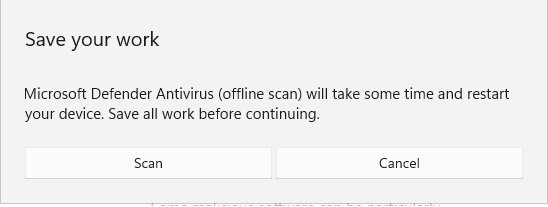
- Then select Microsoft Defender Offline scan and Scan now. The PC restarts, scans for about 15 minutes, and restarts again.
- Review results under Virus & threat protection > Protection history.
- Change the passwords of accounts you used on this PC, from a different, clean device.
Remote Desktop Connection opened after you clicked an .rdp file in an email
RDP files are a known phishing route that can connect you to an attacker's computer.
- Close the Remote Desktop Connection window without entering a password.
- If you already connected, disconnect and change the password you typed, from a different device.
- Delete the .rdp file and the email.
- Run a Full scan in Windows Security, especially if you allowed drive or clipboard sharing.
- On a work PC, report the email to your IT or security team.
mstsc.exe keeps starting and you never open Remote Desktop
A script, scheduled task or program launches it, or a lookalike file is running.
- Run the path and signature checks from the malware section above.
- Run a Full scan and a Microsoft Defender Offline scan from Windows Security.
Windows cannot find mstsc.exe
The System32 copy is missing or damaged, or a policy blocks it.
- Press Windows key + R, type
%windir%\system32\mstsc.exeand press Enter to rule out a broken shortcut. - Open an administrator terminal and run
sfc /scanfile=C:\Windows\System32\mstsc.exeto repair the file. - If the file is fine, run
sfc /scannowto check all protected system files. - On a work PC, ask IT whether Allow .rdp files from valid publishers and user's default .rdp settings is disabled; that policy blocks connections started from the app.
Lock down Remote Desktop access
mstsc.exe is the client, so locking down means two things: stop others connecting in, and control which .rdp files your PC opens.
- If you never connect in from another device, select Start > Settings > System > Remote Desktop and turn Enable Remote Desktop off.
- If you do need it, open Remote Desktop users on the same page and keep the list to the accounts that need access.
- Keep Network Level Authentication on, and give every allowed account a strong, unique password.
- On Pro, Enterprise or Education, press Windows key + R, type
gpedit.mscand press Enter. - Go to Computer Configuration > Administrative Templates > Windows Components > Remote Desktop Services > Remote Desktop Connection Client.
- Set Allow .rdp files from unknown publishers to Disabled to block unsigned .rdp files.
- In an organisation that signs its .rdp files, add the signing certificate's thumbprint to Specify thumbprints of certificates representing trusted .rdp publishers.
Microsoft's high-security setup also disables Allow .rdp files from valid publishers and user's default .rdp settings. That blocks every connection not signed by a trusted publisher, including ones typed into the app, so use it only where signed files are deployed.
How to check your PC is locked down
- Reopen Settings > System > Remote Desktop and confirm the toggle is in the state you set.
- In a terminal, run
quser. The list should show only your own session, marked with>. - Run
Get-AuthenticodeSignature C:\Windows\System32\mstsc.exeagain and confirm Status is Valid. - Double-click an unsigned test .rdp file. With the unknown-publishers policy disabled, Remote Desktop Connection blocks it.
Frequently Asked Questions
What is mstsc in Windows?
mstsc is the command for Remote Desktop Connection, the remote desktop client built into Windows 11 and Windows 10. It opens a session to another PC or server so you can use that computer's desktop, and it can also edit saved .rdp connection files.
What is mstsc.exe used for?
mstsc.exe connects your PC to a remote computer over Remote Desktop. Admins also use its switches to open saved .rdp files, go full screen, span several monitors, use an RD Gateway, or start a session that keeps credentials off the remote PC with /restrictedAdmin or /remoteGuard.
What does mstsc.exe do?
It starts an outgoing Remote Desktop session. While it runs, you see and control the remote computer's desktop, and it can share drives, the clipboard or printers if the connection settings ask for it and you allow it. It does not open your PC to incoming connections.
Where is mstsc.exe located?
The genuine file is at %windir%\system32\mstsc.exe, which is C:\Windows\System32\mstsc.exe on a standard install. A copy in Downloads, AppData, Temp or any user folder is not the Windows client and should be scanned before you run it.
Where is mstsc.exe located in Windows 11?
Windows 11 keeps mstsc.exe in C:\Windows\System32, the same folder as Windows 10. Run mstsc from the Run box, or type Remote Desktop Connection in Start, to open it without browsing to the folder.
Can I delete mstsc.exe from Windows?
Do not delete it. It is the built-in Windows client, and removing it only breaks Remote Desktop Connection. To stop incoming Remote Desktop, turn off Enable Remote Desktop in Settings. To limit the client, use the Remote Desktop Connection Client policies in Group Policy.
Is mstsc.exe running a sign that someone is remotely connected to my PC?
No. mstsc.exe is the client, so it runs when your PC connects out to another computer. Run quser in a terminal to list sessions on your PC. If you never use Remote Desktop and mstsc.exe keeps running, check its path and signature.
Can malware use mstsc.exe even if the file is legitimate?
Yes. Attackers send .rdp files that make the genuine client connect to their computer and request drive or clipboard sharing. Microsoft redesigned the RDP file warnings in the April 2026 update, and admins can block unsigned .rdp files with Group Policy.
What does mstsc.exe /l do?
mstsc /l lists the monitors attached to your PC and the ID of each one. You can use those IDs in the selectedmonitors setting of an .rdp file to choose which screens a remote session uses.
Bottom Line
Leave the System32 copy of mstsc.exe alone, and spend your caution on .rdp files and on the Remote Desktop toggle instead. The Microsoft-signed client only connects out when something starts it. The real risks are phishing .rdp files, redirections you did not mean to allow, and a host PC left open to remote sign-in, and each one has a Settings or Group Policy control.

![What Is Microsoft OneDrive And Do I Need It [Answered]](https://techdows.com/wp-content/uploads/2026/09/Outlookcom-storage-settings-page-showing-shared-Microsoft-account-usage.jpg)