Microsoft to clean up bloat on the toolbar, and also to make the title bar minimal in Edge browser. This could be Microsoft’s efforts to address hiding features that are deemed unnecessary by users.
Who has asked Microsoft to add bloat to the Edge browser and then fix those things?
The company added a hell of unnecessary features.
The toolbar is crowded with unnecessary icons, Microsoft is aiming to correct this and make the Edge title bar and toolbar clean to create ” a minimal default state browser experience”, probably like Chrome.
Micorsoft Edge became bloatware
Ever since Edge switched to using Chromium/Blink, Edge started adding new features to please users to inform them it’s not a Chrome or Chromium clone.
Users expected slimmed version of Chrome to try Edge and started noticing only Microsoft dumping features into Edge.
While the new feature additions are necessary to keep it separate and distinct from Chrome, it made Edge unusable or resource hungry.

Users are not happy with Edge consistently getting new things. Some were never made into release, you can say workspaces, VPN as examples.
There are many more under the pipeline like split screen, some are currently only available to a few in Canary via controlled rollouts.
Microsoft tests to address Edge toolbar bloat
Recently, Edge started working to make the toolbar tidy with less clutter.
In that regard, the company has plans in place to move the Profile icon to the left side.
You need to enable “Microsoft edge minimal toolbar experience” for the same in edge://flags.

And now, with the new experiment “Microsoft Edge basic toolbar & title bar experience” in place, most of the toolbar buttons will disappear.
In other words, Edge disallows settings you set under customize the toolbar and has its own rules to display the toolbar clean.
Enable the Basic toolbar in Microsoft Edge
- Visit edge://flags in the address bar
- Find and enable “Edge basic toolbar title bar”

Microsoft Edge basic toolbar & title bar experience flag - Restart the browser
- Go to Settings > Appearance
- Turn on, the ” show basic toolbar” setting.
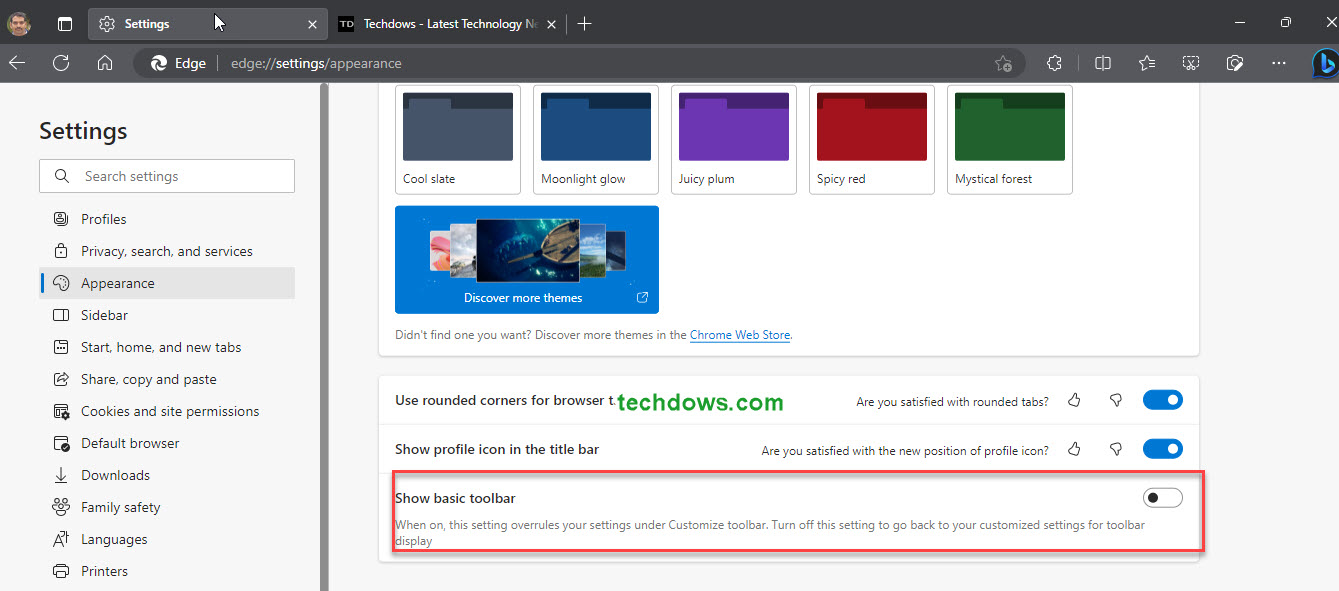
Show basic toolbar setting
After the change, it shows the Screenshot, Web Capture, and Favorites buttons as they are necessary.
The extensions menu button and others will not be available on the toolbar or access.
Despite criticism, Bing discover button has reserved its place on the toolbar.
What’s your take on this? Do you think hiding stuff makes Edge look less bloated? Let us know in the comments below.
Summary: Microsoft may not stop adding or removing bloatware to the Edge browser, at least, the company is working on make hiding the bloat on the toolbar. It is aiming to clean up the Edge title bar and toolbar to bring a minimal default browser state experience like Chrome.





