PWA developers started to update their Apps to support showing app shortcuts on Android and jump lists or tasks on the Windows taskbar.
Progressive Web Apps are the future. You don’t need to create separate apps for multiple platforms such as Windows, Mac, and Android as creating one PWA will serve the purpose and users can access them on different devices.
PWAs support background sync, caching, splash screen, Push notifications and work offline
Recently Microsoft, Google, and Intel joined hands for Web apps to show shortcuts on Windows and Android.
The App Shortcuts feature on Windows can be tested by installing a demo app in Canary versions of Chrome and new Microsoft Edge after enabling the “Desktop PWAs app icon shortcuts menu” flag.
To test the feature on Android, you need to install the app in Chrome Canary.
Popular Twitter is a PWA and when installed in Chrome Canary, now showing “New Tweet”, “Explore, Notifications” and “Direct Messages” jump lists on its icon under Tasks.
By selecting them, you able to create a new tweet, access the explore tab, and check notifications and direct messages from the taskbar itself as they open in separate windows.
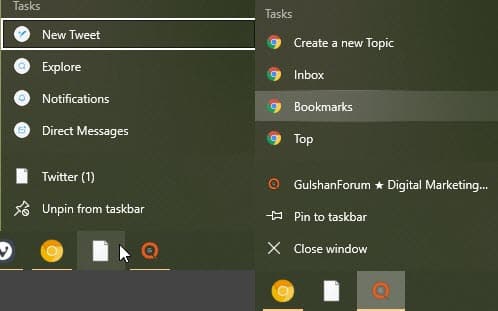
We’ve spotted another PWA, a forum we often visit, has been updated to support jump lists on taskbar and App Shortcuts on Android.

Are you excited about new features PWAs getting right now? Let us know your opinions in the comments below.
Related articles:
New PWA features come to Edge in Windows 10 May 2020 Update
Microsoft Edge can now run PWAs on Windows Startup
Chrome Canary now allows users to run PWAs on Startup in Windows
Chrome PWAs are getting Shortcuts Menu to access common tasks




