Back in February 2019, Google developers announced they’re “exploring new backward/forward cache to cache pages in-memory (preserving JavaScript & DOM state) when the user navigates away”.
When the user navigates to the previously visited page via the back button, then instead of fully reloading the page contents, Chrome just loads the page from the cache that’s saved in memory, same happens with the Forward button. You can think this as pausing a page when you leave and playing it when you return.
Google Chrome Engineering Manager, Addy Osmani, says bfcache feature could “improve performance up to 19% of all navigations for mobile Chrome.”.
FYI, both Firefox and Safari have this feature already built-in with some differences in implementation, Google has decided not to implement WebKit’s bfcache due to incompatibility with Chrome’s multi-process architecture. You can check the videos embedded in this article on how the back-forward cache speeds up navigation on desktop and mobile.
The feature is now available in latest Chrome Canary for testing, to test it right away
1. Ensure you’re using the latest Canary version
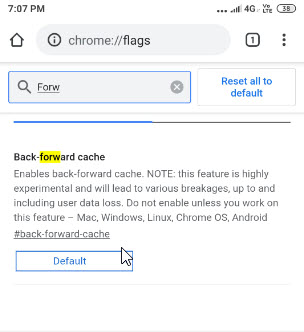
2. Visit Chrome://flags
3. Search for “forward” and for “Back-forward cache” flag, select “Enabled “and relaunch the browser.

The flag available for Mac, Windows, Linux, Android and Chrome OS, warns not to enable the feature unless you work on it as it may ” lead to various breakages, up to and including user data loss”.
Visit some websites in Chrome and check how they load when you go to previous and next pages via back and forward buttons, If you see improvement which we’ve noticed, the feature is working.
If the page content changes when the user navigates back, Chrome then displays cached content instead of updated content, how Google addresses this is an interesting question, then the user may need to reload the page to check for changes in content. Keep in mind “back/forward cache” is still an experimental feature, there is no guarantee this will gets into the stable version of Chrome.
UPDATE September 19, 2019: Back-Forward Cache flag now available for Chrome Canary on Android also.
Related articles:
Access Google Cached Page from Chrome Address bar




