Recently, in the tab groups bug, Google shared how tab groups UI going to look like with headers, the headers in the screenshot is now live in Canary.
By now you all know Google Chrome is getting tab groups, there is a flag available in Canary for the same, you can visit Chrome flags page and enable it to see how the feature has developed so far.
Till now by right-clicking on the tab context menu, you can add desired tabs into a group, you can also separate tabs from the existing group and add to a new group.

The crucial part of the tab groups feature, headers, is now landed in the latest Canary. For the grouped tabs, a header will be shown with the group number. Chrome counts and remembers all tab groups in Windows.
For instance, if you’ve created two groups –Groups 1 and Group 2– in one window, the tab group label for a new one in the second window will be Group 3. At the moment, Groups are no longer saved and restored when you exit and restart Chrome, that something Chromium team already working to address.
UPDATE May 17, 2019: Colored tab groups! To show the difference between the tab groups or to identify them more easily, Chrome now paints tabs in group and tab group header with the same color. For instance, three tab groups will have three different colors. Check the screenshots below.
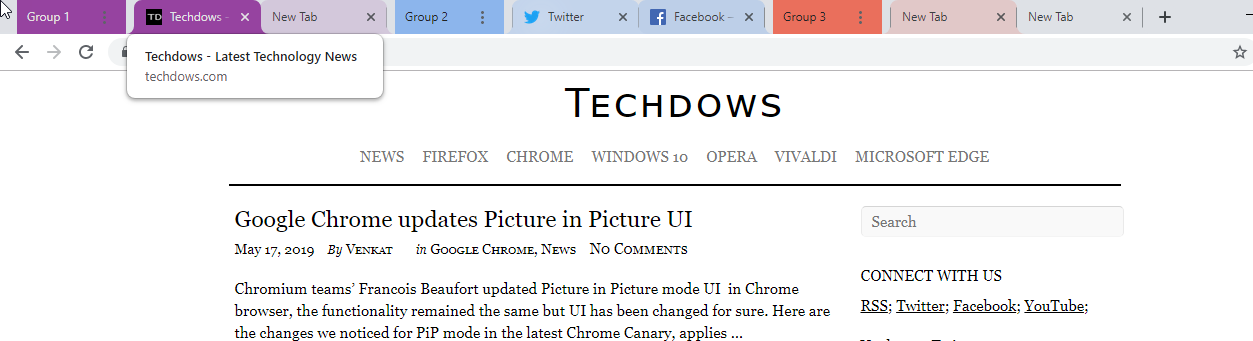
This commit made to tab groups reveals more information about the change:
“Paint tab groups with the group color.
- The background of TabgroupHeader now uses the group color.
- The backgrounds of tabs in the group are tinted with the group color.
This treatment, along with colors chosen, are intended to be a placeholder”.
What you should expect in the future is a context menu on headers with commands to do more stuff.




