Google Chrome on Android is moving back to or restoring System Sharesheet again from Share hub. If you don’t like Chrome’s custom share hub on Android, good news for you! Google is working to migrate it to the system share menu, meanwhile, allowing users to disable the hub.

Android Sharesheet
Some Android apps have their own share menu, and Google apps such as Photos, Files, and Chrome is no different. But this is against Android Guidelines and Google doesn’t honor them.
“We strongly recommend using the Android Sharesheet to create consistency for users across apps. Apps should not display their own list of share targets or to create their own sharesheet variations”
Google backs Android OS Sharesheet than custom share menus for Apps.
“The Android Sharesheet gives users the ability to share information with the right person, with relevant app suggestions, all with a single tap. The Sharesheet can suggest targets unavailable to custom solutions, and with consistent ranking. This is because the Sharesheet can take into account information about the app and user activity that is only available to the system”.

Chrome Custom Share Hub
Having said that, Google introduced a custom share hub for Chrome sometime back, and users using System Sharesheet from the beginning found it difficult to adopt.

Though Chrome’s share hub itself allows us to access the Android share menu, it is not intuitive. You need to tap on the “More menu” in the first row of the Share hub to access it.
Seems as if Google has heard the feedback and pain points from customers who didn’t like it and has now begun to migrate Chrome share hub to the Android’s Native Sharesheet.
While working on this, Google is providing a flag for the same, turning on it, force disables chrome share hub and enables System Share sheet in Chrome on Android.
To disable Chrome’s Share hub on Android
- Launch Chrome
- Visit chrome://flags
- Search for share, find the flag “Share sheet refactor Android”
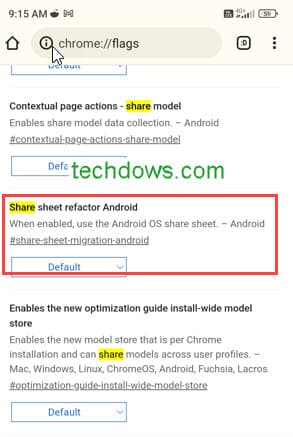
- Select Enabled
- Restart the browser
After the relaunch, if you tap on the Share option on the top toolbar or select the option in the 3-dot menu, you’ll get an Android OS share sheet.
There is no timeline or ETA anounced when Google will introduce the Android OS Share sheet to Chrome release. The above change is being observed in Chrome 112 Canary.
What’s your take on this? Which do you love, Chrome Share hub or Android ShareSheet? Let us know in the comments below
Summary: Android Guidelines make it clear to use System Sharesheet for Apps. The irony is, Google itself doesn’t follow this. Chrome, Files, and Photos are some examples. The company is now working to migrate the Chrome Share hub to the native Sharesheet on Android OS.


Chrome on Android to add ‘drag and drop’ support to ‘Omnibox’ - Techdows
[…] Chrome for Android to ditch Share hub for System Sharesheet […]