Get your Metrocast.net e-mail from Breezeline's webmail: open the Check your Breezeline Email page, choose Something Else, and sign in with your full address and password.
This guide covers the login page, the IMAP and SMTP settings for Outlook and phone apps, password resets, dormant or deleted accounts, and how to save your mail before it disappears.
Open Metrocast webmail
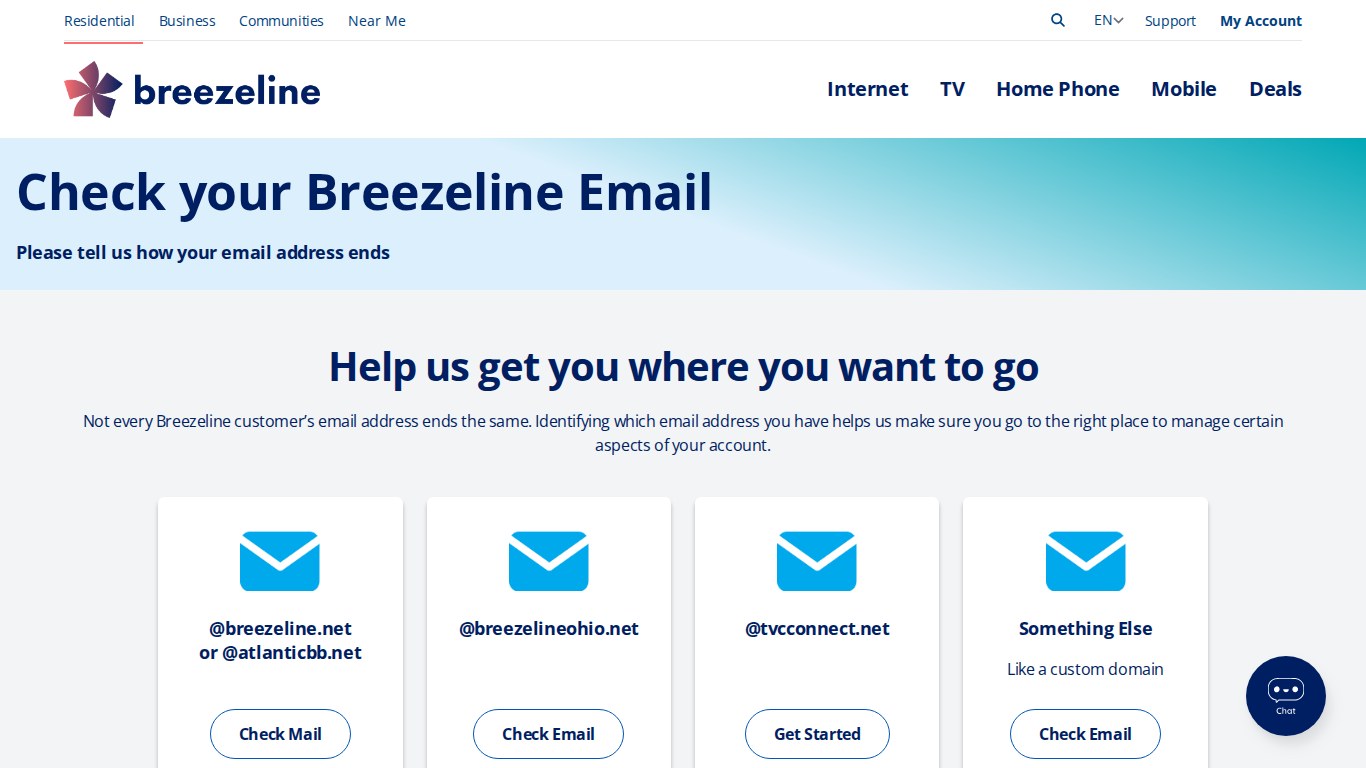
Breezeline runs one webmail entry page for every address it supports, at www.breezeline.com/interstitial-my-email. The page asks how your address ends, and metrocast.net is not one of the listed endings.
- Open www.breezeline.com/interstitial-my-email in any web browser.
- Under Help us get you where you want to go, find the Something Else card (Like a custom domain).
- Select Check Email on that card.
- Type your full address, for example [email protected], and your case-sensitive password.
- Select any message in the inbox to open it in full.
T
h
e
*
*
S
o
m
e
t
h
i
n
g
E
l
s
e
*
*
b
u
t
t
o
n
a
n
d
t
h
e
*
*
@
b
r
e
e
z
e
l
i
n
e
.
n
e
t
o
r
@
a
t
l
a
n
t
i
c
b
b
.
n
e
t
*
*
b
u
t
t
o
n
b
o
t
h
o
p
e
n
t
h
e
s
a
m
e
B
r
e
e
z
e
l
i
n
e
w
e
b
m
a
i
l
s
i
g
n
–
i
n
p
a
g
e
,
m
a
i
l
.
a
t
l
a
n
t
i
c
b
b
.
n
e
t
/
h
P
r
o
n
t
o
/
.
I
f
s
i
g
n
–
i
n
f
a
i
l
s
,
c
h
e
c
k
w
h
e
t
h
e
r
t
h
e
m
a
i
l
b
o
x
s
t
i
l
l
e
x
i
s
t
s
b
e
f
o
r
e
r
e
s
e
t
t
i
n
g
a
n
y
t
h
i
n
g
.
Why the Breezeline page matters
Breezeline hosts several email domains, and each ending on its entry page links to its own sign-in page. Match the card to the end of your address before you type a password.
| Your address ends in | Card on the Breezeline page | Button | Where it goes |
|---|---|---|---|
| @breezeline.net or @atlanticbb.net | @breezeline.net or @atlanticbb.net | Check Mail | mail.atlanticbb.net/hPronto/ |
| @metrocast.net or a custom domain | Something Else | Check Email | mail.atlanticbb.net/hPronto/ |
| @breezelineohio.net | @breezelineohio.net | Check Email | mail.breezelineohio.net |
| @tvcconnect.net | @tvcconnect.net | Get Started | mail.tvcconnect.net |
B
o
o
k
m
a
r
k
t
h
e
B
r
e
e
z
e
l
i
n
e
e
n
t
r
y
p
a
g
e
r
a
t
h
e
r
t
h
a
n
a
n
o
l
d
M
e
t
r
o
C
a
s
t
a
d
d
r
e
s
s
.
B
r
e
e
z
e
l
i
n
e
'
s
h
e
l
p
a
r
t
i
c
l
e
s
a
l
l
p
o
i
n
t
t
o
t
h
a
t
p
a
g
e
a
s
t
h
e
l
o
g
i
n
p
o
r
t
a
l
.
Confirming whether your Metrocast.net email account still exists
Breezeline marks any mailbox as dormant after 6 months without a sign-in. After 12 months of inactivity, the account may be deleted from its system.
- Try to sign in through the webmail page first. A successful sign-in also clears the dormant status.
- If sign-in fails, sign in to My Account at myaccount.breezeline.com.
- Select Account.
- Select Manage Sign In Options.
- Look under Manage Username(s) for your Metrocast.net address.
I
f
t
h
e
a
d
d
r
e
s
s
i
s
n
o
t
l
i
s
t
e
d
t
h
e
r
e
,
t
h
e
m
a
i
l
b
o
x
n
o
l
o
n
g
e
r
e
x
i
s
t
s
o
n
y
o
u
r
a
c
c
o
u
n
t
.
T
h
e
s
e
c
t
i
o
n
o
n
d
i
s
a
b
l
e
d
a
n
d
d
e
l
e
t
e
d
a
c
c
o
u
n
t
s
b
e
l
o
w
e
x
p
l
a
i
n
s
t
h
e
o
p
t
i
o
n
s
.
Accessing Metrocast.net email via webmail (current and legacy login paths)
Breezeline publishes no separate MetroCast webmail address. Every current route ends at the same Breezeline sign-in page, so use whichever one is quickest for you.
| Starting point | What to select | Best for |
|---|---|---|
| www.breezeline.com/interstitial-my-email | Something Else, then Check Email | First visit or a new browser |
| mail.atlanticbb.net/hPronto/ | Sign in directly with the full address | A saved bookmark |
| help.breezeline.com webmail articles | The here link in How do I use webmail? | Starting from Breezeline support |
| An old MetroCast bookmark | Replace it with the Breezeline entry page | Avoiding dead or outdated login pages |
W
e
b
m
a
i
l
n
e
e
d
s
n
o
s
e
t
u
p
.
I
t
r
e
a
d
s
a
n
d
s
e
n
d
s
m
a
i
l
a
n
d
m
a
n
a
g
e
s
s
e
t
t
i
n
g
s
f
r
o
m
a
b
r
o
w
s
e
r
o
n
a
n
y
c
o
m
p
u
t
e
r
.
What to do after signing in
Breezeline updated its webmail with a new look but kept the same features. The main areas are Homepage, Inbox, Contacts, Calendar and Settings (Preferences).
- Open Inbox and confirm recent messages are listed.
- Open the spam folder, because Breezeline moves suspected spam there instead of deleting it.
- Open Contacts to check your saved addresses.
- Open Settings (Preferences) to change mail preferences.
- Expand the extra options in Settings (Preferences) if the setting you want is not on the first screen.
I
f
t
h
e
i
n
b
o
x
o
p
e
n
s
b
u
t
o
l
d
e
r
m
e
s
s
a
g
e
s
a
r
e
m
i
s
s
i
n
g
,
c
l
o
s
e
e
v
e
r
y
b
r
o
w
s
e
r
w
i
n
d
o
w
a
n
d
s
i
g
n
i
n
a
g
a
i
n
.
B
r
e
e
z
e
l
i
n
e
l
i
s
t
s
t
h
a
t
a
s
t
h
e
f
i
x
f
o
r
m
i
s
s
i
n
g
w
e
b
m
a
i
l
m
e
s
s
a
g
e
s
.
Can I read Metrocast mail in Outlook, Thunderbird, or a phone app?
Yes. Breezeline says its email system works with all modern email clients, including Outlook, Apple Mail, Thunderbird and phone mail apps, using IMAP. Breezeline publishes IMAP settings for client setup, and with IMAP its suspected-spam folder shows up in the app just as it does in webmail.
Setting up Metrocast.net email in Outlook, Apple Mail, Gmail, or other email clients
Every client uses the same values, whether you add an existing email account to a laptop, a Mac, an iPhone or an Android phone. Choose manual or advanced setup so you can type the server names yourself.
- Start adding a new account in Outlook, Apple Mail, Thunderbird, Gmail or your phone's mail app.
- Enter your full Metrocast.net address and your case-sensitive password.
- Choose IMAP as the account type when the app asks.
- Set the incoming server to mail.breezeline.net, port 993, with SSL encryption.
- Set the outgoing server to mail.breezeline.net, port 465, with SSL encryption.
- Use the full email address as the username for both servers.
- Save the account and wait for the inbox to sync.
I
f
t
h
e
a
p
p
s
i
g
n
e
d
i
n
b
e
f
o
r
e
a
p
a
s
s
w
o
r
d
c
h
a
n
g
e
,
u
p
d
a
t
e
t
h
e
p
a
s
s
w
o
r
d
i
n
t
h
e
a
p
p
t
o
o
.
B
r
e
e
z
e
l
i
n
e
n
o
t
e
s
t
h
a
t
a
n
o
p
e
n
e
m
a
i
l
c
l
i
e
n
t
c
a
n
b
l
o
c
k
w
e
b
m
a
i
l
s
i
g
n
–
i
n
a
f
t
e
r
a
r
e
s
e
t
.
Metrocast.net email server settings (IMAP, POP3, SMTP) and authentication requirements
| Setting | Incoming (IMAP) | Outgoing (SMTP) |
|---|---|---|
| Host name | mail.breezeline.net | mail.breezeline.net |
| Port | 993 | 465 |
| Encryption | SSL | SSL |
| Username | Full email address | Full email address |
| Password | Case-sensitive password | Case-sensitive password |
| POP3 | Not published by Breezeline | Not applicable |
B
r
e
e
z
e
l
i
n
e
p
u
b
l
i
s
h
e
s
I
M
A
P
a
n
d
S
M
T
P
v
a
l
u
e
s
o
n
l
y
.
B
o
t
h
s
e
r
v
e
r
s
r
e
q
u
i
r
e
y
o
u
r
f
u
l
l
a
d
d
r
e
s
s
a
n
d
p
a
s
s
w
o
r
d
,
s
o
t
u
r
n
o
n
a
u
t
h
e
n
t
i
c
a
t
i
o
n
f
o
r
o
u
t
g
o
i
n
g
m
a
i
l
i
f
t
h
e
a
p
p
a
s
k
s
.
Recovering or resetting a Metrocast.net email password
Breezeline's webmail troubleshooting page resets the password through its Verify your account page. Have your account number from a Breezeline bill ready.
- Open the Verify your account page linked from www.breezeline.com/mail.
- Enter your Account Number, then enter your Phone Number or Service Address, and select Continue.
- Select a phone number linked to the account.
- Choose Call Me or Text Me (SMS) for the verification code, then select Continue.
- Enter the 6-digit code within 5 minutes.
- Select Password Reset, pick the email address to reset, and select Create.
T
h
e
B
r
e
e
z
e
l
i
n
e
h
e
l
p
a
r
t
i
c
l
e
s
f
o
r
c
h
a
n
g
i
n
g
a
n
d
r
e
c
o
v
e
r
i
n
g
a
n
e
m
a
i
l
p
a
s
s
w
o
r
d
b
o
t
h
l
i
n
k
t
o
e
m
a
i
l
t
o
o
l
s
.
a
t
l
a
n
t
i
c
b
b
.
n
e
t
/
p
a
s
s
w
o
r
d
R
e
s
e
t
/
a
s
w
e
l
l
.
Downloading or saving Metrocast messages
Breezeline's help center describes no export tool for webmail. The practical route is an IMAP connection from a desktop email app, which shows your folders where you can copy them.
- Add the Metrocast.net account to a desktop app such as Outlook, Apple Mail or Thunderbird with the IMAP settings above.
- Wait until every folder, including the spam folder, finishes syncing.
- Create a folder in another account or a local folder on your computer.
- Copy the messages you want to keep into that folder.
- Open a few copied messages to confirm the text and attachments came across.
D
o
t
h
i
s
b
e
f
o
r
e
c
a
n
c
e
l
l
i
n
g
B
r
e
e
z
e
l
i
n
e
I
n
t
e
r
n
e
t
o
r
l
e
a
v
i
n
g
t
h
e
m
a
i
l
b
o
x
u
n
u
s
e
d
f
o
r
m
o
n
t
h
s
.
A
d
e
l
e
t
e
d
o
r
c
a
n
c
e
l
l
e
d
m
a
i
l
b
o
x
c
a
n
n
o
t
b
e
r
e
s
t
o
r
e
d
.
If Metrocast webmail will not open
"Unexpected error when handling authentication request to identity provider"
Breezeline links this error to email apps that are still connected to the account.
- Close or disconnect Outlook, Apple Mail, Thunderbird and any other email app using the address.
- Update your password through the Breezeline reset page.
- Sign in to webmail with the new password.
"Account Temporarily Disabled"
Breezeline's fix for this error starts with stored browser data and the password.
- Clear your browser's cache and cookies.
- In Chrome, open the More menu, go to History, select Clear browsing data, tick Cookies and other site data and Cached images and files, and select Clear data.
- In Edge, open Settings, go to Privacy, search, and services, select Choose what to clear, tick the same two boxes, and select Clear now.
- Close and reopen the browser, then reset your password.
- Wait 10 minutes and try again if the message returns.
Common Metrocast.net email errors and how to fix them (login failures, server errors, missing mail)
Emails are missing in webmail
Breezeline's fix is to start a fresh browser session.
- Close all open browser windows.
- Sign back in to webmail.
- Check the spam folder for anything still missing.
Outlook or a phone app reports a server or login failure
The app's settings do not match the values Breezeline publishes.
- Confirm both servers read mail.breezeline.net.
- Confirm ports 993 (incoming) and 465 (outgoing) with SSL.
- Use the full email address as the username.
- Re-enter the current, case-sensitive password.
Stream TV App will not accept a Metrocast.net login
The Stream TV App needs an @breezeline.net account.
- Open Breezeline Email Tools at manage.my.breezeline.com.
- Set up or recover an @breezeline.net account.
- Sign in to the Stream TV App with the new @breezeline.net login.
What to do if your Metrocast.net email was migrated, disabled, or decommissioned
Breezeline's help center does not publish a shutdown date for metrocast.net. What it does publish are the rules for dormant, deleted and cancelled mailboxes.
| Situation | What Breezeline says | What to do |
|---|---|---|
| No sign-in for 6 months | The mailbox is marked dormant | Sign in through webmail; that ends dormancy |
| No sign-in for 12 months | The account may be deleted | Check Manage Username(s) in My Account |
| Username was deleted | It can be re-added, but a new empty inbox is created | Select Add username in My Account |
| Internet service cancelled | Email is deactivated and cannot be recovered | Save important mail before cancelling |
| Need a login for Breezeline apps | @metrocast.net logins do not work in the Stream TV App | Create an @breezeline.net address in Email Tools |
W
h
e
n
r
e
–
a
d
d
i
n
g
a
u
s
e
r
n
a
m
e
,
t
i
c
k
*
*
C
r
e
a
t
e
a
b
r
e
e
z
e
l
i
n
e
.
n
e
t
e
m
a
i
l
a
d
d
r
e
s
s
*
*
t
o
l
i
n
k
i
t
t
o
a
n
e
w
m
a
i
l
b
o
x
.
L
e
a
v
i
n
g
i
t
u
n
t
i
c
k
e
d
l
i
n
k
s
t
h
e
u
s
e
r
n
a
m
e
t
o
t
h
e
a
c
c
o
u
n
t
'
s
p
r
i
m
a
r
y
e
m
a
i
l
.
Contacting Breezeline / Atlantic Broadband support for legacy email access
Breezeline was formerly Atlantic Broadband, which is why atlanticbb.net addresses and tools still appear in its email links. Chat is the support route its email pages name.
- Breezeline Contact Us — Chat with a representative 24-7
- Webmail Troubleshooting Guide — Error fixes and the password reset steps
- Breezeline Email Tools — Find, set up or recover an address with your account number
- My Account — Check or re-add usernames under Manage Sign In Options
- Breezeline Help Center — Email articles under Internet, Breezeline Email
How to safely export, back up, or transition away from Metrocast.net email
Copy everything you need out of the Metrocast.net mailbox before you cancel Breezeline Internet or let the account sit unused for a year, then move your logins to an address you control. Cancelling ends email access as soon as the request is processed, and a deleted or cancelled mailbox cannot be recovered. A re-added dormant account starts with an empty inbox.
O
n
c
e
t
h
e
m
a
i
l
i
s
s
a
v
e
d
,
m
o
v
e
t
o
a
n
a
d
d
r
e
s
s
y
o
u
c
o
n
t
r
o
l
,
s
u
c
h
a
s
a
[
n
e
w
O
u
t
l
o
o
k
e
m
a
i
l
a
c
c
o
u
n
t
]
(
h
t
t
p
s
:
/
/
t
e
c
h
d
o
w
s
.
c
o
m
/
h
o
w
–
t
o
–
c
r
e
a
t
e
–
a
n
–
o
u
t
l
o
o
k
–
e
m
a
i
l
–
a
c
c
o
u
n
t
–
a
–
s
t
e
p
–
b
y
–
s
t
e
p
–
g
u
i
d
e
.
h
t
m
l
)
o
r
y
o
u
r
[
G
m
a
i
l
a
c
c
o
u
n
t
]
(
h
t
t
p
s
:
/
/
t
e
c
h
d
o
w
s
.
c
o
m
/
g
m
a
i
l
–
l
o
g
i
n
–
h
o
w
–
t
o
–
s
i
g
n
–
i
n
–
t
o
–
y
o
u
r
–
g
m
a
i
l
–
a
c
c
o
u
n
t
.
h
t
m
l
)
,
a
n
d
u
p
d
a
t
e
b
a
n
k
s
,
s
h
o
p
s
a
n
d
o
t
h
e
r
s
e
r
v
i
c
e
s
.
B
r
e
e
z
e
l
i
n
e
n
e
v
e
r
a
s
k
s
f
o
r
s
e
n
s
i
t
i
v
e
p
e
r
s
o
n
a
l
d
e
t
a
i
l
s
b
y
e
m
a
i
l
,
s
o
f
o
r
w
a
r
d
s
u
s
p
i
c
i
o
u
s
m
e
s
s
a
g
e
s
t
o
p
h
i
s
h
i
n
g
@
b
r
e
e
z
e
l
i
n
e
.
c
o
m
i
n
s
t
e
a
d
o
f
r
e
p
l
y
i
n
g
.
Common mistakes to avoid
| Mistake | What happens | Do this instead |
|---|---|---|
| Typing only the name before @ | Sign-in fails in webmail and mail apps | Use the full address as the username |
| Choosing the @breezelineohio.net card | It opens a different mail system, mail.breezelineohio.net | Choose Something Else |
| Leaving Outlook open during a password reset | Breezeline lists open email apps as a cause of the identity provider error | Close email apps first |
| Ignoring the spam folder | Real mail looks missing | Check spam; Breezeline never deletes suspected spam |
| Cancelling Internet before saving mail | The mailbox is gone for good | Copy messages out first |
| Leaving the mailbox unused for a year | The account may be deleted | Sign in at least once every 6 months |
Metrocast.net email FAQ
What is the current Metrocast email login URL?
Use www.breezeline.com/interstitial-my-email, choose Something Else, then Check Email. That button opens Breezeline's webmail sign-in at mail.atlanticbb.net/hPronto/, the same page used by @breezeline.net and @atlanticbb.net addresses.
Should I use mail.atlanticbb.net for a Metrocast address?
Yes, if that is your bookmark. Breezeline's own entry page sends both the Something Else card and the @breezeline.net or @atlanticbb.net card to mail.atlanticbb.net/hPronto/, so it is the current webmail sign-in, not an outdated one.
How do I get my email back after it went dormant?
Sign in through Breezeline webmail; a successful sign-in ends dormant status. If sign-in fails, check Manage Username(s) in My Account. A username can be re-added, but Breezeline creates a new inbox and the old messages cannot be recovered.
How do I get my email password?
Reset it. Use the Verify your account page linked from www.breezeline.com/mail, confirm with your account number and a 6-digit code sent by call or text, then select Password Reset, pick the address and create a new password.
How do I get my email account back after cancelling Breezeline?
You cannot. Breezeline deactivates email as soon as an Internet cancellation is processed, and cancelled accounts cannot be recovered. Save important messages before you cancel.
How do I get into my email on the computer?
Open any web browser, go to Breezeline's Check your Breezeline Email page, choose Something Else for a Metrocast.net address, and sign in with your full address and password. Webmail needs no setup on the computer.
How do I get a new email address from Breezeline?
Use Breezeline Email Tools at manage.my.breezeline.com with your account number handy. Depending on your service level, you can create additional addresses there and manage their settings and passwords.
Where are email settings in the new webmail interface?
Open Settings (Preferences) from the webmail menu. Breezeline's redesigned webmail keeps the same features as before, and the Settings area has expanded options for preferences that are not on the first screen.
Can I use the Breezeline Ohio IMAP settings for Metrocast?
No. Breezeline routes @breezelineohio.net addresses to a separate mail system. For a Metrocast.net address, use mail.breezeline.net with port 993 for IMAP and port 465 for SMTP, both with SSL.
Why would someone use my email address to send me messages?
Phishing emails often fake a trusted sender, including Breezeline. Breezeline never asks for sensitive personal information by email, so do not reply with passwords or card details and forward the message to [email protected].
Bottom line: how to get your Metrocast.net email today
Read Metrocast.net mail through Breezeline webmail by choosing Something Else on the Check your Breezeline Email page, or connect an app to mail.breezeline.net over IMAP. Breezeline publishes no separate MetroCast login, and its dormant and cancellation rules can erase a mailbox, so sign in regularly and save anything important.