The Samsung Galaxy A14 5G is a 2023 budget Galaxy A phone with a 6.6-inch 90Hz LCD, a 5,000mAh battery and either a MediaTek Dimensity 700 or an Exynos 1330 chip, according to GSMArena's spec listing.
Samsung has retired the phone's product and spec pages, but still supports it under model codes SM-A146P (UK and Ireland) and SM-A146U (US carrier models). This guide gives the full spec sheet, then covers eSIM, dual SIM, charging, updates, restarting and battery replacement from Samsung's own support pages.
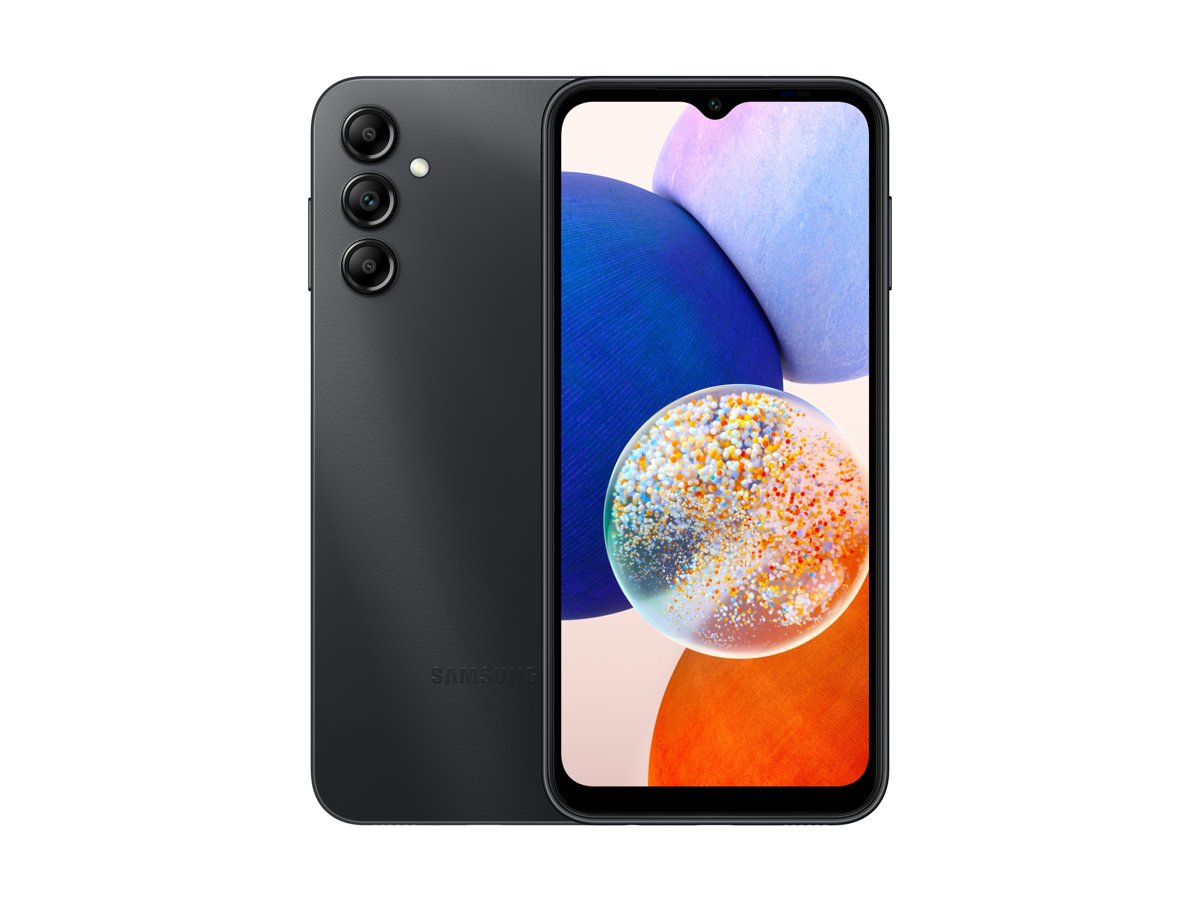
Galaxy A14 5G specifications
Samsung no longer publishes a Galaxy A14 5G product or specifications page in the US, UK, Canada, Australia, India or other regions checked. The hardware figures below are therefore according to GSMArena's spec listing for the Galaxy A14 5G, while support facts come from Samsung's own pages.
Where the US and international models differ, the table names the model code each figure applies to.
| Spec | Galaxy A14 5G | Source |
|---|---|---|
| Announced and released | Announced 4 January 2023, released 12 January 2023 | GSMArena's spec listing |
| Display | 6.6-inch PLS LCD, 90Hz, 1080 x 2408 pixels, 20:9, about 400 ppi | GSMArena's spec listing |
| Chipset | MediaTek Dimensity 700 (7 nm) on SM-A146P and the US model; Exynos 1330 (5 nm) on SM-A146B | GSMArena's spec listing and review |
| RAM and storage | 64GB with 4GB RAM, or 128GB with 4GB, 6GB or 8GB RAM; microSDXC card slot | GSMArena's spec listing |
| Rear cameras | 50MP f/1.8 main with PDAF, 2MP macro, 2MP depth; 1080p video at 30fps | GSMArena's spec listing and review |
| Front camera | 13MP f/2.0, 1080p video at 30fps | GSMArena's spec listing |
| Battery and charging | 5,000mAh, 15W wired; no wireless charging | GSMArena (capacity, wattage); Samsung (no wireless charging) |
| Software | Launched with Android 13; GSMArena lists it as upgradable to Android 15 with One UI Core 7 | GSMArena's spec listing |
| Dimensions and weight | 167.7 x 78 x 9.1 mm, 202 g; glass front, plastic back and frame | GSMArena's spec listing |
| Colours | Black, Light Green, Dark Red, Silver (availability varies by market) | GSMArena's spec listing |
| SIM and eSIM | Nano-SIM, or dual Nano-SIM depending on model; not on Samsung's eSIM device list | GSMArena (SIM); Samsung (eSIM list) |
| Connectivity | 5G, dual-band Wi-Fi 5 (802.11ac), Bluetooth 5.2, NFC, USB Type-C 2.0, 3.5mm headphone jack | GSMArena's spec listing |
| Security | Side-mounted fingerprint sensor | GSMArena's spec listing |
| Price | GSMArena's price listing shows €210.07 for the 128GB, 4GB RAM model; no Samsung page still lists a launch price | GSMArena's price listing |
| UK and US model codes | SM-A146P/DSN (UK and Ireland); SM-A146U, for example SM-A146UZKAATT for the 64GB AT&T model | Samsung Support UK and US |
GSMArena lists twelve model codes in all, including SM-A146B, SM-A146P, SM-A146U, SM-A146U1, SM-A146W and SM-A146M. All but one begin SM-A146; the exception is SM-S146VL.
Which processor does the Galaxy A14 5G use?
The Galaxy A14 5G uses one of two chipsets, depending on the model code. GSMArena's spec listing ties the MediaTek Dimensity 700 to SM-A146P and the Exynos 1330 to SM-A146B, and its review states that the US model uses the Dimensity 700 while the Indian model uses the Exynos 1330.
Samsung Semiconductor's own Exynos 1330 page lists the Galaxy M14 5G as its showcase device, not the Galaxy A14 5G, so Samsung itself does not settle the question.
| Detail | MediaTek Dimensity 700 | Exynos 1330 |
|---|---|---|
| Model codes | SM-A146P (including UK SM-A146P/DSN); US models | SM-A146B |
| Markets named by GSMArena | US | India |
| Process | 7 nm | 5 nm |
| CPU | Octa-core: 2 x 2.2 GHz Cortex-A76 and 6 x 2.0 GHz Cortex-A55 | Octa-core: 2 x 2.4 GHz Cortex-A78 and 6 x 2.0 GHz Cortex-A55 |
| GPU | Mali-G57 MC2 | Mali-G68 MP2 |
| FM radio | Not listed | Yes, per GSMArena's listing |
GSMArena's review expects the Exynos 1330 version to perform better than the Dimensity 700 version. Check your model code before you compare benchmark figures, because a result for one chip does not apply to the other.
RAM and storage options
GSMArena's spec listing shows four memory configurations, and every one of them has a microSDXC card slot for extra storage. Samsung's US support site confirms one of them by name: Galaxy A14 5G, 64GB (AT&T).
| Storage | RAM | Notes |
|---|---|---|
| 64GB | 4GB | Sold by AT&T in the US as SM-A146UZKAATT, per Samsung Support US |
| 128GB | 4GB | The configuration GSMArena's price listing shows at €210.07 |
| 128GB | 6GB | Availability varies by market |
| 128GB | 8GB | Availability varies by market |
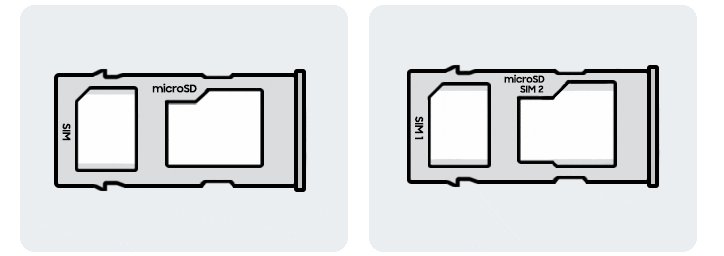
| microSD card | Not applicable | microSDXC; the US model shares the slot with a SIM, while international models have a dedicated slot |
On the US model, a microSD card and a second SIM compete for the same slot, so choose between extra storage and a second line.
Display and everyday performance
The display was the Galaxy A14 5G's main upgrade over the Galaxy A13 5G, according to GSMArena's review: a larger 6.6-inch panel at 1080p instead of 720p. The performance figures in the table come from GSMArena's own tests on the US Dimensity 700 model it reviewed.
| Item | Galaxy A14 5G figure | Source |
|---|---|---|
| Panel | PLS LCD with a waterdrop notch for the selfie camera | GSMArena's spec listing and review |
| Size and resolution | 6.6 inches, 1080 x 2408 pixels, about 400 ppi | GSMArena's spec listing |
| Refresh rate | 90Hz | GSMArena's spec listing |
| Measured brightness | 519 nits maximum, 1334:1 contrast ratio | GSMArena's tests |
| AnTuTu 9 | 307,886 | GSMArena's tests |
| Geekbench 5.1 (multi-core) | 1,727 | GSMArena's tests |
| GFXBench ES 3.1 onscreen | 12fps | GSMArena's tests |
| Loudspeaker | -26.8 LUFS, rated Good | GSMArena's tests |
GSMArena's review expects the Exynos 1330 version to perform better, so these scores describe the slower Dimensity 700 model.
Cameras
The Galaxy A14 5G has three rear cameras and one front camera. GSMArena's review notes that the rear system is carried over unchanged from the Galaxy A13 5G, while the selfie camera rose from 5MP to 13MP.
| Camera | Resolution and aperture | Details |
|---|---|---|
| Main (wide) | 50MP, f/1.8 | 26mm, 1/2.76-inch sensor, PDAF |
| Macro | 2MP, f/2.4 | For close-up shots |
| Depth | 2MP, f/2.4 | Depth sensing for portrait shots |
| Front (selfie) | 13MP, f/2.0 | 26mm wide, in the waterdrop notch |
| Video | 1080p at 30fps | Rear and front cameras |
| Flash and modes | LED flash | Panorama and HDR |
There is no ultrawide camera and no 4K video recording on either chipset version, according to GSMArena's spec listing.
Battery life and charging: check Galaxy A14 5G battery health
The Galaxy A14 5G has a 5,000mAh battery with 15W wired charging, according to GSMArena's spec listing. GSMArena's review found only a USB-C cable in the US box, with no charger, and gave the phone an endurance rating of 130 hours in its older battery test.
Samsung states that Galaxy A series phones do not support wireless charging, so charge the Galaxy A14 5G with a cable. Samsung's own battery check runs in the Samsung Members app and needs no service visit.
- Open the Samsung Members app.
- Tap the Support tab.
- Tap Get Started under Phone diagnostics.
- When the test finishes, tap the Battery status icon.
- Read the result: Normal means no battery issue, Weak means efficiency has dropped, and Bad means the battery has significantly degraded.
Samsung's advice for a Bad result is to visit a Samsung Service Centre for advice. Battery lifespan depends on how and where you use the phone.
How to replace the Samsung Galaxy A14 5G battery
Samsung's route for a worn battery is replacement at a Samsung Service Centre with a genuine Samsung battery. Samsung says this keeps warranty coverage, while unofficial shops may use non-genuine parts.
- Run Phone diagnostics in Samsung Members and confirm the Battery status result.
- Back up the phone with Samsung Cloud, or with Smart Switch on a computer, so nothing is lost during the repair.
- Remove the fingerprint, PIN or pattern lock, because the Service Centre needs the phone unlocked to test it.
- Book a repair through Samsung Support for your model code, or visit an authorised Service Centre.
- Allow about an hour, which is Samsung's average time for a Galaxy battery replacement.
- Set your screen lock again once the phone is returned.
If your Samsung account uses two-step verification, keep your Samsung account backup codes to hand so you can sign back in after the repair.
How to identify your exact Galaxy A14 5G model
Samsung sells the Galaxy A14 5G under different model codes in different regions and on different carriers. The model code decides which chipset you have, and which updates, repair parts and support pages apply to your phone.
- Open Samsung's Find Your User Manual page at samsung.com/uk/support/user-manuals-and-guide/ in a browser.
- Select Need some help locating your model number? to open the model code helper.
- Choose Mobile as the product type, then pick the sub type and category for a smartphone.
- Follow the diagram to the place where the model code is printed for your device.
- Compare the code with the codes below. SM-A146 is the Galaxy A14 5G and SM-A145 is the Galaxy A14.
- Enter the full model code in Samsung Support search to open your phone's own support page.
Known Galaxy A14 5G codes on Samsung's support sites are SM-A146P/DSN (UK and Ireland, for example SM-A146PZKDEUB) and SM-A146U (US, for example SM-A146UZKAATT for the 64GB AT&T model). A code starting SM-A146B points to the Exynos 1330 version, and SM-A146P or a US code points to the Dimensity 700 version, according to GSMArena.
Galaxy A14 versus Galaxy A14 5G
The Galaxy A14 and Galaxy A14 5G are separate models with separate Samsung support pages and different chipsets. Only the 5G model connects to 5G mobile networks, and a case, screen or battery for one is not listed for the other.
| Detail | Galaxy A14 | Galaxy A14 5G |
|---|---|---|
| Network | 4G LTE | 5G |
| Chipset (per GSMArena) | MediaTek Helio G80 or Exynos 850 | MediaTek Dimensity 700 or Exynos 1330 |
| Announced (per GSMArena) | 28 February 2023 | 4 January 2023 |
| Display (per GSMArena) | 6.6-inch PLS LCD, 1080 x 2408 | 6.6-inch PLS LCD, 90Hz, 1080 x 2408 |
| Weight (per GSMArena) | 201 g | 202 g |
| UK model code | SM-A145R/DSN | SM-A146P/DSN |
| Wireless charging | Not supported (Galaxy A series) | Not supported (Galaxy A series) |
| eSIM on Samsung's list | No | No |
Use dual SIM on the Galaxy A14 5G
GSMArena lists the Galaxy A14 5G in single Nano-SIM and dual Nano-SIM versions, and the SIM tray itself tells you which one you have. The phone is not on Samsung's eSIM list, so a second line needs a second physical SIM card.
- Remove the SIM card tray and look at its markings.
- If the tray says SIM2, the phone is dual SIM. If it says SIM2 / microSD, the second slot is a hybrid slot.
- Insert the second SIM card and refit the tray.
- Go to Settings, then tap Connections.
- Tap SIM card manager, then tap the SIM card you want to enable.
- Tap the switch to activate the SIM card.
- Tap Name to label the SIM, then tap Done.
Android and One UI updates on the Galaxy A14 5G
Samsung releases operating system and security updates in stages, by location and by carrier. Connect to Wi-Fi first, because Samsung notes updates can use a lot of data and take some time; you can join Wi-Fi by scanning a QR code instead of typing the password.
- Swipe up on the home screen to open your apps.
- Tap Settings.
- Tap Software update.
- Tap Download and install.
- If an update is offered, follow the prompts to install it.
- Switch on Download updates automatically, which Samsung recommends so the phone stays up to date.
Check the Android version on the Galaxy A14 5G
After an update, confirm which Android version the phone now runs. Samsung shows the version as a number, not a dessert name.
- Open the Settings app.
- Tap the Search icon and type Software information.
- Tap Software information in the results.
- Tap Software information again.
- Read the Android version line to see the version the phone now runs.
What changes with One UI 7?
The Galaxy A14 5G launched with Android 13 and One UI Core 5, and GSMArena's spec listing shows it upgradable to Android 15 with One UI Core 7. No live Samsung page confirms the phone's final version, so the rules below from Samsung's support pages decide what your unit gets.
| Question | What the sources state | What it means for a Galaxy A14 5G |
|---|---|---|
| Which version is the latest listed? | Android 15 with One UI Core 7, according to GSMArena's spec listing | Check Software information to see whether your unit already has it |
| Does every phone get the newest Android? | Samsung: older devices may not be able to update to the latest Android version due to hardware limitations | Check Software update instead of assuming a version |
| When does an update arrive? | Samsung: updates are released in stages, depending on your location and carrier | Your region and carrier decide when your model code is offered an update |
| Which features come with a One UI version? | Samsung: features, including Galaxy AI, vary by country, device model, OS and One UI version and carrier | A feature shown for flagships may not appear on the Galaxy A14 5G |
Why does my Galaxy A14 5G say there is no update?
Software update says no update is available
Samsung releases updates in stages by location and carrier, and no update means the phone already runs the latest version for its model.
- Connect to Wi-Fi and open Settings > Software update > Download and install again.
- Check the Android version under Software information to see what you already have.
- Check again later if you use a carrier model such as SM-A146U, because carriers release updates at different stages.
- If the phone already shows Android 15, it has reached the last version GSMArena lists for the Galaxy A14 5G.
Galaxy A14 5G is frozen and will not restart
An app or the system has stopped responding.
- Press and hold Power and Volume down together for more than 7 seconds.
- Release the keys when the phone vibrates.
- Start in Safe mode to see whether a downloaded app causes the freezes: hold Power, then touch and hold Power off until Safe mode appears, and tap it.
- Exit Safe mode by holding Power and tapping Restart.
Battery drains fast and needs replacing
Battery capacity falls with use and with heat or other environmental conditions.
- Run Phone diagnostics in Samsung Members and read the Battery status result.
- If it reads Weak or Bad, back up the phone and remove the screen lock.
- Book a battery replacement at a Samsung Service Centre for your model code.
eSIM option is missing or a QR code will not add a plan
The Galaxy A14 5G is not on Samsung's list of eSIM-capable Galaxy devices.
- Ask your carrier for a physical SIM card instead of an eSIM.
- Check the SIM tray for a SIM2 slot if you want a second line.
- Enable the second SIM under Settings > Connections > SIM card manager.
Phone does not charge on a wireless charging pad
Samsung states that Galaxy A series devices are not compatible with wireless charging.
- Charge the phone with a USB-C cable and a wall charger.
- If cable charging also fails, book a repair through Samsung Support for your model code.
How to reboot the Samsung Galaxy A14 5G
Use a normal restart when the phone responds, and a forced restart when the screen is frozen. Neither one deletes your data.
- For a normal restart, press and hold the Power key until the power menu appears.
- Tap Restart.
- If the phone is frozen, press and hold the Power key and the Volume down key together for more than 7 seconds.
- Release both keys when the phone vibrates and restarts.
- If the phone keeps freezing, free up storage, check for software updates and test it in Safe mode before you consider a factory reset.
Samsung Galaxy A14 5G FAQ
Is the Samsung Galaxy A14 5G eSIM compatible?
No. The Galaxy A14 5G does not appear on Samsung's list of Galaxy devices that support eSIM, which covers A series models such as the A16 5G, A17 5G, A54 and A55. Use a physical SIM card from your carrier.
Can a Samsung Galaxy A14 5G charge wirelessly?
No. Samsung states that Galaxy A series devices are not compatible with wireless charging, and the Galaxy A14 5G is an A series phone. It charges by USB-C cable at up to 15W, according to GSMArena's spec listing.
Is the Samsung Galaxy A14 5G dual SIM?
It depends on the model, because GSMArena lists both single and dual Nano-SIM versions. Remove the SIM tray to check: Samsung says a tray marked SIM2 is dual SIM and one marked SIM2 / microSD is hybrid.
Does the Samsung Galaxy A14 5G have a SIM card?
Yes. The Galaxy A14 5G uses a physical Nano-SIM card in a removable tray, because it is not on Samsung's eSIM list. Your carrier supplies the SIM, and you can manage it under Settings > Connections > SIM card manager.
Is the Samsung A14 5G a 5G phone?
Yes. Samsung sells and supports the Galaxy A14 5G as a separate model from the 4G Galaxy A14. The 5G model uses SM-A146 model codes, while the Galaxy A14 uses SM-A145 codes, such as SM-A145R/DSN in the UK.
What processor is in the Galaxy A14 5G?
According to GSMArena, US models and SM-A146P use the MediaTek Dimensity 700, while SM-A146B uses the Exynos 1330. Find your phone's model code to see which chipset it has.
How much RAM does the Galaxy A14 5G have?
GSMArena's spec listing shows 4GB, 6GB or 8GB of RAM, paired with 64GB or 128GB of storage. The 64GB model has 4GB of RAM, and the AT&T model on Samsung's US support site is the 64GB version.
Can the Galaxy A14 5G receive Android 15?
GSMArena's spec listing shows the Galaxy A14 5G as upgradable to Android 15 with One UI Core 7. Updates arrive in stages by region and carrier, so open Settings > Software update > Download and install to see what your model is offered.
How do you reboot a Samsung Galaxy A14 5G?
Press and hold the Power key and tap Restart. If the screen is frozen, hold the Power key and Volume down key together for more than 7 seconds until the phone vibrates and restarts. Neither method deletes your data.
How do you replace a Samsung Galaxy A14 5G battery?
Book a battery replacement at a Samsung Service Centre. Samsung advises backing up your data and removing the screen lock first, and says a Galaxy battery replacement takes about an hour on average with a genuine Samsung battery.
Is the Samsung Galaxy A14 5G a good phone?
It is a retired budget model with a large 1080p 90Hz screen and a 5,000mAh battery, but entry-level performance, no eSIM and no wireless charging. Check that it already runs Android 15 before buying one used.
Bottom line: should you still use a Galaxy A14 5G?
Keep using a Galaxy A14 5G you already own while it runs well, but do not buy one used without first checking its model code, chipset and update status. Its 6.6-inch 1080p 90Hz screen and 5,000mAh battery still suit basic use, and Samsung still supports it with repair booking and battery replacement. GSMArena lists Android 15 as its last listed upgrade, and Samsung's lists show no eSIM or wireless charging.