Your Facebook email is listed in Settings and privacy > Settings > Accounts Centre > Personal details > Contact info, on both the website and the Facebook app.
This guide covers the desktop and app routes, how to identify the email when you cannot log in, how to change or hide it, and how to keep it secure.
How to Find Your Facebook Email: A Step-by-Step Process
Pick the row that matches where you are. Some accounts show Meta Account settings instead of Accounts Centre, because Meta is moving people over gradually; the rest of the path is the same.
| Where you are | Path to your email | Section below |
|---|---|---|
| Logged in on a computer | Profile picture > Settings and privacy > Settings > Accounts Centre > Personal details > Contact info | Method 1 |
| Logged in on the iPhone or Android app | Menu > Settings and privacy > Settings > Accounts Centre > Personal details > Contact info | Method 2 |
| Logged out and unsure which email you used | facebook.com/login/identify, then search by phone, name or username | Login screen section |
| Locked out and the email no longer works | facebook.com/login/identify > No longer have access to these? | Troubleshooting |
Method 1: Using Facebook on a Desktop Web Browser
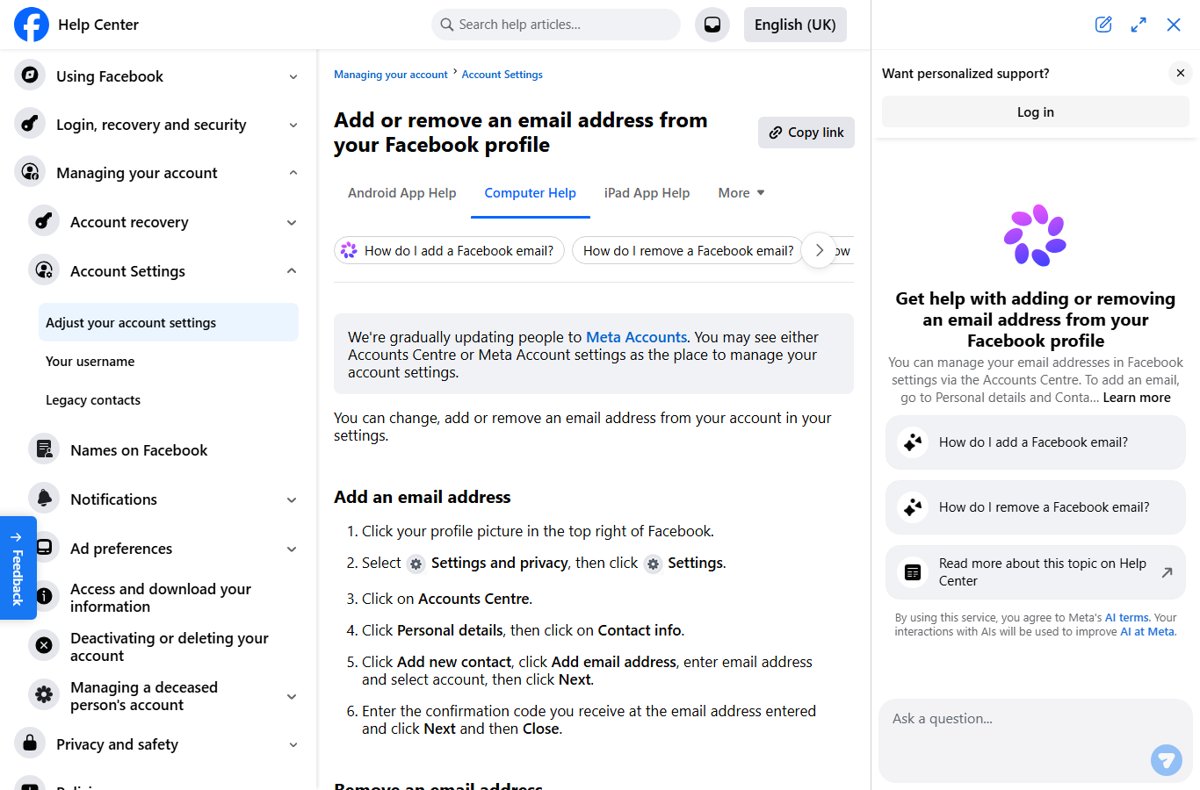
- Go to facebook.com in your browser and log in.
- Click your profile picture in the top right of Facebook.
- Select Settings and privacy, then click Settings.
- Click Accounts Centre.
- Click Personal details, then click Contact info.
- Read the email addresses listed; each one linked to your account appears here.
If you see more than one address, any of them can be used to look up your account. The one you log in with is usually the first you added.
Method 2: Using the Facebook Mobile App
- Open the Facebook app on your iPhone, iPad or Android phone.
- Tap Menu.
- Scroll down and tap Settings and privacy, then tap Settings.
- Tap Accounts Centre, then tap Personal details.
- Tap Contact info to see every email address and phone number on the account.
Checking the Email Address Linked to Your Facebook Account via the Login Screen
When you are logged out, Facebook's account finder tells you whether an email belongs to an account, and lets you search by other details.
- On a device you have used for Facebook before, go to facebook.com/login/identify in your usual browser.
- Enter each email address you have owned, one at a time; an old address you forgot about may be the one on the account.
- If no email works, enter your mobile phone number with its country code, such as +1 for the United States.
- Try your username, which is the name in your profile URL, or variations of your name.
- Ask a Facebook friend to open the About section of your profile and send you the email listed under contact information.
Why Is Your Facebook Email Important?
| Use | What happens without a working email |
|---|---|
| Logging in | You can still use a phone number, but one fewer way to find your account |
| Password reset | Facebook sends reset codes to your email or phone; with neither you need the recovery process |
| Security alerts | You miss alerts about unrecognised logins and two-factor messages |
| Security checkpoints | An email gives you another way to verify the account |
| Looking up your phone number | You can use the email to look up the phone number on the account, and the reverse |
Additional Tips for Managing and Changing Your Facebook Email
Facebook has no edit button for an email. To change it, add the new address first, then remove the old one, so the account is never left without an email.
- Go to Accounts Centre > Personal details > Contact info.
- Click Add new contact > Add email address (in the app, tap Add email), enter the address, choose the account and select Next.
- Enter the confirmation code sent to that address, then select Next and Close.
- To remove the old address, click it, select Delete email, then Delete, and enter your password if asked.
- To control who sees your email, open your profile, click About > Contact and basic info, click Edit next to the email and pick an audience.
Hiding the email from your profile does not stop the people you share it with from finding it elsewhere on Facebook, such as in search.
Troubleshooting Common Issues
Facebook does not find an account with your email
The account uses an older address, a phone number, or a nickname.
- Enter every email address you have owned at facebook.com/login/identify, one at a time.
- Try your phone number with the country code.
- Search by name variations or your username.
- When asked for a friend's name, enter their full name and try more than one friend.
You no longer have access to the email on the account
The email account was closed, forgotten or hacked.
- Go to facebook.com/login/identify on a device you have used for Facebook before.
- Find your account by another email, phone number or name.
- Select No longer have access to these? and follow the prompts.
- Give new contact details that have never been used on the account, then confirm your identity and reset the password.
- Contact your email provider as well to try to recover the email account itself.
The confirmation or reset code does not arrive
The email went to spam, or the request needs more time.
- Check your spam or junk folder.
- Check your phone signal if the code goes by text.
- Wait a few minutes, then request a new code.
Someone else changed your email
Your account may have been hacked.
- Go to facebook.com/hacked on a device you have used to log in before.
- Follow the prompts to secure the account and restore your contact details.
Best Practices for Keeping Your Facebook Email Secure
- Keep at least one current email and one phone number on the account so you always have a recovery route.
- Turn on two-factor authentication so a stolen password alone cannot open the account.
- Trust Facebook emails only from fb.com, facebook.com, facebookmail.com, instagram.com, meta.com or metamail.com, and watch for misspellings.
- Remember that Facebook never asks for your password by email or sends one as an attachment.
- Check genuine messages at facebook.com/recent_emails/security, or Accounts Centre > Password and security > Recent emails.
- Narrow your email's audience under About > Contact and basic info if you do not want it public.
Frequently asked questions
How do I find my Facebook email address?
Open Settings and privacy > Settings > Accounts Centre > Personal details > Contact info. Every email linked to your account is listed there, on the website and in the app.
How do I find my email in the Facebook app?
Tap Menu, then Settings and privacy > Settings. Tap Accounts Centre > Personal details > Contact info to see the email addresses and phone numbers on your account.
How do I find out my Facebook email if I can't log in?
Go to facebook.com/login/identify and search with every email, phone number or name you might have used. A friend can also check the contact information on your profile's About section.
How do I find my friend's email on Facebook?
Open their profile, select About, then Contact and basic info. Their email appears only if they chose to share it with you; otherwise Facebook does not show it.
Where can I find my Facebook email on a computer?
Click your profile picture in the top right, select Settings and privacy > Settings, then Accounts Centre > Personal details > Contact info.
Can I see my Facebook email without Accounts Centre?
Yes. Some accounts show Meta Account settings instead, as Meta updates people gradually. Open it from Settings and look under Personal details > Contact info.
How do I change my Facebook email?
Add the new email in Accounts Centre > Personal details > Contact info, confirm it with the code, then delete the old address. Facebook has no direct edit option.