A Fox News download takes about a minute on any device. On a Windows 11 or Windows 10 PC or a Mac, you install foxnews.com as a desktop app from Chrome, Edge or Safari. On a phone, you get the free Fox News app from the App Store or Google Play.
The desktop app opens in its own window, with its own taskbar or Dock icon, and carries the same articles, video and Watch TV player as the website.
Below you will find which download fits each device, the official links, install steps for Windows and Mac, how live TV sign-in works, and fixes for video that will not play.
Which Fox News download do you need?
Match your device to a row. Desktop rows install from the browser, phone rows install from the store.
| Your device | What to install | Size |
|---|---|---|
| Windows 11 or Windows 10 PC | foxnews.com, installed as an app in Chrome or Edge | Nothing to download |
| Mac on macOS Sonoma 14 or later | foxnews.com, added to the Dock from Safari | Nothing to download |
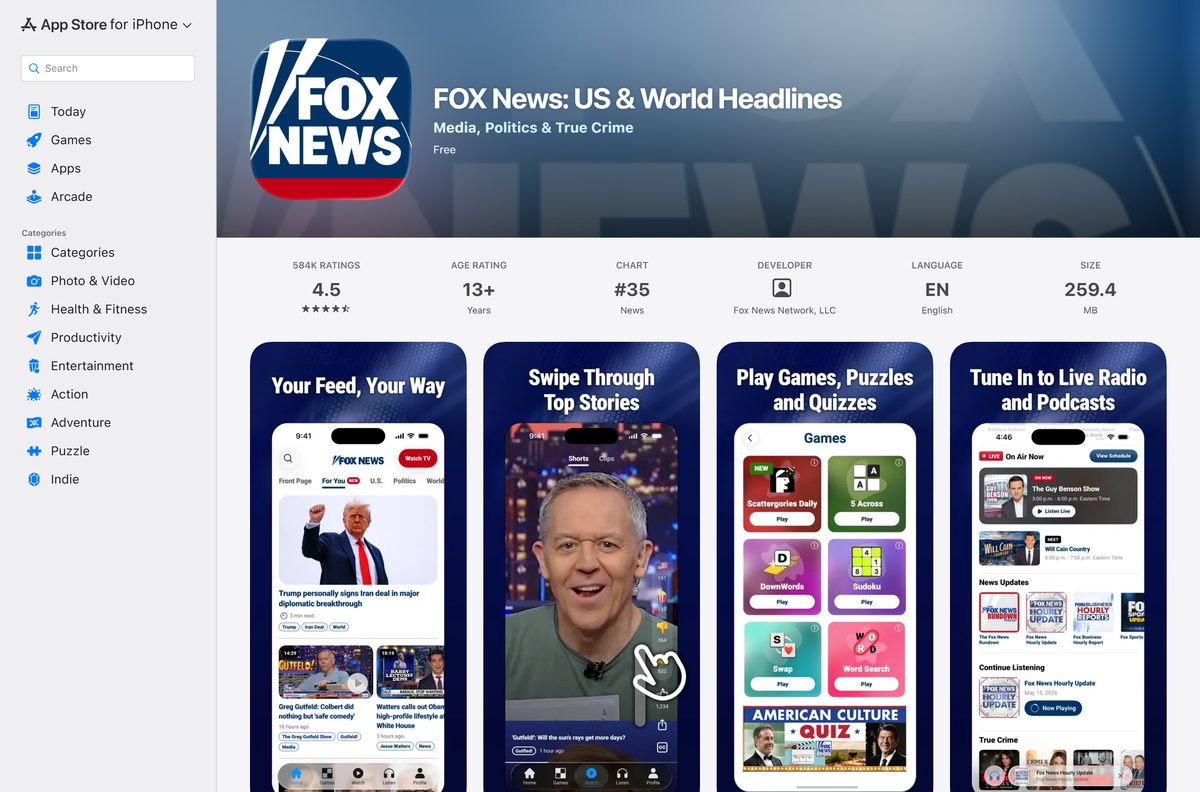
| iPhone or iPad on iOS 18.0 or later | FOX News: US & World Headlines on the App Store | 259.4 MB |
| Android phone, tablet or Android TV | FOX News – Daily Breaking News on Google Play | Play states no size |
The same App Store listing also installs on Apple TV and Apple Watch, and Fox News lists Roku, Fire TV and Chromecast as supported TV platforms.
Download Fox News from the official sources
Fox News Network, LLC publishes its app through the addresses below. The Apps and Products page on foxnews.com links to the same store listings.
- foxnews.com — install it as an app on Windows and Mac
- FOX News on the App Store — 259.4 MB · iPhone, iPad, Apple TV and Apple Watch
- FOX News on Google Play — 10M+ downloads, updated 18 September 2026
- Fox News Apps and Products — every device Fox News supports
Microsoft Edge ships with Windows 11 and Windows 10, so no extra browser is needed to build the desktop app.

How to install the Fox News app on Windows 11 and 10 with Chrome
Chrome turns foxnews.com into a windowed app that opens from the taskbar or desktop, without tabs or an address bar.
- Open Chrome and go to foxnews.com.
- Select More, the three-dot button at the top right.
- Select Cast, save, and share, then Install page as app.
- Rename the app to Fox News if you want, then select Install.
- Right-click the new window’s taskbar icon and select Pin to taskbar.
- Open the app from the Start menu and select Log In to sign in to your Fox News account.
Chrome lists every installed web app at chrome://apps, which is the quickest place to reopen it.
Install the Fox News app on Windows with Microsoft Edge instead of the Store
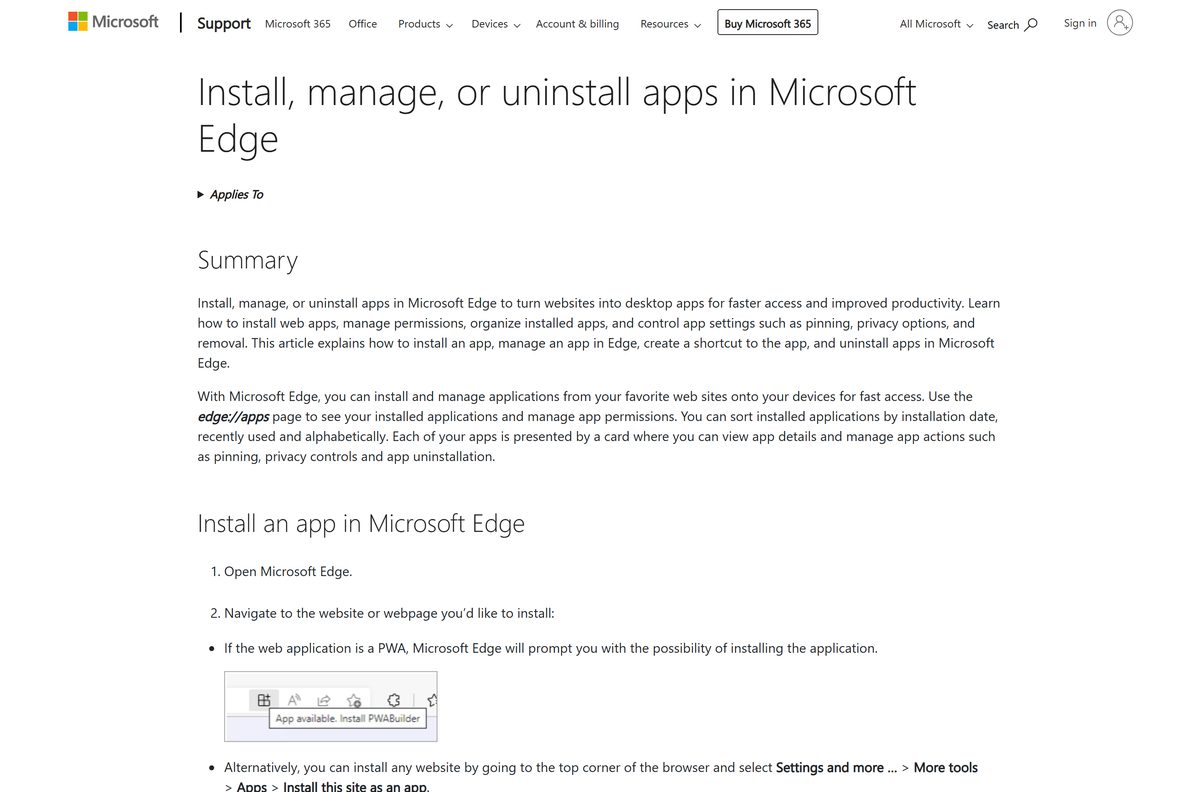
Edge builds the same windowed app with nothing extra to download.
- Open Microsoft Edge and go to foxnews.com.
- Select Settings and more, the three-dot button at the top right.
- Select More tools, then Apps, then Install this site as an app.
- Name the app and select Install.
- Go to edge://apps and select Details on the Fox News card.
- Select Pin to taskbar, Pin to Start or Create Desktop shortcut.
A Microsoft Store search for Fox News returns news apps from other publishers, including CBS News and Microsoft News, but none from Fox News Network, LLC. Skip Store results that only borrow the name.
Which Fox News download do you need for your Mac?
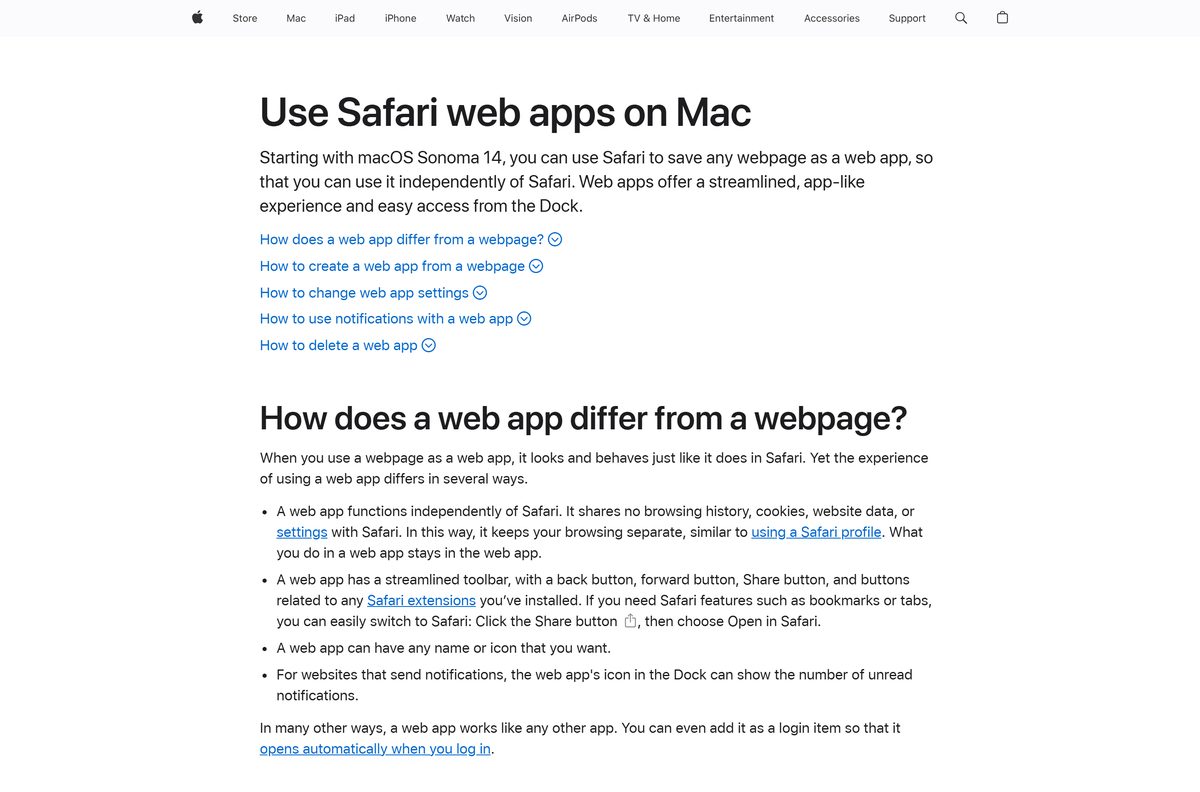
Safari builds a Dock app from foxnews.com on macOS Sonoma 14 or later. On older macOS, use Chrome.
| Your Mac | What to do | Source |
|---|---|---|
| macOS Sonoma 14 or later | Safari: File > Add to Dock on foxnews.com | Apple |
| Older macOS with Chrome | Chrome: More > Cast, save, and share > Install page as app | |
| Any Mac, no app wanted | foxnews.com in a normal browser tab | Fox News |
| You also read on an iPhone | FOX News on the App Store, 259.4 MB | Apple App Store |
To add the Safari app, open foxnews.com, choose File > Add to Dock, type a name and click Add. The App Store listing covers iPhone, iPad, Apple TV and Apple Watch, and the Mac App Store has no Fox News app, so the Dock app is the Mac route.
Is the Fox News app free?
Yes. The Fox News app and the desktop web app are free to install. The App Store lists the app as Free, and Fox News help states that it does not charge for the application. Google Play marks the Android app as containing ads. Watching FOX News Channel live for more than a short preview needs a pay TV login from a package that includes the channel. Fox Nation is a separate subscription sold at nation.foxnews.com, with its own app.
Any site asking money for a Fox News installer is selling a file Fox News does not publish.
Should you use the Fox News phone app or the desktop app?
Use the desktop app for reading and watching on a big screen, and add the phone app if you want breaking news alerts. The desktop app is foxnews.com in its own window, with the same articles, video and Watch TV player. The phone app adds push alerts for breaking news, picture-in-picture video while you browse, saved articles, podcasts and FOX News Radio, and games such as the Mini Crossword and Word Scramble.
Fox News help notes that mobile web in a phone browser still works on older devices, but without push notifications.
How to check your Fox News app version and update it
The desktop app has no version number. It loads the current foxnews.com every time it opens.
- On an iPhone, open the App Store, tap your profile picture and scroll to the list of pending updates.
- Tap Update next to FOX News.
- On Android, open Google Play, tap your profile picture, then Manage apps & device.
- Tap Updates available, find FOX News and tap Update.
- On a PC or Mac, keep Chrome, Edge or Safari up to date, because the desktop app runs inside the browser.
The App Store listed version 5.43.1, released on 22 September 2026. Google Play publishes no version string.
Check the Fox News app requirements
The desktop app has no hardware floor of its own. The browser sets the minimum.
| Field | Value |
|---|---|
| App | Fox News (FOX News: US & World Headlines) |
| Developer | Fox News Network, LLC |
| Latest version | Web-based and auto-updating on PC and Mac; 5.43.1 on iPhone and iPad |
| Price | Free, with ads; live TV needs a pay TV login |
| Windows | Windows 11 and Windows 10 in Chrome, Edge or Firefox |
| Mac | Chrome, Firefox or Safari; Safari web apps need macOS Sonoma 14 or later |
| iPhone and iPad | iOS 18.0 or later, 259.4 MB |
| Android | Phones, tablets and Android TV; Android 7 and older no longer supported |
| Architecture | Uses the browser’s build |
| Offline installer | None |
| Official source | foxnews.com, the App Store and Google Play |
| Last verified | 2026-09-25 |
Fix Fox News video not playing on Windows 11, Windows 10 or Mac
Live TV stops after about 10 minutes
The Watch TV player allows up to 10 minutes of FOX News Channel before it asks for a pay TV login.
- Select Watch TV at the top of foxnews.com.
- Choose your cable, satellite or telco provider from the list.
- Sign in with the username and password you use to pay your TV bill online.
Videos will not play in the desktop app
An ad blocker or tracking prevention is blocking the video player.
- Turn off your ad blocker for foxnews.com.
- Turn off tracking prevention for foxnews.com in the browser settings.
- Clear the browser cache and cookies, then reload the page.
The Microsoft Store has no Fox News app
Fox News publishes no package for the Microsoft Store.
- Open foxnews.com in Edge or Chrome.
- Install the page as an app with the steps above.
- Ignore Store results from other publishers that use the Fox News name.
Add to Dock is missing in Safari
Safari web apps need macOS Sonoma 14 or later.
- Open the Apple menu and select About This Mac to check the macOS version.
- Update to macOS Sonoma 14 or later if the Mac supports it.
- On older macOS, install the page as an app from Chrome instead.

How to uninstall the Fox News app from a PC, Mac or phone
Removing the desktop app removes a window and a shortcut. Your Fox News account stays in place.
- In Chrome, open the Fox News app window, select More, then Uninstall, and select Remove.
- Tick Also delete data from Chrome first to clear what the app stored.
- In Edge, go to edge://apps, select Details on the Fox News card, then Uninstall, and confirm with Uninstall again.
- On a Mac, open Go > Home in Finder, open the Applications folder and drag the Fox News web app to the Trash.
- On an iPhone or Android phone, press and hold the Fox News icon and choose the remove or uninstall option.
Which other Fox apps should you install?
Fox News Network publishes separate apps for business news, weather and its subscription service. Each is free to download from the App Store.
| App | Publisher | Use it for |
|---|---|---|
| Fox Business: Invested In You | Fox News Network, LLC | Markets and business news |
| FOX Weather: Daily Forecasts | Fox News Network, LLC | Forecasts and weather alerts |
| Fox Nation | Fox News Network, LLC | The Fox Nation subscription service |
| FOX LOCAL: Live News & Weather | Fox Television Stations, Inc. | Local Fox station news |
For national news on a PC, install foxnews.com as an app. The apps above cover business, weather, subscription and local content.
Frequently asked questions
Is the Fox News app free to download?
Yes. The App Store lists the Fox News app as Free, and Fox News does not charge for it. Installing foxnews.com as a desktop app in Chrome, Edge or Safari costs nothing either.
Can I download the Fox News app on Windows 11?
Yes. Open foxnews.com in Edge, select Settings and more, then More tools, Apps and Install this site as an app. The Fox News app then opens from the Start menu and the taskbar.
Is there a Fox News app for Mac?
Yes, as a web app. On macOS Sonoma 14 or later, open foxnews.com in Safari and choose File, then Add to Dock. The App Store version covers iPhone, iPad, Apple TV and Apple Watch.
How big is the Fox News app download?
The iPhone and iPad app is 259.4 MB on the App Store. Google Play shows no size for the Android app. The desktop app downloads no installer, because it runs foxnews.com inside the browser.
Is there a Fox News .exe or offline installer for PC?
No. Fox News publishes no .exe, .msi or .dmg, and the Microsoft Store has no Fox News app. Install foxnews.com as an app from Edge or Chrome instead.
Can I watch Fox News live on my computer for free?
Only briefly. The Watch TV button on foxnews.com plays up to 10 minutes before asking for a pay TV login. Major breaking news events and on-demand programming are available without a subscription.
Do I need cable to watch Fox News Channel in the app?
Yes, for live regular programming. Sign in with a cable, satellite or telco provider whose package includes FOX News Channel. The login works away from home on Wi-Fi or cellular data.
Is Fox Nation included in the Fox News app?
No. Fox Nation is a separate subscription bought at nation.foxnews.com, and it has its own Fox Nation app on the App Store.
How much data does Fox News live streaming use?
Fox News Go uses about 2 GB per hour in SD and about 4 GB per hour in HD. Use Wi-Fi on a phone to avoid carrier charges.